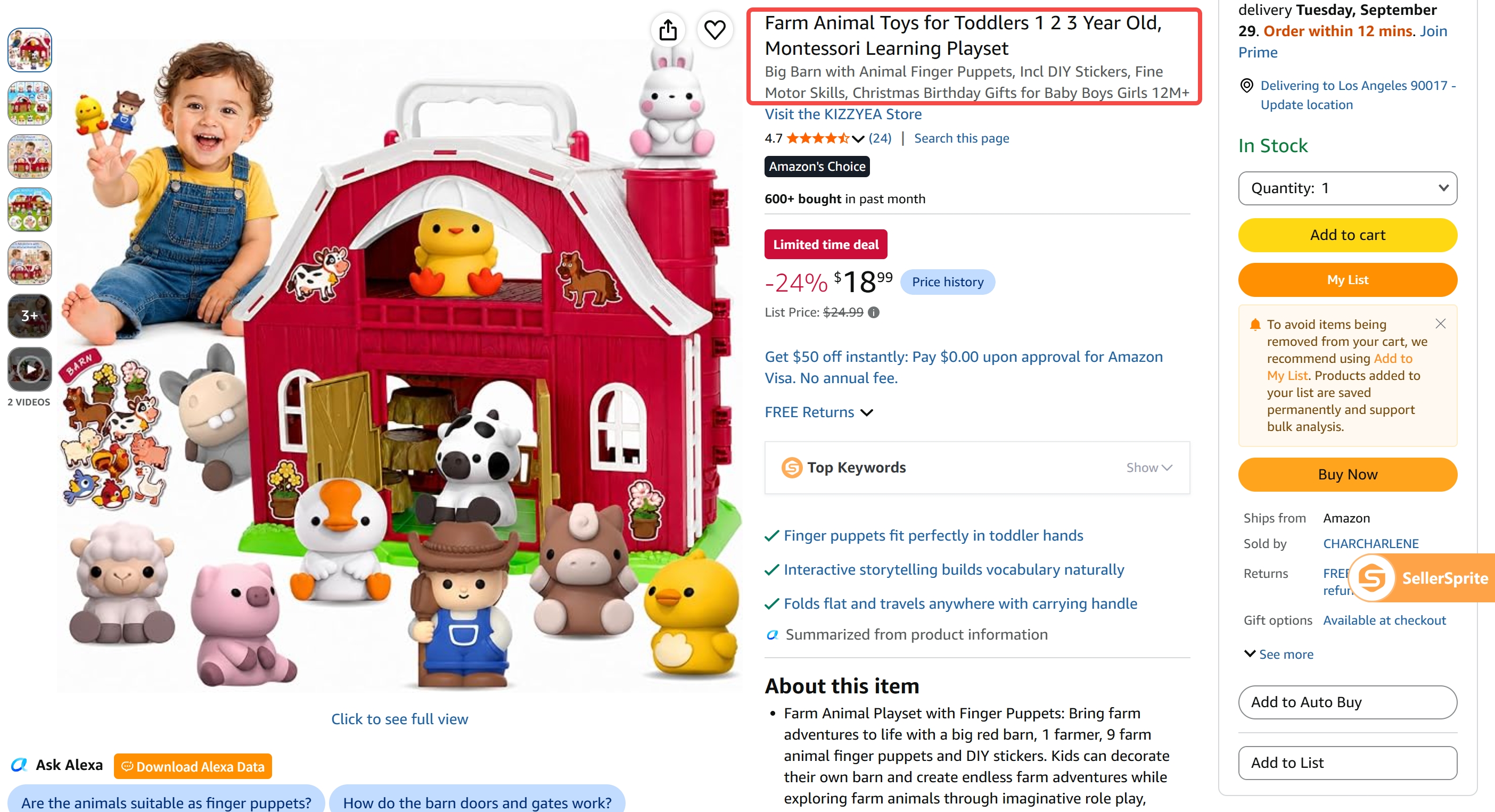
Amazon product titles, also referred to as Item Name in the Add a Product interface, are one of the most important pieces of information customers use to identify products in search results and on product detail pages.
To make product titles clearer, more accurate, and easier to read, Amazon has introduced stricter requirements covering title length, special characters, repeated words, promotional language, and information structure.
The most important requirements include:
- Product titles must be 75 characters or fewer, including spaces.
- The same word generally cannot appear more than twice in a title.
- Certain special characters are prohibited.
- Promotional claims such as "Free Shipping" or "100% Quality Guaranteed" should not be included.
- Titles should prioritize essential information such as the brand, product type, key attributes, color, size or pack quantity, and model.
- Information that does not fit within the 75-character title can be moved to Item Highlights, which provide up to 125 additional characters.
Based on Amazon's official Product Title Requirements and Guidelines, this guide explains Amazon's latest product title requirements and how sellers can update existing listings accordingly.
Which Products Do Amazon's Product Title Requirements Apply To?
Amazon's updated title requirements apply to most product types in supported Amazon stores.
Media product types are excluded. The current 75-character title and Item Highlights policy also does not apply to the Amazon stores in Egypt, Saudi Arabia, Turkey, and the United Arab Emirates.
New products should follow the applicable title requirements when listings are created.
For existing products, non-compliant titles may be adjusted by Amazon or may not display as expected in search.
Sellers should therefore review existing listings regularly to ensure that their titles meet the latest requirements.
What Are Amazon's Product Title Requirements?
1. Keep Titles Within 75 Characters
For applicable product types, the product title must contain no more than 75 characters, including spaces.
A title should clearly tell customers what the product is and highlight its most important distinguishing information.
✅ Recommended:
Amazon Essentials Women's Fleece Jacket, Black, Medium
❌ Not recommended:
Amazon Essentials Super Comfortable Women's Winter Fleece Jacket with Pockets and Zip for Closure Perfect for Cold Weather and Outdoor Activities, Available in Black Color, Size Medium for Women
The second example contains too much descriptive information and is difficult to scan.
The 75-character limit means that a title is no longer the place to include every feature or selling point. Its primary purpose is to tell Amazon and customers what the product is and what its most important differentiators are.
2. Do Not Repeat the Same Word More Than Twice
Amazon limits excessive word repetition in product titles.
The same word should generally not appear more than twice in a title. Brand names are also subject to the same repetition limit and should not appear more than twice in the title.
For example:
❌ Not recommended:
Baby Boy Outfits Baby Boy Fall Winter Clothes Baby Boy Long Sleeve Suspender Outfit Sets
"Baby" and "Boy" appear too many times and make the title look repetitive.
🔓 Notes:
Articles, prepositions, and conjunctions can be repeated where grammatically necessary.
A word used in two genuinely different meanings is not automatically considered keyword stuffing.
For example:
Old Navy and Navy Blue
Here, "Navy" appears once as part of a brand name and once as a color description.
The goal is to remove unnecessary repetition rather than mechanically eliminate every repeated word.
3. Avoid Prohibited Special Characters
Amazon prohibits certain special characters in product titles, including:
!, $, ?, _, {, }, ^, ¬, ¦
For some other symbols, their use depends on whether they serve a legitimate purpose in the product information.
For example:
- Product code: Style #4301
- Weight ranges: <10 lb
In these cases, the symbols convey actual product information.
However, symbols should not be added simply for decoration or to attract attention.
❌ Not recommended:
Paradise Towel Wear Co. Beach Coverup << Size Kids XXS >>
In this example, << >> are used only for decoration and do not communicate any meaningful product information, so the title does not meet Amazon's requirements.
Standard punctuation can still be used where appropriate, such as:
- ","
- "/"
- "-"
- "."
- "&"
The general rule is:
Use symbols to communicate product information, not for decoration.
4. Do Not Add Promotional, Guarantee, or Subjective Claims
A product title should describe the product rather than advertise it.
Avoid language such as:
- Free Shipping
- 100% Quality Guaranteed
- Hot Item
- Best Seller
- BEST SELLER!!!
Also avoid other promotional, guarantee-based, or subjective claims that do not help customers identify the product.
✅ Recommended:
Sony WH-1000XM4 Wireless Noise Canceling Headphones
❌ Not recommended:
Sony WH-1000XM4 HOT ITEM Wireless Noise Canceling Headphones - BEST SELLER!!!
Promotional phrases use valuable title space without helping shoppers understand what the product actually is.
Do not include restricted phrases prohibited by Amazon, such as claims that a product is "FSA eligible" or "HSA eligible."
How Should You Write a Compliant Amazon Product Title?
Within the 75-character limit, focus on four questions:
- What is the brand?
- What is the product?
- What makes it different?
- What specification does the customer need to know?
Depending on the category, a useful title structure is:
Brand + Flavor/Style + Product Type + Key Attribute + Color + Size/Pack Quantity + Model
Not every product needs every element, and the order may vary by category.
The priority should always be information that is both relevant to the product and important to the customer's buying decision.
For example:
Amazon Fresh Decaf Colombia Whole Bean Coffee, Medium Roast, 12 Ounce
✅ This structure lets shoppers quickly recognize:
Brand → Product → Key Attribute → Specification
❌ A less effective version would be:
Medium Roast Decaf Coffee 12oz Pack of 3 Colombia Whole Bean Amazon Fresh
Although it contains similar information, the information order is harder to scan.
Seven Amazon Product Title Optimization Principles
1. Remove Duplicate and Redundant Information
Do not repeat information simply to include more keyword variations.
✅ Recommended:
Levi's Men's 501 Original Fit Jeans
❌ Not recommended:
Levi's Men's Jeans Men's 501 Original Fit Men's Denim Jeans
Avoid repeating "Men's," "Jeans," or similar product-identifying terms when they add no additional meaning.
With only 75 characters available, every word should contribute useful information.
2. Arrange Information in the Order Customers Identify the Product
A title should follow a natural recognition sequence rather than a keyword-stuffing sequence.
In most cases, customers should be able to identify the brand and product type first, followed by the most important attributes and specifications.
The title should read like a real product name, not a collection of search terms.
3. Do Not Write the Entire Title in Capital Letters
✅ Recommended:
Nike Air Running Shoes with Cushioned Sole
❌ Not recommended:
NIKE AIR RUNNING SHOES / nike air running shoes
For English titles, capitalize words naturally.
Articles, conjunctions, and prepositions such as the following can generally remain lowercase when appropriate:
in, on, over, with, and, or, for, the, a, an
4. Use Numerals Instead of Spelling Out Numbers
✅ Recommended:
2-Pack Cotton Towels, 24 x 48 Inches
❌ Not recommended:
Two-Pack Cotton Towels, Twenty-Four x Forty-Eight Inches
Numerals are easier to scan and use less title space.
5. Use Common Abbreviations for Units of Measurement
Common measurement abbreviations can help save characters.
Examples include:
- cm
- oz
- in
- kg
Use abbreviations only when they are clear and commonly understood by customers in the target marketplace.
6. Include Model Numbers When They Help Identify the Product
For products such as electronics, appliances, replacement parts, and other categories where model identification matters, consider including the model number in the title.
For example:
✅ Recommended:
Samsung Galaxy S23 Ultra, 256GB, Phantom Black, SM-S918U
❌ Not recommended:
Samsung Galaxy Phone, 256GB, Phantom Black
The model number can help customers distinguish similar products.
Requirements for model numbers vary by product type, so we recommend also reviewing Amazon's Bulk listing templates.
7. Differentiate Parent and Child ASIN Titles
It is important to note that the product detail page primarily displays the parent ASIN title. Child ASIN titles are typically not shown directly on the detail page. Instead, they mainly come into play when shoppers select a variation, add a specific variation to their cart, or interact with the listing in other variation-related scenarios.
Therefore, specific variation attributes such as color and size should generally be included in the child ASIN title rather than the parent ASIN title.
For example:
- Parent ASIN: Amazon Essentials T-Shirt
- Child ASIN: Amazon Essentials T-Shirt, White, Medium
❌ Avoid titles such as:
Amazon Essentials T-Shirt, Available in Multiple Colors and Sizes
This structure helps keep the parent title concise while allowing each child ASIN to clearly identify its specific variation.
What If 75 Characters Are Not Enough?
Do not solve the problem by making the title longer.
Amazon now provides Item Highlights, which allow up to 125 additional characters for useful product information that does not need to remain in the title.
Item Highlights can be used for information such as:
- Materials
- Recommended use cases
- Secondary attributes
- Compatibility
- Additional specifications
- Other details that help customers make purchasing decisions
The title and Item Highlights should work together instead of repeating the same information.
A useful way to think about the difference is:
- Product Title = What is this product?
- Item Highlights = What else does the customer need to know before deciding?
Amazon also treats both Item Name and Item Highlights as searchable information, so moving a useful detail out of an overloaded title does not mean that it necessarily loses all search value.
Quick Recap: The Core Amazon Title Rules
A simple way to remember the updated rules is:
✅ Keep the title within 75 characters, including spaces.
✅ Prioritize:
Brand + Product Type + Key Attribute + Specification
✅ Avoid keyword stuffing, unnecessary repetition, promotional claims, excessive capitalization, and prohibited special characters.
✅ Move useful secondary information that does not fit naturally in the title to Item Highlights rather than forcing it into the Product Title.
The goal is no longer to write the longest possible keyword-rich title.
The goal is to help customers quickly understand the product while giving Amazon clear and structured product information.
Frequently Asked Questions
Q1: What is the maximum length of an Amazon product title?
For applicable product types and marketplaces, the maximum is 75 characters, including spaces.
Always check whether your category or marketplace has additional listing requirements.
Q2: What should I do if 75 characters are not enough?
Keep the most important product-identifying information in the title and move secondary information to Item Highlights.
Item Highlights provide up to 125 additional characters for useful supporting details.
Do not try to preserve every old title keyword by forcing everything into the 75-character field.
Q3: How many times can the same keyword appear in an Amazon title?
The same word should generally not appear more than twice.
Articles, prepositions, and conjunctions are exceptions where repetition is grammatically necessary.
The purpose of this rule is to reduce keyword stuffing and redundant wording.
Q4: What if my official brand name contains a special character?
If your official brand name contains characters that are not permitted in product titles, such as !, {, or }, enter the full brand name in the Brand Name field.
The special-character restrictions that apply to product titles do not need to be applied in the same way to the Brand Name field. Your brand information may still appear in the designated brand area on product detail pages and in search results.
Do not add a non-compliant version of the brand name to the product title simply to retain those special characters.
Q5: What should I enter if my product does not have a brand?
For a product that does not belong to any identifiable brand, enter "generic" in the Brand Name field.
Do not invent a brand name simply to fill the product title, and do not repeatedly add "generic" to the title.
Q6: Can I edit a title if I disagree with Amazon's suggested title?
Yes.
You can go to Manage All Inventory in Seller Central to update the Item Name and Item Highlights for your listings. After making changes, make sure the revised product title still complies with Amazon's current Product Title requirements.
Q7: Should color, size, and other variation attributes still appear in the title?
Prioritize the most important variation attributes in the Item Name.
If the 75-character limit does not allow all relevant attributes to be included:
- Keep the most important variation attributes in the product title.
- Move secondary attributes to Item Highlights.
For parent-child variation listings, specific variation details such as color and size should primarily be included in the child ASIN title, rather than being crowded into the parent ASIN title.
Q8: Why haven't my product title changes appeared on the product detail page yet?
After your updated Item Name or Item Highlights are successfully submitted, Amazon may still need some time to process and display the changes on the customer-facing product detail page.
Amazon's normal processing time is typically 24 to 48 hours.
If you do not see the changes immediately within this period, this is generally normal and there is no need to submit the same update repeatedly.
If the changes still have not appeared after 48 hours, you can try editing and submitting the listing again, or contact Amazon Selling Partner Support for further assistance.
Q9: What happens if I do not update an existing listing title?
If an existing product title does not comply with Amazon's current requirements, Amazon may automatically adjust the title or the product may not display properly in search results.
For this reason, it is recommended to review existing listings even if they are not newly created.
Pay particular attention to titles that:
- Exceed the 75-character limit
- Repeat the same words excessively
- Contain prohibited or unnecessary special characters
- Include promotional language
- Contain redundant or unnecessary information
Updating these issues proactively can help keep your listings compliant with Amazon's current Product Title requirements.