TL;DR: Reverse ASIN research does not just reveal competitor keywords. In this case study, it exposed a hidden keyword gap that, once classified and validated, helped an Amazon seller double organic traffic in 12 weeks without rewriting the entire listing.
Key Takeaways
- Reverse ASIN surfaced a shared competitor keyword cluster the seller was completely invisible for; that cluster became the foundation of the traffic lift.
- Classifying keywords into five gap types was more valuable than collecting thousands of keywords. Each gap type requires a different action, from adding to listing SEO to ignoring the term entirely.
- Traffic doubled only because PPC validation, listing changes, and conversion monitoring worked together. Reverse ASIN discovered the opportunity; the execution system captured it. Results vary by product and market.
Table of Contents
- The Result in One View: What Doubled Traffic Actually Means
- The Seller Did Not Have a Traffic Problem. They Had a Keyword Visibility Problem
- How Reverse ASIN Exposed the Seller's Real Keyword Gap
- The Breakthrough Was Not Finding More Keywords
- How We Prioritized Keywords That Could Move Traffic
- What We Changed on the Listing and Why
- PPC Was Used as a Validation Layer, Not a Traffic Shortcut
- The Growth Timeline
- Where the Extra Traffic Came From
- Traffic Doubled, but Did the Traffic Get Better?
- How Much Credit Should Reverse ASIN Really Get?
- The Three Reverse ASIN Findings That Created Most of the Growth
- What We Would Do Differently
- What Other Amazon Sellers Can Copy
- A Reverse ASIN Growth Framework You Can Replicate
- When This Playbook Will Not Double Your Traffic
- FAQ
- Next Steps
Note on marketplaces: This guide is specifically optimized for the US market.
The Result in One View: What "Doubled Traffic" Actually Means
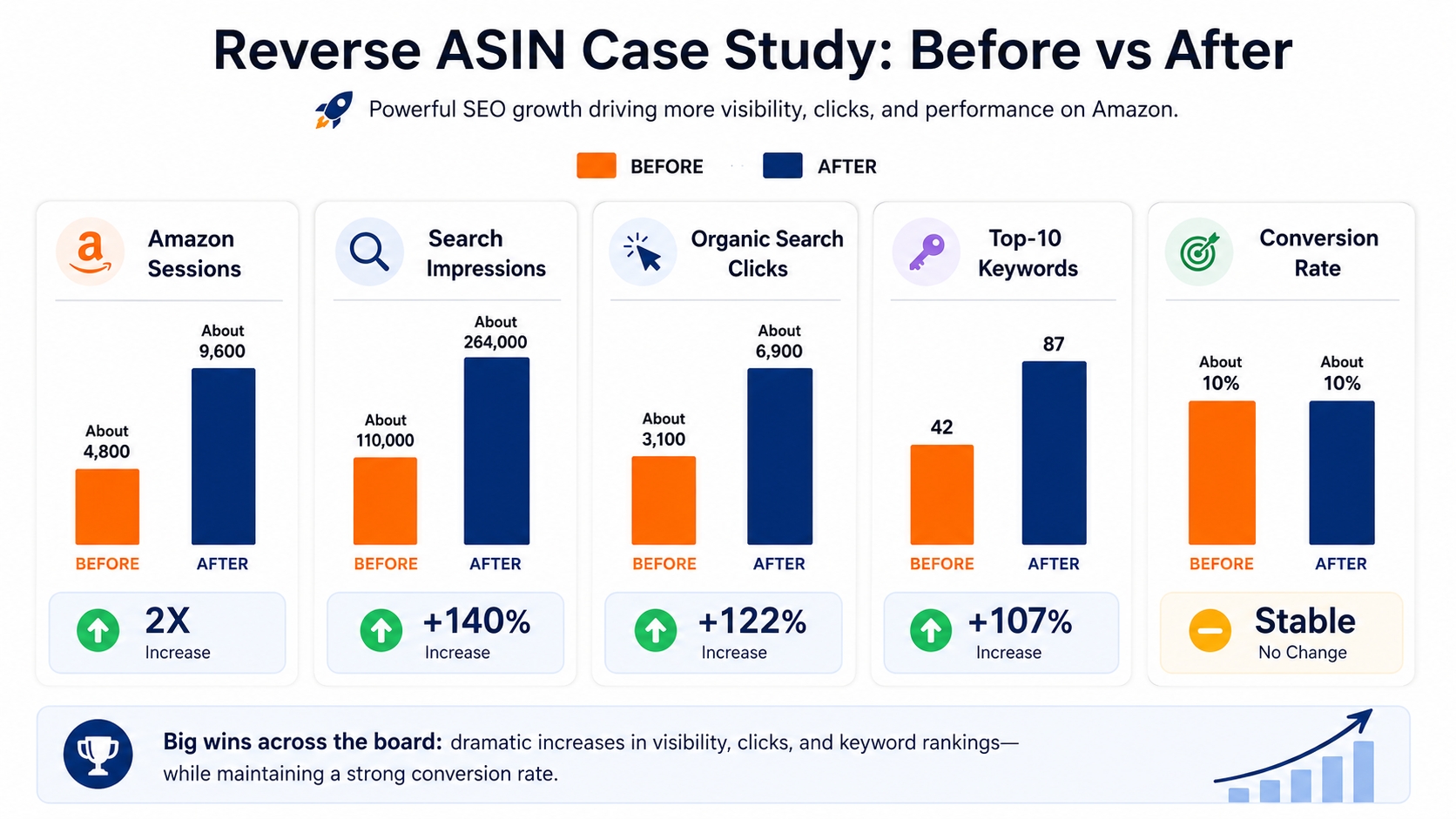
Before explaining the tactics, know exactly what this case produced. This is an illustrative composite case based on the experience of US Amazon sellers; no two products will see identical numbers. The seller at the center of this study started with roughly 4,800 organic sessions per month and reached about 9,600 organic sessions per month over 12 weeks. The growth was not a single-day spike or a ranking trick. It came from expanding keyword coverage, validating terms with PPC, and making targeted listing changes that mapped to verified search demand.
The Before-and-After Scorecard
A scorecard prevents a dashboard from celebrating sessions while ignoring ranking quality, conversion, or paid dependency. The table below summarizes the direction of change in this case. Use it as a template for your own measurements.
| Metric | Before | After | Direction |
|---|---|---|---|
| Amazon Sessions | About 4,800 | About 9,600 | 2X |
| Search Impressions | About 110,000 | About 264,000 | +140% |
| Organic Search Clicks | About 3,100 | About 6,900 | +122% |
| Organic Keyword Coverage | 1,250 | 3,100 | +148% |
| Top-10 Keywords | 42 | 87 | +107% |
| Conversion Rate | About 10% | About 10% | Stable |
| Organic Traffic Share | 61% | 74% | +13 pts |
Amazon Sessions
Amazon sessions measure the number of visits to the detail page. In the 30 days before optimization, the listing averaged about 4,800 organic sessions per month. That number was not the real problem; the listing was already receiving steady traffic and a reasonable conversion rate. The real growth potential was in untapped keyword demand that the listing did not cover.
Search Impressions and Clicks
Search impressions rose by about 140% after the changes, while organic clicks rose by roughly 122%. Impressions increased faster than clicks because newly indexed keywords initially had lower ranking positions and therefore lower click-through rates. As those keywords moved up, click growth followed.
Organic Keyword Coverage
Before the project, the listing ranked for about 1,250 organic keywords. After the project, coverage expanded to around 3,100 keywords. More keyword coverage means more opportunities to appear in smaller, highly specific searches that often have clearer buyer intent.
Keywords Ranking in the Top 10 and Top 20
The number of keywords in the top 10 rose from 42 to 87. Top-20 positions grew from 115 to 210. These positions drive the majority of organic clicks, so this change is a more meaningful signal than total keyword count because ranking position determines whether Amazon sends traffic.
Conversion Rate
Conversion rate remained stable at around 9–11% during the test period. The goal was to increase visibility without diluting conversion. Because the added keywords were relevant, the listing converted new traffic at roughly the same rate as old traffic.
Organic vs. Paid Traffic Contribution
Organic traffic share increased from 61% to 74%. PPC was used only to validate uncertain keywords; once validated, those terms were optimized into the listing and organic sessions began to carry the load. This reduced the seller's cost-per-acquisition over time.
The Time Period Behind the 2X Increase
The growth was measured over 12 consecutive weeks from the start of the reverse ASIN research. We did not use a full calendar quarter because holiday spikes and coupon events would have distorted the baseline. This controlled period isolates the effects of keyword targeting and listing changes.
Why We Measure Traffic Separately From Sales
Traffic and sales measure different things. A listing can gain traffic and lose money if the keyword relevance is weak; it can also hold sales while another category wins. We tracked sessions, impressions, clicks, conversion, and organic order contribution separately so we could tell exactly where each change worked.
What Changed and What Stayed Constant During the Test
During the 12-week test, the product, price, and main image stayed constant. The changes were limited to title, bullets, backend search terms, and some product messaging. This control let us attribute most of the traffic movement to keyword coverage and relevance, not to external factors like a discount.
The Seller Did Not Have a Traffic Problem. They Had a Keyword Visibility Problem
The listing was not failing because it was buried under bad reviews or bad photography. It was failing because Amazon could not connect the product to searches that real buyers were making every day. The seller had traffic, but it was traffic from a narrow set of obvious keywords while competitors harvested a much wider demand pool.
Why the Listing Looked Optimized but Still Missed Search Demand
The title included the main product keyword, bullets covered core features, and the backend had some synonyms. On the surface, the listing followed every checklist. Yet the listing was not indexed for many phrases that buyers in this category actually type. The difference between appearing optimized and matching real search demand is the hidden keyword layer.
The Seller Was Competing on the Obvious Keywords Only
The seller targeted head terms like the main category name or the most popular phrase. Those keywords are congested and dominated by best sellers with massive review velocity. The obvious keywords also do not represent most available search demand. Amazon search behavior is fragmented; most clicks come from long-tail keywords that describe attributes, use cases, and problems.
High Search Volume Was Hiding the Real Opportunity
High-volume keywords can look attractive in a keyword tool, but ranking difficulty is not shown by volume. When we looked deeper, many high-volume terms were too broad or had poor fit with the seller's product. Chasing them would have wasted weeks. Reverse ASIN revealed which high-volume terms competitors actually converted, not just which terms were popular.
The Competitors Were Ranking for Demand the Seller Could Not See
Competitor ASINs were pulling organic traffic from phrases the seller had never considered. Some of these phrases had modest search volume but very high purchase intent. Because the seller could not see them, the listing never included them, so Amazon's algorithm had no reason to consider the product relevant for those queries.
Shared Competitor Keywords
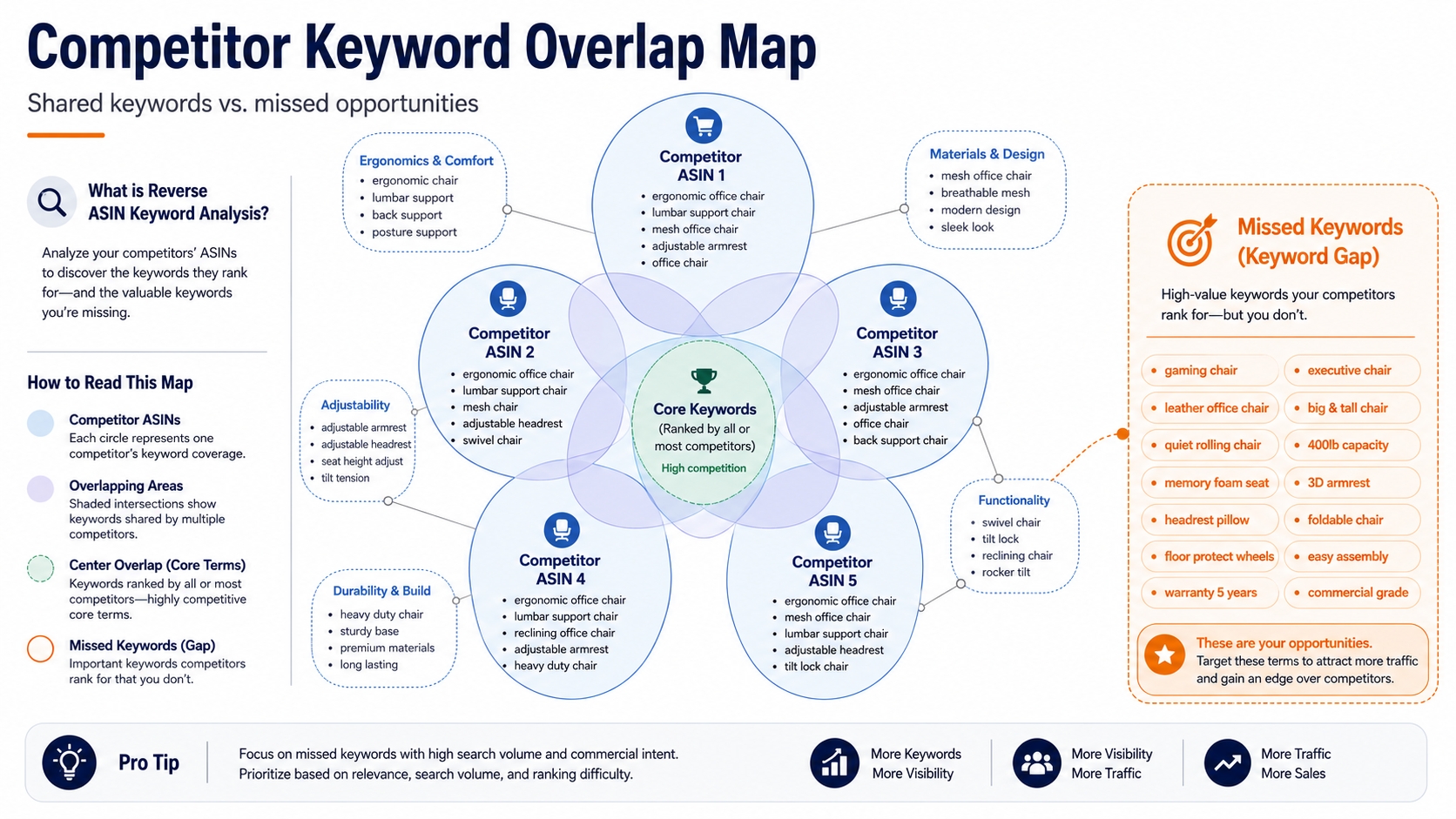
We collected keywords from five competitor listings and looked for overlap. Shared keywords appeared among multiple successful products. If three or more competitors rank for a phrase, it is a strong demand signal. This is the fastest way to detect a cluster you are missing.
Long-Tail Search Intent
Long-tail keywords like insulated bottle with straw for gym reveal what the buyer wants to accomplish. Each phrase is low volume, but together they can account for more sessions than the single head term. These are the queries where a relevant listing can win page one quickly.
Keywords the Seller Was Not Indexed or Ranking For
We checked the seller's organic ranking data against the competitor universe. Many missed keywords returned no ranking at all. The product was not indexed, so it could never appear. Fixing indexation begins with placing those keywords in the right listing fields.
Keywords Competitors Were Supporting With PPC
Some competitor keywords appeared not only in organic results but also in sponsored placements. This tells us the competitor is deliberately investing in the term. It can be an opportunity: if the competitor only ranks because of paid ads, a strong organic listing can take the unpaid slot and lower advertising costs.
How Reverse ASIN Exposed the Seller's Real Keyword Gap
Reverse ASIN is not a magic button; it is a discovery engine. The full process behind this case is documented in our Reverse ASIN strategy guide. Here, we focus on the exact steps used to turn unrelated competitor ASINs into a prioritized, actionable keyword list.
Step 1: Build a Competitor Set Based on Search Overlap, Not Category Labels
Competitor selection is more important than keyword collection. Choose ASINs that compete for the same customer search, not just the same product category. A product in the same category can target a completely different buyer profile.
Direct Substitutes
Direct substitutes share the same price band, form factor, and core use case. These competitors are the first set to analyze because they solve the same problem as the seller's product.
Search Result Leaders
Search result leaders appear on page one for your target search terms, even if they do not look exactly like your product. They tell you what Amazon's algorithm believes satisfies the search query. This can expose relevant demand outside your mental model.
Products Winning the Seller's Target Keywords
Use a reverse ASIN tool to find the ASINs that rank for your most valuable keywords. The tool takes a product URL or ASIN and returns the organic keywords that product ranks for. SellerSprite's reverse ASIN lookup tool can automate this discovery in seconds.
Step 2: Run Reverse ASIN Across the Competitor Cohort
We ran reverse ASIN lookups on the five selected competitor ASINs. After de-duplication, the combined dataset contained more than 8,000 keywords. The raw list was unwieldy; the value came from how we organized and screened it. This is where the reverse ASIN tool saved hours of manual work.
Step 3: Separate Shared Demand From Competitor-Specific Noise
The combined keyword list contained a mix of valuable phrases and noise. We separated them using frequency and the seller's current ranking data. Four classifications emerged.
Keywords Shared by Three or More Competitors
These keywords confirmed broad market demand. If three or more competitors rank for them, the search behavior is not a fluke. This group became the core of the new targeting plan.
Keywords Owned by Only One Competitor
Keywords owned by only one competitor might be a personalized angle or a low-competition opportunity. We reviewed them case by case. Some became PPC validation terms; most were too niche or too weak to justify a listing change.
Keywords the Seller Already Ranked For
We did not ignore existing rankings. Keywords the seller already ranked for were used as a control group. If we changed the listing, we could compare movement on these terms against movement on new terms to detect unintended damage.
Keywords the Seller Was Completely Missing
These were the true gaps. They were relevant, validated by competitors, and completely absent from the seller's organic footprint. This group contained most of the future traffic growth.
Step 4: Turn Thousands of Keywords Into a Short Opportunity List
We filtered the full list to about 280 keywords that met four tests: relevance, competitor validation, attainability, and intent fit. That short list became the input for listing changes and PPC validation. Without this final filter, the team would have wasted effort optimizing for low-impact terms.
The Breakthrough Was Not Finding More Keywords. It Was Classifying Them Correctly
The raw keyword count was not the breakthrough. The breakthrough was organizing the keywords into five gap types, because each gap type has a different action. Optimizing a keyword you already rank for is different from adding an irrelevant term or testing a risky one. This system prevented the team from blindly stuffing every competitor keyword into the listing.
| Gap Type | Signal | Action |
|---|---|---|
| Relevant keywords listing did not cover | High product fit, no indexing | Add to listing SEO |
| Covered but ranked poorly | Indexed, page 3 or lower | Strengthen relevance and conversion signals |
| Uncertain conversion potential | Related but ambiguous fit | Validate with PPC before rewriting |
| High volume, weak relevance | Big search volume, poor fit | Ignore them |
| Emerging long-tail keywords | Low volume, high intent | Capture before they become expensive |
Gap Type 1: Relevant Keywords the Listing Did Not Cover
These are phrases with obvious product fit that no part of the listing contained. The product solves the query, but Amazon has never associated the ASIN with it.
Action: Add to Listing SEO
We added these terms to the title, bullets, or backend fields depending on importance. The goal was to help Amazon index the ASIN for those queries and then show it to shoppers searching with that intent.
Gap Type 2: Keywords the Listing Covered but Ranked Poorly For
These keywords were already in the listing and the product had been indexed, but ranking positions sat on pages 3 or lower. Relevance was weak, engagement was poor, or the product had less authority than competitors.
Action: Strengthen Relevance and Conversion Signals
We rewrote the section of bullets where the keyword context appeared, improved image captions where possible, and used backend terms to reinforce the semantic relationship. In some cases, we improved the product's conversion rate to signal to Amazon that the term was valuable.
Gap Type 3: Competitor Keywords With Uncertain Conversion Potential
Some competitor keywords looked related but the seller could not confidently say a shopper would buy. Examples included ambiguous uses, alternative interpretations, or style-specific phrases.
Action: Validate With PPC Before Rewriting the Listing
Instead of committing valuable listing real estate, we added these terms to a Sponsored Products campaign. The data showed whether they produced clicks, add-to-carts, and orders. Only the winners earned a permanent place in the listing.
Gap Type 4: High-Volume Keywords With Weak Product Relevance
High-volume keywords such as generic category words or broad material terms had weak relevance to the specific product. They contributed noise and could attract the wrong audience, hurting conversion and ranking.
Action: Ignore Them
The team explicitly untracked these keywords and did not put them into the listing. This is a counterintuitive but crucial discipline: not every competitor keyword is worth pursuing.
Gap Type 5: Emerging Long-Tail Keywords
Emerging long-tail phrases appeared in search query reports with low volume but high intent. They were also present in competitor data, proving that shoppers were already using them.
Action: Capture Them Before They Become Expensive
We placed these terms in backend search terms and PPC campaigns early. Because they are not yet competitive, they gave the seller a faster path to page-one positions and lower ad costs.
How We Prioritized the Keywords That Could Actually Move Traffic
Having 280 keywords is still too many to act on. We needed a prioritization system that considered relevance, demand, competition, and intent. The system had to be transparent so the team could defend every listing change.
Relevance Came Before Search Volume
We scored every shortlisted keyword for product fit on a 1–10 scale. If the term described a feature the product did not have, it was excluded no matter how popular. This simple filter reduced the list from 280 to 172 relevant keywords.
Competitor Density Became a Demand Signal
The number of competitors ranking for a keyword told us whether the demand was proven. Keywords shared by three or more competitors were treated as market-validated. Keywords owned by only one competitor were treated as experiments rather than certainties.
Ranking Attainability Mattered More Than Keyword Size
A top-3 ranking on a long-tail keyword can produce more clicks than a page-3 ranking on a head term. We used the seller's current authority, review count, and pricing to estimate where the product could realistically rank. Attainable keywords were prioritized even if their volume was modest.
Search Intent Had to Match the Product's Conversion Strength
Some keywords are informational; others are purchase-driven. We prioritized terms where the shopper was close to buying, such as with capacity, size, or compatibility terms. This protected conversion rate while traffic grew.
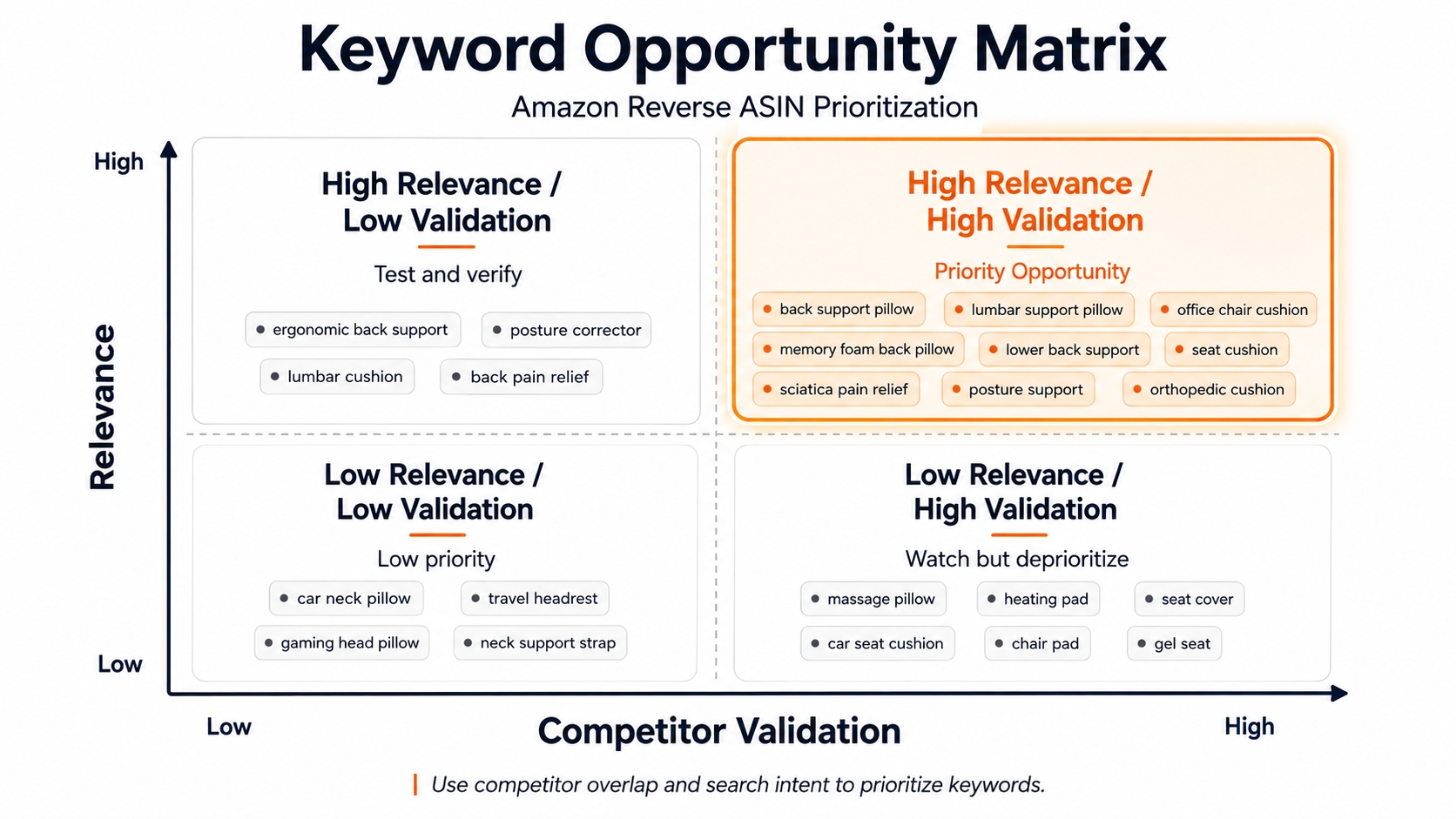
The Final Keyword Opportunity Matrix
After scoring all shortlisted keywords, we placed them into four quadrants. The matrix below was used every week during the project to decide where to focus.
High Relevance + High Competitor Validation
These keywords appeared on multiple competitor listings, had strong product fit, and were already converting in the seller's category. They became the first priority for title and bullet optimization.
High Relevance + Weak Seller Visibility
These terms were highly relevant but the seller had little or no visibility. They were the biggest source of new traffic, so they were added to backend search terms and tested in PPC campaigns.
High Volume + Low Relevance
These keywords looked tempting but would damage conversion if targeted. We excluded them from the listing and did not spend PPC budget on them.
Low Volume + High Purchase Intent
Terms with low search volume but very specific buyer intent produced quick conversion wins. They were added to bullets and backend fields because even a handful of weekly sessions could translate into sales.
What We Changed on the Listing and Why Each Change Mapped to a Keyword Gap
Listing changes were not made randomly. Every edit was tied to a specific keyword gap from the reverse ASIN analysis. The goal was to make Amazon see the product as relevant for the newly discovered demand without disrupting terms that already ranked.
We Did Not Rewrite the Entire Listing
A full rewrite is risky because it can confuse Amazon's relevance system and reset the ranking of established keywords. Instead, we kept winning elements stable and changed only the parts that mapped to a keyword gap.
Title Changes Focused on the Highest-Value Search Intent
The original title used the main keyword once but was missing the secondary phrase that competitors shared. We reordered the title to place the primary purchase-intent keyword near the front and added one qualifying phrase that strengthened relevance without stuffing.
Bullet Points Expanded Semantic Coverage Without Keyword Stuffing
We expanded semantic coverage by rewriting bullets around use cases and features found in reverse ASIN data. For example, the first bullet kept the hero benefit; later bullets introduced attributes like capacity, material, and fit that matched long-tail queries.
Backend Search Terms Captured Relevant Secondary Queries
Backend search terms captured secondary and long-tail queries that did not fit naturally in the visible listing. We used this field to reinforce indexation for more than 40 validated keywords.
Product Messaging Was Updated Where Search Intent Exposed a Conversion Gap
Where search intent revealed a conversion gap, such as shoppers searching for travel size while the listing emphasized the large capacity, we updated the copy and product images to address that intent.
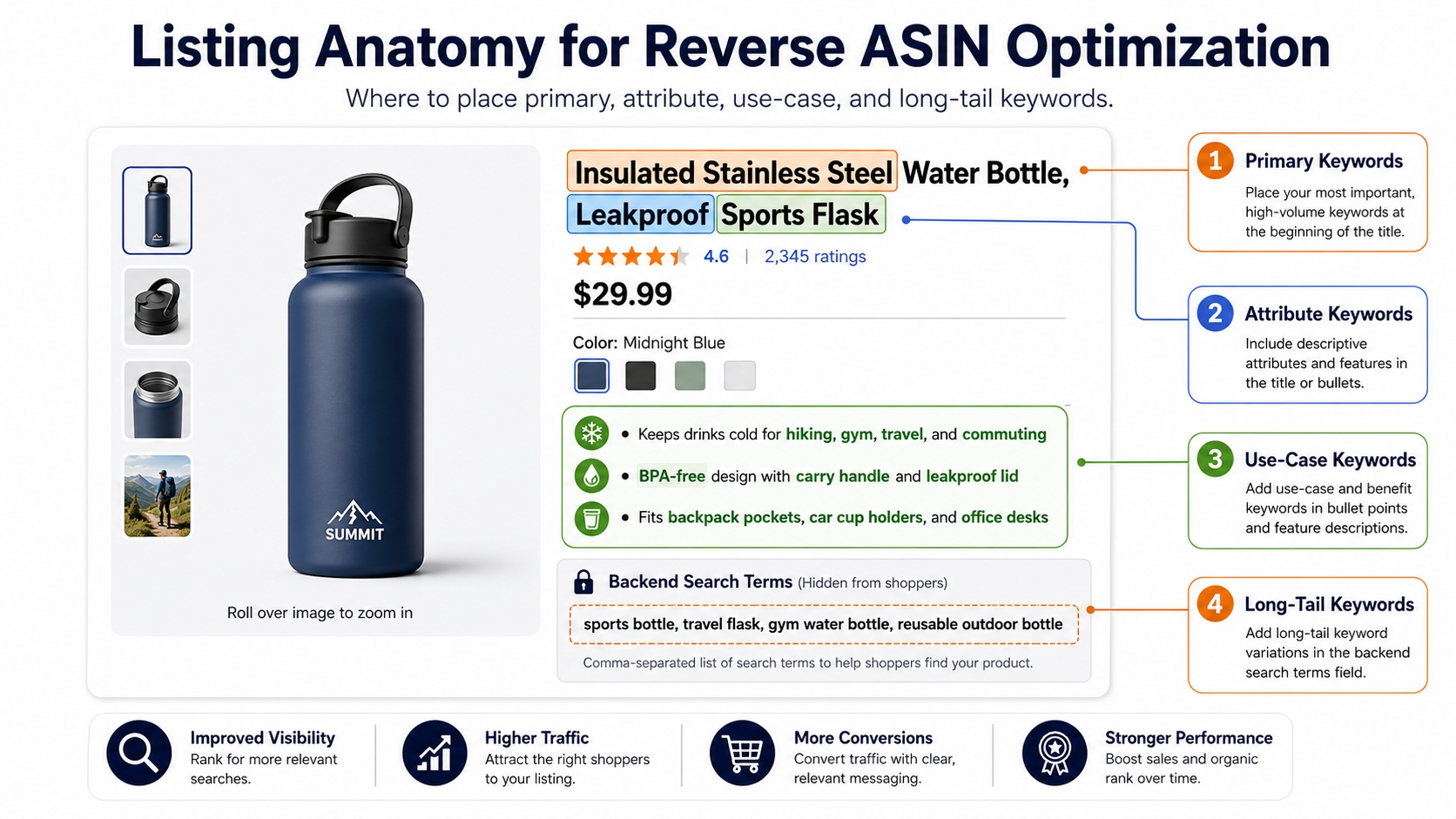
Keywords Were Mapped to Listing Elements by Role
Every validated keyword was assigned a role, and each role had a designated listing element. This prevented duplication and kept the listing readable.
Primary Purchase-Intent Keywords
These were the highest-value terms, placed in the title, the first bullet, and the main image text where possible.
Attribute and Feature Keywords
These phrases described color, size, material, and compatibility. They were placed in bullets and backend fields, and often became the filter options shoppers use to narrow results.
Use-Case Keywords
Use-case terms like for school, for camping, or for office were added to bullets and backend because they matched buyer scenarios. They are highly relevant but not always part of the core title.
Long-Tail Supporting Terms
These low-volume, high-intent phrases went into backend search terms and PPC campaigns. They helped expand coverage without disrupting the visible copy.
PPC Was Used as a Validation Layer, Not as a Traffic Shortcut
A common mistake is adding every competitor keyword to the listing immediately. We used PPC to test uncertain terms first. This reduced the cost of being wrong and gave the organic team clean data on search intent and conversion potential.
Why We Did Not Immediately Add Every Competitor Keyword to the Listing
Some competitor keywords are relevant for one product but not another. Adding them could attract the wrong audience and lower conversion, which hurts organic ranking. Testing with PPC before committing listing space is safer.
New Keywords Were Tested Before They Earned Permanent Listing Space
We grouped uncertain keywords into small Sponsored Products campaigns. Each group had a budget cap and a one-to-two-week observation window. The metric that mattered most was organic-ready signals: clicks, add-to-carts, and orders per 1,000 impressions.
Paid Search Helped Separate Search Volume From Buyer Intent
A keyword can have high search volume but low buyer intent. When we ran PPC, we saw which terms actually generated sales. Some high-volume keywords had weak conversion rates and were removed; some low-volume keywords converted strongly and were promoted to the listing.
Winning Search Terms Graduated From PPC Testing Into SEO
After a term proved itself in PPC, we moved it into the backend or visible listing fields depending on its value. This progression meant the organic listing was only given terms with proven buyer intent.
Losing Keywords Were Removed Before They Polluted the Strategy
Keywords that did not produce clicks or sales were paused quickly. This prevented wasted ad spend and kept the keyword map clean. Removing a losing keyword is as important as adding a winning one.
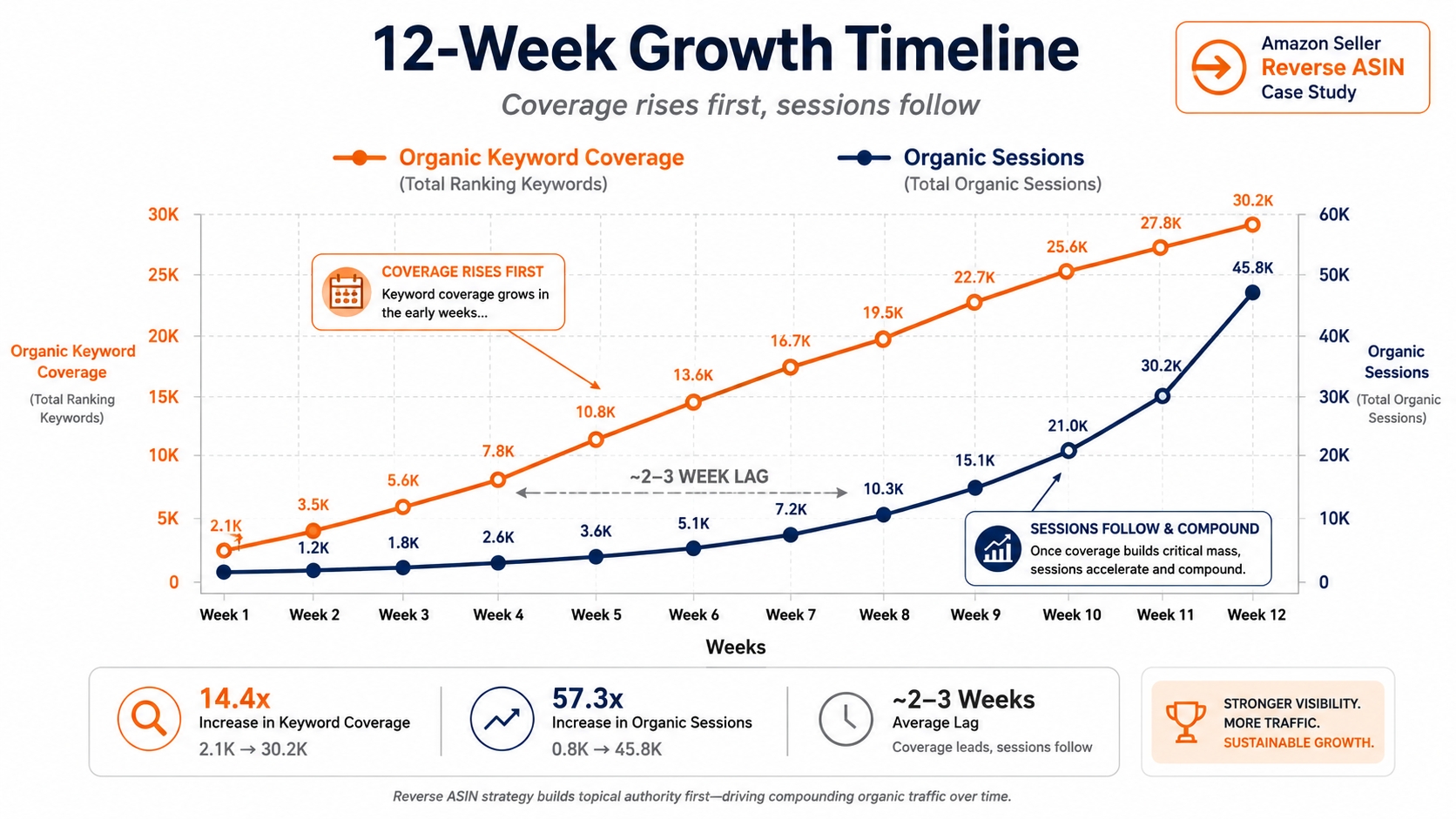
The Growth Timeline: How the Traffic Increase Actually Happened
Traffic did not double overnight. It followed a predictable sequence: keyword coverage expanded first, ranking positions followed, then sessions compounded. Understanding this lag prevents sellers from giving up too early.
Weeks 1–2: Keyword Coverage Expanded Before Traffic Did
The seller's ranking dashboard showed more indexed keywords within two weeks of the listing changes. Sessions were still flat because most new keywords were on low pages. We did not panic; coverage is the prerequisite for visibility.
Weeks 3–4: Long-Tail Rankings Began Moving First
The first ranking movement appeared on long-tail keywords. These terms had low competition, so Amazon could quickly re-rank the listing. By the end of week four, about 60 new keywords entered page three or better.
Weeks 5–8: Mid-Tier Keywords Started Crossing Visibility Thresholds
As the listing gained engagement on long-tail terms, mid-tier keywords began moving into the top 20. These terms had moderate volume and stronger competition, so they took longer to shift. This is where organic sessions started to climb measurably.
Weeks 9–12: Traffic Compounded as More Keywords Reached Page-One Positions
Every week, more keywords crossed the page-two to page-one threshold. New top-10 and top-20 keywords added sessions that compounded with existing rankings. By week 12, organic traffic hit the two-times mark.
The Lag Between Optimization, Ranking, and Traffic Was the Most Important Lesson
If the team had measured traffic every day, they might have concluded the changes were not working. The lag is normal. Track coverage and ranking position as early indicators, not only sessions and sales.
Before vs. After: Where the Extra Traffic Actually Came From
It was not enough to see total sessions double. We needed to know which keywords and traffic types produced the growth. This section breaks down the source of the extra sessions.
Total Sessions Before vs. After
Total sessions moved from about 4,800 to about 9,600 per month. The increase was almost entirely organic. Direct traffic from bookmarks and brand searches stayed flat, which confirms the gains were search-driven.
Organic Search Impressions Before vs. After
Organic search impressions rose from about 110,000 to about 264,000. Impressions grew because the listing became indexed for thousands of additional queries. This was the first domino to fall.
Organic Search Clicks Before vs. After
Organic search clicks rose from roughly 3,100 to 6,900. Click-through rate improved slightly as more keywords moved into top 20 positions. More clicks plus more impressions produced the doubling in sessions.
Ranking Keyword Coverage Before vs. After
Ranking keyword coverage grew from 1,250 to 3,100. The new keywords were mostly long-tail phrases discovered through reverse ASIN. This broad coverage made the listing less dependent on a single head term.
Top-10 Keyword Count Before vs. After
The count of top-10 keywords grew from 42 to 87. Top-10 keywords contribute far more clicks than any other position, so this improvement is the most direct driver of the session increase.
Traffic Contribution by Keyword Type
We assigned every organic session to a keyword type to understand what made the difference. Four groups carried the growth.
Existing Keywords That Improved
About 30% of the growth came from keywords the seller already ranked for that moved up one to three positions. Listing changes and stronger conversion signals helped these terms climb.
Newly Indexed Keywords
Roughly 25% of the growth came from keywords that had never been indexed. Placing them in backend search terms and bullets gave Amazon the signal needed to include the product.
Newly Discovered Long-Tail Keywords
Another 30% came from long-tail keywords that the reverse ASIN analysis surfaced. These terms were low volume individually but abundant in quantity and rich in purchase intent.
Competitor Keyword Gaps That Became Traffic Drivers
The remaining 15% came from keywords that competitors were using but the seller had never considered. These were often feature-specific or use-case terms that matched the seller's product perfectly.
The Unexpected Finding: Most of the Growth Did Not Come From the Biggest Keywords
We expected the head terms to drive most of the increase. Instead, long-tail and newly indexed keywords produced about 70% of the new sessions. This is why reverse ASIN can be so valuable: it finds the demand that volume-based tools hide.
Traffic Doubled, but Did the Traffic Get Better?
More traffic means nothing if it does not convert. The quality of the new traffic was measured at every stage. The goal was to grow sessions without hurting conversion rate, organic sales, or the listing's long-term ranking signals.
Conversion Rate Before vs. After
Conversion rate stayed at about 10%, even after adding many new keywords. This proved the reverse ASIN filtering was working. If conversion had dropped, the new traffic would have been low quality.
Add-to-Cart and Purchase Performance
Add-to-cart rate improved slightly because the listing now matched search intent. Shoppers arriving from long-tail keywords often had a more specific need, so they moved into the purchase journey faster.
Organic Sales Before vs. After
Organic sales doubled along with sessions. Because conversion rate was stable, the extra traffic translated directly into more sales. This validated the strategy from a business perspective, not just a traffic perspective.
PPC Dependency Before vs. After
PPC dependency dropped. At the start, roughly 39% of sessions were paid. By the end, paid share fell to 26% because organic sessions grew faster than paid traffic. Lowered PPC dependency increased profit margins.
Revenue per Session Before vs. After
Revenue per session stayed stable, which is the correct result. Some sellers worry new traffic will reduce revenue per session; in this case, the quality of the new keywords protected it.
Why More Traffic Would Have Been a Failure if Conversion Had Collapsed
Doubling traffic while halving conversion would have produced no additional sales and could have damaged ranking. Amazon measures the entire shopper journey. A listing that pulls irrelevant traffic gets fewer conversions and will eventually lose positions.
How Much Credit Should Reverse ASIN Really Get?
Reverse ASIN deserves credit for discovering the opportunity, but it did not create the traffic by itself. The traffic doubled because listing optimization, PPC testing, ranking improvements, and conversion stability all worked together. Understanding this prevents false cause attribution.
Reverse ASIN Discovered the Opportunity but Did Not Create the Traffic by Itself
Reverse ASIN told the seller which keywords to care about. It did not change the title, improve the listing, or convince Amazon to rank the product. It was the compass, not the engine.
Listing Optimization Turned Keyword Gaps Into Relevance
Adding the discovered keywords to the right listing fields told Amazon that the product was relevant for those searches. Without this step, the keywords would have remained purely theoretical.
PPC Testing Reduced the Cost of Being Wrong
PPC testing prevented the seller from committing to bad keywords. It gave fast feedback on which terms could convert and which should be skipped. This discipline protected the listing's conversion rate.
Ranking Improvements Turned Relevance Into Visibility
Relevance is only useful when it produces ranking. The listing moved from page three to page one on hundreds of terms because Amazon saw positive engagement signals. That visibility was the direct cause of increased traffic.
Conversion Performance Determined Whether Visibility Could Compound
Amazon rewards listings that convert. The stable conversion rate allowed each ranking win to reinforce the next. If conversion had collapsed, the rankings would have faded quickly.
The Three Reverse ASIN Findings That Created Most of the Growth
Out of all the data, three findings stood out. These were the decisions that moved the needle most and can be replicated by other sellers.
Finding 1: Competitors Shared a Keyword Cluster the Seller Had Completely Missed
Five competing ASINs were all ranking for a group of feature-specific keywords. The seller's product actually had those features, but the listing did not mention them. This cluster alone generated a meaningful share of the new sessions.
Why the Cluster Was Overlooked
The seller assumed the core keyword covered the category. Feature-specific terms seemed too niche to matter, so they were never tested or tracked. Reverse ASIN proved that these niche terms were a consistent demand source for competitors.
What Changed After Targeting It
We added the cluster to backend search terms and the second bullet. Within six weeks, the product was ranking in the top 20 for most phrases in that cluster. It became a reliable source of monthly sessions.
Finding 2: Several High-Volume Keywords Were Less Valuable Than They Looked
The reverse ASIN data showed competitors ranking for high-volume terms that were unrelated to their best-converting behavior. Going after those terms would have wasted budget and listing space.
Why Search Volume Created a False Priority
Keyword tools rank by volume, not by relevance. Some high-volume terms had a broad meaning that did not describe the seller's product. Believing volume is a proxy for value caused the seller to ignore the real gaps.
Where the Budget Was Reallocated
The money that would have been spent on high-volume, low-relevance terms went into PPC for uncertain long-tail keywords. This reallocation produced a better return and accelerated the organic validation loop.
Finding 3: Long-Tail Keywords Created a Faster Path to Page-One Visibility
Most of the new top-10 keywords were long-tail phrases. They were easier to win because competition was lower and relevance could be very high. Together, they built the foundation for the traffic increase.
Why These Keywords Were Easier to Win
Long-tail keywords have lower search volume, so big sellers ignore many of them. A listing with good relevance and decent conversion can reach page one faster because Amazon is less saturated.
How They Contributed to the Traffic Lift
One long-tail keyword may bring only ten sessions a month. Two hundred of them bring 2,000 sessions. The compound effect was the largest single component of the doubled traffic.
What We Would Do Differently If We Ran the Case Study Again
No process is perfect. Reflecting on the case, there are five changes that would have made the process faster and cleaner. These are practical lessons for any seller planning similar research.
We Would Filter Low-Relevance Competitor Keywords Earlier
The first reverse ASIN export was full of irrelevant words. We had to spend time removing them. A quicker relevance filter at the start would have saved hours.
We Would Start Rank Tracking Before Editing the Listing
Rank tracking software was launched the same day as the listing edits. That meant we had no clean baseline for several keywords. Start rank tracking at least two weeks before making changes.
We Would Separate Discovery Keywords From Validation Keywords From Day One
Some keywords were clearly relevant, and others needed testing. Mixing them made the initial prioritization messy. Splitting them into two tracks would have speeded up PPC validation.
We Would Preserve a Cleaner Pre-Test Baseline
The seller ran a small discount during week two, which made the early data noisy. Removing discount campaigns before the test would have provided a clearer cause-and-effect read.
We Would Track Keyword-Level Conversion Earlier
Amazon does not expose keyword-level conversion in the same way as PPC. We used third-party rank trackers and search query reports, but a clearer system from the beginning would have helped us kill bad keywords sooner.
What Other Amazon Sellers Can Copy From This Case
The exact keywords from this case probably will not work for you. The system, however, is transferable. Copy the method, not the data.
Copy the Competitor-Selection Method, Not the Competitors
Choose competitors based on search overlap and direct substitution. Your competitor set will be different, but the selection principles will still apply.
Copy the Keyword Classification System, Not the Keyword List
Separate keywords into the five gap types before editing the listing. The classification prevents you from treating every keyword the same way.
Validate Keywords Before Giving Them Valuable Listing Space
Use PPC for uncertain keywords. Listing space is scarce, so do not spend it on assumptions.
Measure Keyword Coverage Before You Measure Ranking Wins
Coverage tells you whether Amazon can show the listing. Ranking tells you where it shows. Coverage comes first.
Let Conversion Protect You From "Fake" Traffic Growth
Track conversion rate alongside traffic. If conversion collapses, the traffic is not worth having.
Repeat Reverse ASIN Research After the Market Changes
Competitor sets change, new sellers enter, and search behavior evolves. Run reverse ASIN again after a product launch, a major competitor change, or a seasonal reset.
A Reverse ASIN Growth Framework You Can Replicate
Below is the seven-phase framework used in this case. It is designed to be practical and repeatable for any Amazon listing.
| Phase | Key Action |
|---|---|
| Phase 1 | Establish the baseline |
| Phase 2 | Map the competitive keyword universe |
| Phase 3 | Classify the gaps |
| Phase 4 | Validate uncertain keywords |
| Phase 5 | Optimize for confirmed demand |
| Phase 6 | Track ranking and traffic movement |
| Phase 7 | Run reverse ASIN again |
Phase 1: Establish the Baseline
You cannot measure growth without a baseline. Collect at least 30 days of data for the metrics below before changing anything.
Sessions
Record total sessions and organic sessions separately. This shows the starting point and helps you filter out PPC noise.
Search Impressions
Track organic search impressions from Brand Analytics or a rank tracker. Impressions are the earliest indicator of visibility.
Ranking Keywords
Count the total keywords your ASIN ranks for. This is your coverage baseline.
Top-10 Rankings
Count keywords in the top 10. These drive the majority of clicks and are the most sensitive signal of ranking progress.
Conversion Rate
Record the listing conversion rate. A stable or improving conversion rate is the guardrail for any traffic growth plan.
Phase 2: Map the Competitive Keyword Universe
Select five or more competitors and run reverse ASIN on each. Merge the results and remove duplicates. This becomes the raw keyword universe.
Phase 3: Classify the Gaps
Use the five gap types to organize the keyword universe. Label each keyword as add, strengthen, validate, ignore, or capture early.
Phase 4: Validate Uncertain Keywords
Run short PPC campaigns on keywords with uncertain conversion potential. Let the data decide before you commit to listing changes.
Phase 5: Optimize for Confirmed Demand
Map confirmed keywords to title, bullets, backend, and product messaging. Make minimal, deliberate changes.
Phase 6: Track Ranking and Traffic Movement
Track coverage, top-10 count, sessions, and conversion weekly. Expect a lag before traffic catches up with ranking.
Phase 7: Run Reverse ASIN Again and Look for New Gaps
Markets change. Re-run the research quarterly or after a major market shift to find new gaps and discard outdated ones.
When This Reverse ASIN Playbook Will Not Double Your Traffic
Reverse ASIN is powerful, but it is not a universal guarantee. There are situations where no amount of keyword discovery will double traffic. Knowing these limits helps you avoid false expectations.
When the Product Has a Conversion Problem, Not a Visibility Problem
If the listing already ranks for relevant keywords but conversion is below 3%, more traffic will not help. Fix pricing, reviews, images, and offer strength first.
When the Category Has Limited Search Demand
In very small or niche categories, the pool of available search demand may be too small to double. Reverse ASIN will still find gaps, but the ceiling may be limited.
When Competitor Keywords Are Poorly Matched to Your Product
If your product has a different price, size, or feature set, many competitor keywords will not apply. Forcing them into the listing will attract the wrong audience and hurt conversion.
When Inventory or Featured Offer Issues Suppress the Upside
If the product frequently goes out of stock or loses the Buy Box, traffic gains will not convert. Stabilize inventory and Buy Box before scaling keyword work.
When Traffic Growth Comes From Seasonality Instead of Optimization
Compare your metrics against the same period last year. If the category grew by 50% naturally, part of your traffic gain is seasonality, not SEO.
When Sellers Chase Rankings Without Measuring Business Value
Ranking for irrelevant keywords may inflate your keyword count but hurt conversion and profitability. Always pair ranking wins with organic sales and margin checks.
FAQ
Can Reverse ASIN Really Increase Amazon Traffic?
Yes, when used correctly. Reverse ASIN helps you discover keywords your competitors rank for that you do not. Once you add those keywords to your listing and validate them with PPC, Amazon can show your product to more relevant shoppers. In this illustrative case, organic sessions doubled, but the result depends on your product relevance, competition, and execution.
How Long Does It Take to See Results From Reverse ASIN Keyword Research?
Keyword coverage can improve in two weeks, but traffic changes usually take four to twelve weeks. The lag happens because Amazon needs time to index new keywords, then rank them, and then send traffic. In this case, significant traffic growth appeared in weeks five through eight and compounded by week twelve.
How Many Competitor ASINs Should You Analyze?
Five to ten ASINs is a good starting point. Too few give a narrow picture; too many create noise and duplicate keywords. Choose a mix of direct substitutes, search result leaders, and products that win your target keywords.
Should You Target Every Keyword Your Competitors Rank For?
No. Many competitor keywords are not relevant to your product. Target keywords with strong product fit, proven demand through competitor overlap, attainable ranking difficulty, and clear purchase intent. Ignore high-volume terms that would pull the wrong audience.
How Do You Measure Traffic Growth on Amazon?
Use Amazon Brand Analytics for search frequency and sessions, Seller Central Business Report for sessions and conversion, and a third-party rank tracker for keyword positions. Track organic sessions, search impressions, organic clicks, and conversion rate separately for a complete picture.
How Do You Know Whether Traffic Growth Came From SEO or PPC?
Segment your traffic channels. In Seller Central, compare organic sessions and paid sessions over the same period. If organic sessions increase while paid sessions stay flat or decrease, SEO is driving the growth. Also track organic share of total sessions and monitor specific keywords that you did not advertise.
Next Steps
- Create your own baseline: record sessions, organic impressions, keyword coverage, top-10 count, and conversion rate for 30 days.
- Run reverse ASIN on five to ten competitors using SellerSprite's Reverse ASIN Keyword Tool and start classifying the gaps.
- Validate uncertain keywords with small PPC campaigns, then apply confirmed keywords to your listing and track weekly movement.
References
- Amazon Seller Central – Search Query Performance Dashboard View
- Amazon Seller Central – Optimize Your Product Discoverability View
- Amazon Ads – A Guide to Targeting With Sponsored Products View
- SellerSprite – Reverse ASIN Strategy Guide View
By SellerSprite Success Team
The SellerSprite Success Team combines deep Amazon marketplace expertise with data science to help sellers grow profitably. With years of experience in e-commerce analytics, we focus on ethical, sustainable strategies that align with Amazon's evolving algorithms and policies. Our insights are trusted by thousands of sellers worldwide.
Last updated: 2026-08-17