TL;DR: Amazon book publishing and self-publishing starts with a book readers want, not a list of keywords. Use Kindle Direct Publishing (KDP) to prepare and publish eligible digital and print editions, then align the cover, description, and metadata with the reading experience. Compare genuinely similar titles, calculate earnings from royalties rather than retail sales, and use small marketing tests to learn before increasing spend.
Key Takeaways
- Define the reader before the book listing. A clear audience, genre, and reason to choose the book make research and positioning more useful.
- Publish through KDP, not a generic product-listing workflow. Choose the right format, prepare the files, and verify book-specific metadata and rights.
- A book sale is not the same as author income. Printing costs, eBook delivery costs where applicable, advertising, and production expenses affect the result.
- Use evidence without manipulating discovery. Accurate keywords, relevant categories, honest reviews, and focused ad tests are more useful than misleading metadata or ranking shortcuts.
Table of Contents
- Quick Answer: How Does Amazon Self-Publishing Work?
- Start With the Reader, Not a Low-Competition Keyword
- Compare Books That Compete for the Same Reader
- How to Publish a Book on Amazon KDP
- Build Accurate Metadata, Keywords, and Categories
- Price the Book Around Royalties, Not Retail Revenue
- KDP Select or Wider eBook Distribution?
- Market the Book Without Buying Reviews
- Read Launch Data Before Changing the Book
- Check Rights, AI Content, and Reader Experience
- The Bottom Line
- FAQs
- References
Scope: This guide is for KDP authors, independent publishers, and book marketers, with Amazon.com pricing examples. It is about publishing your own books, not purchasing book inventory for resale through Seller Central. Check current KDP requirements for your format and marketplace before publication.
Quick Answer: How Does Amazon Self-Publishing Work?
Kindle Direct Publishing (KDP) is Amazon's self-publishing service for eBooks, paperbacks, and hardcovers. You prepare the book, upload its files and details, choose rights and pricing, and submit it for review. KDP distributes eligible eBooks and prints physical editions on demand, so this publishing route does not require an upfront print run.
KDP provides free publishing tools and lets authors retain ownership of their content. Editing, design, proof copies, and marketing still need a realistic budget. Distribution makes a book available; it does not establish that the book has a compelling audience or that advertising will be profitable.
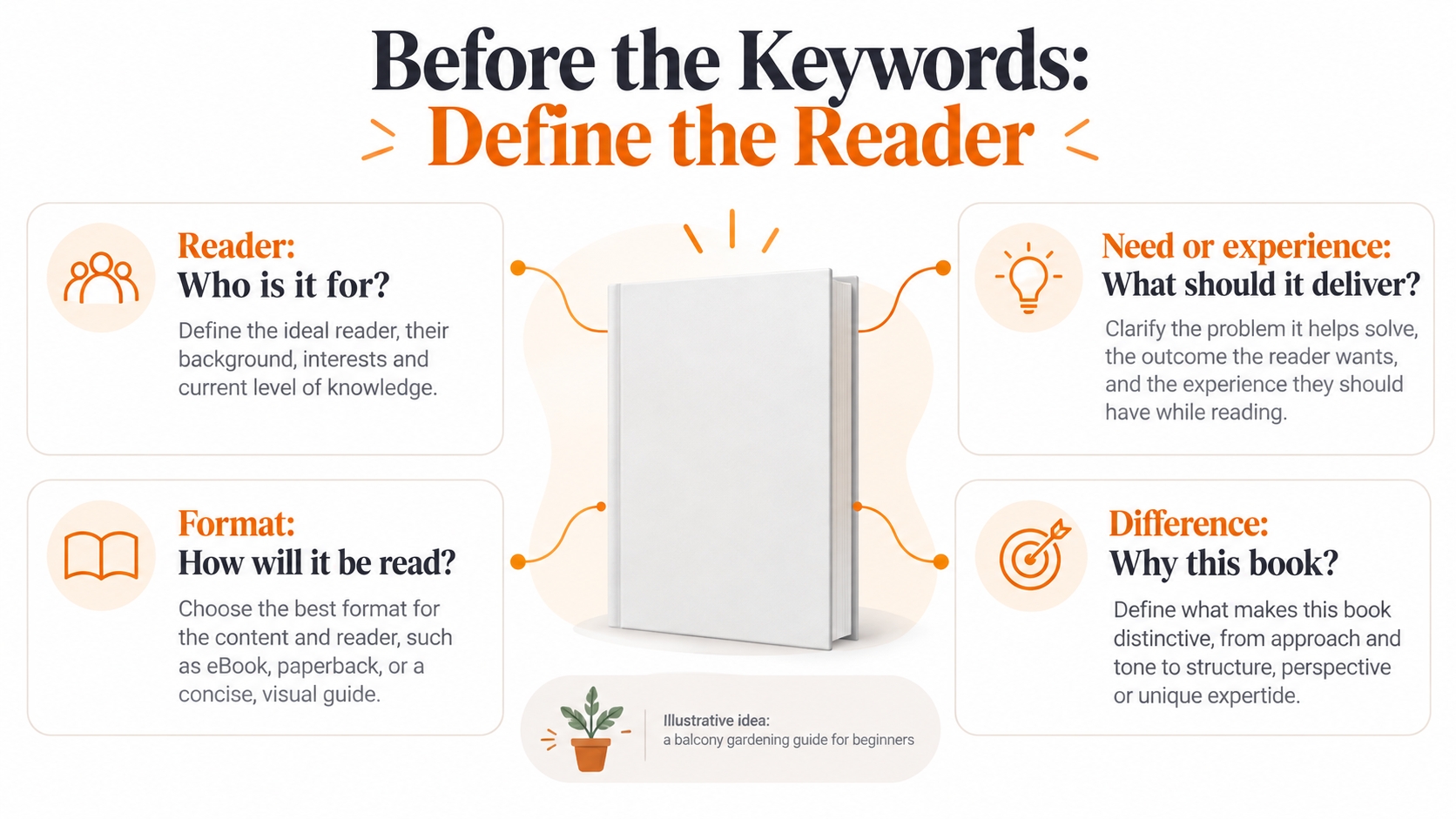
The publishing decision: Who is this book for, what reading experience or problem does it address, and why would that reader choose it over the alternatives? Answer those questions before optimizing a listing.
Start With the Reader, Not a Low-Competition Keyword
Turn the book idea into a specific reader brief before collecting search terms. This gives each later decision, from format to cover design, a reason beyond copying a successful listing.
For Nonfiction, Define the Reader's Starting Point and Outcome
A general gardening book and a beginner guide for apartment renters are not the same offer. For the second idea, define the space constraints, equipment assumptions, climate coverage, and practical tasks the book will teach. Then check whether the manuscript actually delivers those things.
For Fiction, Define the Experience Rather Than an Artificial Problem
Readers may be choosing a genre, emotional tone, setting, relationship dynamic, or level of intensity. Describe the intended experience without implying that a novel must solve a practical problem. Your cover, opening pages, and description should make that experience recognizable.
Treat Search Suggestions as Clues, Not a Sales Forecast
Try relevant phrases in Amazon's book search and inspect the results. KDP recommends researching proposed keywords and search suggestions before using them. A suggestion is evidence of vocabulary, not a verified monthly search count or a promise that a new title will sell.
Keep a short research note for each phrase: the reader intent, the books returned, and whether your manuscript fits. If the results mostly serve a different audience or format, revise the phrase rather than forcing the book into that traffic.
Compare Books That Compete for the Same Reader
A bestseller can show that readers buy a kind of book, but it may be a poor benchmark for a new author. Build a small comparison set that includes both established titles and closer matches to your proposed book.
| Compare | Record | Decision it supports |
|---|---|---|
| Audience and genre | Reader level, genre or subgenre, and promised experience. | Whether the same reader would genuinely consider both books. |
| Format and scope | eBook or print, edition, length, illustration needs, and price. | Whether your planned format and production budget make sense. |
| Cover and description | What the thumbnail communicates and what the description promises. | How to signal relevance without copying another book. |
| Review themes | Recurring praise, unmet expectations, and comments about older editions. | Which gaps merit manuscript or presentation changes. |
| Rank and history | The format, category, observation date, and promotional context. | Whether the apparent demand is persistent or a temporary snapshot. |
Amazon explains that each book format has its own Best Sellers Rank, while some Books category rankings combine activity across formats. Rankings are relative and are not an accurate unit-sales counter. Compare like with like and avoid treating a single rank as a monthly sales estimate.
Separate an actionable gap from a personal preference. Repeated complaints that a beginner guide assumes advanced knowledge may justify a clearer learning sequence; one request for an unrelated topic may not. Check the actual sample and edition before deciding what your book should do differently.
How to Publish a Book on Amazon KDP
The publishing workflow combines account setup, book preparation, and a release check. The steps below follow KDP's official book-creation process while adding editorial checks you can complete before submitting the files.
1. Complete the Account and Confirm Your Rights
Create or sign in to your KDP account, then complete the required identity, payment, and tax information. Use the legal identity required for account records; a pen name belongs in the appropriate book-author field. Make sure you have the publishing rights for the territories you select.
2. Choose Formats and Identifiers
Choose eBook, paperback, hardcover, or a suitable combination based on the reading experience. Prepare each format intentionally: a digital narrative, an illustrated print guide, and a write-in workbook do not have identical layout needs.
KDP eBooks do not require an ISBN. Eligible paperbacks and hardcovers can use a free KDP ISBN or your own; a free KDP ISBN is limited to KDP use. Low-content books have different ISBN rules and are not eligible for the free option. Decide your imprint and distribution needs before assigning identifiers.
3. Prepare the Manuscript and Cover for the Chosen Format
Complete editing and proofreading before final layout. Check navigation for an eBook and margins, bleed where needed, image clarity, and page order for print. Use the format-specific instructions and templates available in KDP rather than assuming one export works everywhere.
4. Enter Details, Upload, and Inspect the Preview
From the KDP Bookshelf, create the chosen format and enter its book details. Upload the manuscript and cover, then inspect the preview. Match the identifying information across files and metadata. For print, order a proof when practical so you can inspect the physical result; KDP does not make this mandatory.
5. Set Rights and Pricing, Then Verify the Published Edition
Review your rights, pricing, and royalty settings before submission. Once the book is live, check the correct format, cover, description, and available sample before directing paid traffic to it. Not all identifying fields remain editable after publication, so do not plan frequent title changes as if they were ordinary ad-copy tests.
Build Accurate Metadata, Keywords, and Categories
Metadata should describe the book you wrote, not the traffic you wish it could attract. Use the KDP metadata guidelines to keep discoverability consistent with the reader experience.
Keep the Cover, Title, and Description Consistent
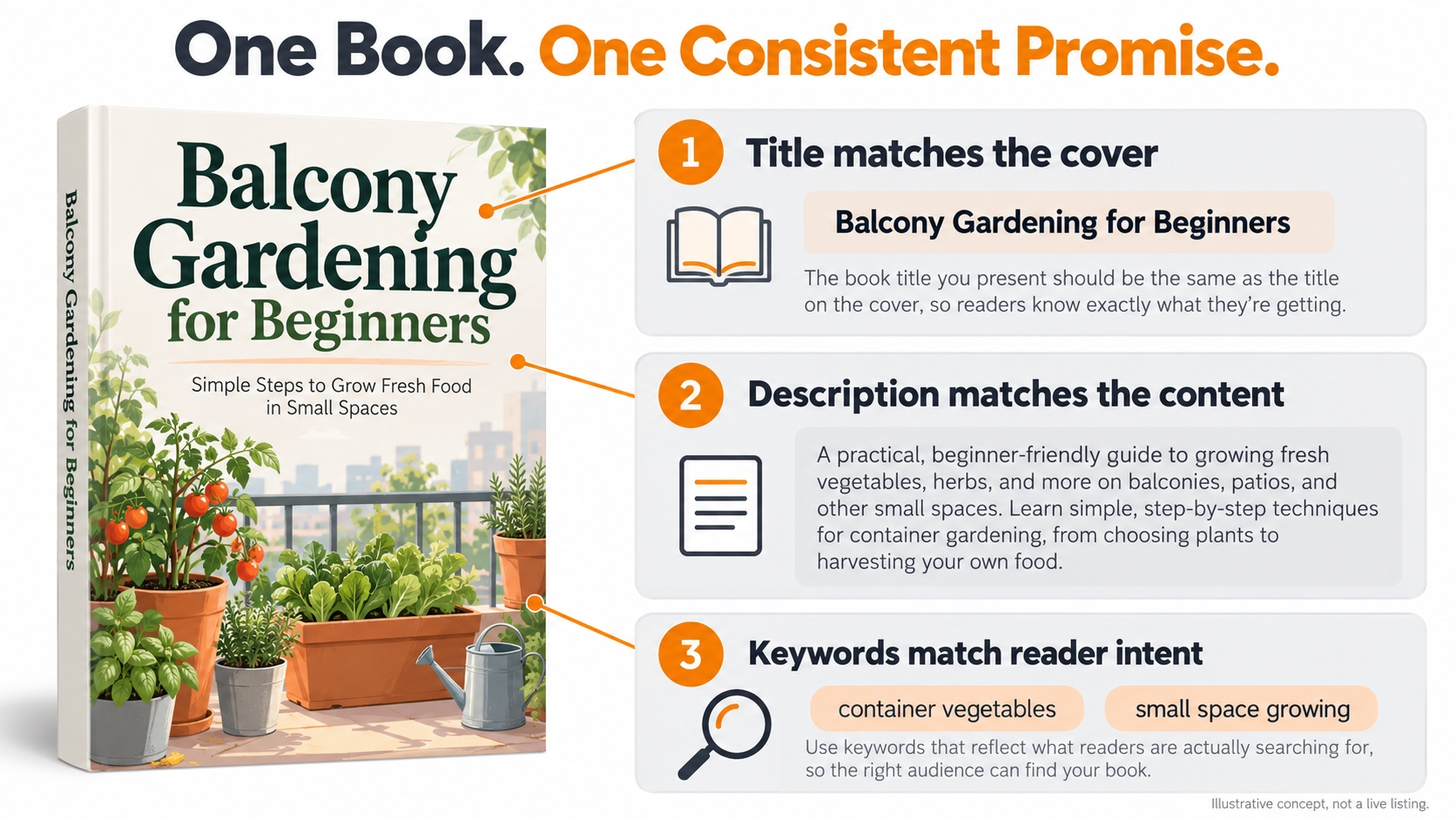
The title and subtitle should match the book's cover and metadata; KDP requires their combined length to be fewer than 200 characters. Avoid keyword-stuffed titles, unauthorized author or trademark references, and promotional claims. A description should explain the book, not become a list of search terms.
For nonfiction, make the intended reader, coverage, and practical value easy to understand. For fiction, establish the premise, tone, and stakes without summarizing away the experience. Treat clarity as an editorial objective, not a reason to cram every related phrase into the description.
Use the Keyword Fields for Relevant Reader Language
KDP allows up to seven keywords or short phrases. Choose accurate terms that add useful information instead of repeating details already covered elsewhere. Do not use unrelated author names, competing titles, unauthorized brands, or claims such as "bestselling" to capture attention.
For the hypothetical gardening guide, phrases to investigate might include "container vegetables", "small space growing", and "urban gardening basics". These are illustrative research candidates, not verified search-volume recommendations or instructions to use phrases that do not match the finished book.
Choose Categories for Fit, Not an Easy Badge
KDP lets you select up to three categories based on your primary audience and marketplace. Choose placements that accurately match the content; unrelated categories can mislead readers. For children's books, check the intended reading age as part of that decision.
Keep research and metadata separate: A comparable author can help you understand an audience. That does not make their name an appropriate KDP keyword or imply their involvement in your book.
Price the Book Around Royalties, Not Retail Revenue
Your budget should start with what you receive per sale, not the amount the customer pays. Calculate each edition separately because royalty options and production costs differ by format and marketplace.
Kindle eBooks: Check the Option and the Sale's Eligibility
KDP offers 35% and 70% eBook royalty options. The 70% option is conditional and accounts for applicable taxes and delivery costs; a listing price inside the allowed range does not establish every sale's eligibility. Check buyer territory, content eligibility, and the terms for your edition.
Current US pricing detail: Effective July 7, 2026, Amazon.com's list-price band for the 70% eBook royalty option is $2.99-$12.99, replacing the previous $2.99-$9.99 band. Other eligibility conditions still apply. Existing titles do not automatically change their selected royalty option.
Paperbacks: Apply the Correct Rate Before Subtracting Printing
For Amazon.com paperback sales, KDP currently applies a 50% royalty rate at list prices of $9.98 or less and 60% at $9.99 or more, then subtracts printing costs. Other marketplaces and distribution channels differ. Check the current calculator and your book's page count, ink, and print specifications before pricing.
Paperback royalty per copy = applicable royalty rate × list price − printing cost
Worked Example: Sales Can Look Healthy While Advertising Loses Money
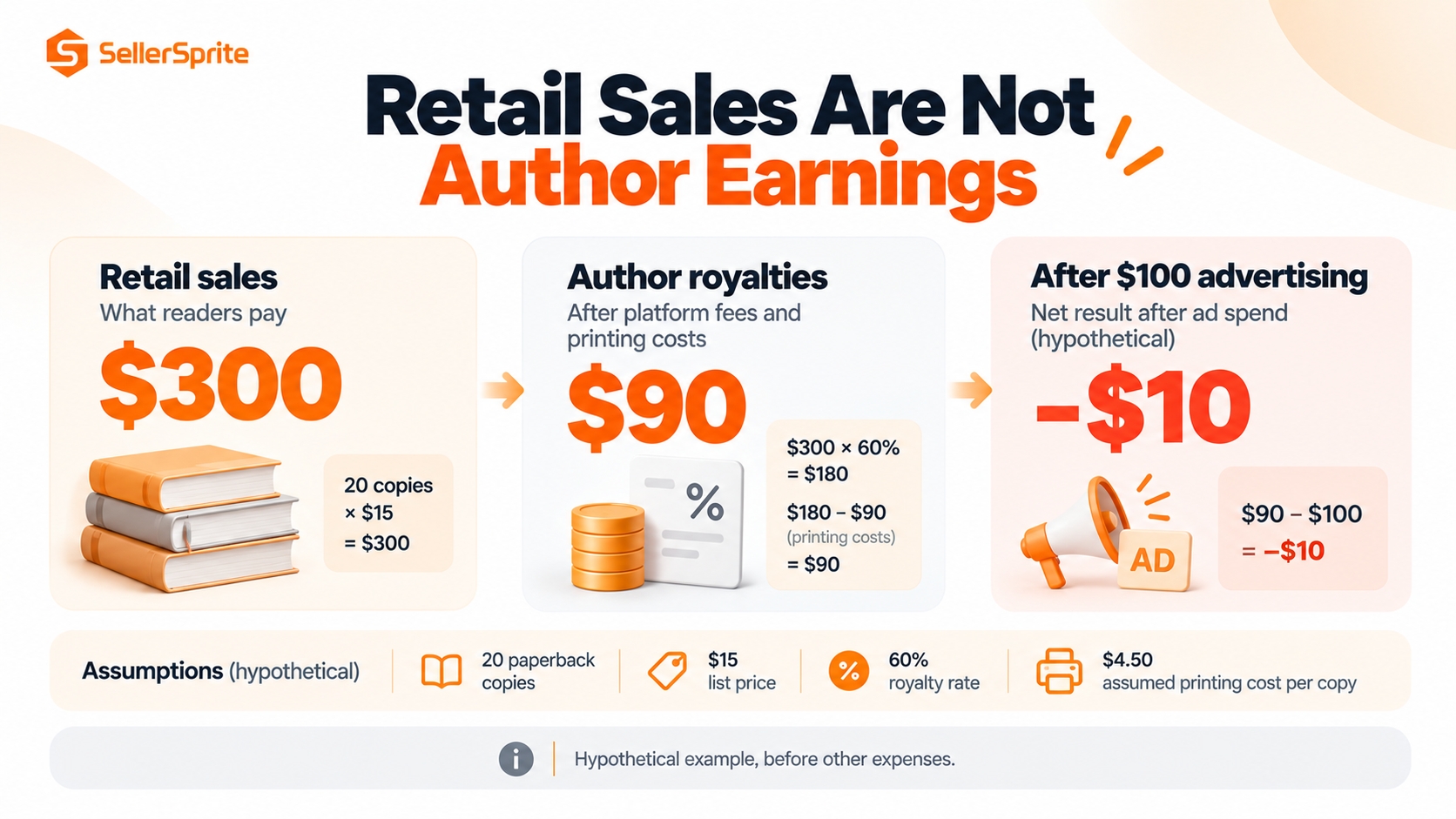
Illustrative assumptions: A US paperback lists at $15, uses the 60% Amazon-distribution rate, and has an assumed $4.50 printing cost. There are 20 paid copies, no refunds, and $100 of advertising spend for the same simplified example. The printing cost is an assumption, not a quote for a particular book.
| Measure | Calculation | Result |
|---|---|---|
| Royalty per copy | (60% × $15) − $4.50 | $4.50 |
| Retail sales value | 20 × $15 | $300.00 |
| Author royalties | 20 × $4.50 | $90.00 |
| Advertising spend | Assumed campaign cost | $100.00 |
| Royalties less advertising | $90 − $100 | −$10.00 |
In this model, advertising cost of sales (ACoS) is $100 ÷ $300 = 33.3%, but the royalty-based break-even point is only $4.50 ÷ $15 = 30%. Even before editing, design, and other expenses, the result is negative. These calculations assume the same book, edition, sales basis, and reporting scope; they are not an advertising benchmark.
For a broader publishing budget, subtract marketing and other incremental costs from expected royalties, then account for editing, design, and production expenses separately. Do not subtract printing twice when the royalty figure already reflects it.
KDP Select or Wider eBook Distribution?
KDP Select is a distribution choice, not a prerequisite for publishing on KDP. Decide whether its benefits fit how you plan to reach readers before enrolling the eBook.
Select runs in 90-day terms and includes the enrolled Kindle eBook in Kindle Unlimited (KU), with access to eligible promotional tools. Its digital exclusivity rules generally prevent selling or distributing that eBook through other retailers or your own website during the term. Current enrollment guidance includes a public-library distribution exception; print and audio formats can continue elsewhere.
Choose Select when you have a reason to test KU readership and can honor the digital restrictions. Consider wider eBook distribution when other stores or direct digital sales are central to your plan. Check enrollment and renewal settings before arranging external digital distribution; disabling renewal does not end the current term immediately.
KU income is based on eligible normalized pages read and the relevant fund allocation, not a fixed payment for every borrow. Keep paid sales and KU reading separate in your forecast, and do not turn a historical per-page estimate into a guaranteed rate.
Market the Book Without Buying Reviews
Marketing should connect an appropriate reader with a ready book. Start by checking the live edition, description, sample, and price, then choose a channel that lets you learn something specific.
Give the Book a Clear Author Presence
KDP points authors toward Author Central, eligible A+ Content, and Amazon Ads as book-promotion resources. Use these to explain the author and book accurately, not to substitute decorative content for a readable sample or a coherent reader promise.
Outside Amazon, choose relevant reader communities, your own audience, or editorial outreach where participation is welcome. Share useful context or an appropriate excerpt, respect community rules, and avoid treating every conversation as an opportunity to drop a purchase link.
Use Sponsored Products as a Focused Test
Sponsored Products is a cost-per-click advertising option for eligible books. The Amazon Ads author's guide explains automatic and manual targeting, including keywords and products. Verify the book's availability and ad eligibility in the marketplace before launching.
Give each test a question: does a relevant search phrase find readers, or does a comparable-book target produce useful visits? Set an affordable test budget, separate materially different audiences or editions, and avoid changing the cover, price, description, and targeting simultaneously.
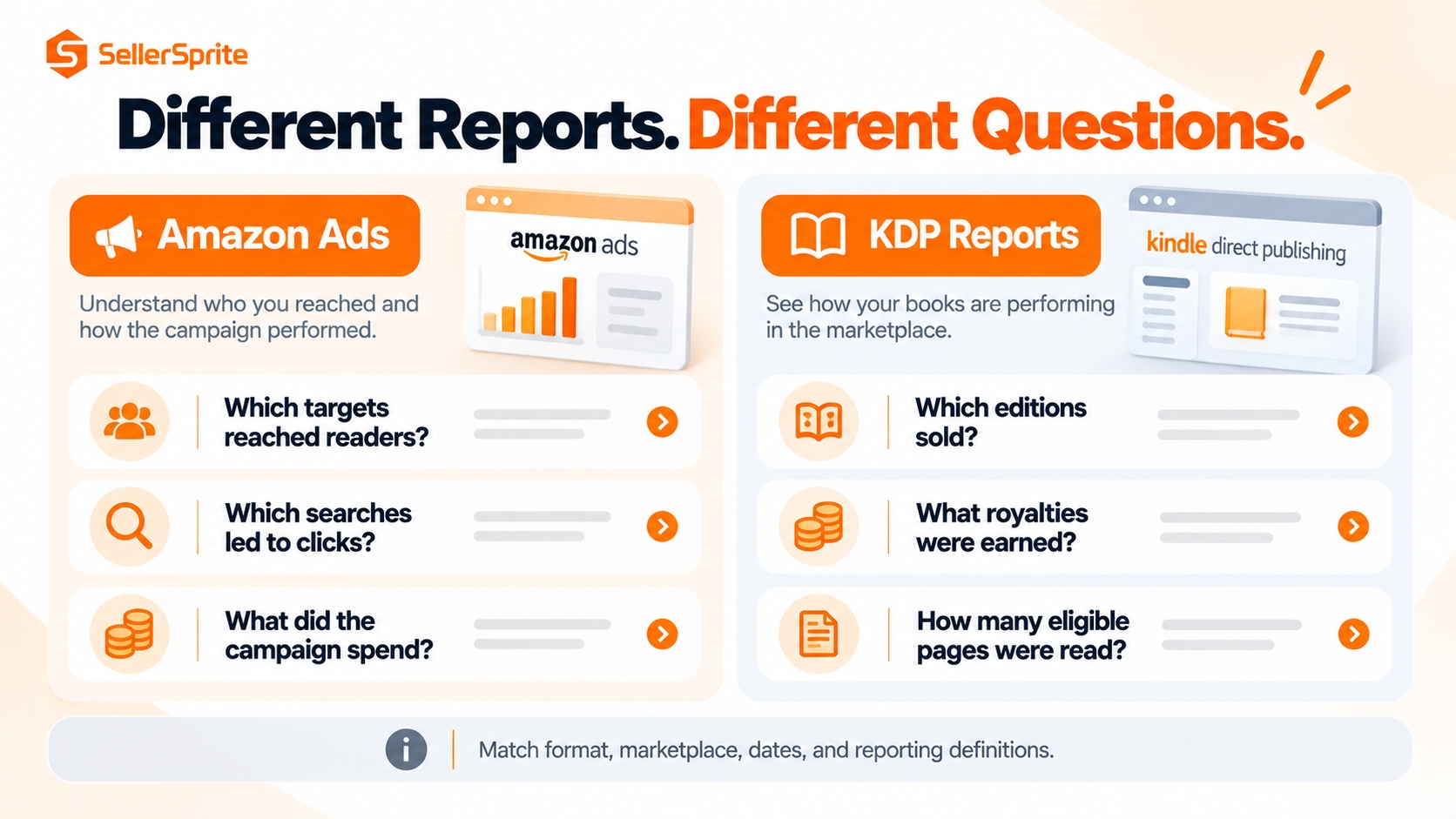
Use the search-term report to examine actual searches associated with clicks and the targeting report to assess the targets you selected. These are not the same dataset. Add relevant discoveries to your research notes and exclude clearly mismatched traffic rather than increasing spend indiscriminately.
Use Advance Copies Without Requiring Reviews
KDP permits free or discounted book copies provided that you do not require a review or try to influence it. Additional compensation, such as gift cards, can invalidate a review. An advance review copy is not a contract for a positive rating, and a purchase or refund should not be tied to feedback.
Read Launch Data Before Changing the Book
Low sales can reflect low visibility, the wrong audience, an unclear book presentation, or weak economics. Identify which question the evidence can answer before revising the manuscript or spending more.
| Observed pattern | Investigate first | Avoid assuming |
|---|---|---|
| Few ad impressions | Availability, eligibility, targeting relevance, and bids. | That the manuscript must be rewritten. |
| Impressions but few clicks | Thumbnail readability, genre fit, title clarity, and target context. | That a larger budget will repair the presentation. |
| Clicks but few purchases | Description, sample, price, edition, and the audience being reached. | That every clicked search term is relevant. |
| Sales but weak earnings | Royalties by edition, refunds, advertising cost, and production expenses. | That retail sales value equals author profit. |
| Repeated disappointed-reader themes | The promised audience, content depth, formatting, and edition reviewed. | That new keywords can fix the reading experience. |
KDP Reports separates orders, estimated royalties, and Kindle Edition Normalized Pages (KENP) read, with filters for formats and marketplaces. Different reports update on different schedules; estimates are not identical to final royalty or payment statements. Align the book, format, dates, and reporting basis before comparing KDP data with ad results.
Do not count a free download as a paid sale, a borrow as a completed read, or a BSR improvement as a measured revenue increase. Amazon separates free and paid Kindle rankings, and relative rank can move even when a book's own activity does not.
Use a defined review period and record each meaningful change. A few clicks or one review are reasons to investigate, not enough evidence for a permanent conclusion. Compare the result with the question that motivated the test, then keep, refine, or stop it.
Check Rights, AI Content, and Reader Experience
A marketing plan should not depend on misleading content or metadata. Complete the rights and quality checks before publication, and repeat them when you materially revise an edition.
Distinguish AI-Generated From AI-Assisted Content
KDP requires disclosure to Amazon of AI-generated text, images, or translations when publishing or republishing a book. That includes generated cover and interior artwork; substantial editing afterward does not automatically change its classification. AI used only to brainstorm, edit, or refine content you created is treated differently and does not require the same disclosure.
You remain responsible for accuracy, rights, and reader experience. Review factual claims, references, images, and translations rather than treating a generated manuscript as publication-ready. The disclosure is not a guarantee that the content meets every other requirement.
Avoid Imitation and Category Shortcuts
Keep records of rights and permissions for the material you publish. Do not imitate another book so closely that the presentation misleads buyers, use unrelated categories to chase a badge, or buy reviews or reading activity.
Low-content books such as many notebooks and journals have separate requirements, including ISBN and feature limitations. They are not a way around content quality or metadata rules. Check the low-content guidance rather than applying every standard-book instruction unchanged.
The Bottom Line
Amazon book publishing and self-publishing works best as a sequence of decisions: define the reader, study real alternatives, produce a worthwhile book, describe it accurately, and market it at economics you understand. No single keyword, category, or advertising setting replaces that work.
Before your next upload or campaign, write down the reader promise, the closest comparable editions, and the royalty available to fund marketing. Those three checks can reveal whether the next investment belongs in the book, its presentation, or its promotion.
FAQs
Is it free to self-publish a book on Amazon?
KDP provides free publishing tools and print-on-demand distribution. You may still pay for editing, design, proof copies, and advertising, and print royalties account for printing costs. A free publishing route does not mean the full project has no expenses.
Do I need an ISBN for a KDP book?
An eBook does not require an ISBN. Eligible paperbacks and hardcovers can use a free KDP ISBN or your own. Low-content books are an exception: they are not eligible for a free KDP ISBN and may be published without one.
How many keywords and categories can I choose?
KDP allows up to seven keywords or short phrases and up to three categories. Both should accurately describe the book and its intended audience; they are not an invitation to use competing author names or unrelated genres.
What royalties can KDP authors earn?
eBooks have 35% and conditional 70% options. Amazon.com paperbacks currently use a 50% rate at $9.98 or less and 60% at $9.99 or more, minus printing costs. Format, marketplace, eligibility, and distribution route matter.
Does publishing through KDP make my eBook exclusive to Amazon?
Not by itself. Enrolling in the optional KDP Select program adds digital exclusivity requirements for the enrollment term, subject to its stated exceptions. Check those terms and renewal settings before distributing the eBook through another store or your website.
Can I give readers free copies of my book?
Yes, KDP permits free or discounted book copies without requiring or influencing a review. Do not add gift cards or other compensation to obtain feedback, and do not treat an advance copy as a promise of a positive rating.
Do I have to disclose AI use when publishing?
KDP requires disclosure of AI-generated content, including generated cover art, when publishing or republishing. It distinguishes that from AI-assisted editing or brainstorming. You remain responsible for complying with its content and rights requirements.
Why can my book generate sales but still lose money?
The customer's purchase price is not your royalty. Advertising and other expenses may exceed what the edition earns. Compare royalty-based income with marketing costs, refunds, and your production budget instead of judging performance from retail sales alone.
References
- Amazon KDP: Self-Publishing Overview View
- Amazon KDP: Create a KDP Account View
- Amazon KDP: Create a Book View
- Amazon KDP: Get an ISBN View
- Amazon KDP: Sales Ranking View
- Amazon KDP: Make Your Book More Discoverable with Keywords View
- Amazon KDP: Book Categories View
- Amazon KDP: Metadata Guidelines for Books View
- Amazon KDP: eBook Royalties View
- Amazon KDP: eBook List Price Requirements View
- Amazon KDP: Paperback Royalty View
- Amazon KDP: KDP Select Overview View
- Amazon KDP: How to Enroll in KDP Select View
- Amazon KDP: Royalties in Kindle Unlimited View
- Amazon Ads: The Author's Guide to Sponsored Products View
- Amazon Ads: Reports for Book Advertising View
- Amazon KDP: Customer Reviews View
- Amazon KDP: Content Guidelines View
- Amazon KDP: Reports View
- Amazon KDP: Low-Content Books View
- Amazon KDP: Publishing and Promotion Tools View
By SellerSprite Content Team
SellerSprite publishes practical guidance on Amazon marketplace research and business decisions. This guide combines a reader-focused publishing framework with official KDP documentation and clearly labeled financial examples.
Last reviewed: October 15, 2026