TL;DR: Learn the top best practices for Amazon Sponsored Brands Video Ads—from ideal video length and design guidelines to performance optimization strategies that increase click-through rates and drive sales. Perfect for beginner and growing Amazon sellers.
Key Takeaways
- The ideal video length for Amazon Sponsored Brands Video Ads is between 30 and 60 seconds to maintain viewer engagement and maximize impact.
- High-quality visuals, clear branding, and compelling storytelling significantly improve click-through rates (CTR) and ad performance.
- Optimize your video ads using key performance metrics like view rate, watch time, and conversion rate to refine targeting and creative strategy.
- Follow Amazon’s technical specifications: 16:9 aspect ratio, MP4 or MOV format, and under 500MB file size to ensure approval and proper display.
- Leverage tools like SellerSprite PPC optimization features to track, test, and scale high-performing video ad campaigns.
Table of Contents
Note on marketplaces: This guide is specifically optimized for the US market.
Introduction to Amazon Sponsored Brands Video Ads
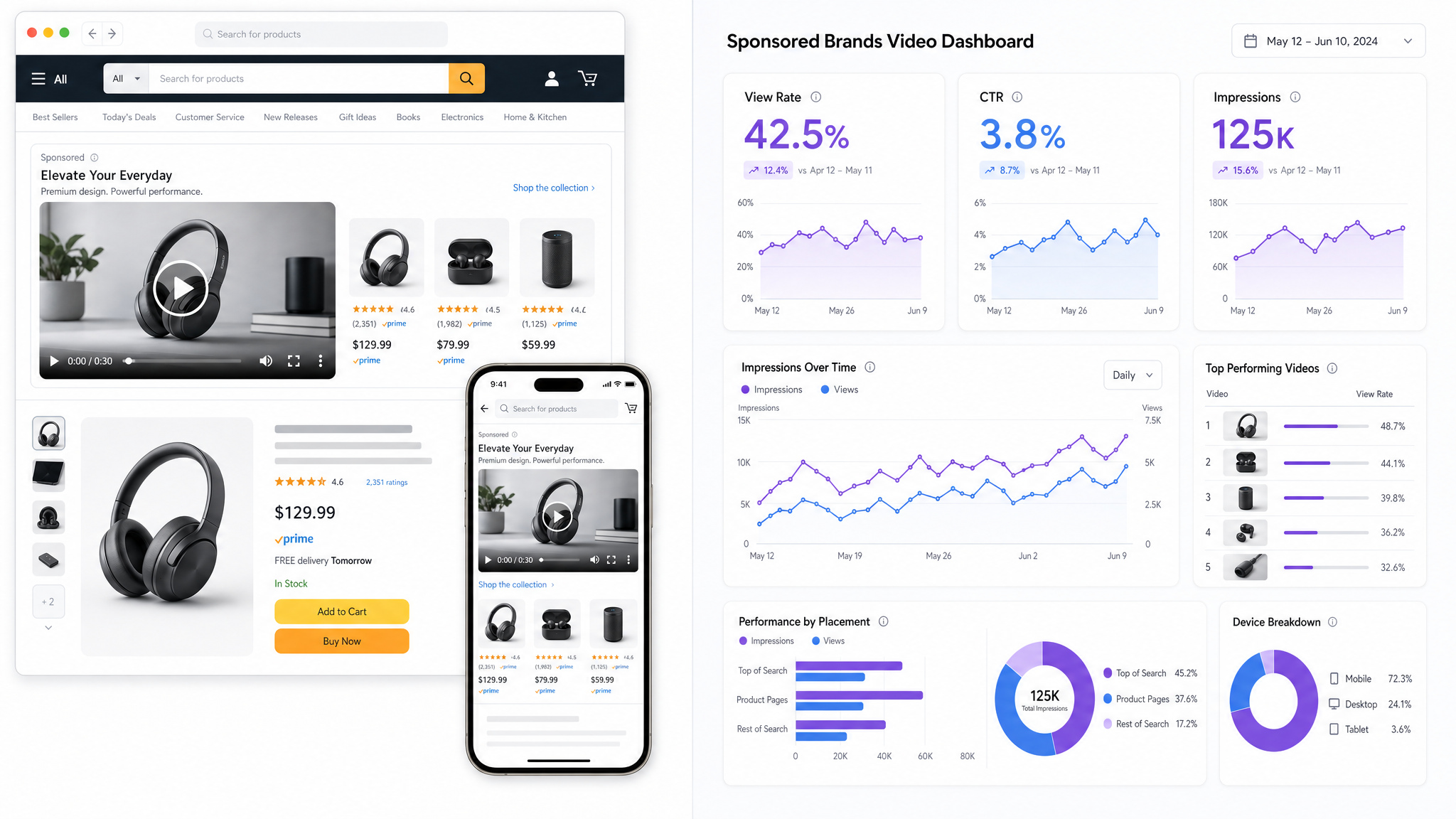
Amazon Sponsored Brands Video Ads represent a powerful evolution in e-commerce advertising. As one of the most engaging ad formats on the Amazon marketplace, these video ads appear in prominent placements—such as the top of search results, product pages, and even within the Amazon mobile app—capturing attention in ways static images cannot.
Unlike traditional Sponsored Brands (which are image-based), video ads combine motion, sound, and storytelling to highlight product benefits, demonstrate use cases, and build brand trust. For beginner and growing sellers, mastering this format can lead to higher visibility, improved click-through rates (CTR), and ultimately, increased conversions.
This guide walks you through the entire lifecycle of a successful Amazon Sponsored Brands Video campaign—from creation and compliance to optimization and performance analysis. Whether you're an entry-level seller or part of a larger brand team, this step-by-step tutorial will help you implement best practices that align with Amazon’s ecosystem and buyer behavior in the US market.
Step 1: Creating High-Impact Video Ads
Creating an engaging video ad isn’t just about good camera work—it’s about strategy, messaging, and understanding the customer journey. Your video should capture attention within the first 3 seconds and deliver value quickly. Here’s how to do it right.
Define Your Goal and Audience
Before filming, ask: What do I want shoppers to do after watching? The goal could be driving product awareness, increasing consideration, or boosting conversions. Your objective will shape your script, tone, and call-to-action (CTA).
For example, a beginner seller launching a new kitchen gadget might focus on product demonstration (how it works, space-saving design), while a brand expanding into a new category may emphasize lifestyle appeal and differentiation from competitors.
Follow Amazon Video Ad Design Guidelines
Amazon has specific design guidelines to ensure a consistent and professional ad experience. Ignoring them can lead to rejection or poor performance. Key rules include:
- Aspect Ratio: 16:9 (landscape format)
- Resolution: At least 720p; 1080p or higher recommended
- Duration: Recommended 30–60 seconds (more on this below)
- File Format: MP4 or MOV (H.264 codec)
- File Size: Under 500MB
- Audio: Clear, balanced voiceover or music; avoid background noise
For detailed guidance, see our article on Using Video in Your Listing: Rules and Best Practices.
Structure Your Video for Maximum Impact
Use a proven storytelling framework such as:
- Problem → Solution → Proof → CTA
For example:
- Problem: ‘Struggling to keep your cables organized?’
- Solution: ‘Our magnetic cable wrap keeps everything tangle-free.’
- Proof: Quick demo of product in action, customer testimonials, or Amazon badge (e.g., ‘#1 Bestseller’)
- CTA: ‘Click to see how easy it is to organize your desk today.’
Keep text overlays minimal. Use bold fonts and high contrast, but avoid covering more than 25% of the screen. Remember: 60% of users watch videos without sound initially, so visual cues and captions are crucial.
Best Video Length for Sponsored Brands
One of the most frequently asked questions: What is the ideal video length for Amazon Sponsored Brands?
Amazon recommends keeping videos between 30 and 60 seconds. Why?
- Attention span: Shoppers scroll quickly; longer videos risk viewer drop-off
- Ad placement: Videos appear in fast-moving feeds; brevity improves retention
- Cost efficiency: Higher completion rates improve Quality Score and lower cost-per-click (CPC)
Pro tip: Use the first 10 seconds to hook attention. Include your product name, primary benefit, and brand logo early. Avoid long intros or slow builds.
Still unsure? Check out our guide on compelling listing videos for inspiration on pacing and structure.
Step 2: Understanding Amazon Sponsored Brands Video Rules
Even the best video won’t succeed if it violates Amazon’s ad policies. These rules exist to protect shoppers and maintain trust in the marketplace. Let’s break down what’s allowed—and what gets flagged.
Prohibited Content
Amazon prohibits:
- False claims (e.g., “Lose 20 lbs in a week”)
- Before/after images (common in weight loss, skincare)
- Irrelevant pricing or special offers not reflected on the detail page
- External website links, social media handles, or QR codes
- Copyrighted music or third-party trademarks without permission
- Profanity, sexually suggestive content, or adult themes
For branded sellers, ensure your brand owns the trademark and is registered in the Amazon Brand Registry—a requirement for running Sponsored Brands Video Ads.
Brand Identity and Logo Requirements
Your brand logo should appear in the video, ideally in the opening seconds and/or at the end. It must match the registered brand in Amazon Brand Registry. Avoid misleading branding—such as using “Amazon’s Choice” unless officially awarded.
Also, make sure your video leads to a verified brand catalog page, not a third-party site or external funnel. Amazon wants users to stay within its ecosystem.
Approval Process and Troubleshooting
After uploading, Amazon reviews your video for compliance. Approval typically takes 1–3 business days.
Common rejection reasons:
- Audio issues (too loud, muffled, or copyrighted music)
- Text overlays with claims like “best,” “#1,” or “guaranteed” unless substantiated
- Logo not visible or mismatched with brand registry
- Video skips or glitches
Tip: Always preview your video on both desktop and mobile before submitting. Test volume levels, subtitle readability, and brand consistency.
Step 3: Optimizing Video Ads for Better Performance
Creating a compliant and well-designed video is only half the battle. The real success comes from optimization—testing, tweaking, and scaling what works.
How to Improve Click-Through Rates (CTR)
CTR is one of the most important metrics for Sponsored Brands Video Ads. A high CTR signals relevance to Amazon’s algorithm and improves ad ranking.
Strategies to boost CTR:
- Strong Hook in First 3 Seconds: Use visual or verbal urgency (e.g., “Stop wasting time with flimsy chargers!”)
- Clear Product Benefit: Focus on one key advantage (e.g., “10x Faster Charging”)
- Emotional Appeal: Tap into pain points (frustration, insecurity) or desires (convenience, confidence)
- Branded Thumbnail: Choose a custom thumbnail that shows the product clearly, not a random frame
- Targeted Keywords: Match ad copy and keywords to buyer intent (use SellerSprite’s keyword research tools for precision)
Test and Iterate with A/B Testing
Run multiple versions of your video ad with slight variations:
- Different intros (benefit-first vs. problem-first)
- Varying length (30s vs. 45s)
- Different CTAs (“Buy Now” vs. “See Why Thousands Love This”)
- Sound-on vs. sound-off emphasis
Monitor performance over at least 7–14 days to gather meaningful data. Use SellerSprite’s A/B testing dashboard to compare impressions, view rates, and conversion lift side-by-side.
Optimize for Amazon’s Algorithm
Amazon’s ad algorithm rewards relevance and engagement. To boost visibility:
- Use exact-match and phrase-match keywords in your campaign
- Ensure your product detail page is optimized (bullet points, images, reviews)
- Align video messaging with ASIN content (avoid discrepancies)
- Run video ads alongside Sponsored Products for full-funnel coverage
Remember: A great video ad that lands on a poorly optimized product page will fail. Ensure your landing page delivers on the promise made in the video.
Step 4: Tracking and Interpreting Key Performance Metrics
You can’t improve what you don’t measure. Amazon provides several key metrics for Sponsored Brands Video Ads. Knowing how to interpret them—and act on them—is critical for long-term success.
Essential Video Ad Performance Metrics
- View Rate: (Views ÷ Impressions) — Measures how often your ad is watched after being shown. A rate above 25% is strong.
- Average Watch Time: How long viewers watch. Aim for at least 50% of the total video length.
- Click-Through Rate (CTR): (Clicks ÷ Views) — Indicates interest. A CTR above 0.5% is good; over 1% is excellent.
- Conversion Rate: (Purchases ÷ Clicks) — Ties video engagement to sales. Compare to non-video traffic.
- ROAS (Return on Ad Spend): Revenue generated per dollar spent. Target ROAS varies by category, but aim for 3x or higher.
Using Data to Refine Strategy
If your view rate is low (<20%), your thumbnail or opening scene may be unengaging. If CTR is low despite high views, the video may not clearly communicate value or include a strong CTA.
For example, a skincare brand ran a 60-second video ad with beautiful visuals but no clear benefit messaging. Data showed a high drop-off after 15 seconds and a low CTR. They re-edited to start with “Dry skin? This serum hydrates for 48 hours,” added bold text, and shortened it to 35 seconds. Result: View rate increased by 40%, CTR by 65%.
Use SellerSprite’s PPC analytics suite to track these metrics across campaigns, compare video vs. image ads, and forecast performance trends.
Benchmarking Against Competitors
Understanding how your video ads compare to competitors can reveal gaps and opportunities. Use tools like SellerSprite’s Competitor Intelligence module to:
- Discover which brands are running video ads in your category
- Analyze their messaging, length, and creative style
- Estimate their ad spend and performance trends
This competitive insight helps you differentiate and refine your strategy.
FAQ
What is the ideal video length for Amazon Sponsored Brands Video Ads?
The ideal video length for Amazon Sponsored Brands Video Ads is between 30 to 60 seconds. Amazon recommends this range to balance engagement and information delivery. Videos shorter than 30 seconds may not convey enough value, while those longer than 60 seconds risk viewer drop-off. Focus on delivering a clear message quickly—especially in the first 10 seconds—to capture attention.
How can I improve click-through rates on my Sponsored Brands Video Ads?
To improve CTR, start with a strong hook in the first 3 seconds, clearly state the product benefit, use emotional or problem-solving messaging, and include a compelling call-to-action. Optimize your thumbnail image to be clean and product-focused. Additionally, align your keywords and target audience with the video content to ensure relevance. Use A/B testing to compare variations and refine performance over time.
What are the recommended video specifications for Amazon Sponsored Brands?
Amazon requires Sponsored Brands Video Ads to meet these technical specs: 16:9 aspect ratio, MP4 or MOV format (H.264 codec), resolution of at least 720p (1080p preferred), maximum file size of 500MB, and duration between 15 and 120 seconds (30–60 seconds recommended). Audio must be clear and free of copyrighted music. Always preview your video on multiple devices before submission.
Next Steps
- Start creating your first Sponsored Brands Video using the best practices outlined above. Use this guide for design inspiration.
- Join SellerSprite today to access advanced PPC optimization tools, A/B testing, and competitor insights to scale your video ad success.
References
- Amazon Advertising Help Center: Video Specifications View
- SellerSprite Guide: Amazon PPC Optimization View
- Amazon Brand Registry for Product Videos View
By SellerSprite Success Team
The SellerSprite Success Team is a group of Amazon advertising and e-commerce growth experts with years of hands-on experience helping thousands of sellers optimize their PPC campaigns, create high-converting content, and scale profitably on Amazon. We combine real-world data, platform updates, and proven frameworks to deliver actionable insights that drive results.


