TL;DR: Amazon keyword match types, including broad, phrase, and exact, determine how closely a customer's search must match your keyword to trigger your ad. Use broad for discovery, phrase for balance, and exact for precision and scaling.
Key Takeaways
- Broad match maximizes reach but requires strong negative keyword management to avoid wasted spend.
- Phrase match offers a middle ground, capturing relevant variations while maintaining control over intent.
- Exact match delivers the highest precision and ROI when used on proven converting keywords.
- Use a structured campaign ladder: start with broad for discovery, promote winners to phrase, then exact.
- PPC match types are not SEO match types; use PPC data to inform SEO content strategy.
Table of Contents
- What "Match Types" Mean on Amazon (And What They Don't)
- Broad vs. Phrase vs. Exact: The Differences in Plain English
- Pick Your Goal First (So You Choose the Right Match Type)
- When to Use Each Match Type (Decision Rules Sellers Can Follow)
- The Launch Ladder: Broad → Phrase → Exact (A Repeatable Promotion Workflow)
- Negative Keywords: The Missing Piece That Makes Match Types Work
- How Match Types Connect to Amazon SEO (Without Mixing Concepts)
- Practical Campaign Structures (Simple, Scalable, and Clean)
- Example Walkthrough: One Product, One Keyword Cluster, Three Match Types
- Common Mistakes (And How to Fix Them Fast)
- FAQ
- References
Note on marketplaces: This guide is specifically optimized for the US market.
What "Match Types" Mean on Amazon (And What They Don't)
Amazon keyword match types define how closely a shopper's search query must align with your targeted keyword to trigger your Sponsored Products ad. Unlike organic search (SEO), where Amazon indexes your listing content and matches it to buyer intent, PPC match types are a paid advertising control mechanism.
These match types are not about SEO relevance; they're about ad targeting precision. Think of them as filters that determine which customer searches can activate your ads based on how closely they match your keyword.
Match Types Are PPC Settings (SEO Doesn't Have Match Types)
A common misconception is that Amazon's organic search uses "match types" like PPC. It doesn't. SEO relies on keyword indexing, listing relevance, and conversion performance. PPC match types are exclusive to Sponsored Products, Sponsored Brands, and Sponsored Display campaigns.
Why Sellers Get Confused: Keyword Intent vs. Match Behavior
Many sellers assume that targeting "wireless earbuds" in exact match will only show their ad when someone types that exact phrase. But Amazon's algorithm interprets intent; so even exact match may include close variants like plurals or minor misspellings. Understanding this nuance is key to managing expectations and optimizing campaigns.
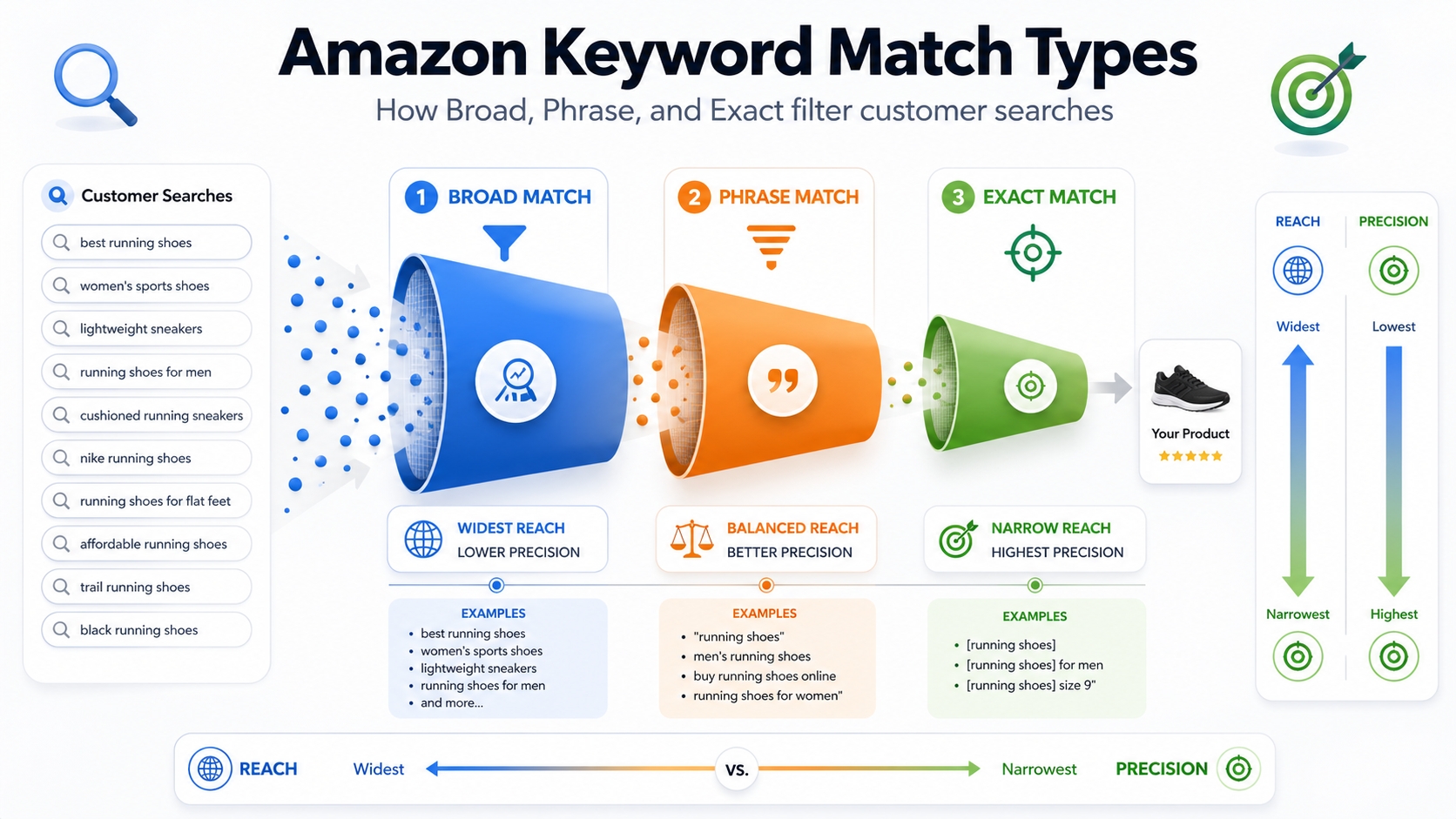
Broad vs. Phrase vs. Exact: The Differences in Plain English
Let's break down each match type in simple terms: no jargon, just clarity.
Broad Match: Maximum Reach, Maximum Noise (Best for Discovery)
Broad match casts the widest net. Your ad can show for searches that include your keyword in any order, along with synonyms, related searches, and variations. For example, targeting "noise cancelling headphones" in broad match could trigger ads for "best headphones for flying" or "over ear headphones with mic."
While this drives high impression volume, it also brings irrelevant traffic. That's why broad match should be paired with aggressive negative keyword strategies and tight budget controls.
Phrase Match: Controlled Expansion (Best for Shaping Intent)
Phrase match requires the customer's search to include your keyword in the same order, but allows for additional words before or after. For example, "noise cancelling headphones" in phrase match would trigger for "best noise cancelling headphones 2026" but not "headphones with noise cancelling feature."
This offers a sweet spot between reach and relevance, ideal for refining audience intent without sacrificing too much volume.
Exact Match: Highest Control (Best for Scaling Proven Winners)
Exact match is the most restrictive. Your ad shows only when the search query closely matches your keyword, including close variants like plurals or minor typos. For example, "noise cancelling headphones" will match "noise cancelling headphone" but not "headphones with noise cancellation."
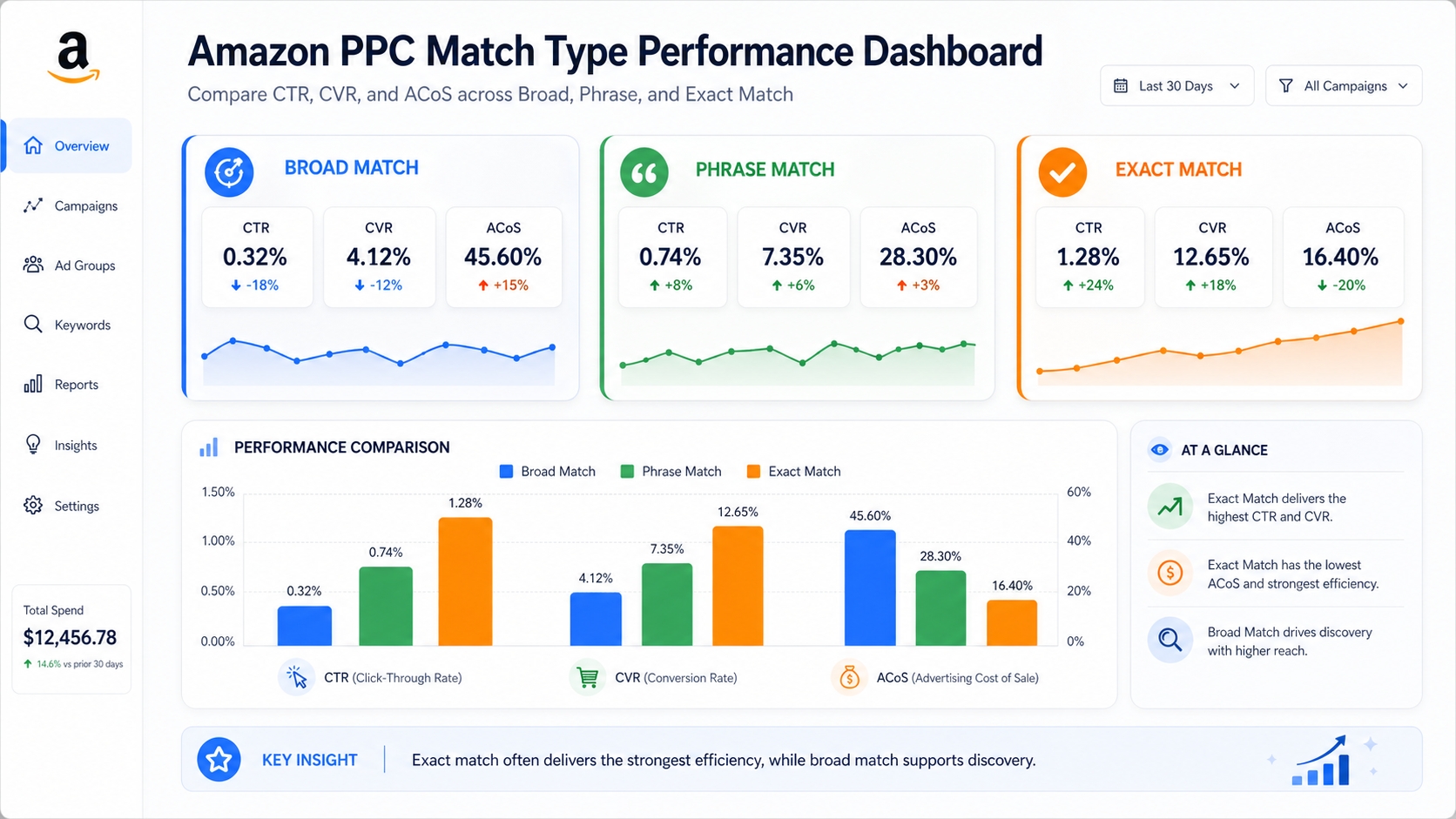
This match type delivers the highest conversion rates and lowest ACoS when used on keywords with proven performance.
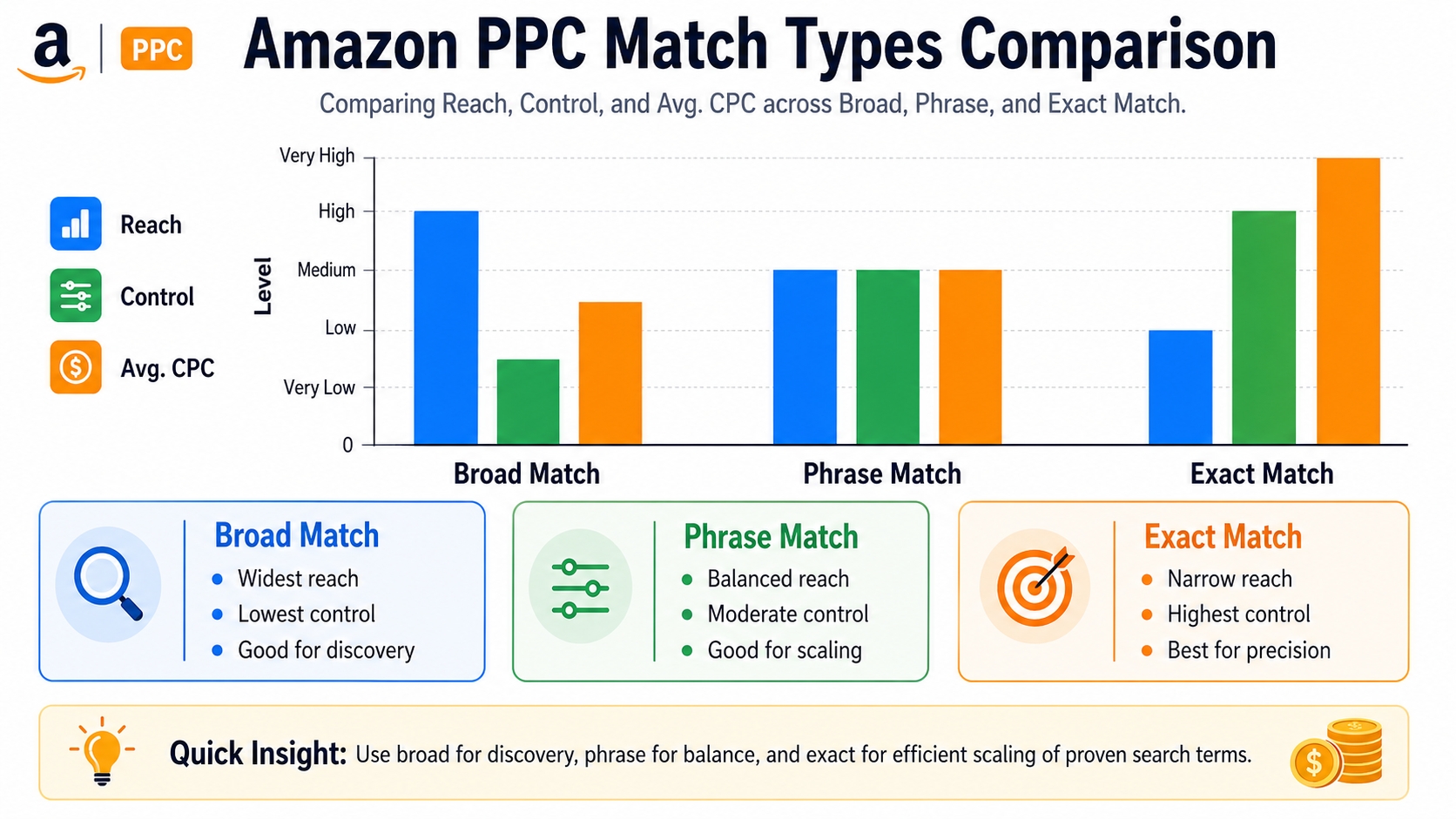
Quick Comparison Table
Match Type Matrix: Reach vs. Control vs. CPC Risk
| Match Type | Reach | Control | Typical CPC Risk | Best Use Case |
|---|---|---|---|---|
| Broad | High | Low | High (waste risk) | Keyword discovery |
| Phrase | Medium | Medium | Medium | Intent shaping |
| Exact | Low | High | Low (efficient) | Scaling winners |
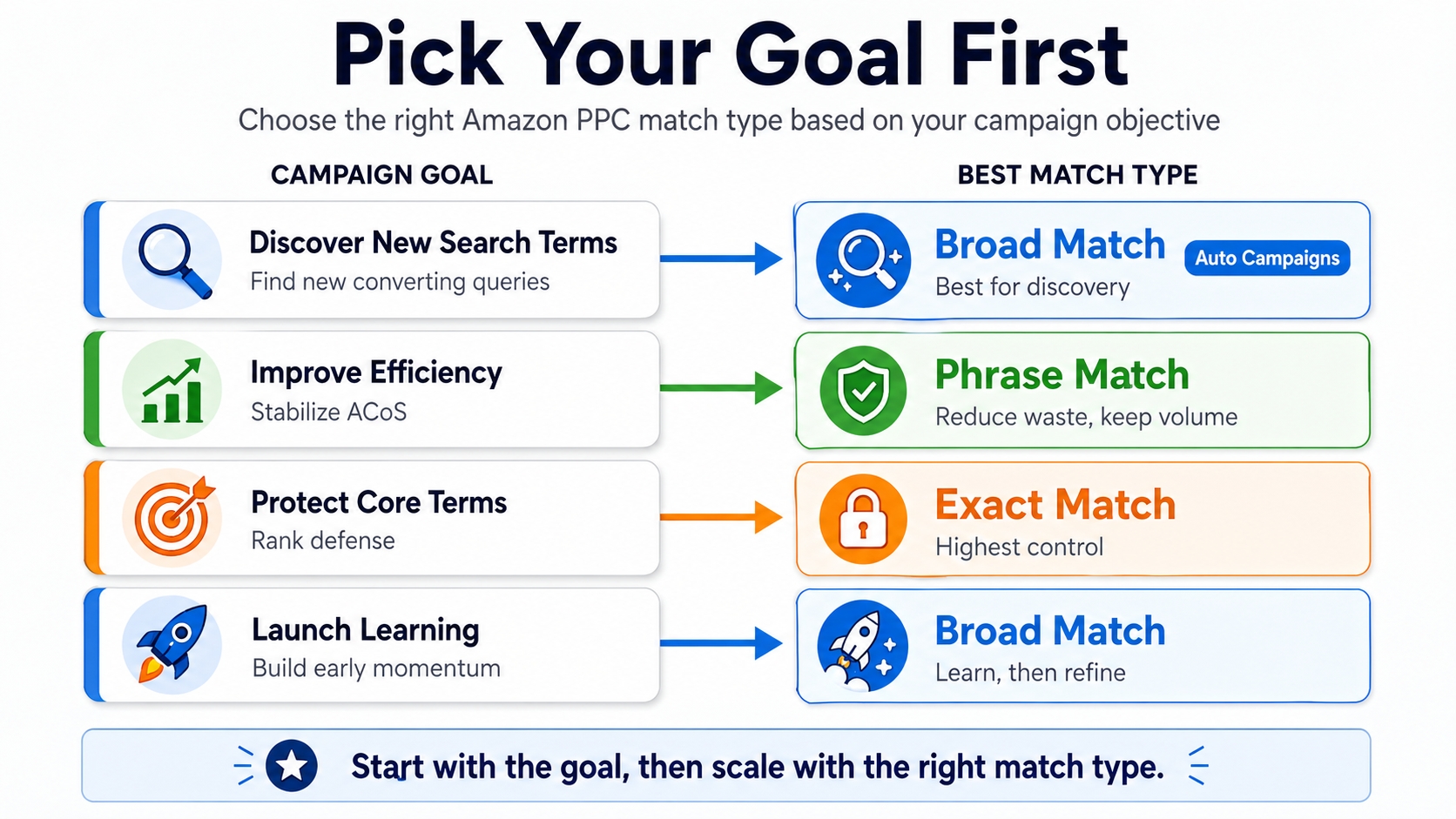
Pick Your Goal First (So You Choose the Right Match Type)
Choosing the right match type starts with clarity on your campaign objective. Here's how to align match types with business goals.
Goal A: Discover New Converting Search Terms
Use broad match or auto campaigns to uncover real customer search queries. Analyze search term reports weekly to identify high-intent, converting keywords you hadn't considered.
Goal B: Stabilize ACoS and Improve Efficiency
Switch to phrase match for keywords showing conversions but inconsistent performance. This reduces irrelevant impressions while maintaining volume.
Goal C: Rank Defense on Core Terms (Profit-Safe)
Use exact match to protect high-value keywords where you already rank organically. This prevents competitors from bidding aggressively on your core terms.
Goal D: Launch Learning (Rank + Reviews Momentum)
For new product launches, start with broad to generate early impressions and sales. Use the data to refine your keyword strategy and build momentum for organic ranking.
When to Use Each Match Type (Decision Rules Sellers Can Follow)
Follow these actionable rules to make data-driven decisions.
Use Broad When…
You Need Keyword Discovery
Run broad match campaigns to harvest real customer search terms. Use tools like SellerSprite Keyword Mining to analyze and cluster these queries.
You Have Strict Negatives + Budget Caps
Always pair broad match with negative keywords. Exclude irrelevant terms (e.g., "cheap," "free") and set daily budget limits to prevent overspending.
Use Phrase When…
You See Conversions But Want Tighter Relevance
If a keyword converts but brings in low-quality traffic, move it to phrase match to filter out loosely related searches.
You're Building Cluster-Level Control
Group similar keywords (e.g., "wireless earbuds for running," "sweatproof earbuds") into ad groups and use phrase match to maintain thematic consistency.
Use Exact When…
You Have Proven CVR and Acceptable ACoS
Only promote keywords to exact match if they've shown at least 5 orders with ACoS below break-even. This ensures scalability without profit erosion.
You Want Predictable Scaling
Exact match campaigns deliver consistent performance, making them ideal for scaling during peak seasons or promotions.
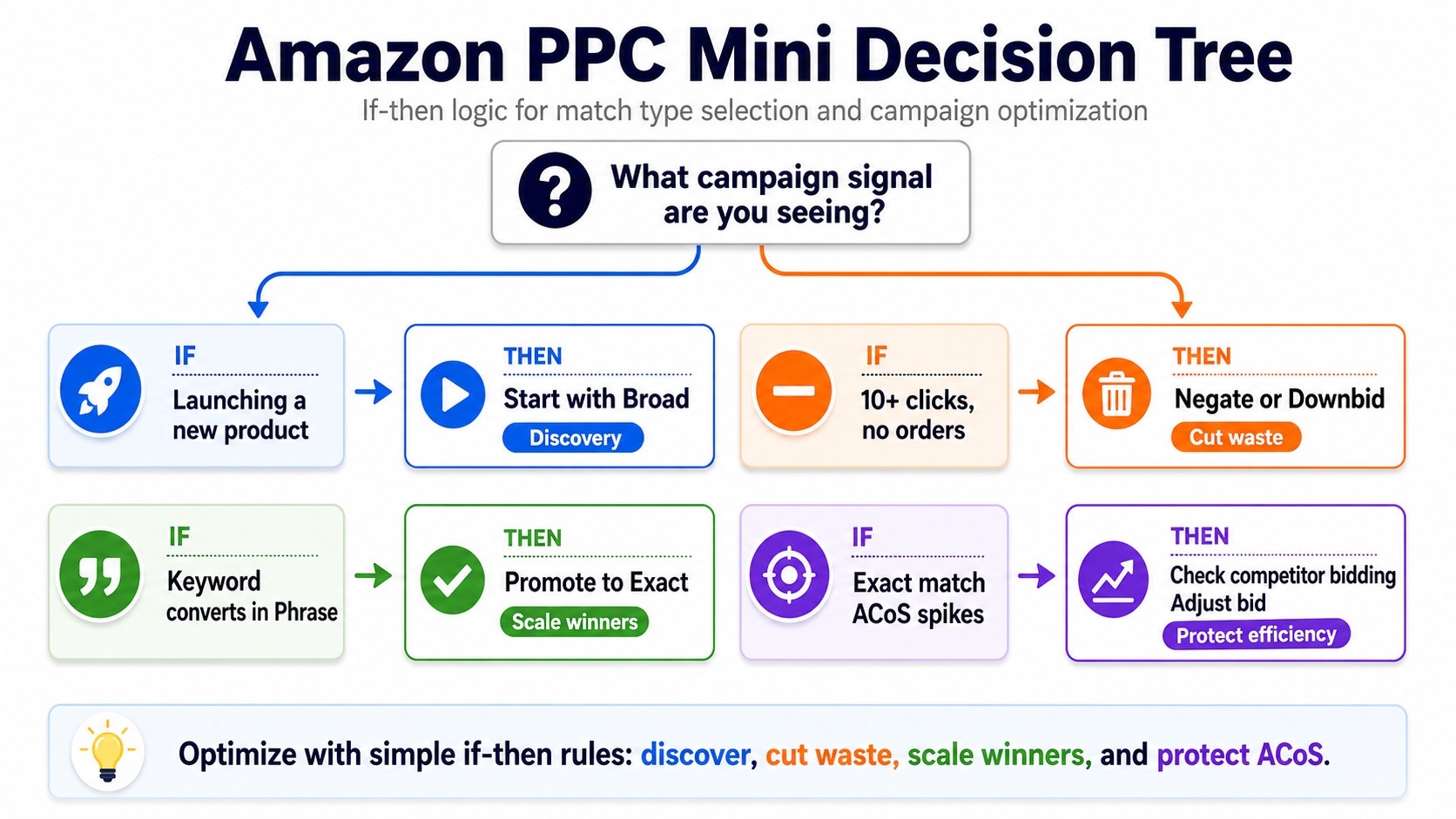
Mini Decision Tree
- If you're launching a new product → Start with Broad
- If a keyword has 10+ clicks and no orders → Negate or downbid
- If a keyword converts in phrase → Promote to Exact
- If exact match ACoS spikes → Check for competitor bidding, adjust bid
The Launch Ladder: Broad → Phrase → Exact (A Repeatable Promotion Workflow)
Top-performing sellers use a structured workflow to move keywords from discovery to scale.
Start Wide (Broad/Auto) to Collect Real Buyer Queries
Launch with broad or auto campaigns to gather real search term data. Run for 2-4 weeks to accumulate statistically significant data.
Promote Winners to Phrase, Then Exact (Graduation Rules)
Minimum Clicks Threshold
Only promote keywords with at least 10-20 clicks to ensure reliable data.
Order/CVR Threshold
Require at least 2-3 orders before moving to phrase or exact match.
ACoS Guardrail vs. Break-Even
Ensure ACoS is within 20% of break-even before scaling. Use free Amazon Profitability Calculator to calculate profitability.
Keep Discovery Separate from Scaling (Budget Isolation)
Run discovery (broad) and scaling (exact) campaigns in separate portfolios with distinct budgets. This prevents high-spend exact campaigns from starving discovery efforts.
Promotion Workflow Checklist: Broad → Phrase → Exact
- Run Broad/Auto for 2-4 weeks
- Download search term report
- Filter for keywords with ≥10 clicks, ≥2 orders
- Add converting terms to Phrase campaign
- After 1-2 weeks, promote top performers to Exact
- Add original keyword as negative in Broad to prevent cannibalization
Negative Keywords: The Missing Piece That Makes Match Types Work
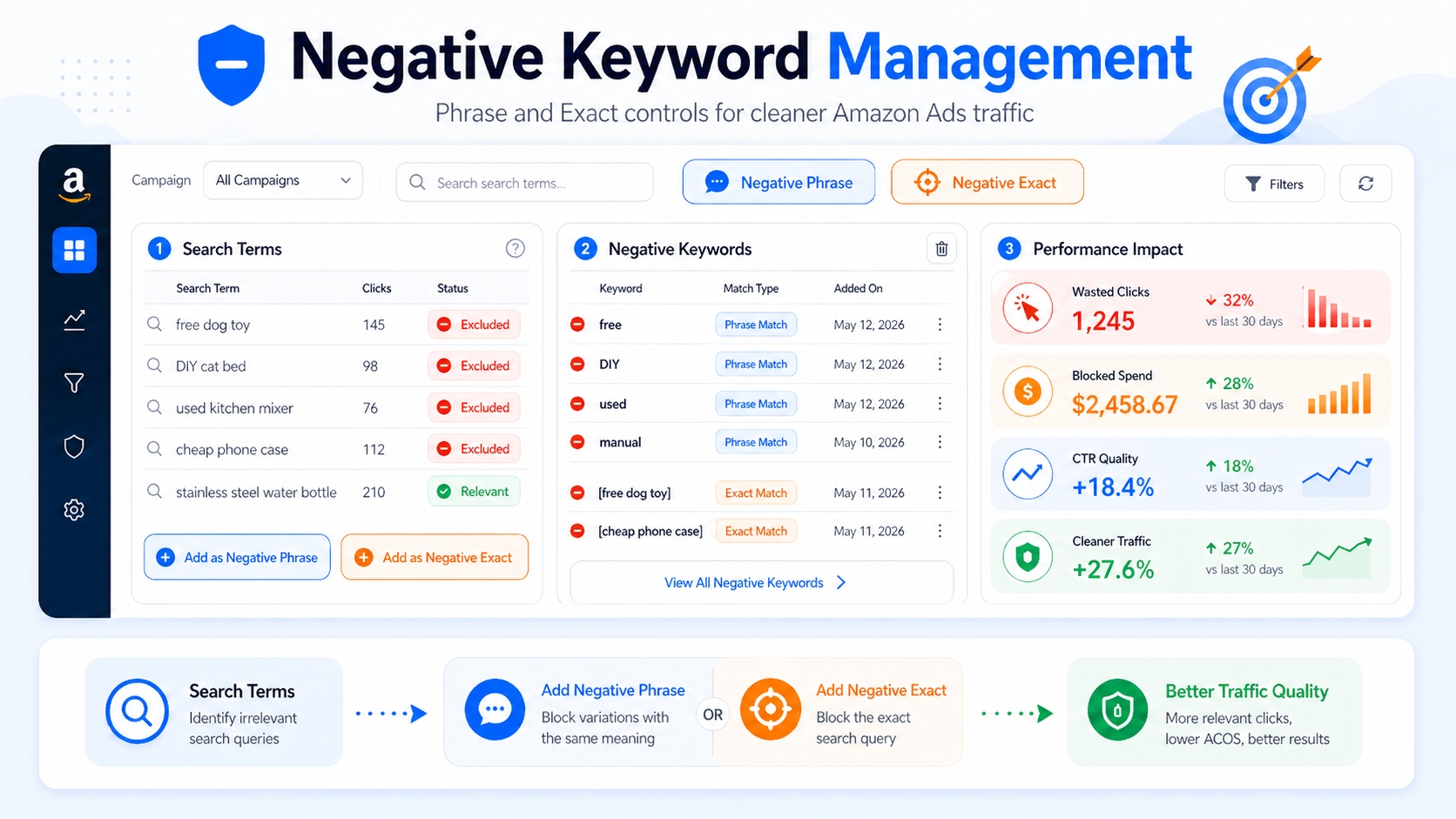
Without negative keywords, even the best match type strategy fails. Negatives prevent your ads from showing on irrelevant searches.
Negative Exact vs. Negative Phrase (When to Use Each)
- Negative Exact: Blocks ads only when the search exactly matches the term. Use for precise exclusions (e.g., block "free" only when standalone).
- Negative Phrase: Blocks ads when the search includes the term in sequence. Use to block broader unwanted intent (e.g., "used", "knockoff").
The "Waste Control" Rules
Clicks with No Orders → Negate or Downbid
Any keyword with 10+ clicks and zero conversions should be added as a negative or have its bid reduced by 50%.
High Spend with Poor Intent → Negate Fast
If a search term has high spend but low relevance (e.g., "DIY repair kit" for a premium headphone), negate immediately.
Prevent Cannibalization Between Match Types
Exact Campaign "Owns" the Term; Broad/Phrase Excludes It
Once a keyword is promoted to exact match, add it as a negative in broad and phrase campaigns to avoid internal competition and skewed data.
Negative Keyword Rules: Exact vs. Phrase
- Use Negative Exact for precise exclusions (e.g., "free")
- Use Negative Phrase for intent-based blocks (e.g., "used", "cheap")
- Always negate promoted keywords in lower-control campaigns
- Review search term reports weekly
How Match Types Connect to Amazon SEO (Without Mixing Concepts)
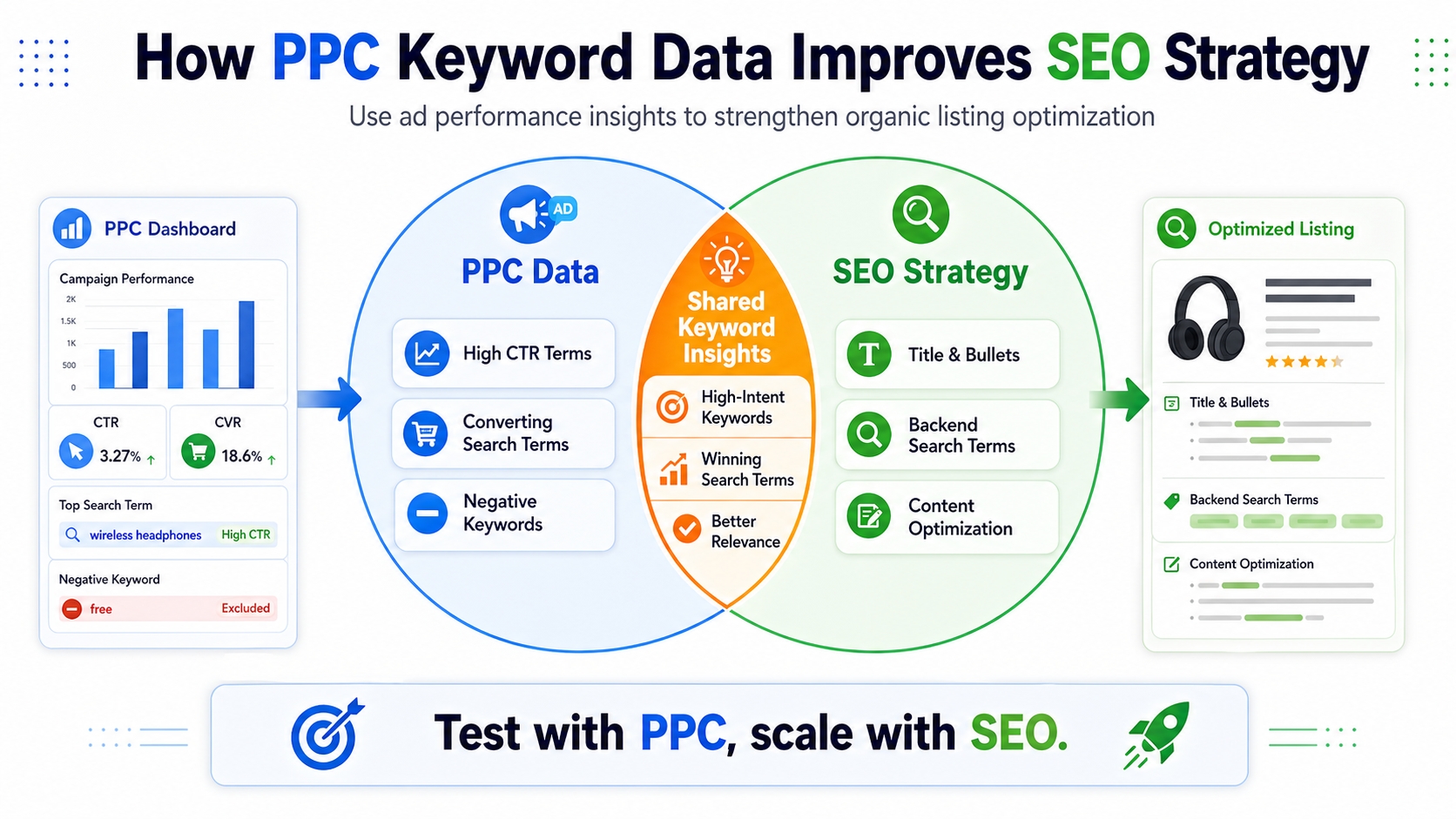
PPC and SEO are different systems, but they inform each other.
SEO Doesn't Match Like PPC: SEO Is About Indexing, Relevance, and Conversion
Amazon's organic algorithm doesn't use "match types." Instead, it indexes your title, bullets, backend keywords, and reviews to determine relevance. High conversion rates improve organic ranking.
Use PPC Match Types to Discover SEO Terms
Your PPC search term reports reveal real customer language. Take high-converting queries and incorporate them into your listing content.
Pull Converting Queries → Map to Title/Bullets/Backend (Where Appropriate)
For example, if "noise cancelling headphones for travel" converts well in PPC, include it in your title or first bullet.
Use "Intent Clusters" to Decide Placement
Core Terms vs. Use-Case vs. Compatibility vs. Problem-Solution
- Core Terms: Include in title (e.g., "wireless earbuds")
- Use-Case: Add to bullets (e.g., "for running")
- Compatibility: Backend or bullets (e.g., "for iPhone")
- Problem-Solution: Bullet or description (e.g., "sweatproof design")
Mini Case Table: Query → Match Type → Action → Placement
| Query | Match Type | Action | Placement |
|---|---|---|---|
| wireless earbuds | Exact | Scale bid | Title, PPC |
| earbuds for running | Phrase | Optimize ad copy | Bullet |
| sweatproof earbuds | Broad | Add negative if irrelevant | Backend |
Practical Campaign Structures (Simple, Scalable, and Clean)
A clean structure ensures clarity and control.
Structure Option 1: 3-Layer Model
Discovery (Broad/Auto)
Dedicated campaign for keyword harvesting. Use low bids and strict negatives.
Control (Phrase)
Mid-funnel campaign for shaping intent. Moderate bids, grouped by theme.
Scale (Exact)
High-bid campaign for top performers. Isolated budget for predictable ROI.
Structure Option 2: Cluster-Based Ad Groups (By Intent)
Group keywords by customer intent (e.g., "gift", "for gym", "noise cancelling"). Apply appropriate match types per cluster.
Budget and Bidding Guidelines by Layer (High-Level)
- Discovery: 20% of budget, low bids ($0.20-$0.50)
- Control: 30% of budget, medium bids ($0.50-$1.00)
- Scale: 50% of budget, high bids ($1.00+)
Example Walkthrough: One Product, One Keyword Cluster, Three Match Types
Let's walk through a real example using "wireless earbuds" as the seed keyword.
Start with a Seed Cluster (Core + Modifiers)
Seed: "wireless earbuds". Modifiers: "for running", "sweatproof", "with mic", "for iPhone".
Run Broad to Harvest Queries
After 3 weeks, search term report shows: "best wireless earbuds for running" (15 clicks, 3 orders), "cheap wireless earbuds" (20 clicks, 0 orders).
Promote 3 Winners to Exact + Add Negatives
Promote "best wireless earbuds for running" to exact match. Add "cheap" as negative phrase in broad campaign.
What to Measure Weekly (CTR, CVR, ACoS, Search Term Quality)
Track CTR (>0.4%), CVR (>10%), ACoS (<30%), and new converting queries. Adjust bids and negatives weekly.
Common Mistakes (And How to Fix Them Fast)
Using Exact Only (No Discovery Engine)
Fix: Always run a discovery campaign (broad or auto) to find new opportunities.
Using Broad Without Negatives (Budget Leak)
Fix: Implement weekly negative keyword reviews to identify waste.
Promoting Too Early (Noise ≠ Signal)
Fix: Wait for statistical significance (minimum 10 clicks, 2 orders) before promoting.
Mixing Match Types in One Campaign (No Control, Messy Data)
Fix: Separate campaigns by match type to maintain clean data and precise control.
FAQ
What are the differences between broad, phrase, and exact match types on Amazon?
Broad match shows your ad for searches related to your keyword, including synonyms and variations. Phrase match requires the keyword to appear in order, with possible additions before or after. Exact match only triggers for searches that closely match your keyword, offering the highest precision and control.
How do Amazon keyword match types affect my ad performance and ROI?
Match types directly impact reach, relevance, and cost. Broad match increases visibility but can waste budget on irrelevant clicks. Exact match improves ROI by targeting high-intent shoppers. Using the right match type for your goal optimizes performance.
Which Amazon keyword match type is best for new product launches?
For new launches, start with broad or auto campaigns to gather search term data. This helps identify real customer queries and build momentum for both ads and organic ranking.
Is Phrase always "cheaper" than Broad?
Not necessarily. While phrase match often has lower CPCs due to tighter relevance, actual cost depends on competition and keyword quality. Always compare performance data rather than assuming one is cheaper.
Should I run all three match types at once?
Yes, but in separate campaigns. Use broad for discovery, phrase for control, and exact for scaling. This layered approach maximizes learning and efficiency while preventing internal competition.
Next Steps
- Run a Broad or Auto campaign to harvest real search terms using SellerSprite Keyword Mining.
- Build a 3-layer campaign structure: Discovery (Broad), Control (Phrase), Scale (Exact).
- Start your free trial at SellerSprite to automate keyword harvesting and match type optimization.
References
- Amazon Advertising Help: Match Types View
- SellerSprite Guide: Keyword Match Types in PPC View
- SellerSprite Guide: Build Exact Match Campaigns View
- SellerSprite Guide: Amazon Keyword Research View
By SellerSprite Success Team
The SellerSprite Success Team combines hands-on Amazon advertising expertise with data science to help sellers scale profitably. With over 1.7M+ registered users worldwide, we've optimized millions in ad spend using AI-powered tools for keyword research and match type strategy.


