TL;DR: If you're seeing confusing competitor data, it's likely due to common reverse ASIN mistakes. Learn how to fix them and boost your Amazon rankings.
Key Takeaways
- Identify the four most frequent reverse ASIN errors and how they distort keyword data.
- Apply a step‑by‑step workflow to filter, validate, and triangulate competitor keywords.
- Use Amazon Brand Analytics together with third‑party tools to get reliable search‑volume insights.
Table of Contents
- Introduction: The Frustration of "Ghost" Competitor Data
- Critical Reverse ASIN Mistakes Making Your Data Look Inaccurate
- Why Different Amazon SEO Tools Show Conflicting Reverse ASIN Data
- How to Conduct a Flawless Reverse ASIN Analysis (The SEO Best Practices)
- Conclusion: Turning Raw Data into Profitable Amazon Rankings
- FAQ
- References
Note on marketplaces: This guide is specifically optimized for the US market.
Introduction: The Frustration of "Ghost" Competitor Data
Many new and growing Amazon sellers stare at reverse ASIN reports only to see "ghost" competitors, which refers to keywords that seem to rank for rival listings that you can't locate on the SERP. This mismatch can feel like a data‑bug, causing wasted ad spend and missed opportunities.
Before you dismiss the tool, understand that the root cause is often a simple misunderstanding of what reverse ASIN lookup actually tracks. In this guide we'll unpack those misconceptions, highlight the most common mistakes, and give you a bullet‑proof workflow to turn noisy data into actionable insight.
For the full strategic backdrop, check out our reverse ASIN strategy guide.
Critical Reverse ASIN Mistakes Making Your Data Look Inaccurate
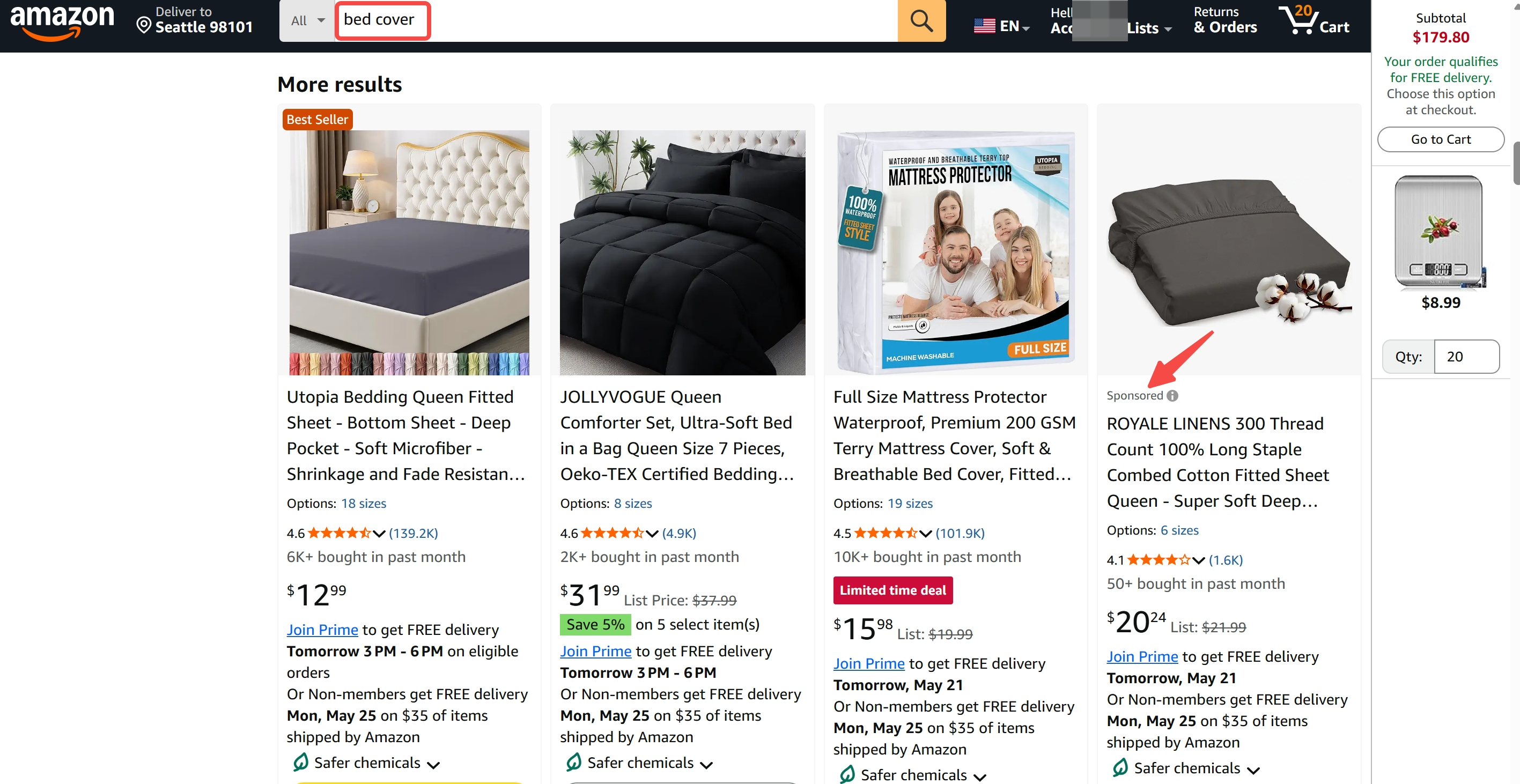
Mistake #1: Treating Organic and Sponsored (PPC) Keywords the Same
Organic rankings and paid ad placements behave differently. A competitor may dominate a keyword through aggressive PPC, inflating perceived organic relevance.
How competitors mask their true search volume through aggressive PPC
Sponsored ads can appear on the first page even when the organic rank is low. If you only scrape the SERP without distinguishing ad slots, you'll overestimate the keyword's organic potential.
Mistake #2: Overlooking Parent‑Child ASIN Variations
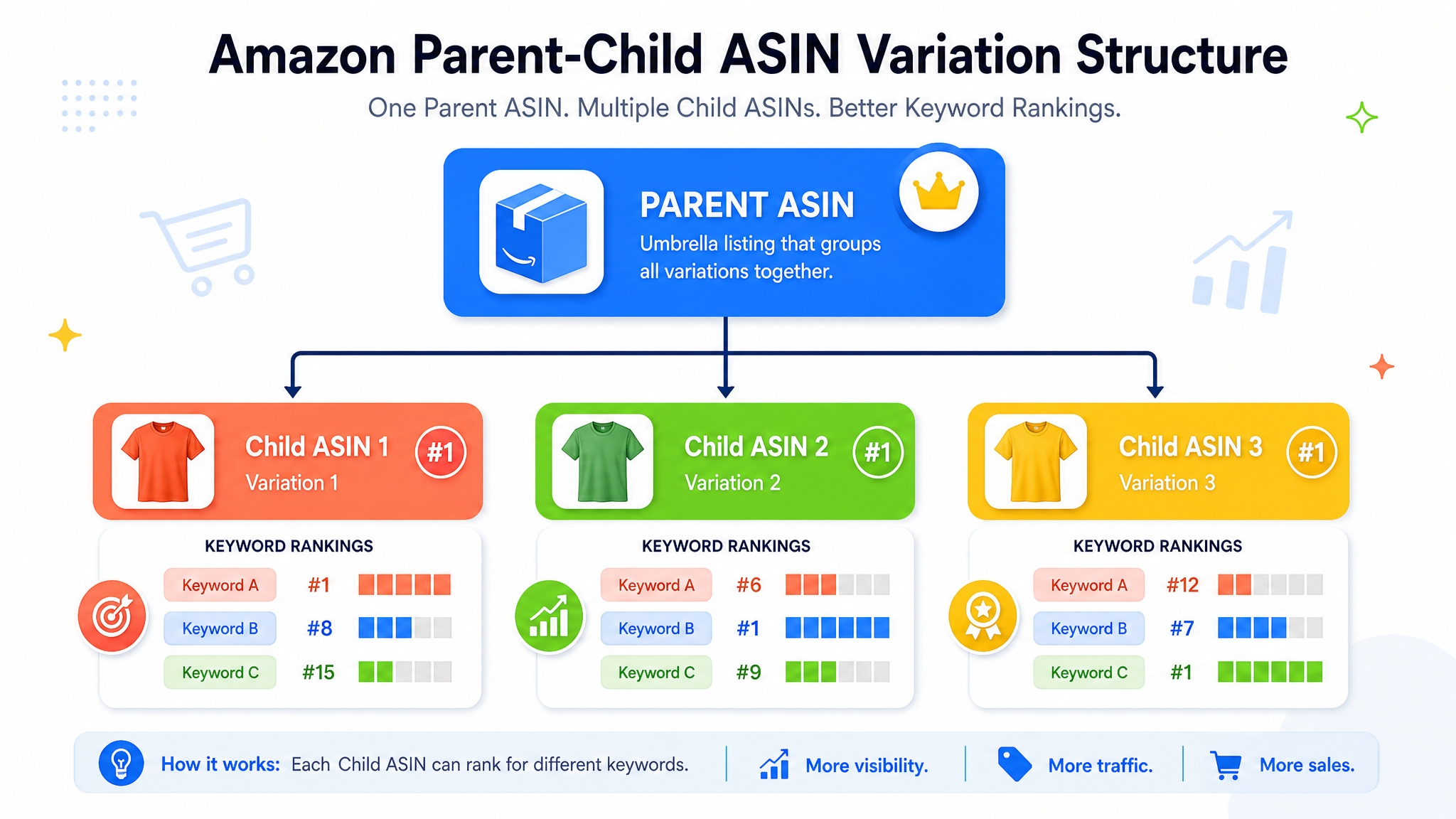
Amazon's variation system means a child ASIN can inherit traffic from its parent's keyword pool, making the data appear "ghostly."
The "Variation Trap": Which child ASIN is actually driving the keyword volume?
If you don't map the hierarchy, you may attribute a keyword to the wrong SKU, leading to mis‑allocation of advertising budget.
Mistake #3: Relying Blindly on Tool‑Estimated Search Volume
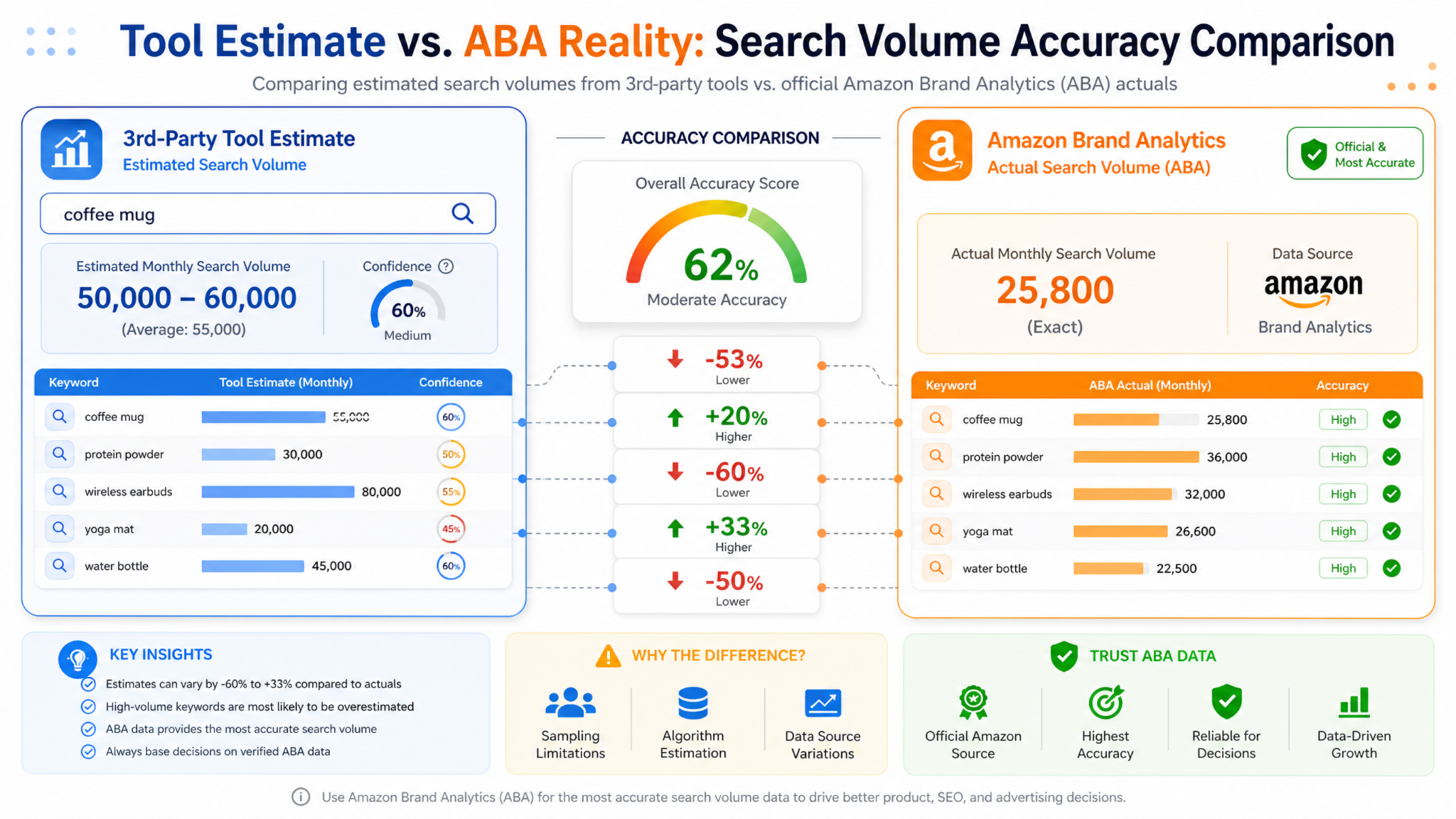
Third‑party tools estimate search volume based on scraping frequency and proprietary models. These numbers can lag behind Amazon's real‑time algorithm updates.
How scraping frequency and Amazon's algorithmic shifts cause data lag
A sudden rank boost may not be reflected in the tool's volume estimate for several days, giving the illusion of zero traffic.
Mistake #4: Ignoring Seasonal and Dynamic Ranking Fluctuations
Keywords can swing dramatically around holidays, Prime Day, or new product launches. A static snapshot misses these peaks and valleys.
Why Different Amazon SEO Tools Show Conflicting Reverse ASIN Data
Not all tools are created equal. Differences arise from the way data is collected (scraping vs. statistical modeling) and how Amazon's proprietary data (like Brand Analytics) is integrated.
Data Scraping vs. Statistical Modeling: How Software Estimates Volume
Scraping tools pull raw SERP snapshots, while modeling tools apply algorithms to predict volume based on historical trends. Both have strengths and blind spots.
The Role of Amazon Brand Analytics (ABA) as Your Ground Truth
If you have access to ABA, use its "Search Opportunity" data as the baseline. Third‑party estimates should always be cross‑checked against ABA to avoid costly misinterpretations.
How to Conduct a Flawless Reverse ASIN Analysis (The SEO Best Practices)
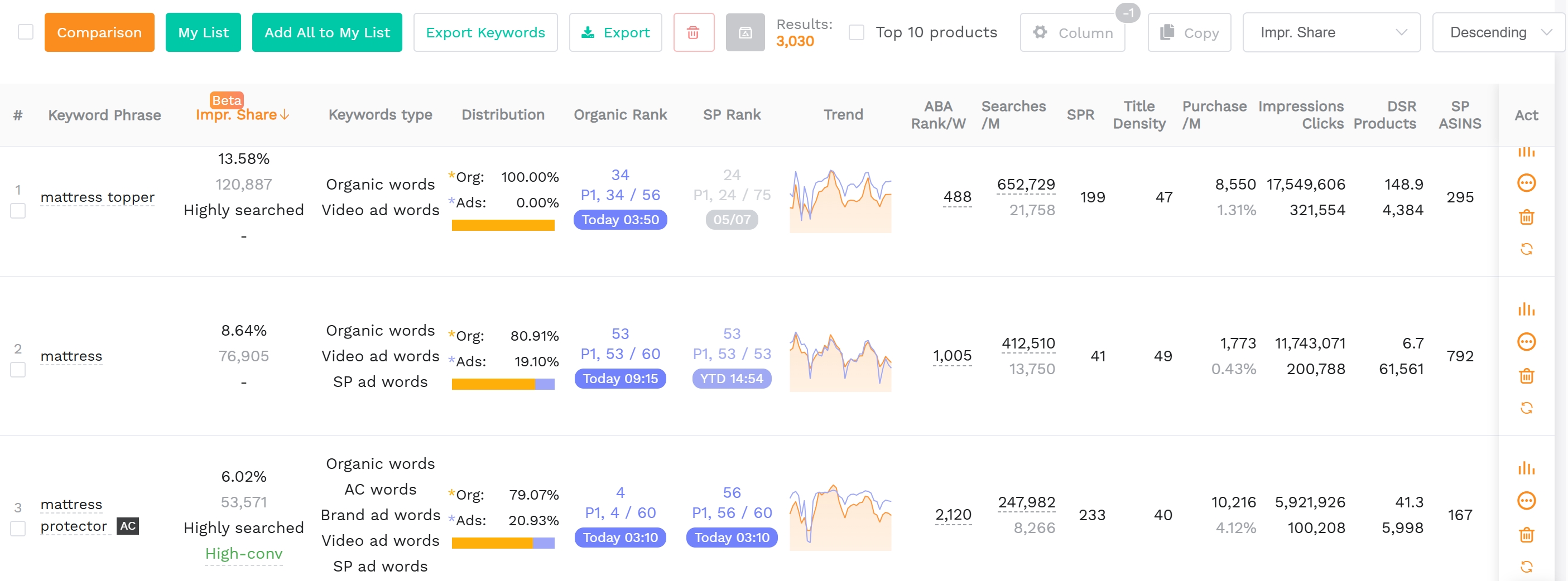
Step 1: Filter by Relevancy and Search Intent, Not Just Volume
Exclude generic or brand‑only queries. Focus on keywords that align with your product's features and purchase intent.
Step 2: Use Historical Data Over the Last 90 Days to Spot Trends
A 90‑day window smooths out daily volatility while still capturing seasonal shifts. Plot the rank trajectory to see which keywords are consistently climbing.
Step 3: Triangulate Third‑Party Tool Data with Amazon's Search Opportunity Finder
Cross‑reference the reverse ASIN list with the keywords you find in Amazon's Search Opportunity Finder (available in Brand Analytics). This double‑check validates volume and uncovers hidden long‑tail opportunities.
Conclusion: Turning Raw Data into Profitable Amazon Rankings
Reverse ASIN lookup is a powerful competitor‑intel tool, but only when you avoid the four classic pitfalls outlined above. By filtering for intent, using 90‑day trends, and anchoring your findings to Amazon Brand Analytics, you turn noisy data into a roadmap for higher organic rankings and smarter ad spend.
Ready to apply a flawless reverse ASIN analysis? Jump straight to our keyword‑reverse tool and start uncovering hidden opportunities today.
FAQ
How often should I run a reverse ASIN lookup on my competitors?
We recommend running a reverse ASIN lookup at least once a month for stable niches, and weekly for fast‑moving categories or when you're launching a new product.
What are the most common reverse ASIN mistakes on Amazon?
The top mistakes are treating organic and sponsored keywords alike, ignoring parent‑child variations, trusting tool‑estimated search volume without validation, and overlooking seasonal rank shifts.
Why is my competitor ranking for a keyword but I can't find their listing on that page?
The competitor may be ranking with a child ASIN, a bundled offer, or a sponsored ad that isn't visible in organic results. Check the ASIN hierarchy and the ad placement data.
What should I do if my ASIN is hijacked by another seller?
First, open a case with Amazon's Brand Registry for enforcement, then monitor the hijacked listings to detect and report unauthorized changes quickly.
Next Steps
- Run a reverse ASIN analysis with SellerSprite Reverse ASIN to uncover hidden keyword opportunities.
- Read our comprehensive guiding blogs to deepen your understanding.
References
By SellerSprite Success Team
The SellerSprite Success Team combines years of Amazon marketplace experience, data‑science expertise, and e‑commerce growth consulting. We help sellers of all sizes turn analytics into profitable strategies while maintaining compliance with Amazon's policies.


