TL;DR: Review velocity is the speed at which customers leave reviews for your product. Tracking it helps you catch quality problems, understand customer sentiment, and react faster to marketplace changes. This guide explains how to measure it, what tools to use, and how to separate meaningful trends from noise.
Key Takeaways
- Review velocity is a lagging but powerful indicator of product satisfaction and marketplace health.
- Measure velocity as reviews per time period (daily, weekly, monthly) and compare it to sales or units shipped.
- Use tools like SellerSprite, Amazon Brand Analytics, and third-party review trackers to automate trend monitoring.
- Look beyond raw speed: monitor sentiment shifts, review length, and rating distribution to understand the “why” behind velocity changes.
- Combine review velocity with quality metrics to avoid chasing vanity numbers while ignoring real product issues.
Table of Contents
- Introduction
- What Is Review Velocity?
- Why Review Velocity Matters for Amazon Sellers
- How to Measure Review Velocity (Step-by-Step)
- Tools for Monitoring Customer Feedback Trends
- How to Analyze Review Velocity Trends
- Review Velocity vs. Review Quality Metrics
- Common Pitfalls When Tracking Review Velocity
- Actionable Strategies to Improve Your Review Velocity
- Conclusion
- FAQ
- Next Steps
- References
Note on marketplaces: This guide is specifically optimized for the US market.
Introduction
If you sell on Amazon, reviews are more than just social proof — they directly influence conversion rates, ad performance, and even product ranking. Yet most sellers only look at the total star rating or the number of reviews. That’s like watching the speedometer but ignoring the gas pedal. The real signal lies in review velocity — the rate at which reviews accumulate. When you track velocity over time, you can spot changes in customer satisfaction, detect listing issues, and benchmark yourself against competitors.
In this guide, we’ll break down what review velocity means, why it matters, and exactly how to measure it. You’ll also learn how to monitor customer feedback trends using tools like SellerSprite, how to separate genuine trends from random noise, and how to avoid the trap of focusing only on speed while ignoring review quality.
Whether you’re a new seller trying to build your first 50 reviews or an established brand managing thousands, understanding review velocity gives you a data-driven edge. Let’s get started.
What Is Review Velocity?
Review velocity is a metric that measures how quickly your product earns new customer reviews over a defined period. It’s usually expressed as the number of reviews per unit of time — for example, 10 reviews per week or 40 per month. Unlike total review count, which is a cumulative number, velocity focuses on the flow. It answers the question: “Are reviews coming in steadily, spiking, or slowing down?”
Think of review velocity as the heartbeat of your product’s reputation. A steady beat suggests healthy customer engagement. A sudden spike might indicate a viral moment or a promotional push. A drop could signal a problem with fulfillment, product quality, or increased competition.
Review velocity can be measured at different levels — individual ASINs, parent-child variations, or even your entire brand catalog. You can calculate it manually from your seller dashboard or automate it with a tool like SellerSprite, which aggregates review data and shows you trends at a glance.
Why Review Velocity Matters for Amazon Sellers
Monitoring review velocity is not just a nice-to-have. It directly impacts several critical areas of your Amazon business:
- Early detection of product issues — A sudden drop in velocity often precedes a rise in negative reviews. If you catch the slowdown early, you can investigate and fix a defect before it snowballs.
- Better forecast of sales and inventory — Reviews play a role in conversion. A higher velocity generally means more recent feedback, which signals a healthy product. Slower velocity can indicate waning interest or increased competition, helping you plan discounts or PPC adjustments.
- Competitor benchmarking — By tracking review velocity of your competitors, you can measure what “normal” looks like in your niche and set realistic growth goals.
- Measuring the impact of listing changes — Did your new A+ content or updated images change anything? Review velocity can show you if the changes led to more purchases and thus more reviews.
- Compliance and policy awareness — Rapid spikes in velocity can sometimes be a red flag for incentivized or fake reviews, which could attract Amazon’s attention. Understanding your baseline helps you stay regulated.
For example, if you launch a new variation and reviews are trickling in at 2 per week, while your main ASIN gets 15 per week, that could indicate a problem with the new listing or its audience fit.
How to Measure Review Velocity (Step-by-Step)
There are two primary approaches to measuring review velocity: manual (using Amazon's Seller Central) and automated (using a review analytics tool). Let’s walk through both.
Step 1: Collect Raw Review Data
First, you need a list of all reviews for your ASIN with their dates. If you have a small number of reviews, you can manually copy them from the product page or use Seller Central’s “Voice of the Customer” dashboard. For larger catalogs, use a tool like SellerSprite that lets you export review history with timestamps.
You’ll also need your sales data for the same period — units ordered, sessions, or conversion rate. This helps you calculate review rate (reviews per sales), which gives context to velocity.
Step 2: Define Your Time Frame
Review velocity is best measured in fixed windows. Weekly is a common choice for monitoring, while monthly smooths out daily volatility. Set a baseline over the past 3–6 months, then track the current period against it.
Step 3: Calculate the Metric
Basic formula: Review Velocity = (Number of New Reviews) / (Number of Days). For example, if you got 14 reviews in the last 30 days, your velocity is 0.47 reviews per day. For weekly, multiply by 7 to get ~3.3 per week.
To make it more actionable, calculate the ratio of reviews to orders: Review Collection Rate = (New Reviews) / (Orders in the same period). For instance, if you sold 500 units and got 10 reviews, your collection rate is 2%. Industry benchmarks vary by category and price point, but a healthy rate is typically 1–3% for non-incentivized reviews.
Step 4: Track Historical Trends
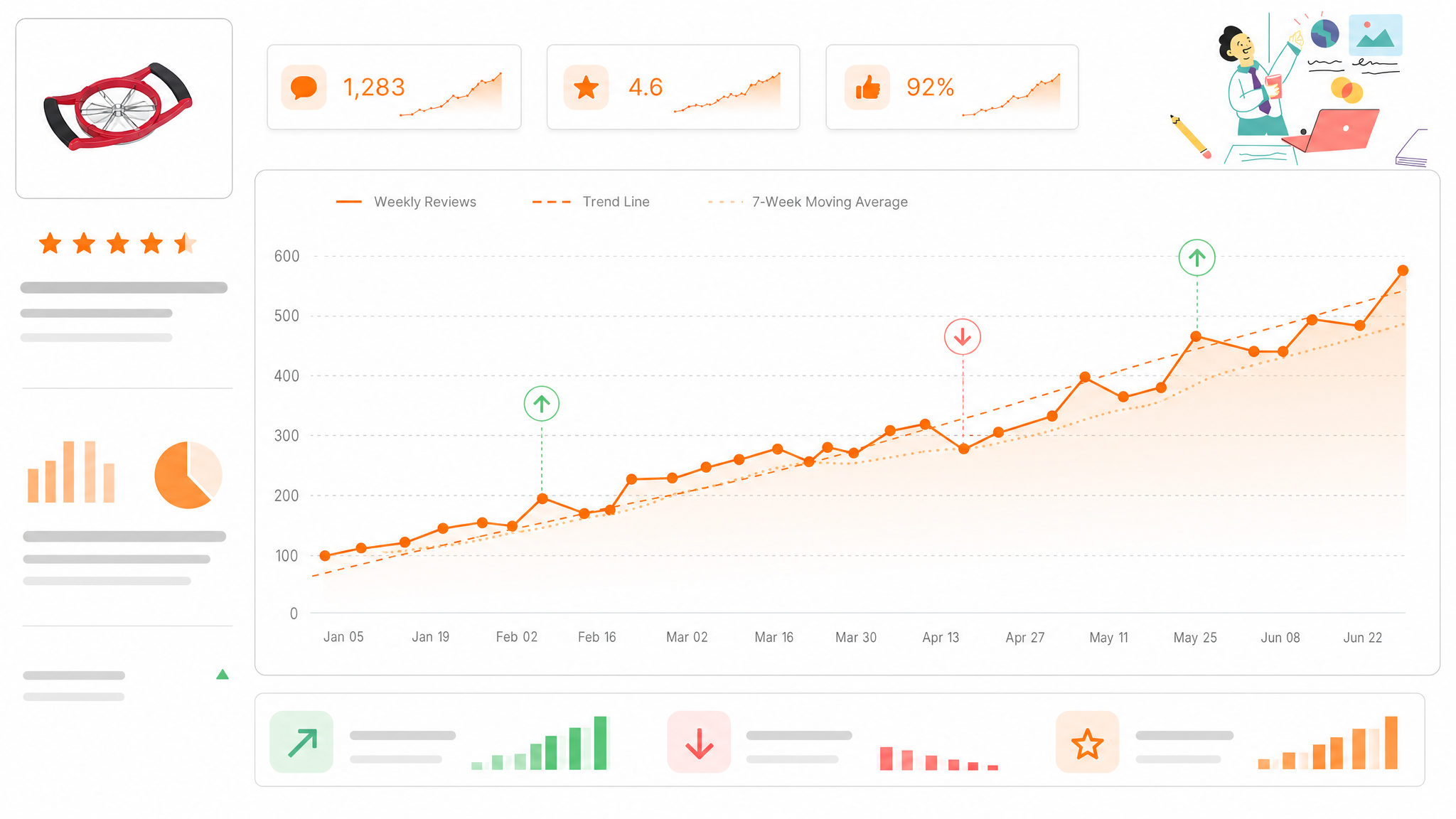
Plot your weekly velocity on a line chart. Look for patterns: seasonality (holiday spikes), listing changes, ad campaigns, or supply chain issues. A drop of 50% or more from your baseline means something changed — investigate immediately.]
Tools for Monitoring Customer Feedback Trends
Manual tracking works for a few products, but scaling requires automation. Here are the main categories of tools you can use:
Amazon’s Built-in Reports
- Voice of the Customer — Shows customer feedback health and offers a “customer feedback” report with review ratings and comments.
- Brand Analytics — Available to registered brands, it provides aggregate purchase and review data.
These are free but limited in historical depth and analytics.
SellerSprite Review Analytics
SellerSprite is a comprehensive Amazon toolkit that includes review monitoring features. It automatically collects new reviews, timestamps them, and displays velocity charts on your dashboard. You can filter by ASIN, date range, and even star rating, making it easy to spot trends. For deeper analysis, you can export the data and combine it with your own sales records.
To see how SellerSprite fits into your overall workflow, read our Amazon Seller Analytics Guide.
Third-Party Review Trackers
- Helium 10 — offers review tracking and “Review Insights” with historical data.
- Jungle Scout — includes review velocity estimates and review alerts.
- Keepa — focuses on price history but also tracks review count over time.
When choosing a tool, consider its data retention, accuracy, and whether it integrates with your other analytics.
How to Analyze Review Velocity Trends
Seeing a number go up or down is only the beginning. The real value comes from interpreting what it means. Here’s how to turn review velocity data into actionable insights.
1. Correlate with Major Events
Whenever you launch a promotion, change your main image, alter your price, or receive a surge in traffic, check the review velocity around those dates. For example, if you discount your product by 20% and see a jump in reviews, it tells you that price-sensitive buyers are more likely to leave feedback — and that the overall experience is still positive.
2. Separate Signal from Noise
A single week with zero reviews might just be randomness. Look at 4-week moving averages to smooth out day-to-day fluctuations. If the 4-week average drops consistently over 2–3 periods, that’s a real trend.
3. Watch Sentiment and Rating Distribution
Velocity tells you how many, but not what customers think. Keep an eye on the percentage of 1–2 star reviews within the new batch. If you’re gaining reviews but the average star rating is dropping, your product or listing may be attracting the wrong audience.
4. Compare with Competitors
Use tools like SellerSprite’s competitor analysis to see their review velocity. If the market leader is getting 20 reviews/week and you’re at 5, you know how much catch-up you need. This also helps you set realistic targets.
For a deeper dive into mining review content, check out our guide on analyzing Amazon reviews for product differentiation.
Review Velocity vs. Review Quality Metrics
Tracking velocity without quality is like driving fast with no destination. Quality metrics tell you whether the reviews you’re getting are actually helping your conversion. Key quality indicators include:
- Average star rating — A high velocity with decreasing average rating is a red flag.
- Review length — Longer, detailed reviews are more helpful to potential buyers and search engines.
- Helpful votes — The ratio of “helpful” votes indicates how valuable your reviews are to customers.
- Sentiment analysis — Are new reviews using more negative words like “broken,” “cheap,” or “didn’t work”?
- Verified purchase ratio — A high percentage of verified reviews boosts trust and complies with Amazon’s guidelines.
A healthy product should see steady velocity and stable or improving quality. For instance, you might see a spike in reviews after a viral influencer post, but if those reviews are mostly 2-star because the influencer attracted the wrong audience, your velocity is actually harming your listing.
Always pair velocity data with review content analysis. You can use tools that extract keywords and themes from reviews, as outlined in our Amazon reviews seller guide.
Common Pitfalls When Tracking Review Velocity
Even with the right tools, sellers often misinterpret review velocity. Avoid these mistakes:
- Ignoring seasonality — Review velocity always dips after Q4 and rises before holidays. Compare year-over-year, not just month-over-month.
- Tracking only one ASIN — If you have variations, monitor each separately. A single bad variation can drag down your entire catalog’s perceived quality.
- Overreacting to small changes — A drop from 10 to 8 reviews per week might be noise. Set a threshold (e.g., 30% decline) before triggering an investigation.
- Not combining with sales data — Velocity without context is meaningless. A decline in reviews might simply be because you reduced your ad spend and got fewer orders.
- Buying reviews or using forbidden tactics — Artificially inflating velocity can lead to Amazon penalties. Always stay compliant and refer to Amazon’s review policies.
Actionable Strategies to Improve Your Review Velocity
Once you understand your review velocity and what drives it, you can implement strategies to keep it healthy and growing.
1. Request Reviews Compliantly
Use Amazon’s “Request a Review” button on every safe-to-contact order. You can also use Seller Central’s automated request tools. Personalize the request and make it easy — but never offer incentives.
2. Improve Your Product’s Fit
Reviews are a reflection of customer expectations. If your listing overpromises and the product underdelivers, you’ll get negative reviews regardless of velocity. Continuously refine your bullet points and images to accurately set expectations.
3. Use Review Insights to Innovate
If you notice a recurring complaint in new reviews, fix it. It could be as simple as adding a missing accessory or improving your packaging. Responding to feedback shows you care and can turn detractors into brand advocates.
4. Launch Promotions with a Review Goal
When you run a deal, track the resulting review velocity. If the spike is short-lived, consider following up with a post-purchase email reminder (within Amazon’s guidelines) to sustain the momentum.
5. Monitor Competitor Velocity for Growth Targets
Use SellerSprite’s competitor tracking to see which products are gaining reviews fastest and try to understand why. Sometimes it’s not just sales volume — it’s a better unboxing experience or a more effective review request sequence.
Conclusion
Review velocity is a powerful, forward-looking signal that every Amazon seller should add to their analytics stack. It helps you catch problems early, measure the impact of your actions, and ultimately build a more trustworthy brand. No matter where you are in your selling journey, start tracking your review pace today and use it to drive smarter decisions.
Remember, velocity is not the end goal — a steady stream of high-quality, verified reviews is. Use the strategies and tools outlined in this guide to keep your finger on the pulse of customer feedback.
If you’re looking for an all-in-one solution to simplify this process, check out our SellerSprite review 2026 to see how the tool stacks up for monitoring feedback trends and much more.
FAQ
How do you measure review velocity?
To measure review velocity, count the number of new reviews over a specific time period (e.g., weekly or monthly) and divide by the number of days. For example, if you receive 14 new reviews over 30 days, your velocity is 0.47 reviews per day. More advanced measurements divide reviews by orders to get a collection rate. You can manually export your review history from Seller Central or use tools like SellerSprite that automate the calculation and display charts.
What tools can help monitor customer feedback trends?
Several tools can help, ranging from Amazon’s free reports to third-party analytics platforms. Amazon’s “Voice of the Customer” dashboard provides basic insights, but for historical tracking and trend charts, sellers often use SellerSprite, Helium 10, Jungle Scout, or Keepa. SellerSprite is particularly strong for its review velocity charts, competitor review tracking, and integration with other Amazon analytics.
Why is tracking review velocity important for businesses?
Tracking review velocity is important because it gives you an early-warning system for product satisfaction and listing health. A sudden drop in velocity can indicate a problem that hasn’t yet shown up in your overall star rating. It also helps you measure the effectiveness of changes like price adjustments, advertising campaigns, or listing optimization. Additionally, comparing your velocity with competitors helps you set realistic growth targets and identify market opportunities.
Next Steps
- Audit your current review velocity for your top 3 ASINs using the formulas above.
- Set up automated tracking with a tool like SellerSprite — sign up for free and get instant review trend charts.
- Create a monthly review analytics report that combines velocity with sales data and sentiment keywords.
References
By SellerSprite Content Expert
Amazon seller tools and marketplace SEO specialist.
Editorial process: AI-assisted draft prepared for human fact-checking, source verification, and brand review before publication.