TL;DR: Amazon arbitrage tools are built for speed — find a mispriced ASIN, confirm sales velocity and margin in minutes, buy, reprice, repeat. Private label tools are built for depth — validate durable demand, map keywords, differentiate a product, and defend a brand for years. Most US sellers only need four to six tools per model, and the fastest way to waste money is to buy the private label research stack while running an arbitrage business, or the reverse.
Key Takeaways
- The two models need different tools not because the software is different, but because the decisions are: arbitrage is a daily purchase decision, private label is a multi-quarter investment decision.
- A minimum arbitrage stack covers five jobs: sourcing, gating and eligibility checks, price-history and velocity validation, fee-accurate profit math, and repricing plus bookkeeping.
- A minimum private label stack covers demand and keyword validation, review and competitor intelligence, supplier vetting, listing and creative work, and PPC plus brand protection.
- Budget in tiers. Many beginners can run a workable US stack for roughly $50–$150 per month, but treat any figure as a planning estimate and verify current plan pricing before you commit.
- One data platform can serve both models — SellerSprite's product database and keyword tools support arbitrage validation and private label research — but the workflow built around it has to change.
- Always verify fees, gating, and brand restrictions inside Amazon Seller Central before you buy inventory. Third-party estimates are modeled, not official Amazon numbers.
Table of Contents
- Tools for Amazon Arbitrage vs. Private Label: What Actually Changes
- How Each Model Works in the US Market
- What Each Model's Tools Must Actually Solve
- The Arbitrage Tool Stack: Five Jobs, Five Tool Categories
- The Private Label Tool Stack: From Demand to Defensible Brand
- Side-by-Side: Amazon Arbitrage vs. Private Label Tool Comparison
- Two Illustrative Scenarios: How the Stacks Play Out
- Tool Budget: What to Spend and Where to Cut
- A 7-Day Setup Plan for the Right Stack
- Six Tool Mistakes That Quietly Kill Margins
- The Hybrid Play: One Data Platform, Two Workflows
- Decision Framework: Which Stack Should You Build First?
- Metrics That Tell You the Stack Is Actually Working
- Bottom Line
- FAQ
- References
Note on marketplaces: This guide is written for sellers operating in the US marketplace. It references Amazon.com fee structures, US gating and brand-restriction dynamics, and US sourcing conditions. The workflow logic applies to other marketplaces, but fees, category approvals, tool coverage, and supplier behavior will differ.
Tools for Amazon Arbitrage vs. Private Label: What Actually Changes
Most comparisons of Amazon business models start with money. That is the wrong starting point for a software decision. The variable that actually determines your tool stack is speed: how quickly the model forces you to make a buy-or-skip call, and how much it costs when that call is wrong. Arbitrage compresses the decision into a few minutes and keeps each mistake small. Private label stretches the same decision across months and makes each mistake expensive. Every tool requirement in this guide follows from that single difference.
That is why the honest answer to which tools are better for Amazon arbitrage vs. private label is: neither. A price-history chart and a keyword database are both data products, but they answer different questions. Arbitrage asks whether a specific ASIN at a specific price will sell fast enough, this month, to release your cash. Private label asks whether a category will still carry durable search demand in two years and whether you can win the top of the search results. One is a trade. The other is a build.
This guide breaks the comparison down by job to be done, then by tool category, budget, and setup order. If you already know which model you are running, jump straight to the section for your stack. If you are still deciding, the decision framework near the end will help you match a stack to your capital, your available hours, and your tolerance for inventory risk.

How Each Model Works in the US Market
Before comparing software, it helps to be precise about the models themselves. US sellers generally operate in one of four configurations, and two of them are routinely confused with each other.
Retail arbitrage and online arbitrage
Retail arbitrage means buying discounted inventory from physical US retail stores — clearance aisles, liquidation lots, store-closing sales — and reselling it on Amazon. Online arbitrage applies the same logic to online retailers and storefronts, with the difference that sourcing happens remotely and volume depends on deal alerts rather than store visits. Both are inventory-first models: you find the deal, you buy it, and you sell it before the price moves. Per-unit margins are usually thin, cash velocity matters more than brand equity, and your edge is information speed. For the full sourcing workflow, see SellerSprite's guide to Amazon and online arbitrage.
Wholesale: the middle path
Wholesale sits between arbitrage and private label. You buy branded products in bulk from distributors or brands, often with authorization, and compete for the Buy Box on existing listings. The tooling looks a lot like arbitrage — price history, Buy Box share, margin math, repricing — but the risk profile is different: purchase orders are larger, payment terms matter, and losing one supplier relationship can end a product line. Many sellers use wholesale as the bridge that funds a private label launch.
Private label
Private label means sourcing a product from a manufacturer, branding it as your own, and owning a listing you create. Nothing exists to scan. Demand has to be estimated before inventory is produced, differentiation has to be real enough to justify a new ASIN, and success depends on ranking for keywords and converting traffic. The capital cycle is longer, and the tool stack is used months before revenue arrives. For a deeper treatment, see the private label Amazon guide for 2026.
| Model | Where inventory comes from | Primary risk | Decision cadence | What tools must do |
|---|---|---|---|---|
| Retail arbitrage | Clearance and liquidation in physical US stores | Gating, slow sell-through, stale pricing | Daily, in-store | Instant scan, fee math, velocity check |
| Online arbitrage | Online retailers, deal feeds, storefronts | Price moves before delivery, restricted brands | Daily, remote | Lead screening at volume, fast rejection |
| Wholesale | Distributors and brands, often authorized | Capital tied up, Buy Box competition | Weekly to monthly | Buy Box share, margin, reorder timing |
| Private label | Manufacturers, your own brand | Wrong product, weak differentiation, slow ranking | Monthly to quarterly | Predict demand, find gaps, protect brand |
The snapshot matters because it shows where tool spend goes. In the two arbitrage models, nearly all software value is concentrated in the first 48 hours of a deal. In private label, software value is spread across a three-to-six month pre-launch period and then a long optimization curve after launch. Same subscription budget, completely different distribution of value.
What Each Model's Tools Must Actually Solve
Comparing feature lists is a trap. Two products can both claim product research and be completely different instruments. The more useful comparison is by job to be done: the decision the seller has to make, and the data quality that decision actually requires.
| Job to be done | Arbitrage requirement | Private label requirement |
|---|---|---|
| Confirm demand exists | Sales velocity estimate for one existing ASIN over weeks | Multi-year search volume, seasonality, click share and purchase share for a keyword set |
| Validate the price | Today's Buy Box price, 90-day median, number of competing offers | Price band across the top listings and enough headroom to absorb ad spend |
| Model the true cost | Landed cost, prep, inbound freight, referral and FBA fees per unit | Tooling, sampling, compliance, trademark, launch PPC budget, plus all standard fees |
| Monitor competition | Offer count, Buy Box rotation, new sellers appearing | Organic rank, review velocity, ad density, image and A+ content gaps |
| Protect the position | Gating status, restricted brands, IP complaint exposure | Brand Registry, hijacker monitoring, trademark enforcement, listing takeover |
| Decision horizon | Days to weeks | Quarters |
Read the right-hand column closely and a pattern appears: private label tooling is a research stack, while arbitrage tooling is a screening stack. Research tolerates slower, richer data. Screening demands fast, shallow data that can be applied to dozens of candidates per day. That is why a single tool rarely does both jobs well, even when the underlying database is the same. The operating model also changes how much data depth you need per record — an arbitrage seller wants ten fields on five hundred ASINs, a private label seller wants fifty fields on five.
The Arbitrage Tool Stack: Five Jobs, Five Tool Categories
A working arbitrage stack covers five jobs. You can spend heavily on each, but the minimum viable version is smaller than most beginners expect. Here is what each category has to do, and where sellers overspend.
1. Deal sourcing and lead generation
Scanners and deal feeds are the entry point. A usable tool compares live Amazon pricing against the source retailer's price, subtracts estimated fees, and filters by sales rank and category so you are not reading a thousand unusable rows. The important caveat: deal lists are sold to many subscribers, so the list itself is rarely the edge. Your edge is the speed of verification and rejection. Set a rule — if a lead cannot be validated in under four minutes, skip it and move on.
2. Gating, eligibility, and risk screening
Nothing ends an arbitrage business faster than buying inventory you are not allowed to sell. Some brands are gated, some categories require approval, and some brands aggressively pursue unauthorized resellers. Third-party tools can flag likely restrictions, but the authoritative check is always inside Amazon Seller Central before you buy. Treat any tool's approved label as a hint, not a permission, and budget time rather than money here: fifteen to twenty seconds per lead, on every lead.
3. Price history and sales velocity validation
This is where arbitrage money is made and lost. A price-history tool such as Keepa shows how the Buy Box price moved over 90 days or a year, and it exposes the two traps that catch new sellers: a current price that is a temporary spike, and a rank that looks healthy only because the listing had no competition for three days. Read the median price rather than today's price, check rank stability over at least 90 days, and count the offers. If the median sale price leaves less than your target margin after fees, it is not a deal no matter how good the screenshot looks.
4. Profit calculation and repricing
Fee-accurate math is non-negotiable. Referral fees, FBA fulfillment fees, inbound placement, prep, storage, and returns all come out of the sale price before you see a dollar. A spreadsheet that pulls the current fee schedule beats a calculator nobody has updated. Once inventory is live, a repricer protects the Buy Box without starting a race to the bottom — set a hard floor at break-even plus a minimum acceptable margin and let the tool compete above that floor only.
5. Bookkeeping and inventory tracking
Thin margins do not survive sloppy accounting. Arbitrage sellers routinely discover at tax time that a category was unprofitable because inbound freight and return rates were never allocated per unit. A simple bookkeeping tool that tracks cost of goods per shipment, plus a reorder and aging view, is worth more than a second scanner subscription.
The minimum viable arbitrage stack, in order of value: (1) one sourcing scanner, (2) one price-history and sales-estimate tool, (3) a fee-accurate profit spreadsheet, (4) a repricer once you carry more than roughly twenty active SKUs, and (5) bookkeeping from the first shipment. Keyword research suites, listing optimization platforms, and PPC dashboards are close to irrelevant at the SKU level in this model, because you are selling on listings that already exist and already rank.
The Private Label Tool Stack: From Demand to Defensible Brand
Private label flips the order of operations. You spend on data before you spend on inventory, and a bad research decision cannot be rescued by repricing. The stack therefore has to support a sequence of decisions, not a single screening loop.
1. Demand and keyword validation
Start with keywords, not products. A product database can show estimated monthly sales for an ASIN, but the durable question is whether a keyword set has stable multi-year demand and enough purchase concentration to support a new entrant. Your tools should surface search volume, seasonality curves, click share, and conversion share so you can separate keywords that generate traffic from keywords that generate orders. Build the keyword map before you shortlist a single supplier — it will also tell you whether your planned price point is realistic.
2. Competitive and review intelligence
The top results for your main keyword are your future competitors, and their reviews are free product research. Review-mining tools cluster complaints by theme — leaking lids, inconsistent sizing, weak stitching, confusing instructions — and those themes become your differentiation brief and your image brief. Pair that analysis with sales estimates and price-band data so you are not entering a category where the leading listing has tens of thousands of reviews and a landed cost you cannot match.
3. Differentiation, design, and supplier vetting
These are not classic Amazon tools, but they decide whether the launch works. Sampling, supplier verification, compliance documentation, and a landed-cost model that includes tooling and molds belong in the same budget as your software. A keyword tool will never tell you that a supplier's lead time makes a Q4 launch impossible, or that a component requires testing you have not budgeted for.
4. Listing optimization and creative
Once the product exists, the tool job shifts to conversion. That means mapping keywords into title, bullets, and backend fields, checking indexing, and producing images and A+ content that answer the objections surfaced during review mining. A listing tool that flags missing or duplicated keywords is useful; one that only generates text is not a substitute for category knowledge or a real photo shoot.
5. PPC, ranking, and brand protection
Launch traffic is bought, not earned. You need campaign structure, search-term harvesting, and rank tracking to know whether organic position is actually improving or whether sales only exist because ads are paying for them. In parallel, register the brand so you can access Amazon Brand Registry protections, and monitor for hijackers and unauthorized sellers. For a private label seller, brand protection is not an add-on — it is the asset you are building.
| Tool category | Decision it supports | When to buy it |
|---|---|---|
| Keyword and product database | Which category deserves six months of your time | Before any supplier contact |
| Review analysis | What to change so the product is worth switching to | During shortlisting |
| Rank and competitor tracking | Whether organic position is improving after launch | Two weeks before launch |
| PPC management | Which search terms to fund and which to cut | Launch week |
| Brand protection | Whether your listing and buy box are safe | As soon as the trademark is filed |
What private label sellers overbuy: social listening suites, all-in-one platforms with modules they never open, and enterprise PPC tools before the first campaign has thirty days of data. What they routinely underbuy: review analysis, creative production, and compliance support. The underbought items are the ones that change a decision; the overbought ones mostly change a dashboard.
Side-by-Side: Amazon Arbitrage vs. Private Label Tool Comparison
Here is the full comparison in one view. Ranges are deliberately qualitative, because actual capital needs depend on category, supplier terms, and your own risk tolerance — model them yourself rather than trusting a generic benchmark.
| Dimension | Amazon arbitrage | Private label |
|---|---|---|
| Upfront capital | Lower and tied to individual purchase lots | Higher: tooling, minimum order quantities, freight, trademark, launch ads |
| Time to first sale | Days to weeks | Months |
| Margin profile | Thinner per unit, driven by the sourcing spread; varies deal by deal | Potentially higher and more durable, but only after ranking and reviews accumulate |
| Cash conversion cycle | Fast and repeating | Slow and front-loaded |
| Tool budget floor | Very low; a scanner plus a spreadsheet can work | Higher; research must be paid for before inventory exists |
| Most valuable tool category | Price history and velocity validation | Keyword and demand validation |
| Least valuable tool category | Keyword research suites | Deal scanners and online arbitrage feeds |
| Primary failure mode | Buying gated, restricted, or slow-moving inventory | Launching a me-too product with no real differentiation |
| Core KPI | Return on cash per sourcing cycle | Organic rank, conversion rate, and total advertising cost of sales |
| Decision horizon | This week | This year |
The two least-valuable rows explain most wasted software spend. An arbitrage seller paying for a keyword suite is buying research they will never apply to a listing they do not control. A private label seller paying for a deal scanner is buying a tool for a business they are not running. Before you subscribe, name the row that describes you and delete the matching tool from your cart.
Two Illustrative Scenarios: How the Stacks Play Out
These are composite scenarios built to illustrate tool logic. They are not testimonials from real sellers, and the figures are planning illustrations rather than benchmarks. Always verify current subscription pricing and Amazon fees before committing to a budget.
Scenario A: a US online arbitrage seller with about $2,000 in working capital
This seller runs a lean three-tool stack: one online arbitrage scanner, one price-history and sales-estimate tool, and a spreadsheet that mirrors current Amazon fee schedules. Repricing is manual until the catalog passes roughly twenty active SKUs. The daily loop is disciplined: scan a few dozen leads, instantly reject anything gated or with an unstable rank, validate the survivors in the price-history tool, then buy only what clears the margin floor. Because the margin per unit is thin, the seller reviews cash-in-hand weekly rather than revenue, and stops buying any category where returns and inbound freight push realized profit below plan. The stack costs less than a single wholesale reorder, and the whole system depends on the seller's rejection speed, not on the number of subscriptions.
Scenario B: a US private label seller launching one SKU in home organization
This seller spends three months before placing a purchase order. The stack starts with a keyword and product database to map demand, seasonality, and the price band across the top listings. Review analysis of the leading competitors produces a differentiation brief: the recurring complaints are a lid that does not seal and a size that does not fit standard shelving. A supplier is vetted with samples and a landed-cost model that includes tooling and testing. Only after that does the seller pay for listing support, image production, and PPC management. The tool budget front-loads research and moves to conversion and brand protection after launch, and the trademark filing is treated as a line item in the launch budget rather than an afterthought. Every subscription maps to one of the five private label jobs, and anything that maps to none is cancelled at the thirty-day review.
Both scenarios share one principle: every subscription maps to a decision that repeats. The arbitrage seller repeats a purchase decision daily. The private label seller repeats a research decision for a few months and then a conversion decision for years. If a tool does not change a recurring decision, it is a hobby, not a business expense.
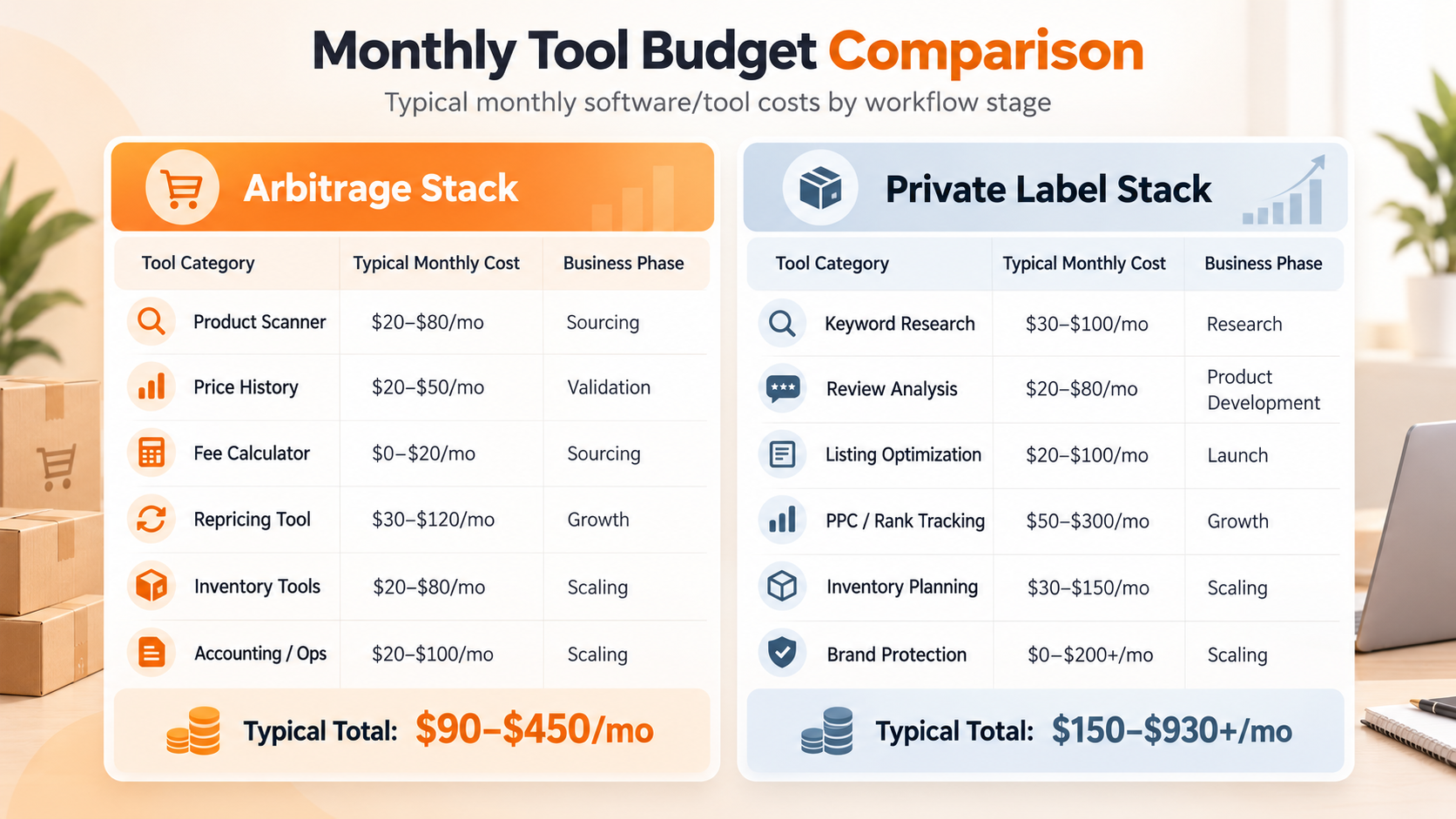
Tool Budget: What to Spend and Where to Cut
Tool budgets are usually discussed as a percentage of revenue, which is unhelpful before you have revenue. A better frame is tiering by the number of decisions the stack supports. The ranges below are planning estimates based on typical US subscription pricing at the time of writing — verify current plans before you commit, because vendors change pricing and packaging frequently.
| Tier | Est. monthly range | What it typically covers | Who it fits |
|---|---|---|---|
| Starter | $0–$50 | One core tool on a basic plan, free price-history access, spreadsheet profit model | First 90 days, either model |
| Operator | $50–$150 | Core research platform plus price history plus a repricer or PPC helper plus bookkeeping | Consistent monthly volume |
| Scaled | $150–$400+ | Multi-seat research, rank tracking, review analysis, PPC management, accounting integrations | Multiple SKUs or a small team |
Five rules for cutting without losing capability: (1) one tool per decision, and write the decision next to the subscription in your notes; (2) cancel anything you have not opened in thirty days, no exceptions; (3) exhaust free tiers and trials before paying, but do not run a sourcing business on a capped free plan; (4) ignore feature claims that do not change a number you act on; (5) fund bookkeeping from day one, because a profitable-looking month can hide a losing category for a full quarter.
A 7-Day Setup Plan for the Right Stack
If you are starting from zero, resist the urge to subscribe to five tools on day one. Build in this order and you will spend less and learn faster.
- Day 1 — Name the decision you repeat most. For most arbitrage sellers it is whether to buy this lot. For private label it is which category deserves the next six months. Write the decision down; it becomes the filter for every subscription you will consider.
- Day 2 — Pick one primary data source and learn it deeply. Depth beats breadth early. Learn the filters, the estimate methodology, and the limitations of one platform before adding a second. If you are working in SellerSprite, start with the product database and keyword research modules rather than every feature at once.
- Day 3 — Build the fee-accurate profit model. Pull current referral and FBA fee schedules from Amazon's own pricing pages, not from a blog or a tool's default assumptions. Build a spreadsheet that outputs profit per unit at three price points.
- Day 4 — Set the compliance screen. Arbitrage: a fixed two-step check for gating and brand restrictions before any purchase. Private label: a keyword map with search volume, seasonality, and competitor counts for your shortlist.
- Day 5 — Define thresholds and write them down. Minimum margin, maximum days of inventory, minimum rank stability, maximum offer count, minimum review count for a competitor you are willing to fight. Thresholds convert tool output into decisions.
- Day 6 — Run ten real decisions and compare tool output to reality. Ten leads, or ten keyword sets. Record what the tool predicted, then check what the live listing actually shows. This calibration step is what separates sellers who trust their data from sellers who guess.
- Day 7 — Cut, keep, and schedule a review. Cancel anything you did not open, keep what changed a decision, and put a thirty-day review on the calendar. Tool stacks drift toward bloat without a recurring audit.
Six Tool Mistakes That Quietly Kill Margins
1. Buying the stack before defining the decision
The most common failure is not a bad tool, it is a tool without a job. Sellers subscribe during a motivated weekend, use the platform for three days, and then default to their old spreadsheet. Define the recurring decision first; the subscription list almost writes itself.
2. Using an arbitrage scanner to validate a private label idea
A scanner answers whether an existing ASIN is profitable today for a reseller. It does not answer whether a new brand can win the keyword in eighteen months. Using sourcing data for product development produces confident decisions built on the wrong question.
3. Treating a single sales estimate as fact
Every third-party sales estimate is modeled from public signals such as rank and category. Two vendors can show different numbers for the same ASIN. Use estimates to rank candidates against each other, then confirm with price history, offer count, and review velocity before you commit capital. Never build a purchase order on one number from one screen.
4. Forgetting that Amazon fees change
Fee schedules are updated periodically, and small changes compound across thousands of units. A profit model built two years ago is a liability disguised as an asset. Re-verify referral and fulfillment fees against Amazon's official pricing pages at least quarterly, and immediately after any announced fee change.
5. Trusting a tool's approved label for gating
Third-party eligibility flags lag. Brands become restricted, categories open and close, and enforcement priorities shift. The only authoritative check is inside Seller Central while you are logged into your own account, before the purchase. A tool can tell you to look; it cannot tell you that you are allowed.
6. Letting the stack sprawl
Six overlapping subscriptions create conflicting numbers and no single source of truth. Pick a primary platform for each job, accept its imperfections, and use a second source only for verification on high-stakes decisions. Conflicting dashboards slow down exactly the decisions that need to be fast.
The Hybrid Play: One Data Platform, Two Workflows
Many US sellers run both models on purpose. Arbitrage or wholesale generates cash flow and marketplace literacy, then funds a private label launch. When you operate that way, consolidating onto one data platform reduces cost and, more importantly, reduces the number of conflicting numbers you have to reconcile. If you are mapping the broader landscape of vendors first, the best Amazon seller tools overview on our hub is the natural starting point.
Running arbitrage inside a research platform
Use the product database to sanity-check a candidate ASIN's estimated sales before you commit to a lot, and use keyword data only as a secondary demand signal — not as a sourcing filter. The screening loop stays the same: scanner lead, price history, fee math, gating check. The research platform adds a second opinion on velocity, which is useful precisely because vendored estimates disagree.
Running private label inside the same platform
Use keyword research to build the demand map, competitor tracking to watch rank and review velocity, and review analysis to build the differentiation brief. The same subscription then supports post-launch optimization, which is where the private label return actually lives. Consolidation works because the underlying data jobs overlap, even though the workflows do not.
One caution: consolidated platforms encourage the illusion of completeness. Every estimate is still modeled, and every dashboard is still a summary. Keep the habit of verifying high-stakes numbers against Amazon's own pages and the live listing. If you want to test a single platform against both workflows, you can create a SellerSprite account and run the ten-decision calibration exercise from Day 6 before you cancel anything you already pay for.
Decision Framework: Which Stack Should You Build First?
Answer six questions honestly. If most of your answers land on the left, build the arbitrage stack. If they land on the right, build the private label stack. If you are split, start with arbitrage as a training ground with strict capital limits, and treat it as tuition rather than a destination.
- How much capital can you lose without changing your life? Low tolerance points to arbitrage.
- How many hours per week can you commit? Frequent short sessions favor arbitrage; concentrated deep work favors private label.
- How urgently do you need cash to circulate? Immediate needs favor arbitrage.
- Which skill do you want to build — sourcing judgment or brand building? Both are valuable, but they are different careers.
- How much compliance complexity can you absorb right now? Private label adds testing, labeling, and trademark work.
- Do you want to sell other people's products or own your own listing? Ownership is the entire point of private label.
| Seller profile | Start here | Why |
|---|---|---|
| Beginner with limited capital | Scanner, price history, profit spreadsheet, bookkeeping | Fastest feedback loop with the smallest possible loss per mistake |
| Growing seller with steady cash flow | Add a consolidated research platform and a repricer | Ready to test a private label idea without abandoning the current business |
| Operations or marketing manager | Keyword research, rank tracking, PPC management, review analysis | The job is defending and growing existing listings, not sourcing |
| Established brand or large seller | Multi-seat research, brand protection, competitor monitoring, analytics integrations | Coordination cost outweighs subscription cost at this stage |
Metrics That Tell You the Stack Is Actually Working
Software is an input. These are the outputs that tell you whether the money is well spent. Track them for thirty days after any stack change and compare before and after.
| Metric | Arbitrage version | Private label version |
|---|---|---|
| Prediction accuracy | Estimated margin versus realized margin per lot | Forecast sales versus actual units in the first 60 days |
| Decision speed | Minutes per lead screened, and leads screened per week | Weeks from category shortlist to supplier sample |
| Return on tool spend | Profit from tool-sourced lots divided by subscription cost | Revenue influenced by researched keywords divided by subscription cost |
| Inventory health | Days of inventory on hand and sell-through rate | Organic rank trend and total advertising cost of sales |
| Downside control | Return rate and number of gated or restricted mistakes | Review rating stability and hijacker incidents resolved |
Run this audit monthly. If a tool cannot be connected to a metric on this table, it is a candidate for cancellation at the next review — regardless of how good its onboarding email was.
Bottom Line
The tools for Amazon arbitrage vs. private label are not competing products; they are two different instruments for two different decisions. Arbitrage needs a screening stack that rejects bad inventory in minutes: a scanner, price history, gating checks, fee-accurate math, and repricing once volume justifies it. Private label needs a research stack that answers questions before inventory exists: keyword and demand validation, review mining, supplier vetting, listing and creative, then PPC and brand protection. Build in the order of your recurring decisions, verify fees and eligibility inside Seller Central, and audit subscriptions every thirty days. And if you plan to run both models, start with a beginner-friendly reselling workflow before you commit capital to a brand.
FAQ
What are the best tools for Amazon arbitrage compared with private label for US sellers?
For arbitrage, the essential categories are a sourcing scanner or deal feed, a price-history and sales-estimate tool such as Keepa, a fee-accurate profit model, a repricer once you carry meaningful SKU volume, and basic bookkeeping. For private label, the essentials are a keyword and product database for demand validation, review analysis for differentiation, supplier vetting and sampling support, listing and creative tooling, PPC management, and brand protection through Brand Registry. The best specific vendor depends on how often you make the decision — daily screening favors lightweight speed, while a months-long launch favors deeper research. Many sellers use one consolidated platform such as SellerSprite for the research layer and add specialist tools only where a gap appears.
Is Amazon arbitrage or private label better for beginners in the US market?
Arbitrage is usually the easier place to learn because the feedback loop is short: you buy a lot, you list it, and within weeks you know whether your judgment was sound. The cost of a single mistake is small, and the tool stack is cheap. The trade-offs are thin per-unit margins, exposure to gating and brand restrictions, and no long-term asset. Private label demands more capital, more patience, and more upfront research, but it builds an asset you control. A common path is to run arbitrage with a strict capital cap to learn fees and marketplace mechanics, then move that knowledge and cash into a private label launch. Either way, verify current fees and category eligibility in Seller Central rather than relying on third-party summaries.
Which Amazon seller tools do I need for arbitrage sourcing versus private label product research?
For arbitrage sourcing you need three things working together: a lead source that compares retail prices to live Amazon prices with fees subtracted, a price-history view that shows the 90-day median price and offer count rather than today's spike, and a profit model that reflects current referral and FBA fees. Eligibility checking is a manual step inside Seller Central, not a tool setting. For private label product research you need search volume with seasonality and click share, a competitor set with review themes and price bands, and a way to track organic rank after launch. The overlap is smaller than vendors suggest: sourcing tools screen existing listings, research tools evaluate products that do not exist yet.
Can I use the same tools for both arbitrage and private label?
Partly. Data platforms that include a product database, sales estimates, and keyword research can support both, but the workflow around them has to change. In arbitrage you use the data to validate an existing listing quickly and then move on. In private label you use the same data to build a demand map and a differentiation brief over several weeks. What rarely transfers is specialist tooling: a deal scanner has no role in a private label launch, and a rank-tracking suite has no role in a sourcing decision. Consolidate the research layer if you want fewer subscriptions, but keep the decision rules separate.
How much should I budget for Amazon seller tools per month?
A realistic starting range for a US seller is roughly $0 to $50 per month for the first 90 days, moving to about $50 to $150 per month once you have consistent volume, and higher for multi-SKU or team operations that need rank tracking, review analysis, and PPC management. Treat these as planning ranges rather than benchmarks, and verify current plan pricing directly with each vendor before committing, since packaging and pricing change. The better question is not what you should spend but which decisions you need to support — one tool that changes a repeated decision beats four that produce dashboards you never act on.
Do I need a repricer for private label?
Usually not in the way an arbitrage seller does. A repricer exists to win the Buy Box against competing offers on the same ASIN, which is the core problem in arbitrage and wholesale. In private label you are normally the only seller on your own listing, so the priority shifts to price positioning, promotion planning, and protecting margin rather than reacting to competitors minute by minute. Some brand owners still use automated pricing rules to enforce a floor or to adjust for rising fees, but that is a margin-control function, not a Buy Box function. Brand protection and unauthorized-seller monitoring matter far more than repricing for most private label sellers.
Next Steps
- Write down the single decision you repeat most often, then list every tool you currently pay for and mark whether it changes that decision.
- Rebuild your profit model using Amazon's current referral and fulfillment fee pages, and set a hard margin floor you will not go below.
- Run the ten-decision calibration exercise this week: compare what your tool predicted against what the live listing shows.
- Create a free SellerSprite account, test the product database and keyword research against your chosen model, and cancel any overlapping subscription that does not survive the thirty-day audit.
References
- Amazon: Sell on Amazon pricing and fee overview View
- Amazon: Fulfillment by Amazon program overview View
- Amazon Brand Registry View
- Keepa price and rank history for Amazon products View
- USPTO: Trademark basics for brand owners View
- SellerSprite: Best Amazon seller tools hub View
- SellerSprite: Amazon and online arbitrage guide View
- SellerSprite: Amazon retail arbitrage reselling guide View
- SellerSprite: Private label Amazon guide for 2026 View
By SellerSprite Content Expert
Amazon seller tools and marketplace SEO specialist.
Editorial process: AI-assisted draft prepared for human fact-checking, source verification, and brand review before publication.