If you are learning how to find niche products on Amazon, the fastest path is to start from real shopper search behavior, then validate with data. This step-by-step guide shows how to use Amazon autocomplete plus an Amazon keyword research tool like SellerSprite, and then use Google to expand ideas and cross-check demand so you can shortlist high-demand, low-competition products with less guesswork.
Quick Summary (TL;DR)
- Start with a broad seed keyword, then use Amazon autocomplete to discover long-tail niche variants.
- Validate demand with SellerSprite search volume and trends before you get excited about a niche.
- Expand ideas using Google autocomplete and tools like Google Trends, then localize for US, EU, JP markets.
- Score each niche in a research sheet using demand, competition, feasibility, and differentiation notes.
- Use SellerSprite competition metrics (for example product count and title density) and the Chrome extension to confirm viability.
- Keep the top 3 ideas and test them quickly with real listing and price checks before sourcing.
Table of Contents
- Step 1: Pick a seed keyword that represents a product family
- Step 2: Discover niche keywords with Amazon autocomplete
- Step 3: Validate demand with SellerSprite Keyword Mining
- Step 4: Interpret niche intent to design better product angles
- Step 5: Use Google to expand, localize, and confirm demand
- Step 6: Build a niche research sheet and prioritize your shortlist
- Step 7: Analyze competition and validate the opportunity
- Recommended workflow: Amazon to SellerSprite to Extension to AI Insights
- Key Takeaways
- Data sources and disclaimer
- About the author and team
- References
Step 1: Pick a seed keyword that represents a product family
Start with a broad seed that could describe many products. Your goal is not to pick the final product yet. Your goal is to find a keyword that unlocks lots of buyer intent variants.
- Good seeds: simple nouns like "tea infuser", "desk lamp", "pet brush".
- Avoid seeds that are too branded or too specific at the start.
- Choose a category where you understand usage and quality expectations.
Example seed: tea infuser
Step 2: Discover niche keywords with Amazon autocomplete
Amazon autocomplete is a direct window into what shoppers type when they want to buy. Use it to niche down from your seed into buyer-specific long-tail phrases.
How to do it
- Open Amazon for your target marketplace (US, UK, DE, FR, IT, ES, JP).
- Type your seed slowly and record the suggestions.
- Repeat with modifiers: "for", "with", "best", "small", "travel", "cute", "stainless steel", "silicone".
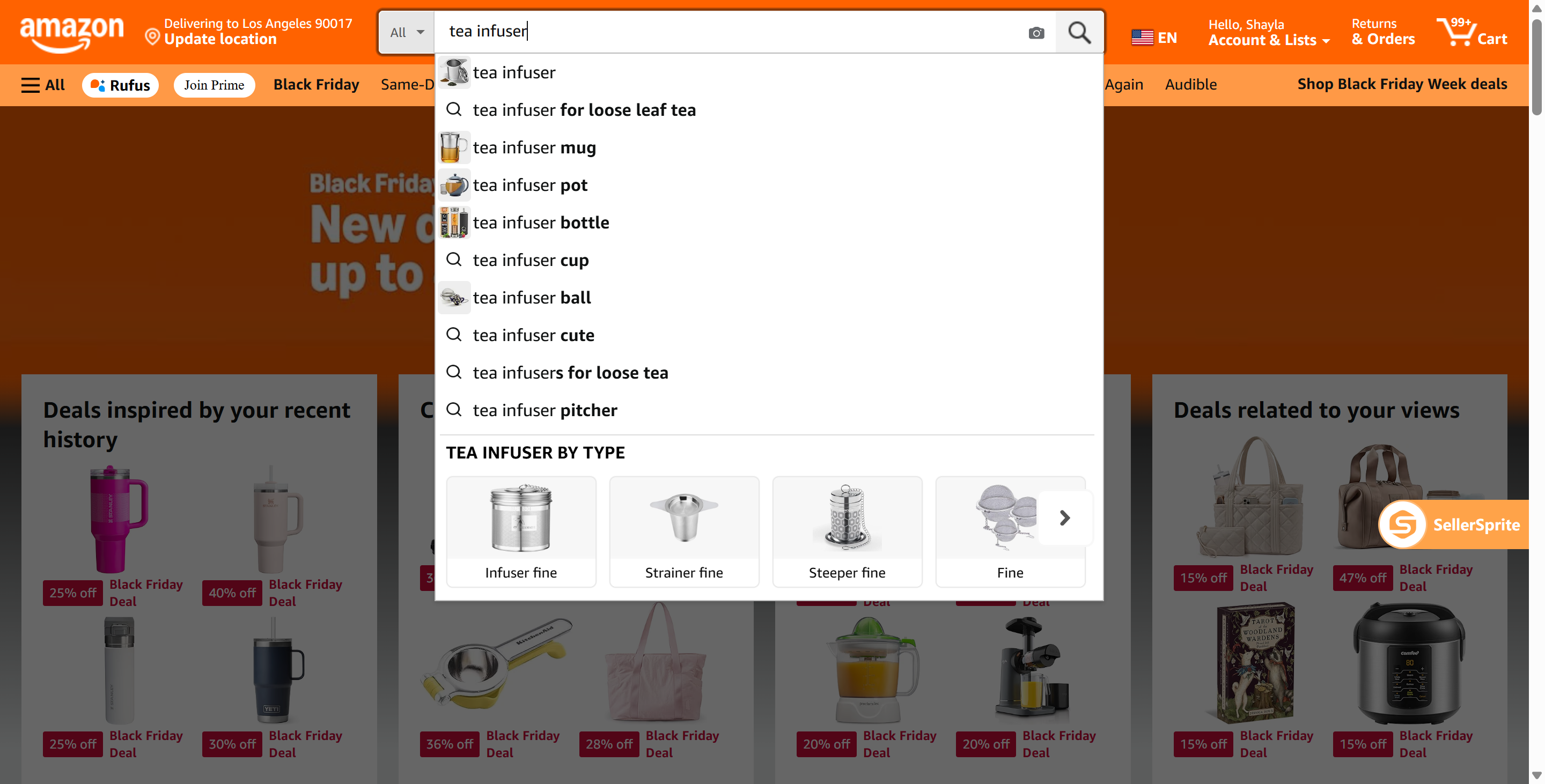
What you are collecting
- Audience niches (example: cat lovers, gift buyers).
- Use case niches (example: travel, office, camping).
- Feature niches (example: material, size, easy clean).
Step 3: Validate demand with SellerSprite Keyword Mining
Autocomplete gives you ideas. SellerSprite helps you validate which ideas have real demand by showing search volume, trend signals, and related keyword variations.
What to check inside SellerSprite
- Search volume: confirm the niche has enough searches to support sales.
- Keyword variations: find additional long-tail terms you missed on Amazon.
- Trend direction: avoid declining demand unless you have a clear seasonal plan.
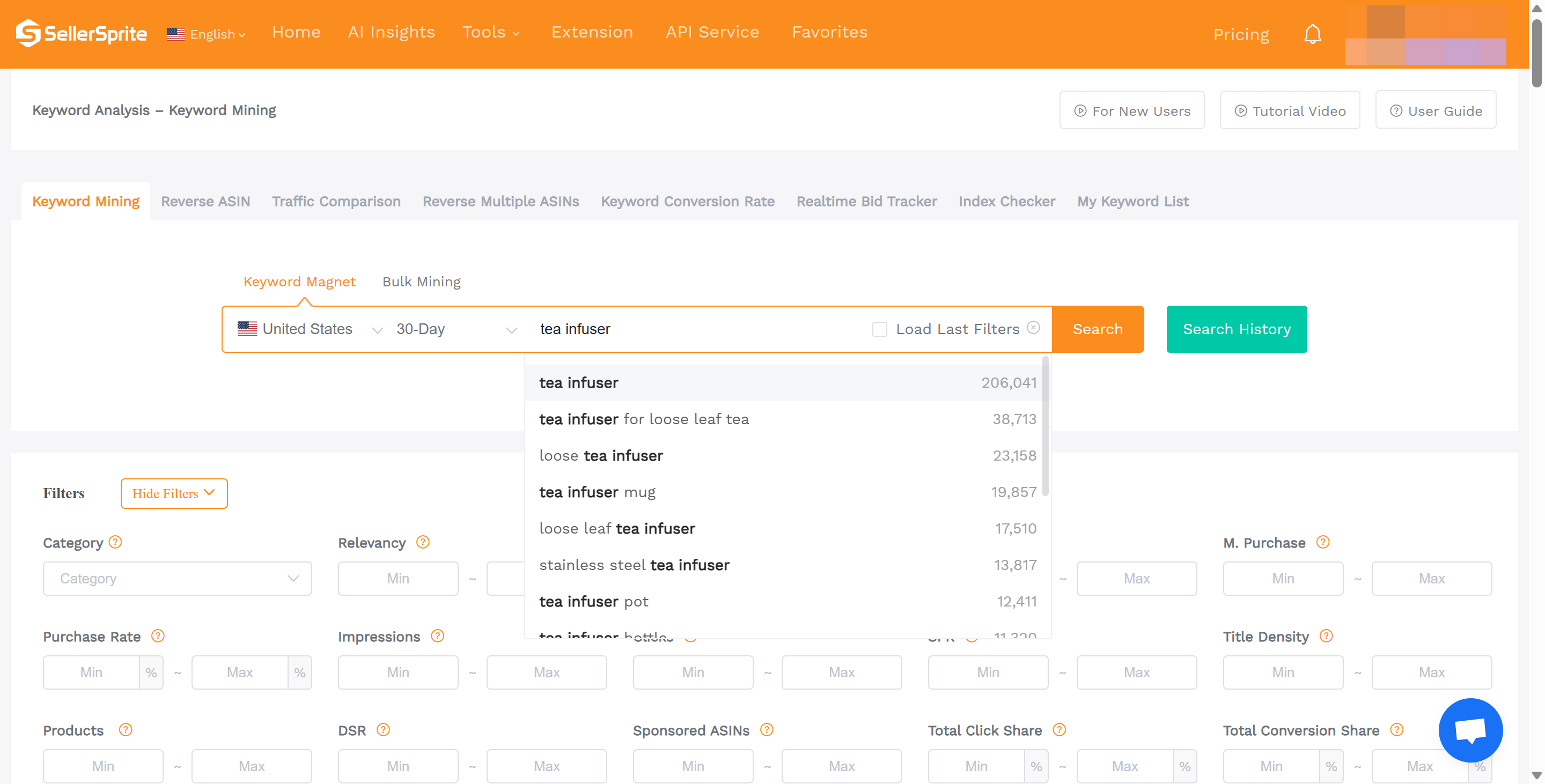
Try SellerSprite Keyword Mining
Test your top 3 product ideas with real keyword demand data and faster niche expansion.
Example case study sidebar 1 (illustrative)
This is a simplified example to show the data chain from keyword to niche. Numbers are for teaching only.
- Seed: tea infuser
- Niche long-tail found: "cat tea infuser", "tea infuser bottle", "tea infuser for loose leaf"
- Demand check (SellerSprite): keep niches above a few hundred searches per month, prioritize above 1,000 when possible
- Angle: combine audience plus material, for example, "silicone cat shaped tea infuser"
- Next validation: check product count and title density for each niche, then review top listings for gaps
Step 4: Interpret niche intent to design better product angles
Keywords are not just traffic. They tell you why buyers search. Turn those signals into a product concept that fits a niche audience, use case, or feature preference.
A quick intent checklist
- Audience: Who is this for (cat owners, travelers, new moms)?
- Use case: Where is it used (office, gym bag, car, camping)?
- Feature: What matters most (material, size, no spill, easy clean)?
- Differentiation: What will you do better (design, bundle, durability, instructions)?
Step 5: Use Google to expand, localize, and confirm demand
Google can reveal questions, comparisons, and emerging terms that do not always show up clearly on Amazon. Use it as a complementary source, especially when you sell across regions like the US, EU, and JP.
Google setup for GEO research (US, EU, JP)
- Language: search in the buyer language (example: English for US/UK, German for DE, Japanese for JP).
- Location: change Google Search settings to your target country or use a country-specific domain (example: google.com, google.co.uk, google.de, google.co.jp).
- Query variants: add local phrases buyers use (example: "travel", "no spill", "stainless steel", plus local equivalents).
- Trend check: confirm seasonality and spikes before committing inventory.
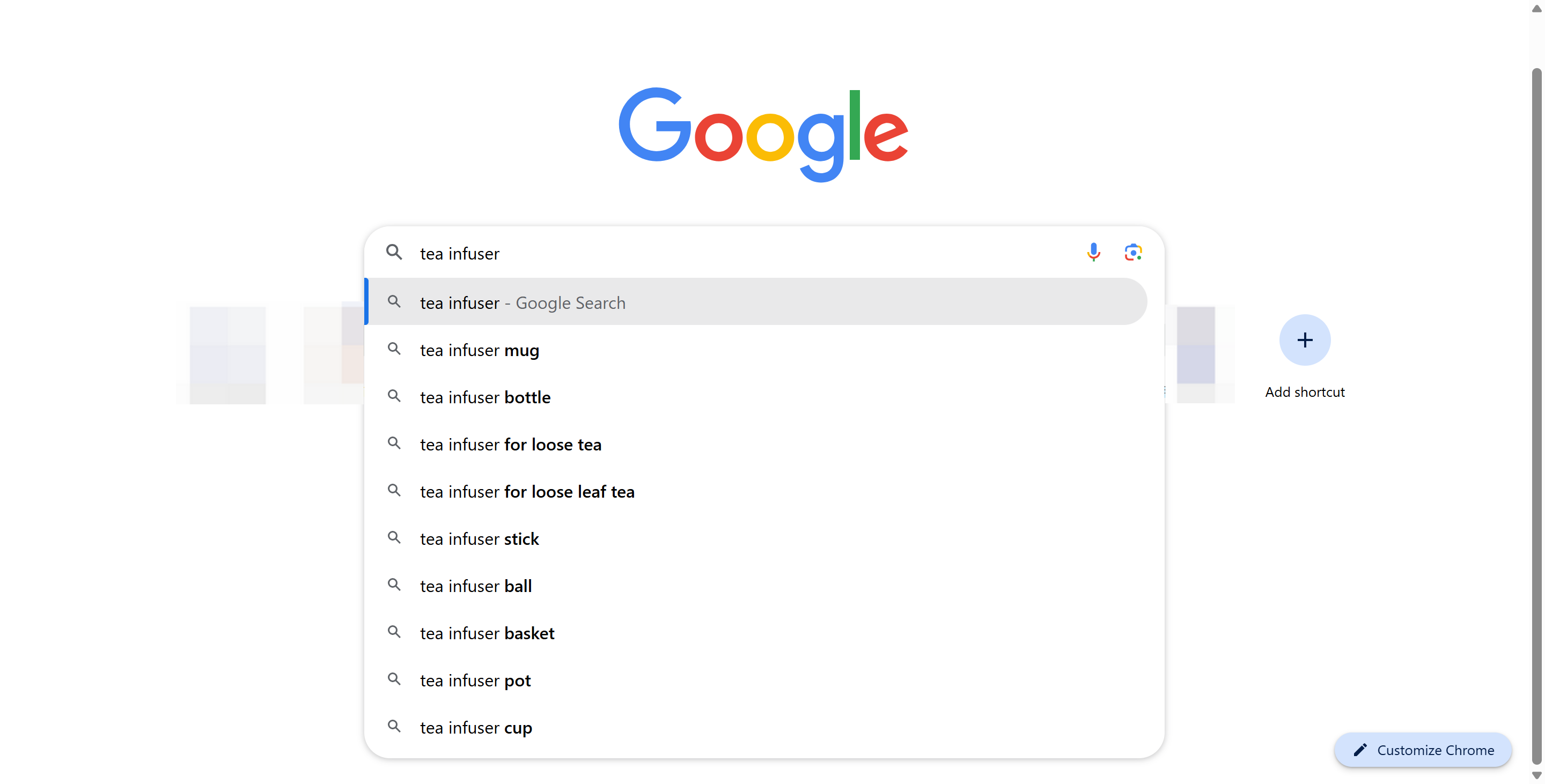
Explore SellerSprite and Google Trends
Jump from Amazon search data to trend signals and confirm demand before you source.
Example case study sidebar 2 (illustrative, GEO)
Teaching example: one niche can look strong in the US but weak in JP, or vice versa. Always localize keywords and re-check trend direction.
- US query: "travel tea infuser bottle" (English)
- DE expansion: add German equivalents for "travel" and "tea infuser", then compare intent and suggestions
- JP expansion: search in Japanese for the product type, then validate Amazon JP suggestions and trend stability
- Decision rule: shortlist markets where demand is steady and competition signals are favorable
Step 6: Build a niche research sheet and prioritize your shortlist
Once you have niche keywords from Amazon, SellerSprite, and Google, put them into one scoring sheet so you can compare opportunities objectively.
What to score
- Demand: Amazon search volume, trend stability, keyword breadth.
- Competition: product count, title density, review barriers, brand concentration.
- Feasibility: sourcing complexity, QA risk, shipping, packaging, compliance.
- Differentiation: clear feature or audience angle, bundle options, improvement opportunities from reviews.
Copyable niche research table header
Copy and paste this into Google Sheets or Excel:
Marketplace (US/UK/DE/FR/IT/ES/JP) | Seed Keyword | Niche Keyword (Long-tail) | Amazon Search Volume | Trend (Up/Flat/Down) | Product Count | Title Density | Avg Price (Top 1-3 pages) | Avg Reviews | Differentiation Notes | Feasibility Notes | Risk Notes | Score (1-10) | Next Action
Tip: keep your first shortlist small. Pick the top 3 niches with enough demand, manageable competition signals, and a clear product improvement plan.
Step 7: Analyze competition and validate the opportunity
The final filter is competition. A niche can have high demand but still be a poor choice if the top results are dominated by strong brands, high review moats, or heavy ad pressure. Use SellerSprite competition metrics and real listing checks to validate.
Competition checks to run
- Competing products: how many listings target the niche directly.
- Title density: how many listings use the exact niche keyword in the title.
- Top listing strength: review counts, rating quality, price clustering, brand dominance.
- Gap signals: recurring complaints and missing features you can solve.
Start Your SellerSprite Free Trial
Create a free SellerSprite account to test product research, keyword tools, and competition analysis on your niche ideas.
Recommended workflow: Amazon to SellerSprite to Extension to AI Insights
Use this simple workflow to move from ideas to validation without skipping steps:
- Amazon Search: seed keyword, autocomplete, buyer intent variants
- SellerSprite Keyword Mining: search volume, variations, trends
- SellerSprite Chrome extension: live listing checks, fast market context while browsing Amazon
- Category and competitor AI insights: deeper market structure, brand concentration, and expansion angles
If you want a fast start, keep your first cycle to 60 minutes and walk away with only 3 shortlisted ideas.
View The SellerSprite Course Directory
Ready for the next step? Open the SellerSprite Academy course directory to continue building your Amazon FBA skills chapter by chapter.
Key Takeaways
- Amazon autocomplete reveals real buyer intent and is the fastest way to discover niche directions.
- SellerSprite keyword data helps you validate demand before you invest time in sourcing.
- Google autocomplete and Trends can reveal feature language and confirm broader demand across regions.
- Score niches in one sheet so you can compare opportunities objectively and avoid emotional picks.
- Prioritize niches with clear differentiation paths, not just big search volume.
- High demand is only half the equation; always validate competition with product counts and title density.
- Keep your shortlist small and run faster validation cycles to avoid analysis paralysis.
- Use a repeatable workflow so your research stays consistent across US, EU, and JP marketplaces.
Data sources and disclaimer
Data source: SellerSprite metrics referenced in this guide are derived from the SellerSprite database and Amazon front-end signals. Different data modules update on different cycles.
- Extension data: typically fetched in real time from Amazon when you query.
- Sales estimates: typically refreshed daily.
- Keyword metrics (like search volume): typically updated monthly, with trend selections updated weekly.
- Tracking and monitoring: typically updated daily on a rolling basis.
Disclaimer: All examples and numbers shown in this article are for teaching and demonstration only. Always verify the latest values inside SellerSprite and in your target Amazon marketplace before making inventory or sourcing decisions.
About the author and team
SellerSprite Content Team
We publish data-driven playbooks for Amazon sellers, focused on repeatable workflows for product research, keyword research, and competition validation.
- Built for Amazon sellers worldwide and refined over 8+ years of tool development and seller education.
- Used by 1.6M+ registered Amazon sellers and supported by a large extension user base.
- Our guides are designed to be practical: you should be able to follow the steps and produce a shortlist within one session.
References
- SellerSprite Data Update Frequency
- SellerSprite Google Trends Guide
- SellerSprite Keyword Mining
- SellerSprite Extension download and installation
Get Help From the SellerSprite Community
Share your product research situation, get feedback, and learn from other sellers in the SellerSprite Discord and Facebook Group.