If you are asking "how many sales do I need to rank on Amazon," you are asking the right question, because ranking is mostly sales velocity tied to a keyword.
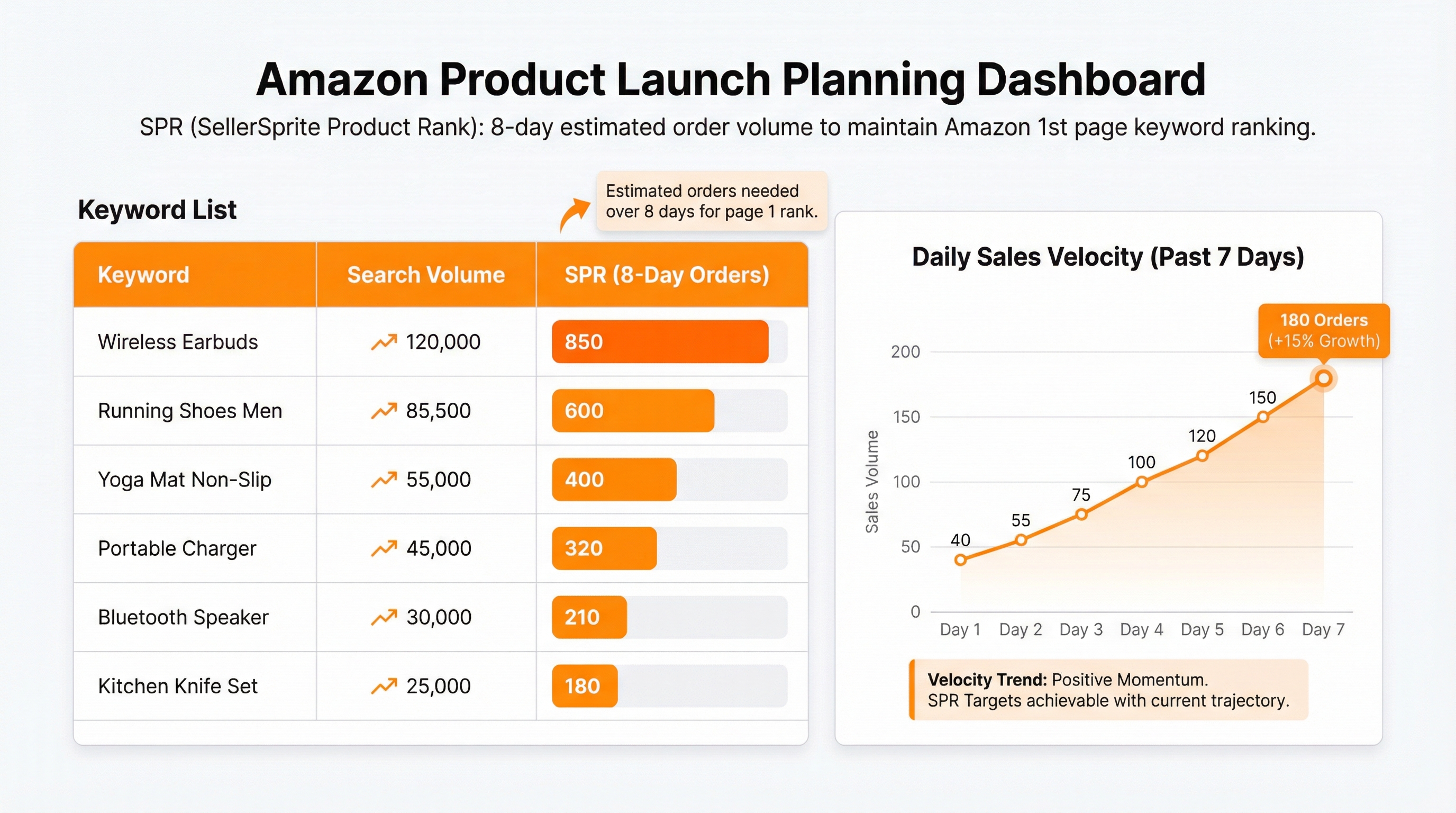
The fastest practical answer is this: use SellerSprite metric SPR(SellerSprite Product Rank) to estimate sales you need to rank on first page for certain keyword, then plan an eight-day sales sprint that looks natural and sustainable.
While you build that momentum, you also need reviews to lift the conversion rate. You do not need shortcuts. You need repeatable, policy-safe systems: Vine (if eligible), Request a Review, value-driven inserts, and consistent sales volume.
This chapter focuses on Amazon US as the primary example. The workflow is similar across other marketplaces, but availability, fees, and timelines may vary, so always confirm in your Seller Central account for your target marketplace.
Key Takeaways
- SellerSprite SPR gives a practical estimate of how many sales you need in an eight-day window to rank on page one for a keyword.
- Long-tail keywords usually require fewer sales to rank, making them the fastest path to early organic traction.
- A steady sales curve over several days is typically more stable than a one-day spike.
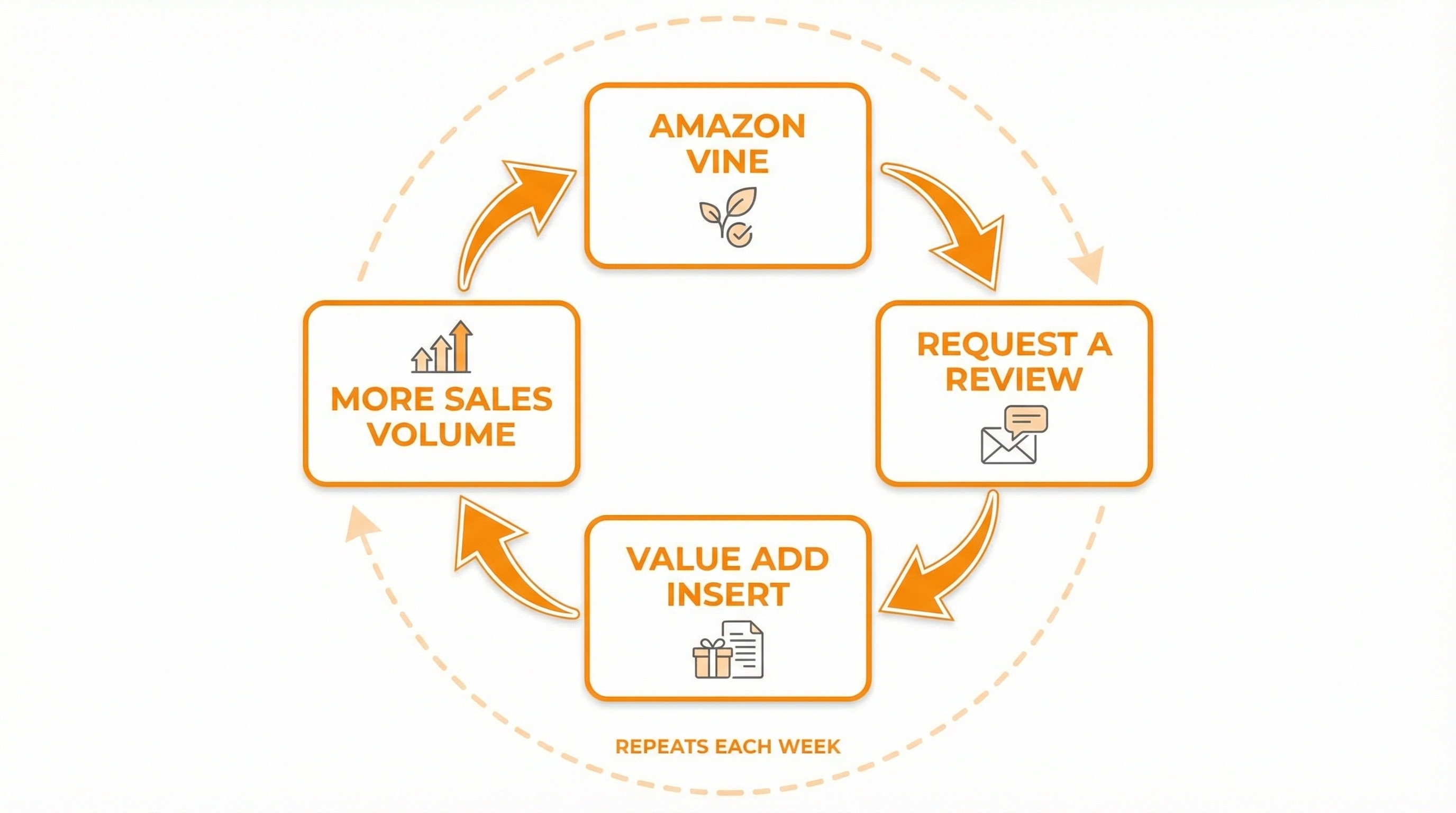
- Your review strategy should be system-based: Vine (if eligible), Request a Review, a better-than-expected experience, and increased sales volume.
- Do not ask for positive reviews or offer incentives. Build value and support, then let customers decide.
- Track rank and keyword progress with SellerSprite so you know what to double down on and what to drop.
Table of Contents
What Does Sales Needed to Rank on Amazon Mean
When sellers ask, "how many sales do I need to rank on Amazon", they are really asking about Sales to Rank. This is a way to estimate the sales velocity required for a product to climb toward page one for a specific keyword.
In SellerSprite, this is commonly reflected as SPR, a practical estimate tied to an eight-day window that helps you plan a launch sprint and avoid blind spending.
Why it matters
- It turns keyword ranking into a measurable target, not a feeling.
- It helps you pick realistic keywords for a new listing, especially long tail terms.
- It helps you plan spend and inventory so you do not run out of stock mid-sprint.
Common pitfalls
- Only targeting a high-competition head term, then burning budget without ranking.
- Trying to force ranking with one day spikes instead of stable sales velocity over time.
- Chasing rank without improving conversion rate, reviews, and listing relevance.
How Many Sales Do You Need to Rank on Amazon
Here is the practical answer: you cannot reliably calculate this by hand. Use SellerSprite SPR as your planning baseline, then validate through tracking.
Steps
- Build your launch keyword shortlist. Use SellerSprite Keyword Research and Keyword Mining to generate keyword ideas, then use Reverse ASIN to pull keyword data from top competitors.
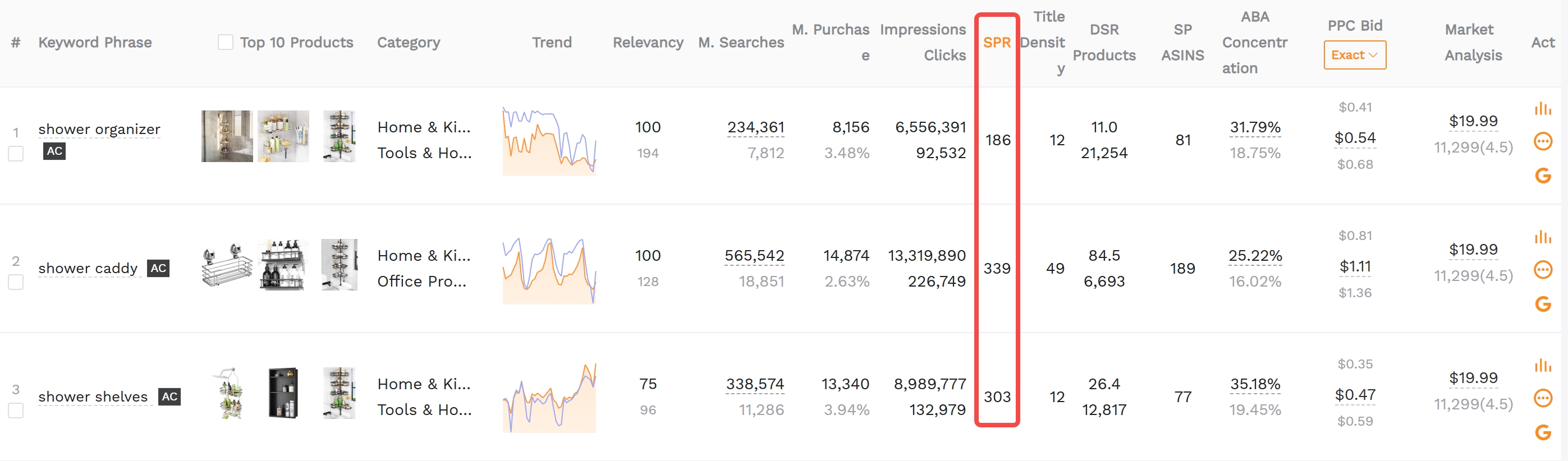
- Check the SPR for each target keyword. In the keyword results table, locate the SPR metric and record it for each keyword you want to rank for.
- Convert the SPR into a daily sales target. Treat SPR as an eight day target. Divide the number by 8 to get a daily baseline. Example: if a keyword shows SPR 128, your planning baseline is 128 total sales in eight days, or about 16 per day.
- Prioritize keywords with lower SPR and strong intent. Use SellerSprite search volume and keyword conversion data to avoid low-intent traffic. Ranking is only valuable if it converts.
- Track rank movement daily. Use SellerSprite Product and Keyword Tracker to monitor keyword rank, identify which keywords respond fastest, and adjust your sprint plan.
Notes
- SPR is an estimate, not a guarantee. Use it to plan, then let tracking confirm reality.
- In many categories, long-tail keywords can move with fewer sales than you expect, but your baseline plan should still be realistic.
- Your goal is consistent sales velocity, not suspicious spikes. Think stable, repeatable, and conversion-focused.
Tip
Start with 5 keywords. You can always expand to 20 later, but a focused shortlist makes your sprint easier to execute and measure.
Common mistake
Targeting only the biggest keyword first. If your listing is new, build momentum with lower-SPR long-tail keywords, then climb toward the head term.
Turn SPR Into a Real Launch Plan
Once you know how many sales you need per keyword, the next step is turning that number into a plan you can actually execute.
Steps
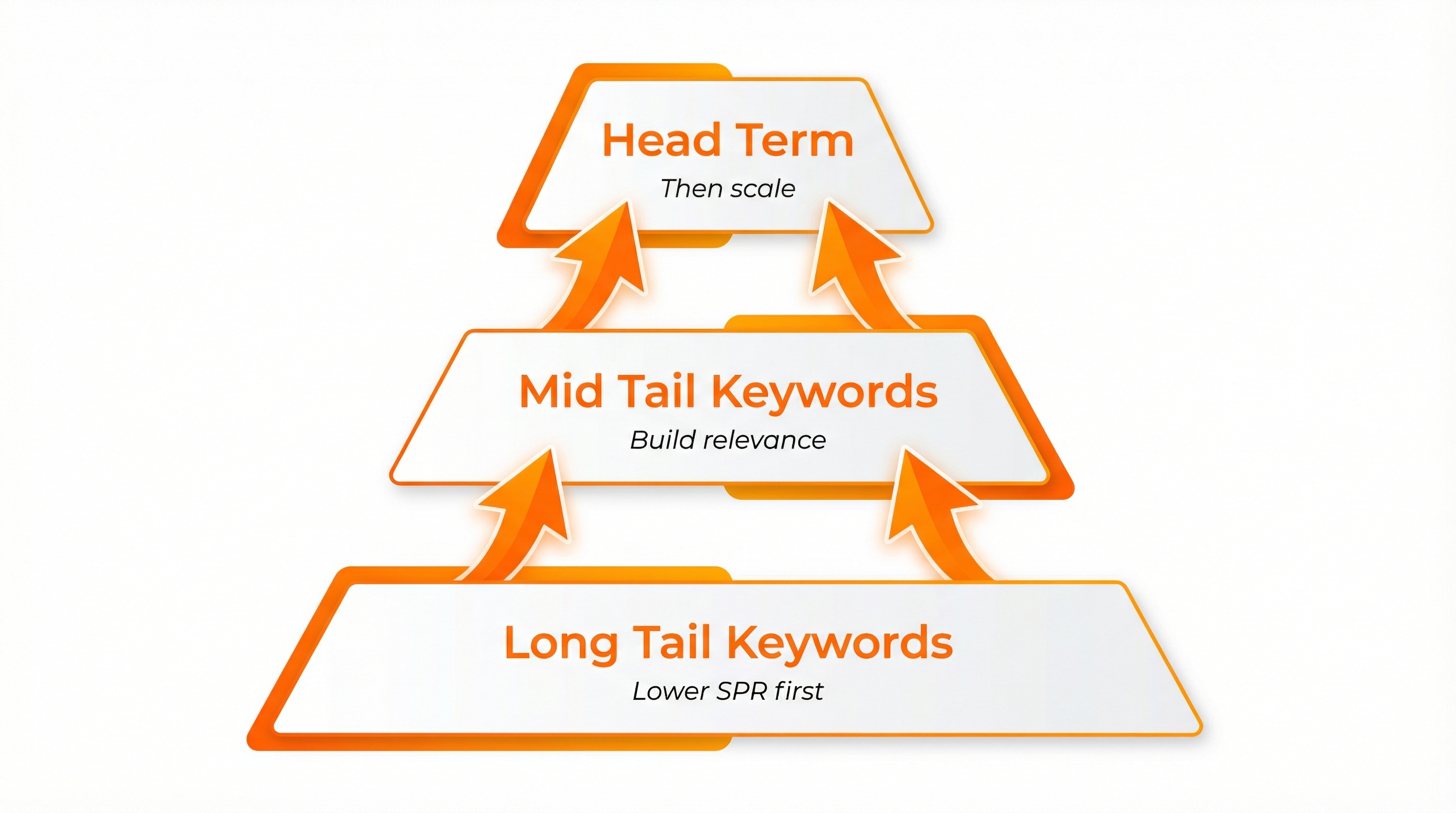
- Pick 2 to 3 low-SPR long-tail keywords to win first. These keywords usually require fewer sales to rank and bring in earlier organic orders that support the rest of your sprint.
- Add 1 to 2 mid-tail keywords as your second wave. These terms build relevance and help you bridge toward your main head term.
- Set a daily sales target per keyword. Use the SPR baseline, then decide how you will distribute sales across your keyword group based on intent and budget.
- Validate that your listing is indexed. Before you push traffic, confirm your listing is indexed for your target terms. This prevents wasted spend and slow results.
- Track and iterate. Use SellerSprite Product and Keyword Tracker to watch ranking movement. Keep what moves, pause what does not, and keep your sales velocity smooth.
Notes
- A keyword sprint works best when listing relevance, price, images, and reviews are improving at the same time.
- Do not over-optimize for rank only. Conversion rate protects your ad spend and helps organic stick.
- If you rank earlier than expected on a long tail keyword, you can reduce pressure and reallocate budget to the next keyword in the ladder.
Quick exercise
Create a simple spreadsheet with these columns: Keyword, Search Volume, SPR, Daily Target, Current Rank, Notes. Fill it with your first 5 keywords, then update the rank once per day for 8 days.
4 Amazon Compliant Ways to Get Your First Reviews
Reviews are not just social proof. They raise conversion rates, making every ranking push cheaper and more effective.
Your goal is to build a system that earns reviews naturally, without violating policy.
Policy reminder
Do not ask for a positive review. Do not offer money, gifts, discounts, or bonuses in exchange for a review. Keep your customer support message focused on help, not review pressure.
Method 1: Amazon Vine program
Vine is one of the cleanest ways to seed early reviews because Amazon manages the reviewer side of the program.
Steps
- Open Seller Central and look for the Vine option in your available programs.
- Enroll the correct ASIN or variation group based on your marketplace rules.
- Confirm the current fee and the product quantity requirements inside Seller Central before submitting.
- Monitor reviews as they arrive, and use feedback to improve listing clarity and customer experience.
- Best for: Brand registered sellers who want early review velocity.
- Watch out: Reviews are honest and can vary. Make sure your product and listing set accurate expectations.
Method 2: Request a Review every week
Amazon gives you a built in Request a Review button on orders. If you click it consistently, review volume becomes a routine, not a mystery.
Steps
- In Seller Central, go to Orders, then Manage Orders.
- Open recent orders and click Request a Review on eligible orders.
- Repeat weekly so you never fall behind.
Optional speed boost with SellerSprite
If you want to save time, SellerSprite Browser Extension includes a Review Requests feature that can help you batch request reviews more efficiently.
Method 3: Add value so experience beats expectations
A simple mental model is: reviews are driven by experience minus expectations. If you deliver more value than expected, customers are more likely to leave a positive review naturally.
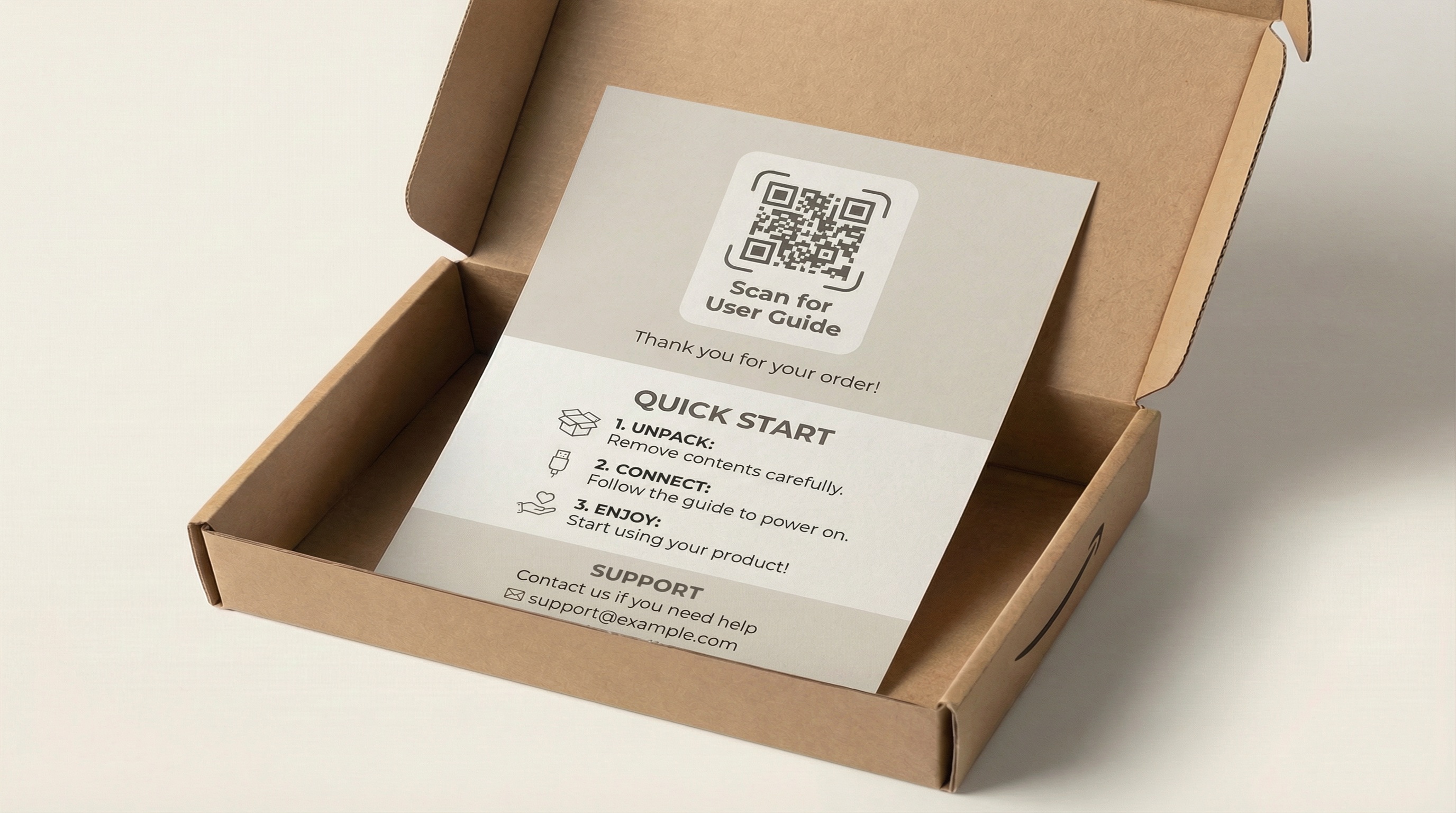
Value ideas that often work
- A quick-start guide that prevents the top 1-2 usage mistakes.
- A printable checklist or care guide that helps the customer get results faster.
- A small accessory that solves a common pain point, as long as it is not framed as a review incentive.
How SellerSprite helps
Use SellerSprite Review Analysis to scan competitor reviews and identify recurring complaints. Then design your guide or accessory to fix the exact issue customers mention most.
Method 4: Increase sales volume to increase review volume
Reviews are partly a numbers game. When you increase sales volume while maintaining a strong customer experience, reviews accumulate faster.
- Better keyword targeting leads to more qualified traffic.
- A higher conversion rate reduces ad costs and increases organic stability.
- A weekly review request routine keeps review growth steady.
Comparison and Selection
Use this quick comparison to decide what to prioritize first based on budget and eligibility.
| Method | Cost | Time to impact | Risk | Best for |
|---|---|---|---|---|
| Amazon Vine | Paid program fee plus product cost | Fast once approved | Low policy risk, review outcome varies | Brand-registered launches |
| Request a Review | Free | Medium, consistent over weeks | Very low if used correctly | Every seller, every ASIN |
| Value add insert | Low to medium | Medium, increases satisfaction quickly | Low if compliant, high if you solicit reviews | Brands improving experience and differentiation |
| More sales volume | Depends on ads and promo strategy | Medium to long term | Low if traffic is qualified | Scaling phase, after product market fit |
Recommendation: If eligible, start with Vine and weekly review requests. In parallel, use SellerSprite SPR to rank on low SPR keywords first, because higher conversion and higher sales volume make every review method work better.
Examples and Templates
Example 1: Sales to rank the sprint plan
Use this structure for your first five keywords. You can build it in a spreadsheet in 10 minutes.
| Keyword | SPR | Daily target | Current rank | Notes |
|---|---|---|---|---|
| Long-tail keyword A | 8 | 1 per day | Track daily | High intent |
| Long-tail keyword B | 16 | 2 per day | Track daily | Great fit |
| Mid-tail keyword C | 40 | 5 per day | Track daily | Bridge term |
| Head term keyword D | 128 | 16 per day | Track daily | Scale after momentum |
Example 2: Weekly review routine
- Every Monday: Request a Review for eligible orders from the prior week.
- Every Wednesday: Check new reviews, respond to issues, and update your listing clarity if needed.
- Every Friday: Review rank trends in SellerSprite and adjust which keywords you push next week.
Copy and paste template
Use this insert copy as a compliant baseline. It enhances the customer experience without asking for reviews.
Insert text template
Quick Start
1) Unbox and check all parts.
2) Scan the QR code to view the setup guide and best practices.
3) If anything is missing or you need help, contact our support, and we will make it right.
Support
Message us via Amazon Buyer-Seller Messaging. We respond quickly and want you to have a great experience.
FAQs
Q1: Is SPR an exact number of sales I must hit?
A: No. Treat SPR as a planning estimate. It gives you a practical target, but real results depend on listing relevance, category competition, conversion rate, and traffic quality.
Q2: Can I rank with fewer sales than the SPR estimate?
A: Yes, especially on long-tail keywords. But using the SPR baseline keeps your plan conservative and reduces surprises.
Q3: How long should my ranking sprint run?
A: A practical starting point is an eight-day sprint because it helps you spread sales velocity across multiple days. After you gain traction, keep monitoring and adapting week by week.
Q4: Is Amazon Vine free?
A: Vine typically includes a program fee and product cost. Fees and eligibility can vary by marketplace, so confirm inside Seller Central.
Q5: Do product inserts violate Amazon policy?
A: Inserts can be compliant if they focus on setup help and support, and do not request positive reviews or offer incentives for reviews. When in doubt, keep your message support-focused and policy-safe.
Q6: What if I do not have Vine access yet?
A: That is fine. Use weekly Request a Review, improve the customer experience with better guidance, and focus your ranking sprint on low-SPR keywords first to increase sales volume and review opportunities.
Summary and Next Steps
Ranking and reviews are not separate goals. When you plan sales velocity with SellerSprite SPR and build a compliant review routine, your conversion rate improves, and your ranking spend becomes more efficient.
Start small, measure daily, and keep your system consistent. Momentum is built through repetition, not one-time hacks.
Next step action checklist
- Use SellerSprite Keyword Research tools to shortlist 5 launch keywords and record SPR.
- Create an eight-day sprint plan with daily sales targets and track rank movement.
- Start your weekly review routine and improve customer experience with a compliant insert.
Share Your Sourcing Journey With SellerSprite Community
Join the SellerSprite community on the Facebook Group to share your sourcing journey, ask questions, and get support from fellow Amazon sellers.
View The SellerSprite Course Directory
Ready for the next step? Open the SellerSprite Academy course directory to continue building your Amazon FBA skills chapter by chapter.
About the author
SellerSprite Team publishes practical, step-by-step playbooks for Amazon sellers, combining platform data, SellerSprite workflows, and execution focused templates so you can launch and scale with fewer mistakes.


