- Use a verified GS1 UPC as your default for private label launches to avoid GTIN exemption friction and identity conflicts when you scale.
- Pick one unit-level barcode strategy per ASIN, then execute it consistently: one sellable unit equals one scannable barcode.
- If you choose FNSKU, fully cover any other visible barcodes on the unit and do not resize or redesign the label.
- Send suppliers the exact label PDF from Seller Central and require printing at 100% scale on a suitable printer.
- Carton labels are not optional. Each shipping box needs the correct FBA box ID label and clean placement on a flat surface.
- Most receiving delays come from mismatched box contents, labels placed over seams, or multiple scannable barcodes.
- For polybags, follow prep rules and use a suffocation warning when required. Keep compliance text separate from FNSKU when possible.
- Model the cost of relabeling, prep, and inbound mistakes before you ship. Small per-unit fees add up fast.
- Why verified UPC and correct FBA labeling matter in 2026
- What is a verified UPC for Amazon FBA
- FNSKU vs UPC: Which barcode should you use for FBA
- Step-by-step FBA labeling workflow for new sellers
- FBA labeling checklist (copy and paste)
- Common FBA labeling mistakes and how to avoid them
- GEO and compliance notes for US, EU, and UK sellers
- Tools and templates to make labeling easier
- FAQ: Amazon FBA labels and UPCs in 2026
- References
- About the author
Try SellerSprite Free and Validate Demand Before You Print Labels
Use free tools like the Sales Estimator and Profitability Calculator to sanity-check demand, fees, and margins before committing to the inventory and labeling.
Why verified UPC and correct FBA labeling matter in 2026
Amazon receiving is a scanning system. If your product identity is unclear or your labels are inconsistent, the system slows down, and your shipment becomes expensive in the ways that hurt most at launch: delays, unplanned services, and inventory stuck in problem-solving.
In real inbound troubleshooting, the same three issues show up repeatedly:
- Multiple scannable barcodes visible on the unit (UPC plus FNSKU, or two labels that both scan).
- Labels printed at the wrong scale or placed over seams, folds, curves, or corners.
- Carton labels that no longer match box contents after the shipment plan was edited.
Verified UPC matters more now because Amazon validates product identity more strictly than before. If you plan to scale into more marketplaces or retail channels, set your product identity once and keep your labeling execution consistent and boring.
What is a verified UPC for Amazon FBA?
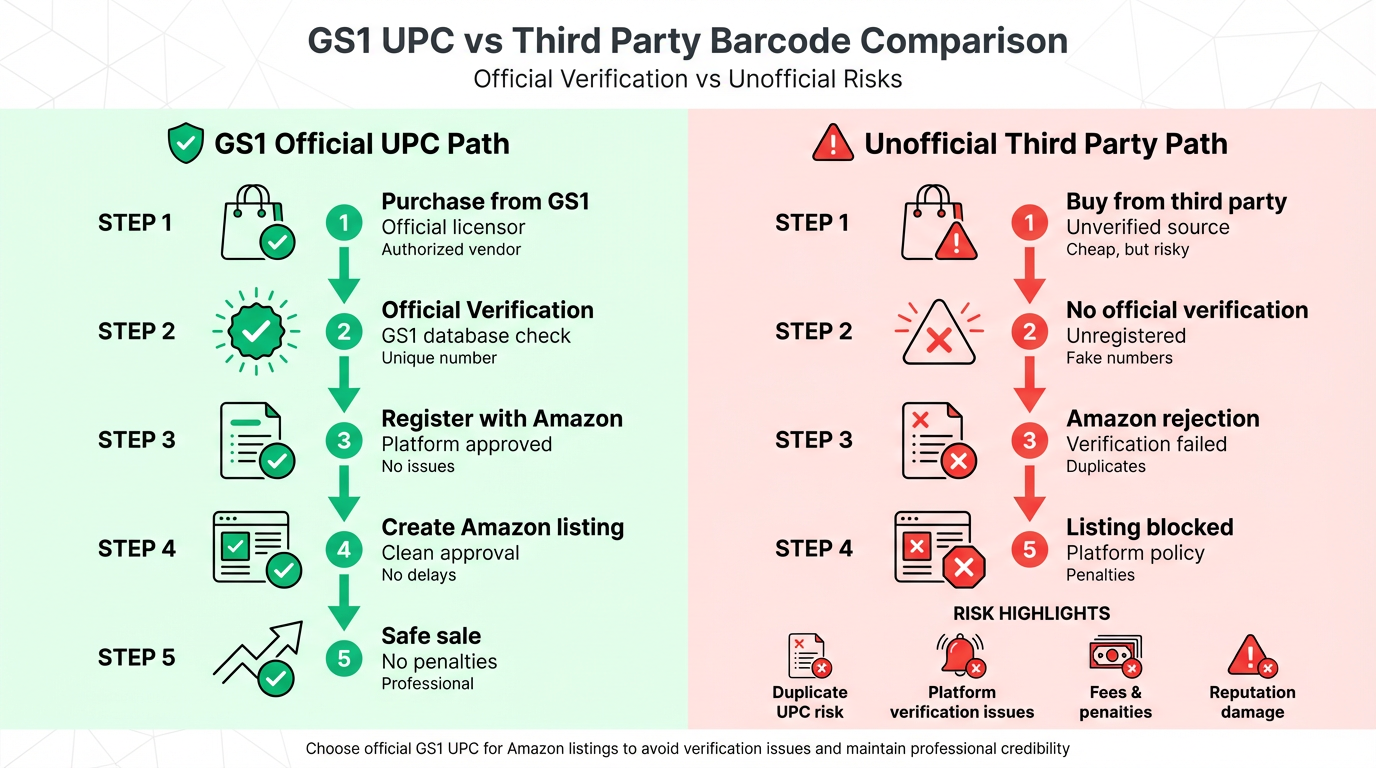
A verified UPC is a UPC issued by GS1 and tied to the company that owns the brand and product identity. Practically, it reduces listing creation friction and lowers the risk of identity conflicts because it can be validated against GS1 records.
GS1 registered UPC vs cheap third-party codes
Cheap barcode bundles from unofficial sellers can look like a shortcut, but they often create long-term risk: duplicates, mismatched prefixes, or verification failures when platforms tighten checks. If you want a clean, scalable launch, avoid identity shortcuts.
When the GTIN exemption is still useful
GTIN exemption can still make sense for narrow scenarios like short experiments, but it is rarely the best default for a private label brand planning to scale. The hidden cost is time: applications can bounce, require resubmission, and slow down listing creation.
FNSKU vs UPC: Which barcode should you use for FBA
Amazon supports both manufacturer barcodes (UPC, EAN, ISBN) and Amazon barcodes (FNSKU). The real question is which option produces fewer inbound problems for your operation.
Step-by-step FBA labeling workflow for new sellers
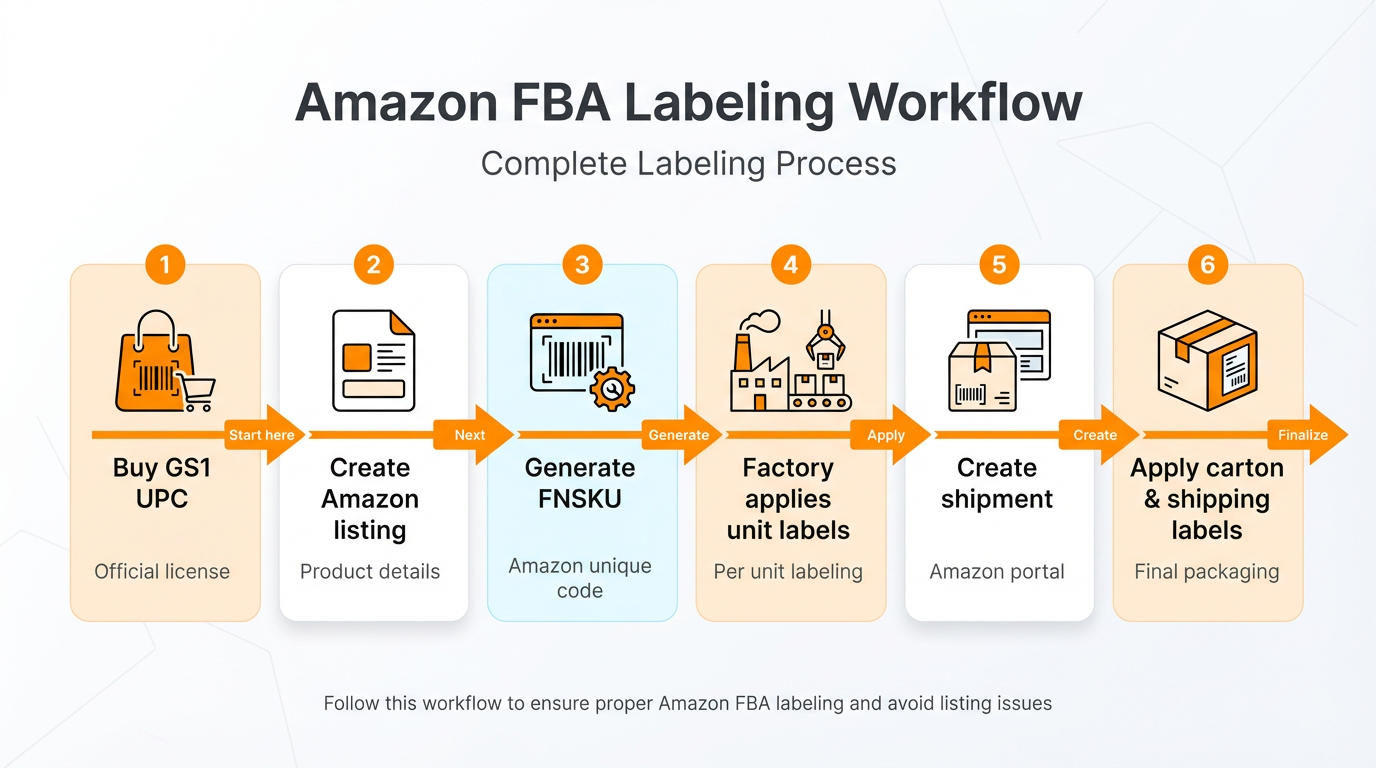
Step 1: Purchase a GS1 UPC and create your listing
- Buy your UPC from GS1 and store GTIN records in a shared folder your team can access.
- Create the listing using the verified UPC so product identity stays stable across channels.
- Standardize naming conventions early (product family, size, pack count) to reduce catalog cleanup later.
Step 2: Decide barcode preference and generate FNSKU labels
In Seller Central, convert the offer to FBA if needed, then print item labels (FNSKU) for the sellable unit. Send the label PDF to your supplier and require printing at 100% scale.
Step 3: Apply FNSKU labels at the factory (unit level)
Require one label per sellable unit. Place the label on a flat scannable surface, not over seams, folds, or curves. If packaging already has a UPC printed, the FNSKU must fully cover it so only one scannable barcode remains visible.
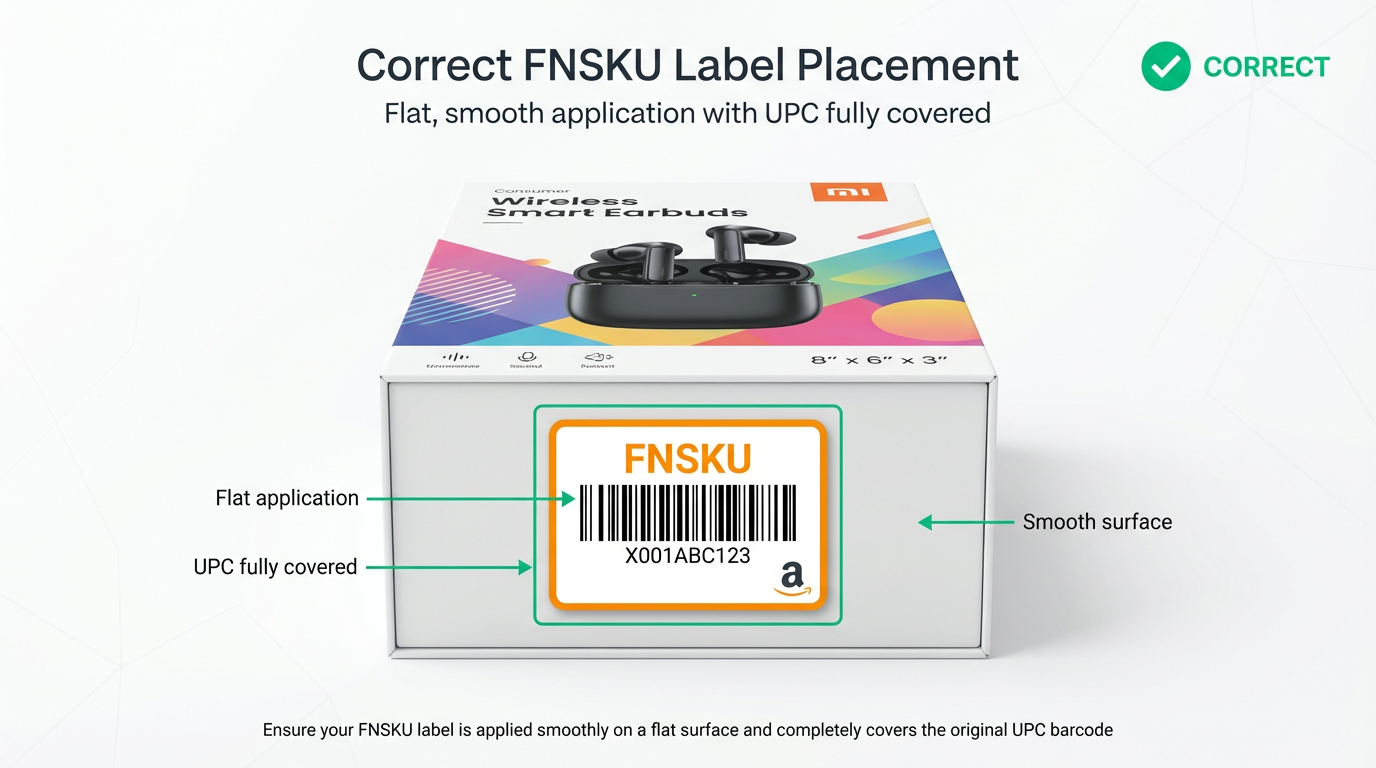
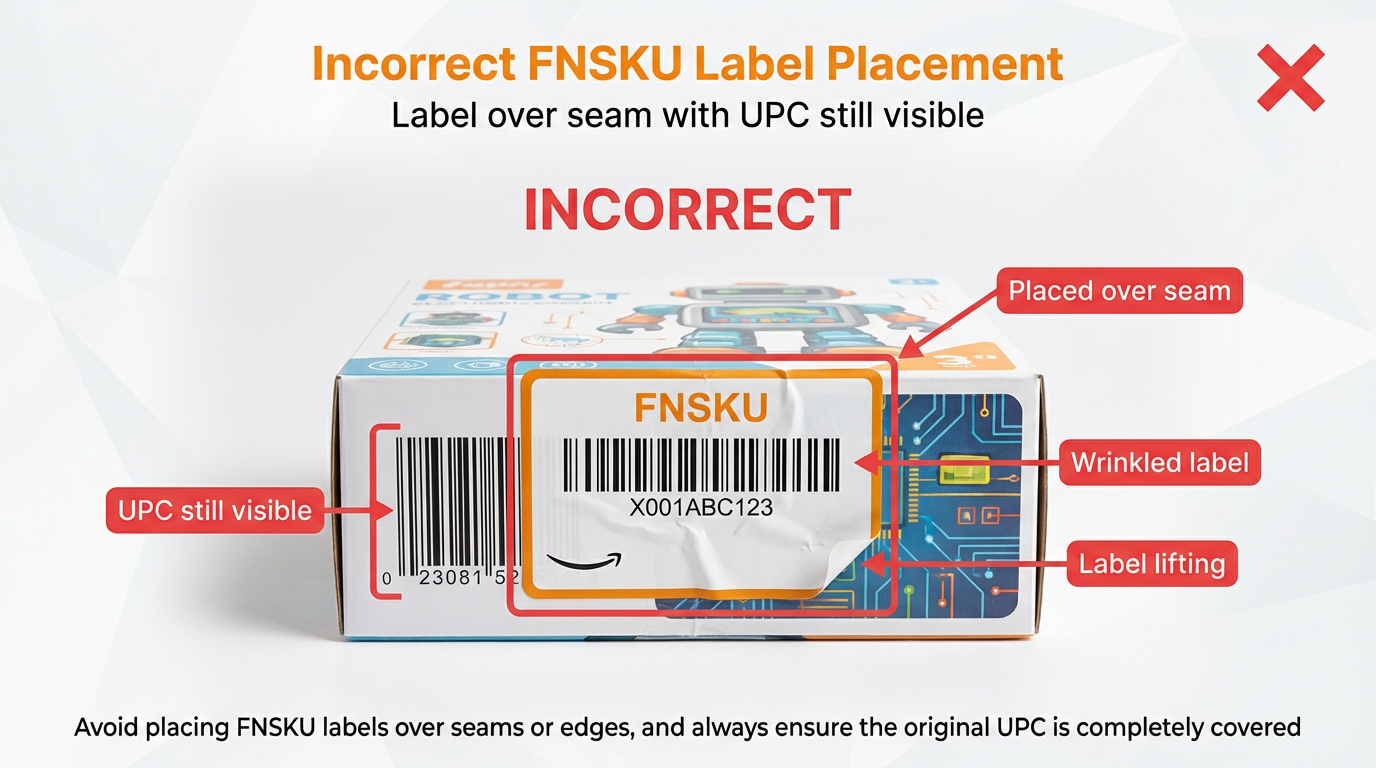
Figure 4. Incorrect FNSKU label placement on a retail box.
Step 4: Prep and compliance labels (keep separate when possible)
- Country of origin: print on the product or add a durable sticker like "Made in China".
- Polybags: if required, use a suffocation warning and keep the barcode scannable without opening the bag.
- Keep warnings, symbols, and branding labels separate from FNSKU whenever possible.
- Print item labels at 100% scale (no scaling) and test scan before mass production.
- Use a thermal or laser printer where possible. Avoid low-quality inkjet output for barcodes.
- Keep whitespace around the barcode and do not cut into the quiet zone.
- Place labels on flat surfaces and away from seams, edges, and corners.
- If you use common label sheets, Seller Central supports multiple templates, including 1 inch x 2 5/8 inch (about 25.4 mm x 66.7 mm) on US Letter.
Step 5: Carton labels and shipping labels (box level)
Carton-level labeling is where clean launches often break. Amazon box ID labels are unique per carton and must match the box contents you declared. If you edit box counts or contents after printing, reprint the full set of labels and reapply them correctly.
SHIPPER:
[Company name or supplier name]

PRODUCT:
[Product name] | [SKU or internal code]

CARTON:
Carton No: [1 of X]
Units per carton: [Qty]

CARTON SIZE:
[L x W x H] inches ([L x W x H] cm)

GROSS WEIGHT:
[XX] lb ([XX] kg)

COUNTRY OF ORIGIN:
Made in China
FBA labeling checklist (copy and paste)
- Barcode choice confirmed: manufacturer barcode or FNSKU, documented in your SOP.
- One sellable unit equals one barcode label, pack logic confirmed for bundles and multipacks.
- If using FNSKU: any printed UPC on packaging is fully covered, no extra scannable barcodes visible.
- Unit labels printed at 100% scale and test scanned.
- Label placement confirmed with supplier photos before mass labeling.
- Compliance labels handled separately: origin, warnings, and required symbols as applicable.
- Carton shipping mark applied with weight, dimensions, and country of origin.
- Shipment plan created and box content information completed accurately.
- Each carton has the correct FBA box ID label, placed on a flat surface away from edges and seams.
- Old labels removed or covered if reusing boxes. No tape over barcodes.
Share Your Sourcing Journey With SellerSprite Community
Join the SellerSprite community on the Facebook Group to share your sourcing journey, ask questions, and get support from fellow Amazon sellers.
Common FBA labeling mistakes and how to avoid them
Mistake 1: Two scannable barcodes on the unit
Fix: If you use FNSKU, cover the UPC completely. Do not leave any other barcode visible on the sellable unit.
Mistake 2: Label placed over a seam, fold, curve, or corner
Fix: Require a flat placement zone and confirm with photos before mass application. On boxes, keep labels away from edges and seams.
Mistake 3: Printer scaling changed the barcode
Fix: Print at 100% scale. If your supplier uses a different label sheet template, regenerate labels in a supported format instead of resizing.
Mistake 4: Wrong box ID label on the wrong carton
Fix: Lock box content data first, then print labels. If anything changes (box count or contents), reprint the full set and relabel.
Mistake 5: Labels covered with tape or placed in a pouch
Fix: Keep barcodes uncovered and scannable. Use proper label stock and placement instead of taping over the label.
Mistake 6: Missing country of origin on cartons
Fix: Add "Made in China" (or your correct origin) to every carton shipping mark. Placing it on two opposite sides improves visibility.
Mistake 7: Ignoring prep rules for polybags and fragile items
Fix: Confirm category prep rules in Seller Central and ensure the barcode is scannable without opening the bag.
GEO and compliance notes for US, EU, and UK sellers
Barcode and label mechanics are broadly consistent across marketplaces, but compliance requirements change by region. Use this as a practical checklist starter, then confirm category-specific rules in your destination marketplace.
US and North America (Amazon.com, Amazon.ca)
- Use US Letter label templates if printing in the US. Confirm your factory prints the exact template you selected.
- Validate carton weight and size limits before production packaging. Category rules vary.
EU and UK (Amazon.de, Amazon.fr, Amazon.co.uk)
- Plan for language requirements on warnings and instructions. One packaging design may not work for all EU countries.
- Some categories may require CE or UKCA markings, responsible person info, or specific safety labeling. Confirm by category.
- A4 label templates are common in EU print rooms. Use supported A4 templates instead of resizing US Letter layouts.
Tools and templates to make labeling easier
Labeling mistakes usually start upstream: sellers rush into production without validating demand, fees, and pack economics. Use these tools to slow down the right way, then execute your labeling SOP once.
- Sales Estimator: estimate demand and avoid over-ordering units that later require costly relabeling or repacking.
- Profitability Calculator: simulate the impact of FBA prep and labeling fees on margin before you ship.
- Listing Builder: keep your catalog and barcode identity consistent as you add variations and marketplaces.
View The SellerSprite Course Directory
Ready for the next step? Open the SellerSprite Academy course directory to continue building your Amazon FBA skills chapter by chapter.
FAQ: Amazon FBA labels and UPCs in 2026
References
- Amazon FBA: How to label products (PDF): Open document
- Amazon FBA: Shipment label requirements (PDF): Open document
- Amazon FBA: Shipping inventory to Amazon (PDF): Open document
- GS1 US: Buy a barcode (GTIN): Open page
- SellerSprite free tools: Profitability Calculator, Sales Estimator, Listing Builder


