Click-through rate (CTR) is one of the fastest levers you can pull to increase traffic to your Amazon listing. More clicks from the same impressions means more sessions, more chances to convert, and a clearer signal that your offer is relevant on the search results page.
This guide focuses on Amazon.com (US) by default. If you sell in the UK, EU, or JP, the principles stay the same, but character limits, shopper behavior, and category norms can differ. In SellerSprite, simply switch your marketplace before keyword and competitor analysis.
In this guide, you will learn:
- What Amazon CTR is and how to calculate it for organic search and ads
- What a good CTR means in context (organic vs ads, brand vs generic, mobile vs desktop)
- Why CTR impacts sales efficiency and how it connects with CVR and ACoS
- A SellerSprite workflow to diagnose CTR problems and prioritize fixes
- 14 practical main image strategies to win more clicks, plus a safe testing loop
Key takeaways
- CTR is the bridge between impressions and sessions. Improve CTR, and you can unlock more sales without increasing traffic spend.
- On the search results page, the main image is the highest leverage CTR driver because titles often truncate on mobile.
- A good CTR is not one universal number. Your best benchmark is your category peers (ads) and your own historical baseline (organic and ads).
- Fix relevance first (keyword intent and targeting), then fix presentation (main image, title, price cues), then iterate with controlled tests.
Table of contents
- What Is Amazon's Click-Through Rate (CTR)
- What Is a Good CTR on Amazon
- Why CTR Matters for Sales, Rank, and ACoS
- Key Factors That Influence CTR
- Diagnose CTR: Organic vs Ads, Brand vs Generic
- Step by Step: Improve CTR With SellerSprite
- 14 Main Image Strategies to Win More Clicks
- FAQ About Amazon CTR
- Implementation Action List
- About the author
- References
What Is Amazon Click-Through Rate (CTR)
CTR measures how often shoppers click after they see your product in search results or an ad placement. Conceptually, it answers one question: when shoppers see your thumbnail, price, rating, and title, do they choose you or scroll past?
Definition and formula
- Ads CTR: Clicks divided by impressions, multiplied by 100
- Organic CTR: Click behavior on the search results page. Depending on the report, you may see sessions, clicks, or click share. Treat these as your click indicator relative to impressions.
A beginner-friendly way to visualize the Amazon funnel is:
- Impressions: how many times shoppers see you
- Sessions: how many visits your listing receives
- Unit session percentage: how often sessions turn into orders (a close proxy for conversion rate on the detail page)
CTR math example you can reuse
If you have 1,000,000 impressions and a 1% CTR, you get 10,000 sessions. If your unit session percentage is 10%, that is about 1,000 orders.
Increase CTR to 1.5% with the same impressions and the same unit session percentage, and you get 15,000 sessions and about 1,500 orders. That is 500 extra orders from one lever, without changing
conversion rate.
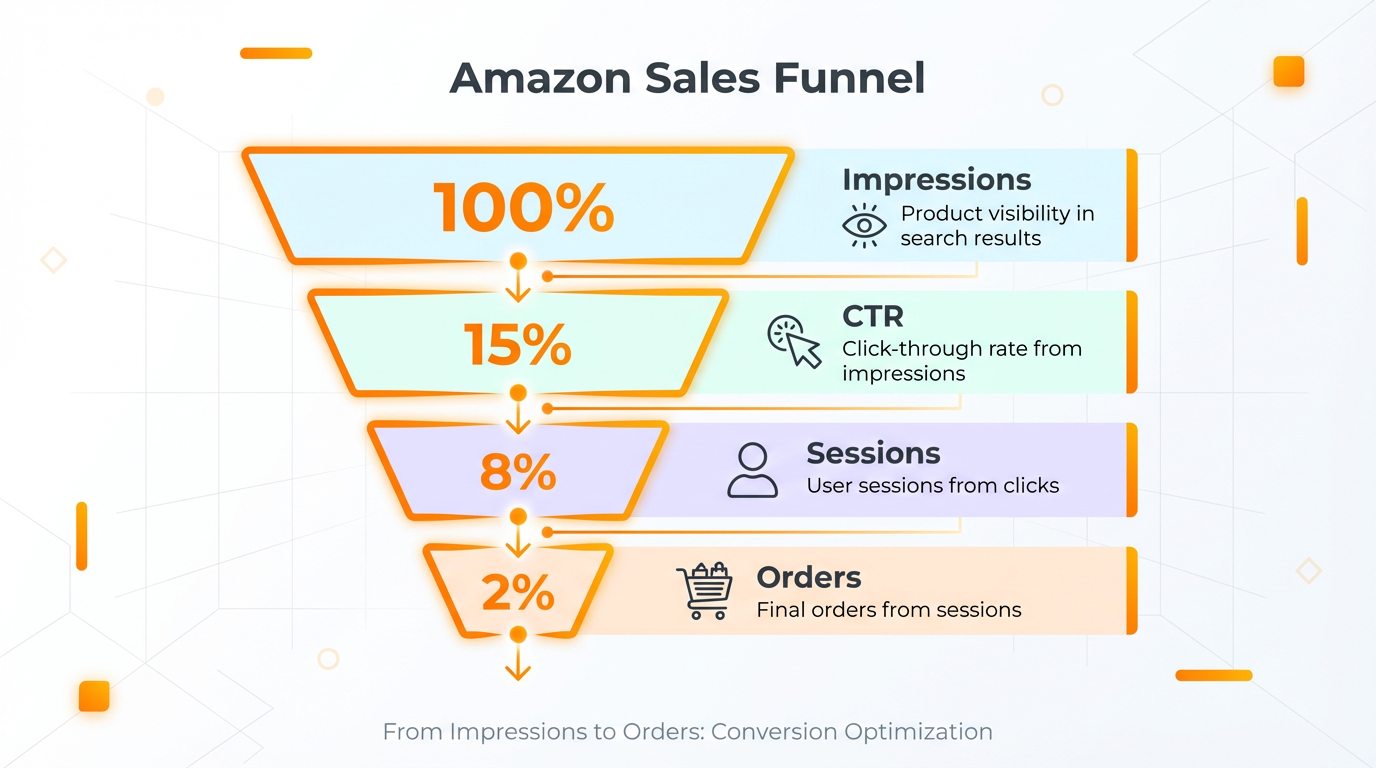
- CTR is the middle of the funnel. It determines how many impressions turn into listing visits.
- Small CTR lifts can produce meaningful order lifts, even when the conversion rate stays the same.
What Is a Good CTR on Amazon
A good CTR is contextual. The right benchmark depends on where the impression happened, which keyword triggered it, and what shoppers expected to see. Instead of chasing one universal number, use this framework.
Benchmark CTR by scenario, not by ego
- Organic CTR vs ads CTR: Organic CTR is driven by how you look on the search results page. Ads CTR is driven by both appearance and targeting relevance.
- Brand search vs generic search: Brand keywords usually click higher because intent is focused. Generic keywords usually require stronger differentiation.
- Top of search vs rest of search: Placement changes visibility and shopper attention. Compare CTR within the same placement when possible.
- Mobile vs desktop: Mobile truncates titles and compresses the layout, so the main image does more work.
Pro tip
For Sponsored Brands, Amazon provides category benchmarking so you can compare your CTR against peers. Use that as your definition of good for that ad type and category, then aim to beat your own baseline week over week.
Key takeaways
- The best CTR benchmark is category and placement-specific.
- Your most useful goal is improvement versus your own history, not a generic internet number.
Why CTR Matters for Sales, Rank, and ACoS
CTR does not just change traffic volume. It changes traffic quality and the efficiency of your growth engine.
CTR, CVR, and ACoS: a practical relationship
- CTR: Are shoppers choosing you from the search results page
- CVR (unit session percentage): Are shoppers buying after they land on your listing
- ACoS: how much ad spend it takes to generate ad-attributed sales
Here is the operational takeaway: if your targeting is off, you often get low CTR and low conversion. If your targeting is right but your presentation is weak, you often get low CTR but decent conversion when shoppers do click. If your presentation is strong but your offer is weak, you might get clicks but lose money on conversion and ACoS.
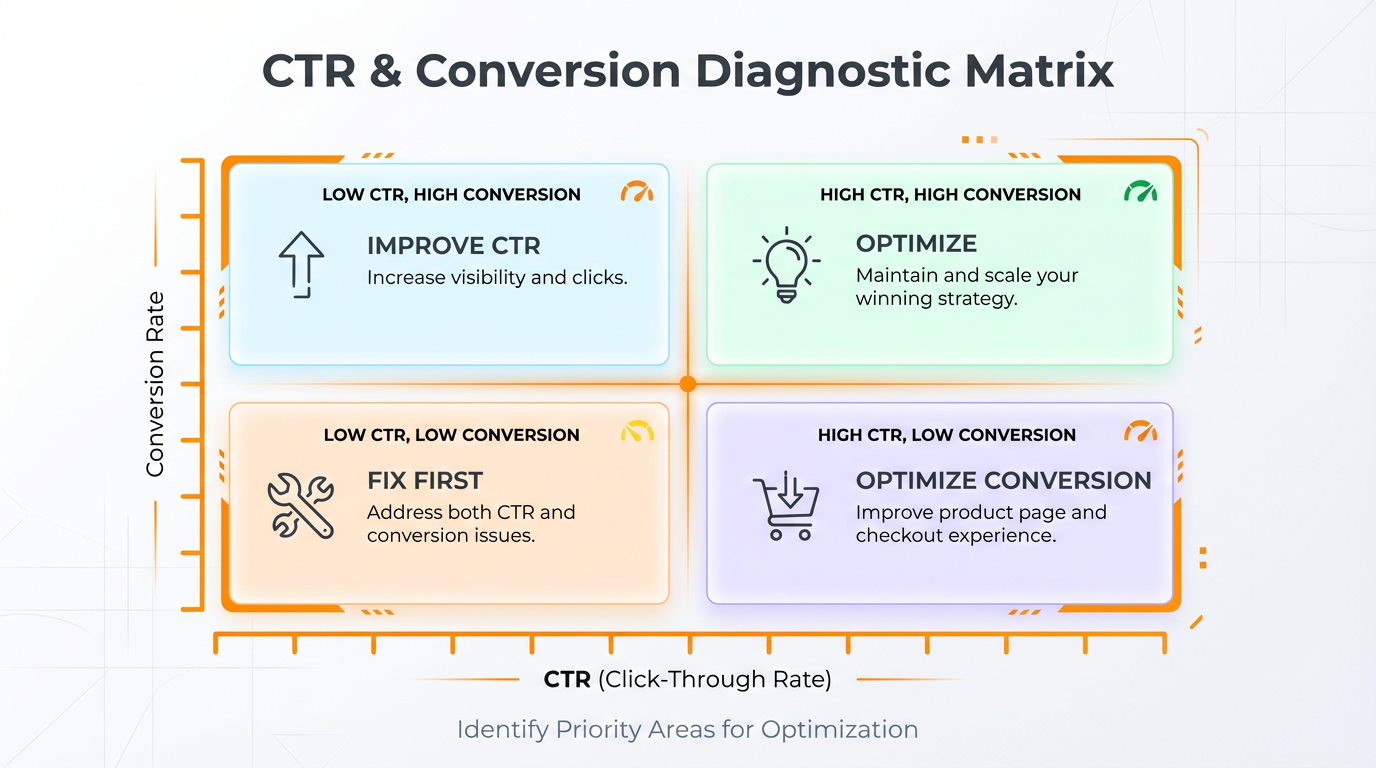
How to read the signal
- Low CTR + low CVR: relevance problem first (keyword intent, targeting, offer mismatch)
- Low CTR + high CVR: presentation problem first (main image, title clarity, price cues)
- High CTR + low CVR: expectation gap (your thumbnail promises something the detail page does not prove)
Key takeaways
- CTR and CVR are separate levers. Diagnose which one is limiting growth before you change everything.
- The highest ROI CTR wins usually come from fixing relevance and the main image first.
Key Factors That Influence CTR
Shoppers decide in seconds. On a crowded results page, CTR is driven by a small set of cues:
| Factor on the results page | What shoppers decide | Fast improvements | Use SellerSprite to |
|---|---|---|---|
| Main image | Is this clearly the right product for my need | Clarify what it is, show size or key element, improve contrast, simplify | Audit competitor thumbnails with Competitor Research and marketplace browsing with the SellerSprite Extension |
| Title opener | Do I instantly recognize the match to my search intent | Put the top keyword phrase early, remove fluff, and keep it readable | Build a keyword bank with Keyword Research and validate coverage with Keyword Distribution |
| Price cue | Does this look like a good value for my category | Stay in the competitive band, avoid confusing variation price gaps | Compare price bands via Competitor Research and Category Insights |
| Rating and review count | Is this trustworthy, low risk | Improve expectation setting, reduce returns, and strengthen social proof over time. | Find review-driven objections with Review Analysis. |
| Fulfillment and badges | Can I get it fast and safely | Improve shipping speed where possible, and avoid stockouts. | Monitor inventory and competitors with Product Tracker. |
Common mistake
Trying to fix CTR by changing everything at once. If you change the image, title, price, and ad targeting in the same week, you lose the ability to learn what actually moved the needle.
Diagnose CTR: Organic vs Ads, Brand vs Generic
Before you design a new main image, diagnose where CTR is underperforming. The same product can have excellent CTR on brand keywords and weak CTR on generic keywords because the expectation is different.
A simple segmentation you can apply today
- Organic search terms: Identify your top 10 to 30 search terms driving impressions, then compare CTR patterns by intent.
- Ads targets: Separate branded vs non-branded targets, and separate exact match vs broad match behavior.
- Placement and device bias: When possible, compare within the same placement. Mobile behavior tends to reward clarity and bold differentiation.
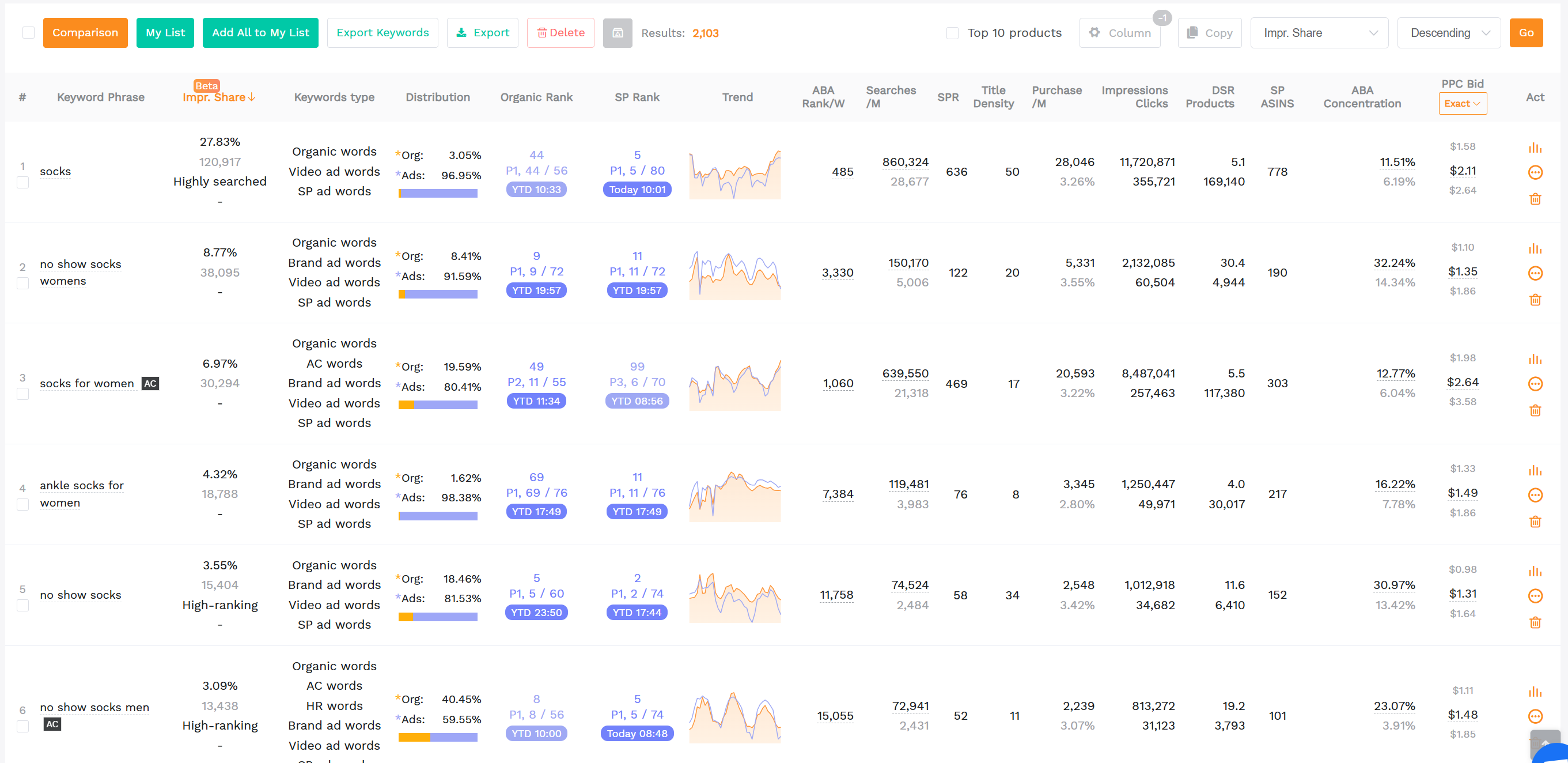
Use SellerSprite to clarify intent fast
- Use Keyword Research to find high-intent terms and understand how shoppers describe the product.
- Use Reverse ASIN to see which keywords top competitors actually rank for and prioritize.
- Use Traffic Comparison to compare your ASIN against competitors for keyword coverage and traffic structure.
- Use Keyword Distribution to map keyword groups to title, bullets, and backend fields so your listing matches intent.
Step by Step: Improve CTR With SellerSprite
This workflow keeps you focused: first, you confirm relevance and impressions, then you improve CTR, then you protect conversion rate, and finally, you evaluate cost efficiency.
Step 1. Establish a baseline and pick your CTR battleground
- Choose 5 to 10 keywords that represent your core demand and have consistent impressions.
- Record your current CTR, conversion rate, and sales trend for those keywords.
- Do not start with low-impression keywords. You want enough visibility to learn quickly.
Use SellerSprite to
Track your priority keywords with Keyword Tracker and monitor competitor movement with Product Tracker so you can tell if a CTR shift is caused by competition or by your change.
Step 2. Align keyword intent before you change creatives
Many CTR problems are relevance problems in disguise. If a keyword implies a specific feature, size, bundle, or use case, and your image does not communicate that instantly, shoppers will skip you.
- Use SellerSprite Keyword Research to identify the highest intent phrase and the top modifiers.
- Use Reverse ASIN on your top 5 competitors to confirm which modifiers are actually winning clicks in your niche.
- Update the first part of your title to match the primary phrase, then keep the rest readable.
If you want a dedicated title workflow, see: Amazon Product Title Optimization 2026: Step by Step Formula.
Step 3. Identify the visible pattern you must break
CTR is a pattern recognition game. Shoppers scan fast. If your thumbnail looks identical to everyone else's, you lose clicks even if your product is better.
Use SellerSprite to
Pull up the top competing ASINs in Competitor Research, then audit what shoppers see first: image style, angle, packaging color, bundle layout, and price band. Your goal is not to be different for the sake of being different. Your goal is to be instantly understood and instantly preferred.
Step 4. Improve CTR with controlled tests, not guesswork
- Pick one change at a time: main image first, then title opener, then price cue and promotion strategy if needed.
- Use Amazon's built-in experimentation when available to validate which variant wins.
- Keep a fully compliant backup main image ready so you can revert fast if an image is suppressed.
Step 5. For ad CTR, tighten targeting before you redesign everything
Ads CTR is heavily influenced by relevance. If your Sponsored Products campaign is broad, Amazon may show you on searches that never convert. That pushes CTR down and wastes impressions.
Use SellerSprite to
- Use Ads Insights to find targets with high impressions but weak CTR, then decide if it is an intent mismatch or a presentation problem.
- Use Keyword Conversion Rate to prioritize keywords that convert, so your CTR improvements translate into sales.
- Use Realtime Bid Tracker to monitor competitive pressure on your core terms and avoid overbidding for low-relevance clicks.
Key takeaways
- Diagnose first. Fix relevance before you assume the image is the problem.
- Test one variable at a time so you learn faster and reduce risk.
Share Your Sourcing Journey With SellerSprite Community
Join the SellerSprite community on the Facebook Group to share your sourcing journey, ask questions, and get support from fellow Amazon sellers.
14 Main Image Strategies to Win More Clicks
On mobile, your title often truncates. That is why the main image is usually the highest leverage CTR driver you control. But you still need to respect Amazon image requirements.
Compliance reminder
Keep a pure white, fully compliant main image ready. If a test image gets suppressed, revert immediately and iterate more safely. Your goal is sustainable growth, not a short-term gamble.
Strategy 1. Keep a fully compliant backup main image
Build one conservative version that follows every requirement. Use it as your emergency switch if an experimental image is suppressed.
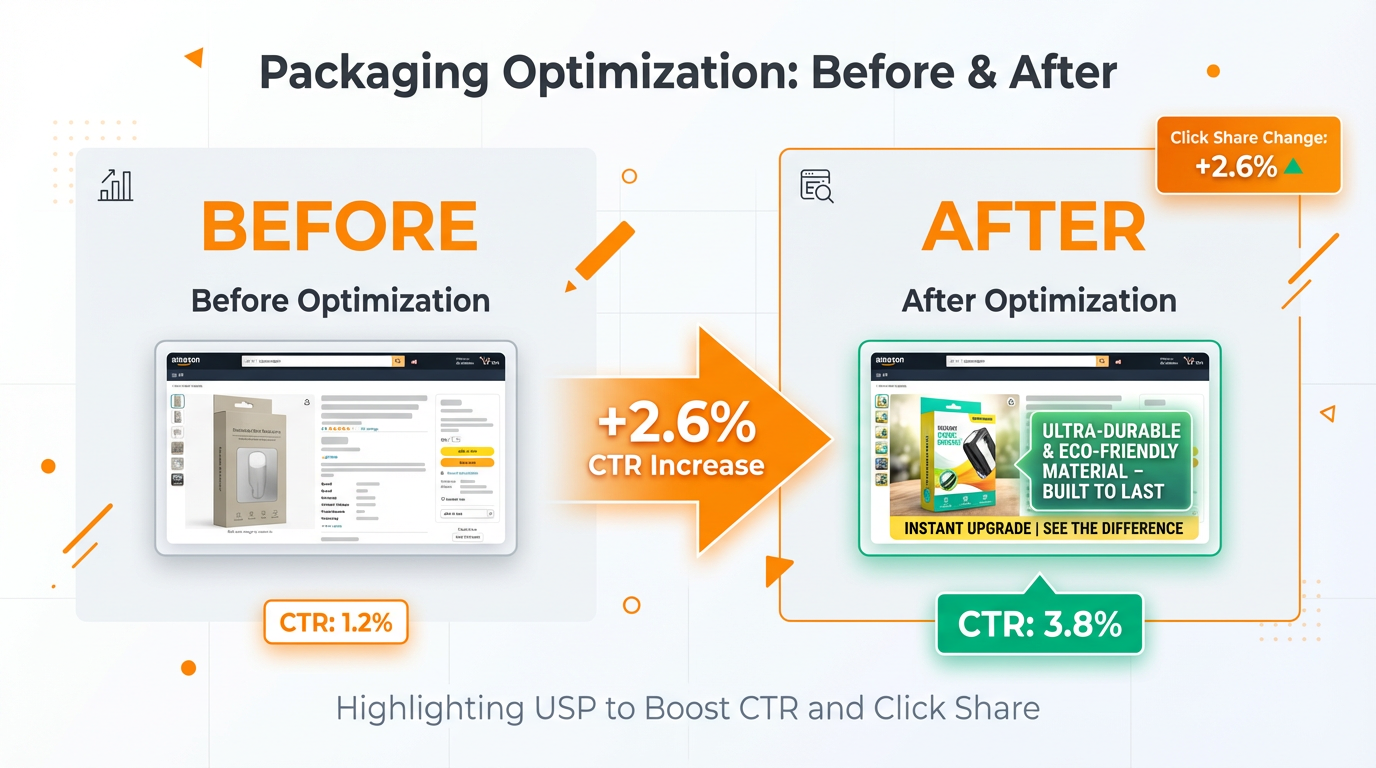
Strategy 2. Label it using packaging text that communicates your USP
If your product has packaging, you can communicate key differentiators through the label or packaging design itself. This can stand out while still showing the real product.
Mini case example
In one test shared in the transcript, adding clear USP text to packaging increased click share on the same keyword from 9% to 17%, measured in Amazon Brand Analytics.
Strategy 3. Create an on-product wrapper or sleeve for non-packaged items
If your product does not naturally come in retail packaging, consider a simple compliant wrapper, sleeve, or band that is part of the product presentation. The goal is to add clarity, not to add graphics that violate policy.
Strategy 4. Use a model when it improves instant understanding
A model can break the scroll pattern and instantly communicate who the product is for. This is especially effective for wearable, beauty, and personal care categories where the human context reduces ambiguity.
Mini case example
In the transcript, adding a recognizable model increased click share on the same keyword from about 10% to about 20%.
Strategy 5. Show variation options without forbidden graphics
Instead of adding color swatches or graphic callouts, place small secondary units in the background to imply other available colors or versions. Keep it subtle and avoid misleading the shopper.
Strategy 6. Apply the Kaizen loop: ask "Can this image be improved?"
CTR optimization is not one big redesign. It is a repeatable loop. Improve sharpness, improve clarity, then add the next layer of differentiation. Each iteration should be intentional and testable.
Strategy 7. Use close-ups when shoppers need to inspect the product
For texture-based, comfort-based, or detail-heavy products, a closer view can win clicks because it answers the buyer's question instantly: "What does it look like up close?"
Strategy 8. Show multiple angles when one angle hides important information
If buyers need to understand shape, thickness, connectors, or structure, multiple angles can improve CTR and reduce irrelevant clicks. This can increase CTR and protect conversion rate by filtering out the wrong buyers.
Strategy 9. Pass the 2-second rule
A shopper should understand what the product is and what it does in 2 seconds or less. If not, simplify. Clarify. Remove clutter.
Strategy 10. Add contrast for white or transparent products using compliant props
Some products disappear on a white background. Use subtle, compliant elements to create contrast without turning the image into an infographic.
Strategy 11. Show packaging only if it looks premium
If your packaging looks like a real retail product and supports trust, include it. Avoid unpresentable packaging that lowers perceived value.
Strategy 12. Use 3D renders for reflective or difficult-to-photograph products
For reflective, metallic, or hard-surface products, high-quality renders can create a clean, sharp look that stands out in thumbnails.
Strategy 13. Lay out bundles and accessories clearly
If shoppers care about what is included, show every included item cleanly. A clear bundle layout often increases CTR because it removes uncertainty.
Strategy 14. Show the product in action when it creates instant understanding
When usage is not obvious, an in-action context can win clicks even against bigger brands because it tells the story instantly.
How to keep these strategies safe
- Start with a compliant baseline image that can always be restored.
- Choose one strategy to test at a time. Do not stack multiple changes on day one.
- Monitor CTR and conversion together. Winning clicks that do not convert is not a win.
- Iterate with the Kaizen loop every time the niche gets more competitive.
Want to strengthen the keyword foundation behind your CTR work? Start here: Amazon Keyword Research Guide and Amazon Ads and PPC Optimization Using SellerSprite.
FAQ About Amazon CTR
What is the difference between CTR and conversion rate?
CTR measures clicks from impressions. Conversion rate (unit session percentage) measures purchases from sessions. CTR is about winning the click. Conversion rate is about winning the sale.
How long does it take to see CTR improvements?
If impressions are stable, you can often see directional change within days. For reliable conclusions, use a longer window and avoid mixing multiple changes in the same period.
Should I optimize CTR for organic search first or ads first?
Start where the biggest volume is. If ads drive most impressions, tighten targeting and improve thumbnail clarity. If organic impressions are strong, focus on the main image and title opener to win more clicks without extra ad spend.
Can I add text or badges to the main image to increase CTR?
Be careful. Amazon has strict main image rules. The safer approach is to communicate differentiators through the product or packaging itself and keep a compliant backup ready.
Implementation Action List
High priority
- Add the Table of contents and the top Key takeaways box so the article is easy to scan and easier for AI summaries to extract.
- Add the What is CTR and What is a good CTR sections with clear definitions and scenario benchmarks.
- Insert 2 before and after mini case blocks and add screenshot placeholders using the provided alt texts.
- Add the factor table that connects CTR levers to SellerSprite tools.
- Add the FAQ block to target FAQ rich results and AI Q and A extraction.
Medium priority
- Add 2 to 3 additional callouts (Pro tip, Common mistake, Warning) around testing and compliance.
- Link to related SellerSprite guides: keyword research, PPC optimization, title optimization, and listing optimization.
- Add marketplace note lines where relevant (US default, applies to EU, UK, JP).
View The SellerSprite Course Directory
Ready for the next step? Open the SellerSprite Academy course directory to continue building your Amazon FBA skills chapter by chapter.
About the author
SellerSprite Team
We help Amazon sellers turn messy data into clear execution. Our team focuses on listing optimization, keyword strategy, and PPC workflows using SellerSprite tools, with a practical emphasis on measurable outcomes and repeatable processes.
References
- Amazon Ads Support Center: reports and metrics (CTR definition)
- Amazon Ads: Category benchmark report for Sponsored Brands (CTR benchmarking)
- Amazon Seller Central: product image requirements and selection
- Sell on Amazon: Manage Your Experiments (A/B testing)
- Sell on Amazon: Amazon Brand Analytics overview


