TL;DR: Amazon shoppers behave differently on mobile and desktop, such as using distinct keywords, browsing patterns, and conversion paths. Optimizing by device boosts visibility, CTR, and conversion while reducing ACoS.
Key Takeaways
- Mobile users search with shorter, autocomplete-driven queries; desktop users use longer, comparison-rich terms.
- Amazon SERPs differ by device: mobile favors image-driven CTR and truncates titles earlier, impacting keyword placement.
- A device-aware keyword strategy requires separate mobile-first and desktop-first keyword lists, tailored content, and split PPC campaigns.
- Tracking organic rank, CTR, CVR, and ACoS by device is essential to measure optimization success.
- Common mistakes include ignoring title truncation on mobile and overloading bullets with long-tail terms that hurt scannability.
Table of Contents
- Why Mobile vs. Desktop Keyword Strategy Matters on Amazon
- How Mobile and Desktop Shoppers Search Differ (What to Expect)
- Mobile vs. Desktop SERP Differences That Change Keyword Performance
- Set Your Goal and Measurement Plan (Device-Specific)
- The Step-by-Step Workflow to Optimize Keywords for Mobile vs. Desktop
- Keyword Examples: How the Same Product Uses Different Terms by Device
- Mobile-First Listing Optimization (Keywords + Creative Work Together)
- Device-Aware PPC Playbook (Protect ACoS While You Learn)
- Tracking and Reporting: How to Know If Device Optimization Worked
- Common Mistakes (And How to Avoid Them)
- FAQ
- References
Note on marketplaces: This guide is specifically optimized for the US market.
Why Mobile vs. Desktop Keyword Strategy Matters on Amazon
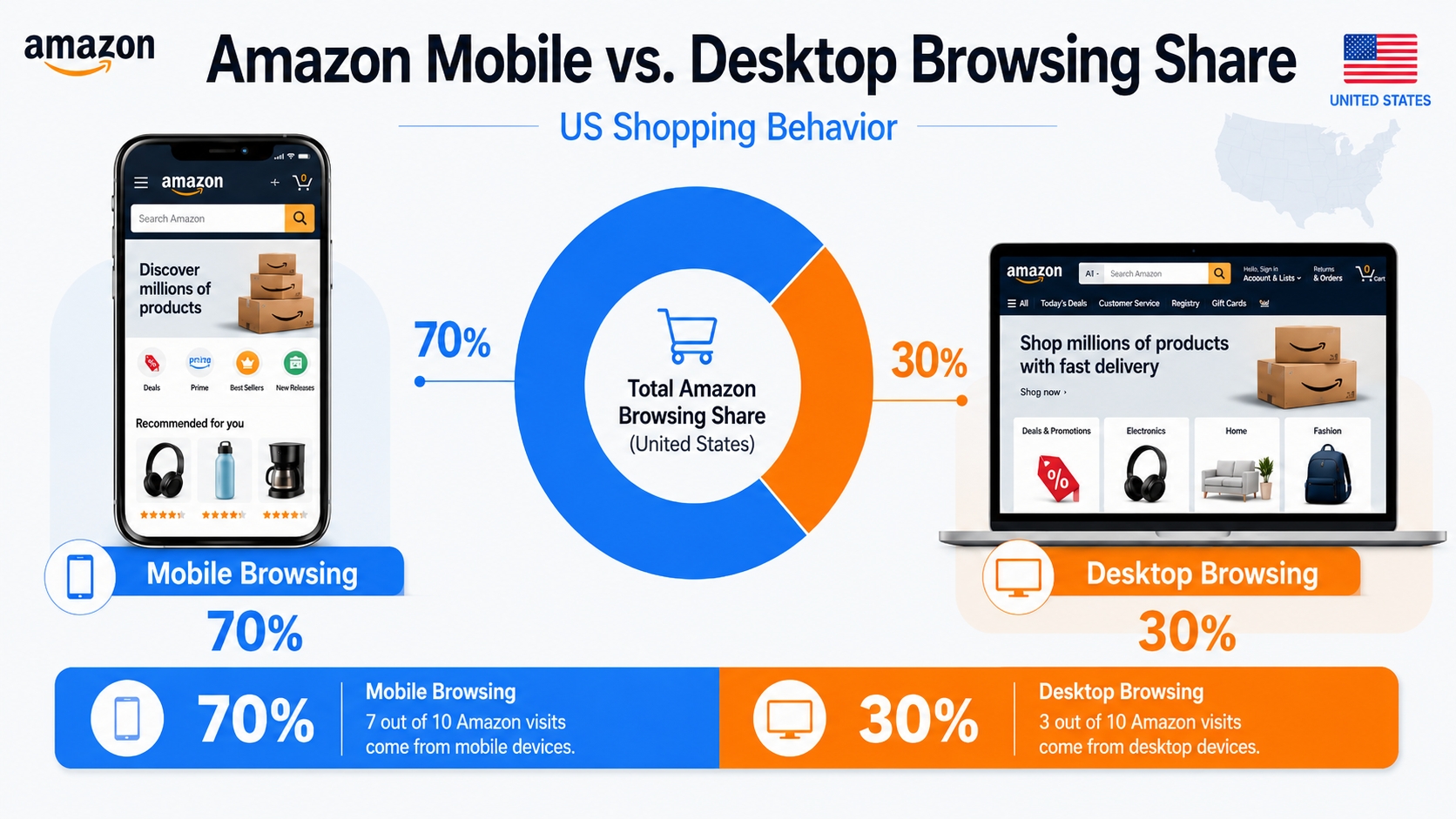
Amazon shoppers are no longer a monolithic audience. With over 70% of Amazon browsing now occurring on mobile devices in the US, understanding how search behavior differs between mobile and desktop is critical for keyword optimization. Yet, many sellers still treat keywords as device-agnostic, missing out on conversion opportunities and inflating ACoS due to misaligned targeting.
Definition: Device-Based Keyword Behavior
Device-based keyword behavior refers to how search intent, query length, phrasing, and conversion paths vary between mobile and desktop users on Amazon, requiring tailored keyword strategies for each platform.
The reality: most browsing happens on mobile, but intent patterns differ
While mobile dominates in browsing volume, desktop users often exhibit higher purchase intent for complex or high-consideration products. A report found that mobile shoppers are 2.3x more likely to browse around casually (impulse), while desktop users spend 40% more time comparing specs and reviews before buying. This means mobile keywords should prioritize speed and clarity, while desktop keywords can afford depth and specificity.
What changes by device: query length, SERP layout, and conversion friction
On mobile, shorter queries dominate due to typing friction and voice search. The SERP is more image-centric, with fewer visible listings above the fold. On desktop, users see more results, use filters more frequently, and engage with A+ content. These differences directly impact which keywords convert and how listings should be structured.
How Mobile and Desktop Shoppers Search Differ (What to Expect)
Understanding the psychology behind device-based searches is the first step in crafting a winning keyword strategy. Mobile users are often on-the-go, seeking quick answers, while desktop users are in research mode, comparing options and evaluating value.
Query length and phrasing
Mobile tends to be shorter, faster, more "autocomplete-led"
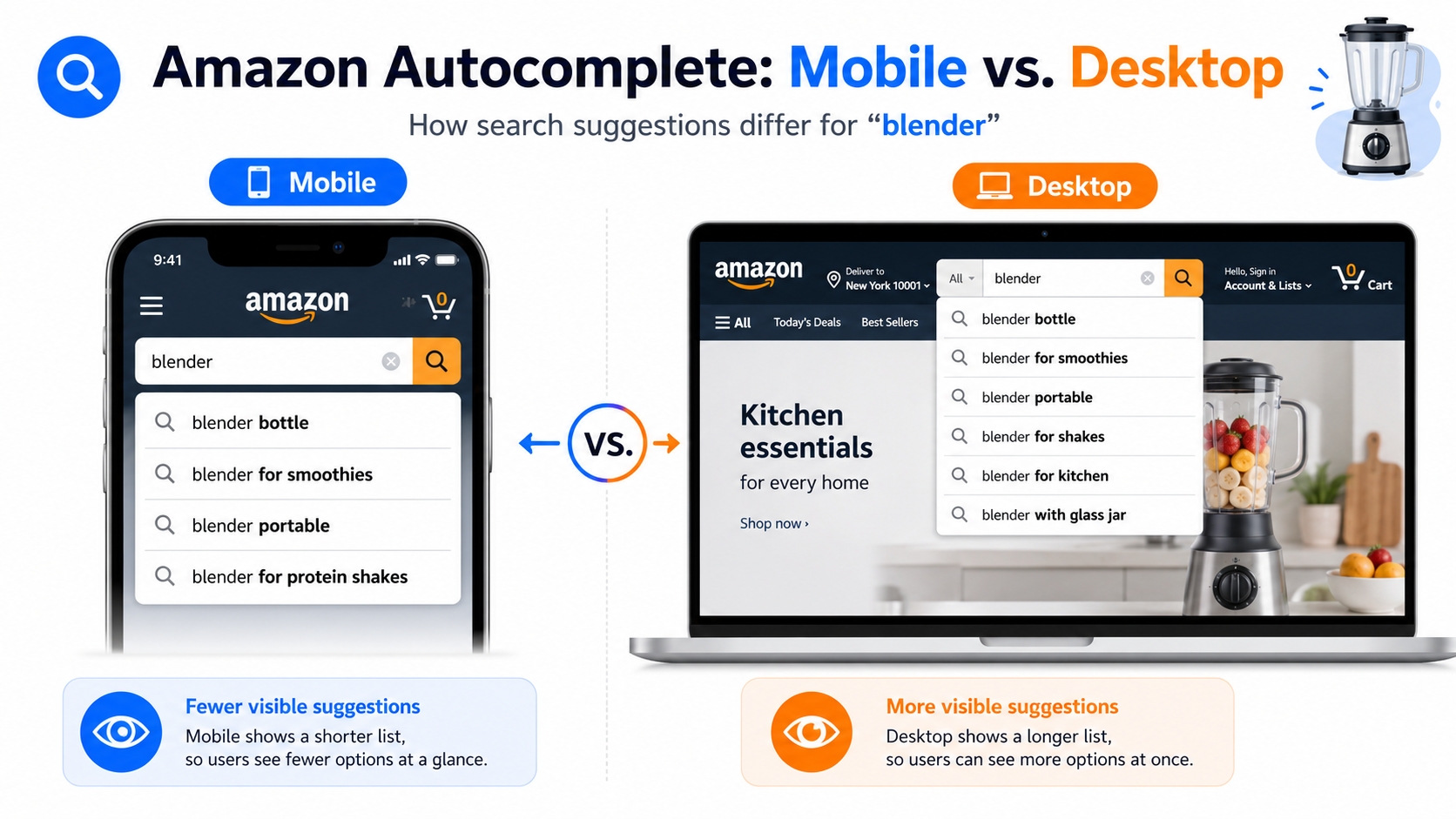
Mobile users type less and rely heavily on Amazon's autocomplete. Searches like "blender" or "wireless earbuds" are common. These short-head terms are high-competition but essential for visibility. Use tools like SellerSprite Keyword Mining to identify high-volume mobile-first keywords.
Desktop tends to be longer, more specific, more comparison-driven
Desktop users search with precision: "best blender for smoothies under $100" or "wireless earbuds with noise cancellation for gym." These long-tail queries indicate higher purchase intent and lower competition, ideal for targeted PPC and SEO.
Autocomplete and suggestion influence (stronger on mobile)
Amazon's autocomplete algorithm is more aggressive on mobile, shaping user queries in real time. This means mobile keywords must align closely with Amazon's suggested phrases. Run mobile-specific autocomplete tests using incognito mode on a smartphone to capture real-time suggestions.
Voice search and typo patterns (more common on mobile)
Voice search accounts for 25% of mobile Amazon queries. Phrases like "show me coffee makers" or "buy printer ink" are common. Typos are also more frequent, such as "blenr" instead of "blender." Include phonetic and misspelled variants in backend search terms.
Intent shifts by device (browse vs. buy vs. compare)
Mobile is ideal for discovery and impulse buys; desktop excels in research and high-AOV purchases. A 2025 A/B test by SellerSprite ABA Research showed mobile CTR was 38% higher on visual products (e.g., decor), while desktop CVR was 29% higher on technical items (e.g., laptops).
Mobile vs. Desktop Search Patterns
- Mobile: Short queries, voice input, autocomplete reliance, high CTR on images
- Desktop: Long-tail, comparison terms, filter usage, deeper content engagement
- Implication: Optimize titles for mobile, bullets for desktop, backend for variants
Mobile vs. Desktop SERP Differences That Change Keyword Performance
The Amazon SERP is not the same across devices. What ranks well on desktop may not convert on mobile due to layout, visibility, and user behavior differences.
Above-the-fold is smaller on mobile (keywords + value prop must hit fast)
Title truncation and what it means for primary keywords
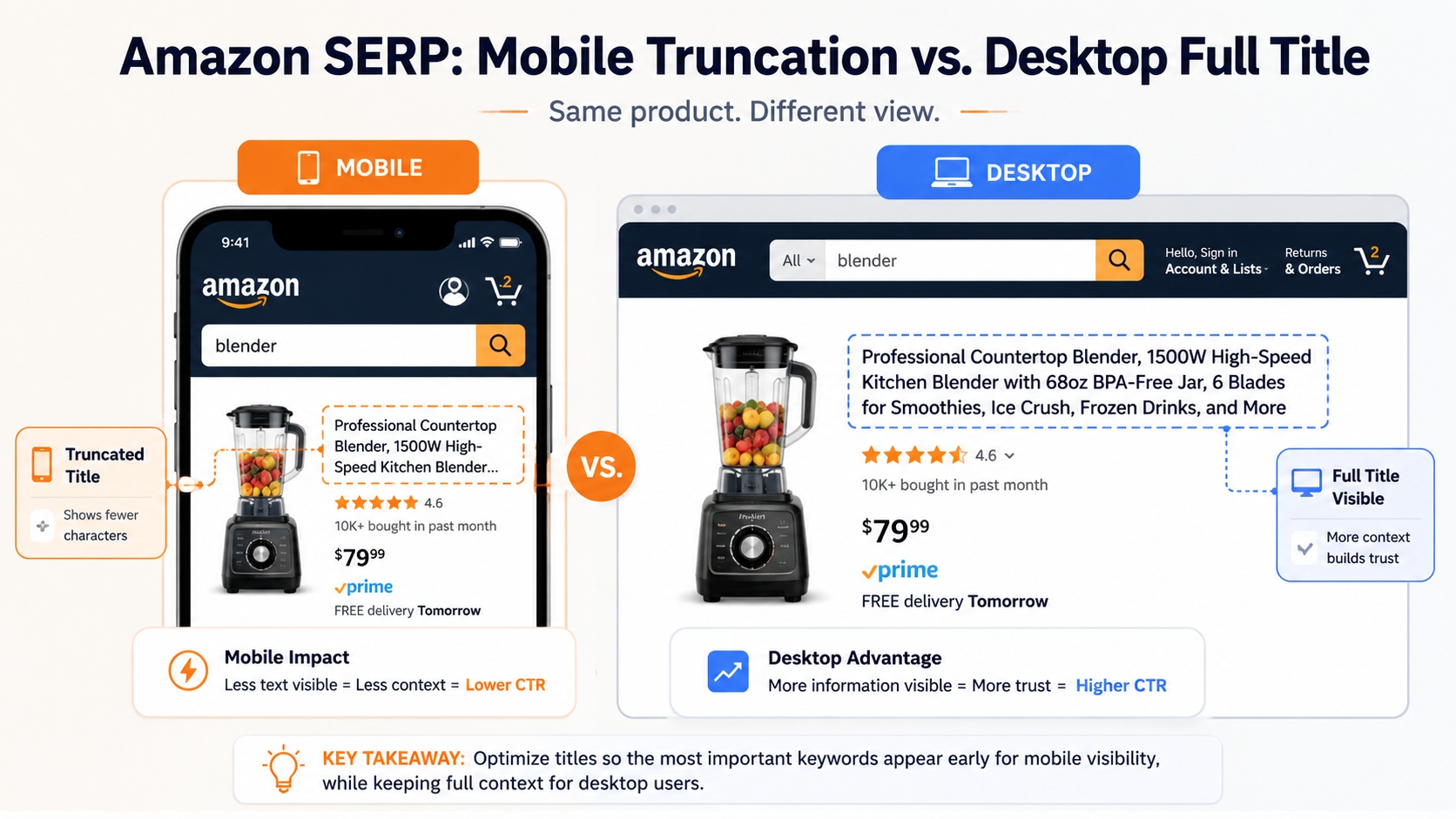
On mobile, titles are truncated after around 60 characters. If your primary keyword isn't in the first 50 characters, it may not be seen. Example: "Organic Coffee Beans – Medium Roast, 12oz Bag" risks being cut to "Organic Coffee Beans – Medium Roast…" on mobile. Front-load keywords: “Medium Roast Organic Coffee Beans – 12oz”.
Image dominance: CTR is impacted more on mobile
Mobile users rely heavily on images. A high-contrast, benefit-driven main image can increase CTR by up to 50%. Pair strong visuals with keyword-rich alt text and titles for maximum impact.
Sponsored placement density and visibility differences
Mobile SERPs show 2–3 sponsored products above organic results, crowding the top. Desktop shows 4–5 but with more white space. Mobile ads must win on image and price; desktop ads can rely more on copy.
Filters, badges, and UI elements (how they change click behavior)
Desktop users apply filters (price, rating, Prime) more frequently. Badges like "Amazon's Choice" or "Climate Pledge Friendly" have higher trust weight on desktop. Mobile users scroll faster and are more influenced by placement and visuals.
Category and variation behavior (mobile browsing loops)
On mobile, users often tap into a product frosted-glass preview, then swipe through variations. This "browse loop" means variation titles and images must be keyword-optimized independently.
Mobile vs. Desktop SERP Checklist
- Mobile: Front-load keywords, optimize image CTR, check truncation
- Desktop: Use full title space, highlight specs, leverage filters
- Both: Monitor sponsored ad crowding and badge visibility
Set Your Goal and Measurement Plan (Device-Specific)
Before optimizing, define what success looks like. Are you aiming for higher CTR, better CVR, lower ACoS, or improved organic rank? Your goal determines your KPIs and tracking approach.
Choose the goal: CTR lift, CVR lift, ACoS control, rank growth
For mobile, focus on CTR and CVR, where visibility and speed are key. For desktop, prioritize ACoS control and rank growth for long-tail terms.
Decide your tracking split: mobile vs. desktop rank + ads reporting
Track organic rank by device. In Amazon Ads, segment reports by device to analyze CPC, CTR, and CVR separately.
Create a baseline snapshot (before you change anything)
Record current metrics: organic rank (mobile/desktop), CTR, CVR, ACoS, and top converting keywords. This baseline allows you to measure impact post-optimization.
Device KPI Checklist
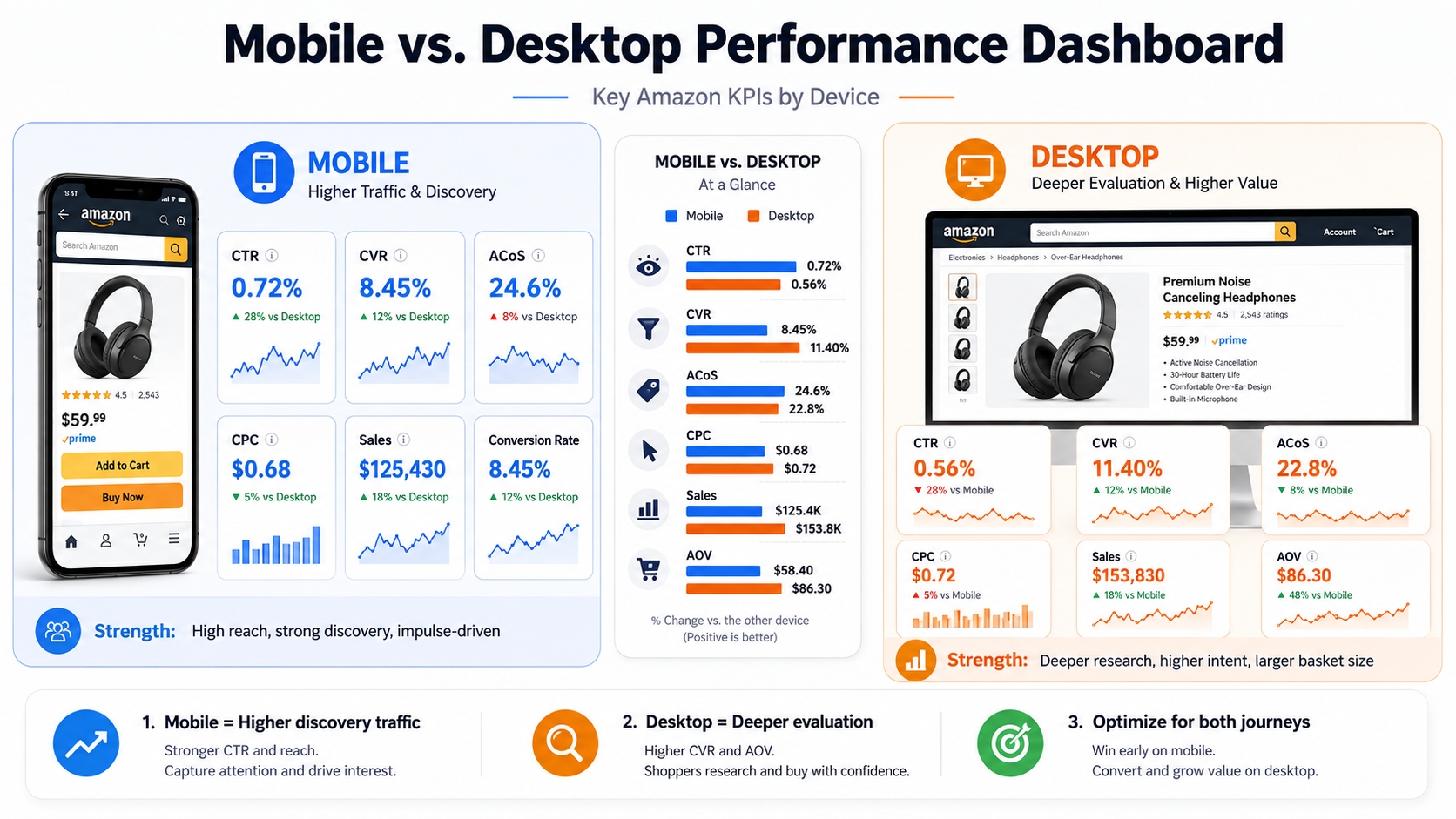
- CTR: Track by device; mobile should be higher
- CVR: Desktop often converts better for complex products
- CPC: Monitor device-level ad spend efficiency
- ACoS: Compare mobile vs. desktop campaign performance
- Rank: Use device-specific keyword tracking tools
The Step-by-Step Workflow to Optimize Keywords for Mobile vs. Desktop
Follow this proven workflow to build a device-aware keyword strategy that improves visibility and conversion across platforms.
Step 1: Build Two Keyword Lists: Mobile-first vs. Desktop-first
Mobile-first list: short head/mid-tail + high-frequency phrases
Focus on terms like "coffee maker," "blender," or "noise cancelling earbuds." Use high search volume and low competition filters in Keyword Mining.
Desktop-first list: longer modifiers, comparisons, compatibility, problem-solution terms
Include phrases like "best coffee maker for small kitchens," "blender for frozen fruit," or “earbuds compatible with iPhone gym use.”
Step 2: Prioritize "Front-Loaded" Keywords for Mobile Titles
Put the primary term and key attribute early (title truncation reality)
Example: "Wireless Earbuds with Mic – 30H Playtime, IPX7 Waterproof" places the core product and key benefits upfront.
Keep readability high (mobile shoppers scan fast)
Avoid complex punctuation. Use dashes or commas to separate key features.
Avoid stuffing synonyms in the first line
"Bluetooth headphones, earbuds, wireless in-ear" looks spammy and confuses algorithms.
Step 3: Use Bullets to Capture Desktop Long-Tails (Without Hurting Mobile UX)
Bullet rule: one intent cluster per bullet
Group related benefits: durability, compatibility, use case.
Add long-tail modifiers where they fit naturally (compatibility/use case/specs)
Example: "Perfect for runners: secure fit, sweatproof design, stays in place during intense workouts."
Use scannable formatting (mobile-friendly phrasing)
Start with verbs or benefits: "Fast Charging – 5-minute charge = 2 hours playback."
Step 4: Use Backend Search Terms for "Low-Visibility" Variants
Misspellings and spacing variants (mobile typing behavior)
Include "blenr," "wireless earbuds waterproof," "coffeemaker."
Secondary synonyms that don't belong in the title
Add "headphones," "in-ear," "on-ear" if not in front-end copy.
Avoid repetition and keyword stuffing
Amazon's algorithm penalizes redundancy. Use each variant once.
Step 5: Match PPC Strategy to Device Behavior (Where You Pay for Clicks)
Mobile PPC: tighter targeting, focus on high-intent short terms + negatives
Use exact and phrase match for core terms. Add negatives to filter desktop-only queries.
Desktop PPC: test longer long-tails and comparison terms
Bid on "best wireless earbuds under $100" or "noise cancelling vs. passive."
Harvesting loop: discover → promote winners to Exact → add negatives
Use broad match to find converting terms, then move to exact and block irrelevant traffic.
Step 6: Validate With SERP Checks and Iterate With a Calm Cadence
Check mobile SERP vs. desktop SERP for your key terms
Use incognito mode on both devices to simulate real user views.
Change one variable at a time (title vs. bullets vs. bids)
Isolate impact to understand what drives results.
Review weekly using a consistent lookback window
Wait at least 7 days before judging performance changes.
Device-Aware Keyword Optimization Workflow
- Build separate mobile-first and desktop-first keyword lists
- Front-load primary keywords in titles for mobile
- Use bullets to capture desktop long-tails naturally
- Fill backend with variants and misspellings
- Align PPC campaigns to device intent
- Validate via SERP checks and iterate weekly
Keyword Examples: How the Same Product Uses Different Terms by Device
Mobile example: short phrase + core attribute
Query: "water bottle insulated"
Intent: Quick purchase, temperature retention
Optimization: Title: "Insulated Water Bottle – Keeps Cold 24H"
Desktop example: expanded intent + compatibility + spec
Query: "insulated water bottle for hiking with wide mouth and leakproof lid"
Intent: Research, durability, usability
Optimization: Bullet: "Leakproof lid design – ideal for backpacks and outdoor adventures"
Turning one cluster into a device-aware keyword map (template)
Use this template to organize keywords by device:
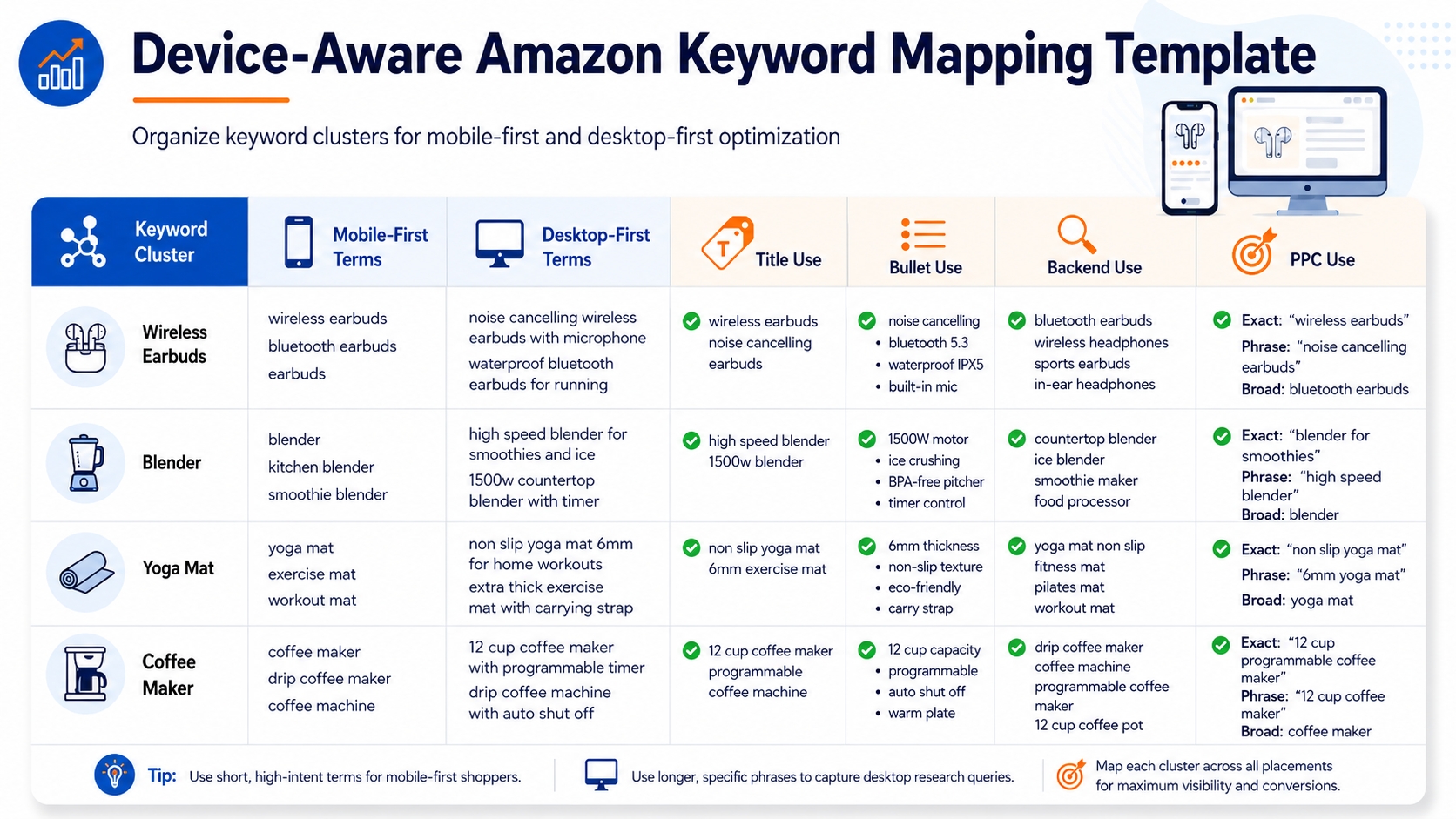
Device-Aware Keyword Mapping Template
| Field | Mobile Use | Desktop Use |
|---|---|---|
| Title | Front-load core term | Use full spec space |
| Bullets | Scannable benefits | Detailed use cases |
| Backend | Typos, spacing | Synonyms, variants |
| PPC | Exact/Phrase, high intent | Broad/Long-tail, comparison |
Mobile-First Listing Optimization (Keywords + Creative Work Together)
Title: primary keyword + differentiation early
Place the most important keyword within the first 50 characters. Add a key differentiator like "24H Cold," "IPX7," or "BPA-Free."
Main image: CTR driver that amplifies keyword performance
Use lifestyle images that reflect the keyword intent. For "insulated water bottle," show it in a gym or hiking setting with condensation visible.
Bullets: scannable benefits + proof for fast decision-making
Use icons, short lines, and power words: "✅ 24H Ice Retention | ✅ Leakproof Lid | ✅ 1-Click Flip Cap".
A+ and images: answer objections desktop buyers evaluate more deeply
Include comparison charts, material close-ups, and warranty info; these are critical for desktop decision-making.
Device-Aware PPC Playbook (Protect ACoS While You Learn)
Separate discovery vs. scale (clean structure prevents overlap)
Use broad match for discovery, then exact for scaling, by device segment.
Use negatives to control "mobile noise"
Block irrelevant desktop terms in mobile campaigns and vice versa.
Promote desktop long-tail winners into exact match scaling
High-converting long-tails should be scaled with exact match bids.
Watch for cannibalization (PPC vs. PPC, PPC vs. SEO)
Ensure your mobile PPC isn't competing with your own organic listing.
Tracking and Reporting: How to Know If Device Optimization Worked
What to track by device
Organic rank movement (mobile vs. desktop)
Use device-specific tools to monitor rank shifts.
CTR/CVR changes after copy updates
Compare pre- and post-optimization metrics.
PPC CPC/ACoS shifts by keyword cluster
Segment reports by device and match type.
Common measurement traps
Attribution delay and short-term noise
Wait at least 7–14 days before drawing conclusions.
Confusing seasonality with device effects
Compare YoY or use control groups.
Suggested review rhythm (weekly + monthly)
Weekly: Check CTR/CVR. Monthly: Full ACoS and rank analysis.
Common Mistakes (And How to Avoid Them)
Writing titles for desktop and forgetting mobile truncation
Always preview on mobile. Use tools to simulate truncation.
Overloading bullets with long-tails (hurts mobile scanning)
Keep bullets concise. Save long-tails for desktop context.
Ignoring backend search terms (missing variant coverage)
Include all relevant variants, even if not in front-end copy.
Optimizing too fast based on 1-2 days of data
Allow time for data to stabilize. Avoid knee-jerk changes.
Not separating intent clusters (random keyword mixing)
Group keywords by use case: durability, compatibility, occasion.
FAQ
Do mobile and desktop shoppers use different Amazon keywords?
Yes. Mobile users tend to use shorter, faster queries like "blender" or "wireless earbuds," often influenced by autocomplete and voice search. Desktop users use longer, more specific phrases like "best blender for smoothies under $100." These differences reflect varying search intent and behavior by device.
What are the key differences in conversion rates between Amazon mobile and desktop users?
Desktop users typically have higher conversion rates for high-consideration or technical products due to deeper research behavior. Mobile users convert better on impulse or visual products. A 2025 study found desktop CVR was 29% higher on electronics, while mobile CVR led by 18% on home decor.
How can Amazon sellers optimize product listings for mobile shoppers?
Front-load primary keywords in titles (within first 50 characters), use high-CTR main images, keep bullets scannable with icons and short lines, and ensure backend terms include mobile typos and spacing variants. Also, validate visibility via mobile SERP checks.
Should I write a "mobile-first" title for every product?
Yes, because mobile dominates browsing volume and titles are truncated. Prioritize the primary keyword and key differentiator in the first 50 characters. You can still use the full desktop space for additional specs, but mobile readability comes first.
Why does desktop traffic often lead to higher average order values on Amazon?
Desktop users spend more time comparing products, reading reviews, and evaluating bundles or multi-packs. They're also more likely to add complementary items to cart. This deeper engagement leads to higher AOV, especially for technical or high-consideration purchases.
Next Steps
- Use SellerSprite Keyword Mining to build mobile-first and desktop-first keyword lists.
- Review your top 5 listings for mobile title truncation and optimize using the 6-step workflow.
- Segment your PPC campaigns by device and align bids to intent patterns.
References
- Amazon Keyword Research Guide View
- Why Mobile Optimization for Amazon Listings Matters View
Amazon shoppers behaviors difference View
By SellerSprite Success Team
The SellerSprite Success Team combines 10+ years of Amazon marketplace expertise with data science and SEO innovation. We help thousands of sellers, from beginners to enterprise brands, optimize listings, master keyword strategy, and scale profitably using AI-powered tools validated by real-world performance.


