By SellerSprite Team SellerSprite works with a large global base of brand sellers, supporting Brand Registry setup, A plus content optimization, and product video strategy across Amazon US, UK, and EU marketplaces. Insights in this guide are based on aggregated seller projects and observed performance patterns. About SellerSprite
TL;DR: Amazon Brand Registry unlocks product videos, A plus content, and Brand Store features that can significantly improve click-through rate and conversion. In this guide, we explain what Amazon Brand Registry is, how to apply, where to upload product videos, and how to use videos strategically across listings and Brand Stores. You will also learn how SellerSprite helps brands identify video angles and keywords that align with shopper intent and AI-driven search summaries.
Key Takeaways
- Brand Registry is required to unlock product videos, A plus content, and Brand Store video modules.
- Product videos can appear on listing detail pages, Brand Stores, and Sponsored Brand video ads.
- Based on SellerSprite customer data, listings with well-structured videos often see higher engagement and conversion.
- Keyword research and review analysis help turn real buyer pain points into effective video scripts.
Table of Contents
- What Is Amazon Brand Registry?
- Why Does Brand Registry Matter for Videos?
- How to Apply for Amazon Brand Registry
- Where Do Amazon Product Videos Appear?
- How to Upload a Product Video in Seller Central
- Best Practices for High-Converting Amazon Videos
- Using SellerSprite to Plan Video Content
- FAQ
- Next Steps
What Is Amazon Brand Registry?
Answer: Amazon Brand Registry is a program that verifies brand ownership and unlocks advanced brand protection and marketing features. Once approved, brands gain access to A plus content, Brand Stores, product videos, and enhanced reporting tools.
Official reference: Amazon Brand Registry Overview
Why Does Brand Registry Matter for Product Videos?
Answer: Without Brand Registry, sellers cannot upload brand-owned videos to listings or Brand Stores. Brand Registry turns video from an optional asset into a core conversion and brand-building tool.
Observed case: Based on SellerSprite customer analysis in Home and Kitchen, a brand that enabled Brand Registry and added a 30-second product video saw higher listing engagement and a measurable lift in conversion within one month, compared to similar ASINs without video.
How to Apply for Amazon Brand Registry
Answer: Applying for Brand Registry requires a registered trademark and verification through Seller Central. Approval unlocks brand-level content and video features.
- Prepare your registered trademark and brand name.
- Log in to Seller Central and open Brand Registry.
- Submit trademark information and verify ownership.
- Wait for Amazon confirmation and approval.
Official references: Brand Registry eligibility, Brand Registry enrollment
Where Do Amazon Product Videos Appear?
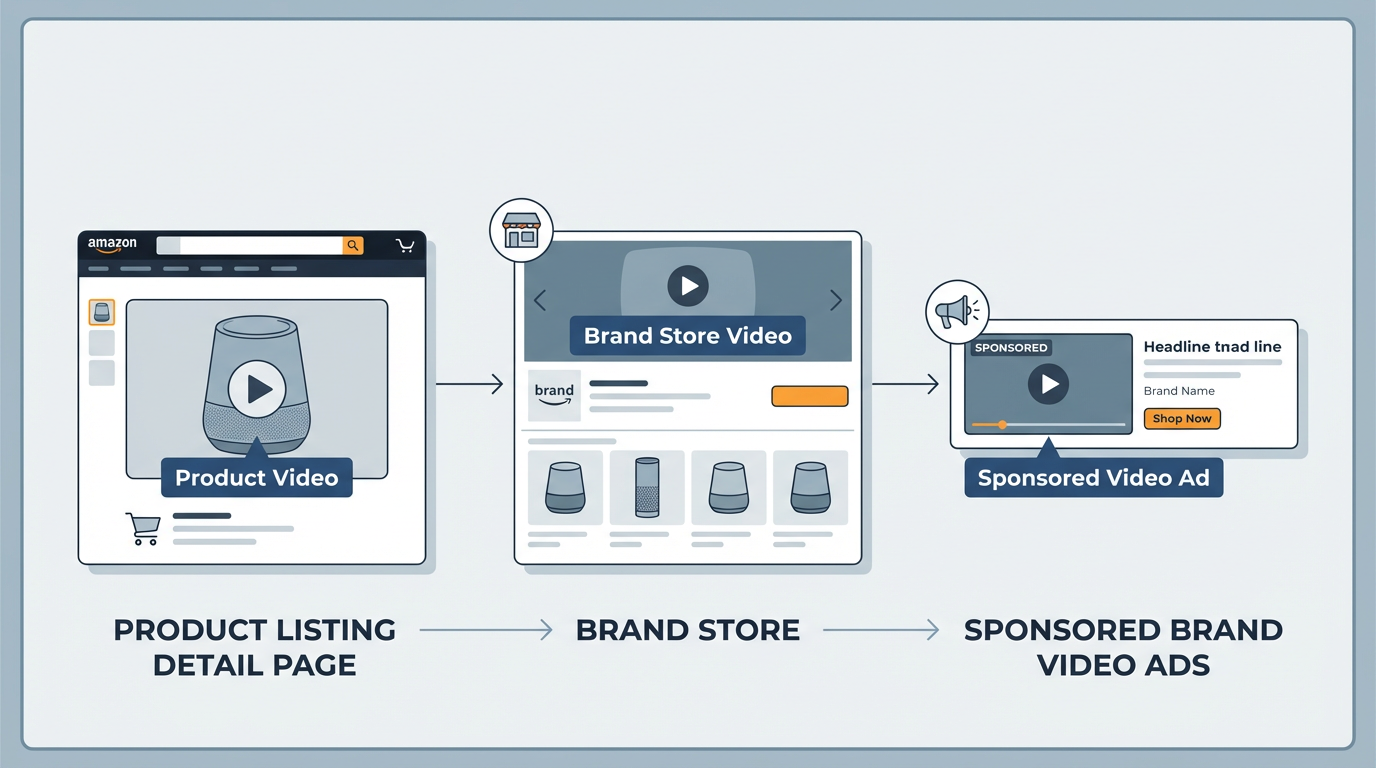
Answer: Brand-registered sellers can place videos in multiple high-visibility locations, each serving a different purpose in the buyer journey.
How to Upload a Product Video in Seller Central
Answer: Product videos are uploaded through Seller Central and linked to your ASIN. Only Brand Registry owners can complete this step.
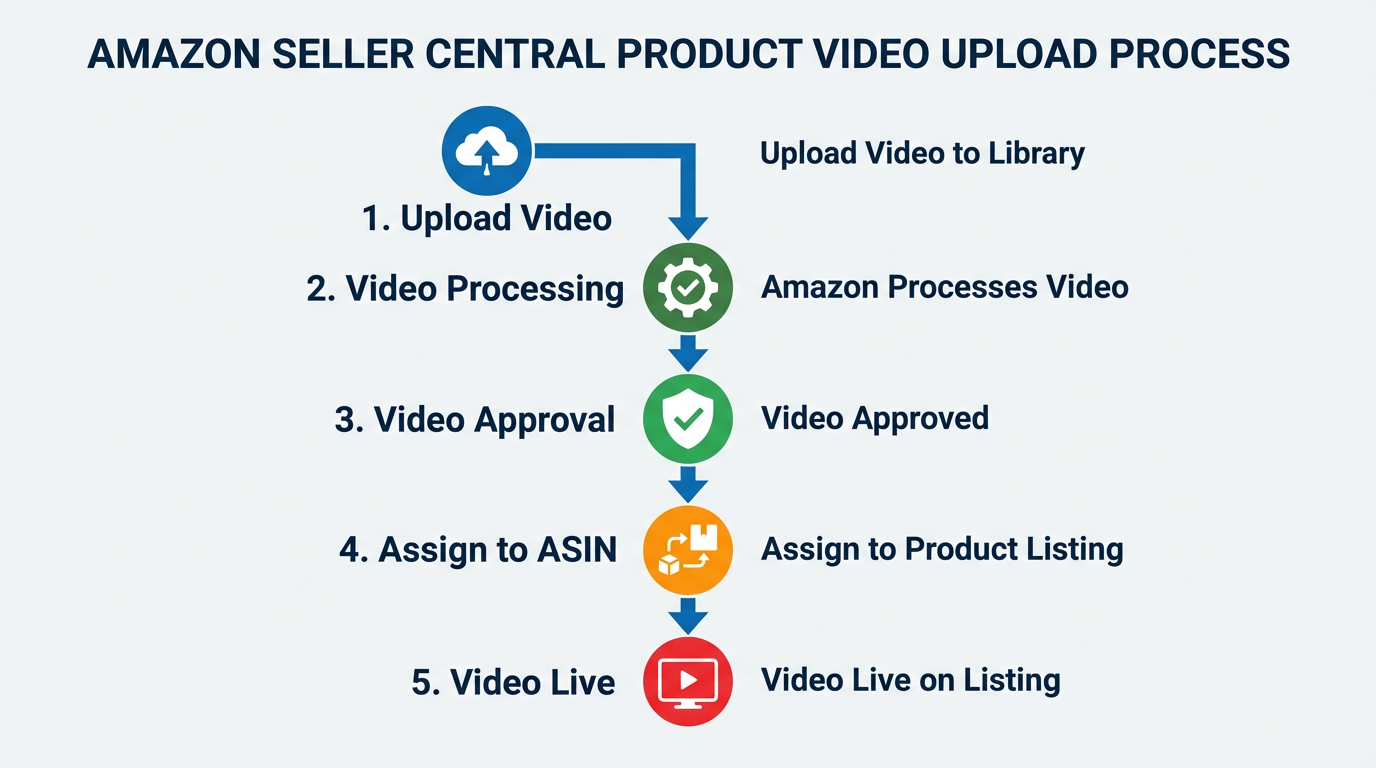
- Open Seller Central and go to Advertising or Brand Content.
- Select Upload Video and choose the target ASIN.
- Upload a compliant video file and submit for review.
- Monitor approval status and placement.
Official reference: Amazon product video guidelines
Best Practices for High-Converting Amazon Product Videos
Answer: High-converting videos focus on clarity, relevance, and buyer intent rather than cinematic effects.
- Show the product in use within the first 3 seconds.
- Address the main buyer pain point clearly.
- Use simple text overlays instead of heavy narration.
- Keep videos concise and easy to understand without sound.
Observed case: In Beauty and Personal Care, SellerSprite analysis shows that videos aligned with top review complaints and questions often outperform generic lifestyle videos in conversion impact.
Using SellerSprite to Plan Video Content
Answer: SellerSprite helps brands turn real customer data into video scripts and keyword-aligned descriptions.
- Review Analysis: extract common pain points and usage scenarios from reviews.
- Keyword Miner: identify high intent keywords for video titles and Brand Store text.
- Reverse ASIN: study how top competitors position their products visually.
Next Steps
- Confirm or apply for Amazon Brand Registry.
- Use SellerSprite to extract review insights and keyword intent.
- Create and upload your first product video.
- Track engagement and conversion changes over time.
FAQ
Do I need Brand Registry to upload product videos?
Yes. Only Brand Registry owners can upload brand-owned product videos.
How long does Amazon take to approve a product video?
Approval times vary, but most videos are reviewed within several business days.
Do videos help with AI search and summaries?
High-quality videos support engagement and clarity, which can indirectly help listings perform better in AI-driven discovery systems.
Get Help From the SellerSprite Community
Share your Brand Registry and video questions with other sellers in the SellerSprite Discord and Facebook Group.
View The SellerSprite Course Directory
Ready for the next step? Open the SellerSprite Academy course directory to continue building your Amazon FBA skills chapter by chapter.


