- Amazon Merch on Demand removes inventory and fulfillment work, but creators still need to choose the right niche, keywords, design angle, product type, and promotion path.
- SellerSprite is not a Merch upload platform. It works as a research toolkit to validate niches, discover Amazon keywords, analyze competitors, review price bands, and monitor product opportunities.
- Merch creators should research before designing at scale: demand, saturation, seasonality, keyword relevance, IP risk, and product-type fit can all affect performance.
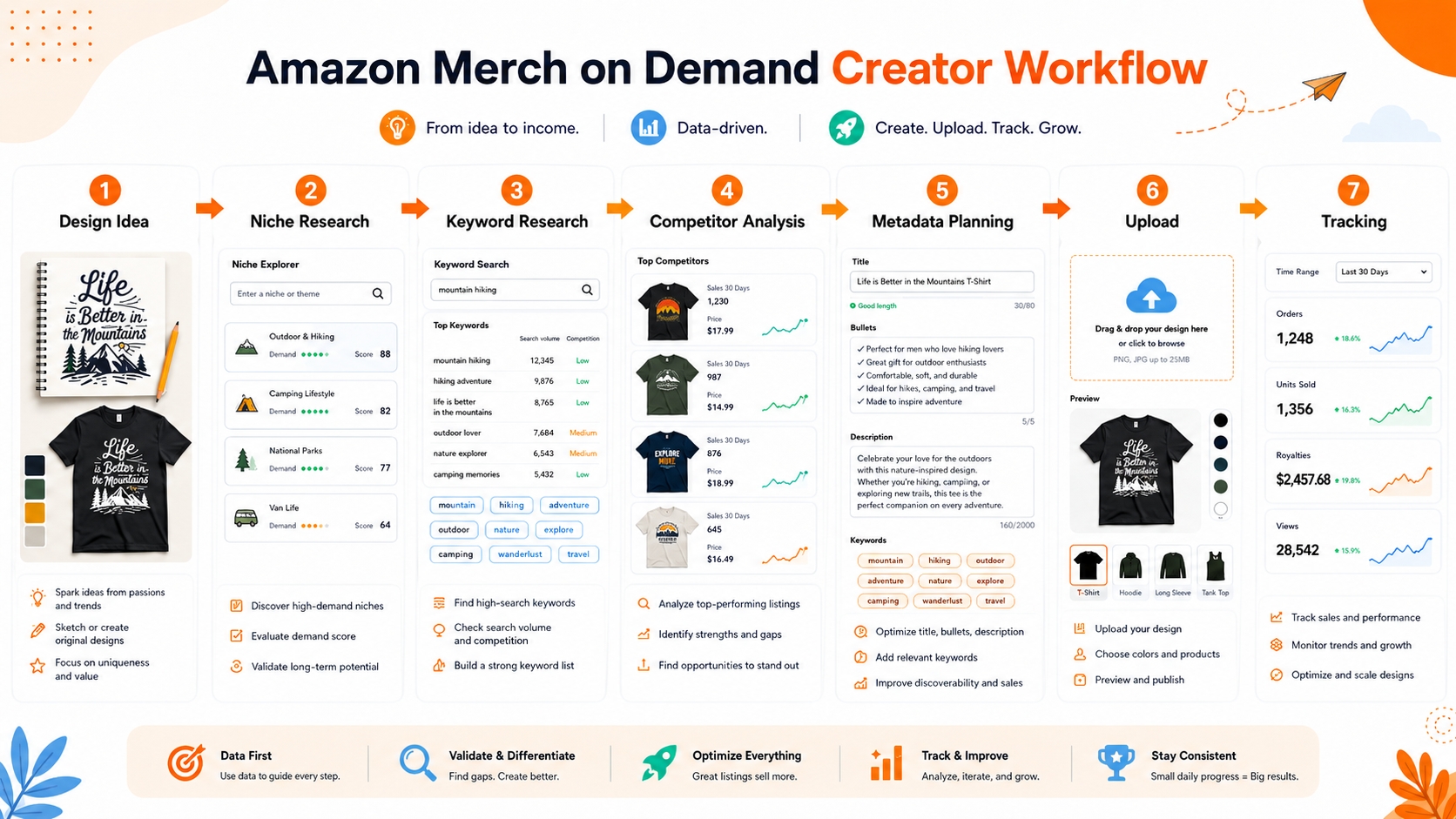
- The strongest workflow is repeatable: idea → market research → keyword research → competitor validation → metadata plan → upload → tracking → expansion.
Quick Answer: How Can SellerSprite Help Amazon Merch on Demand Sellers?
SellerSprite helps Amazon Merch on Demand sellers research what to design, which keywords to use, which niches look competitive, and how similar products perform on Amazon before uploading artwork.
Use SellerSprite to validate design ideas with market research, Amazon keyword research, competitor analysis, price-band review, seasonality checks, and post-launch tracking. It is a research toolkit for Merch sellers, not an Amazon Merch upload tool.
Positioning note
This page is for creators who want data before design volume. It does not replace Amazon Merch on Demand, does not submit artwork to Amazon, and does not provide legal approval for trademarks or copyright.
What Is Amazon Merch on Demand?
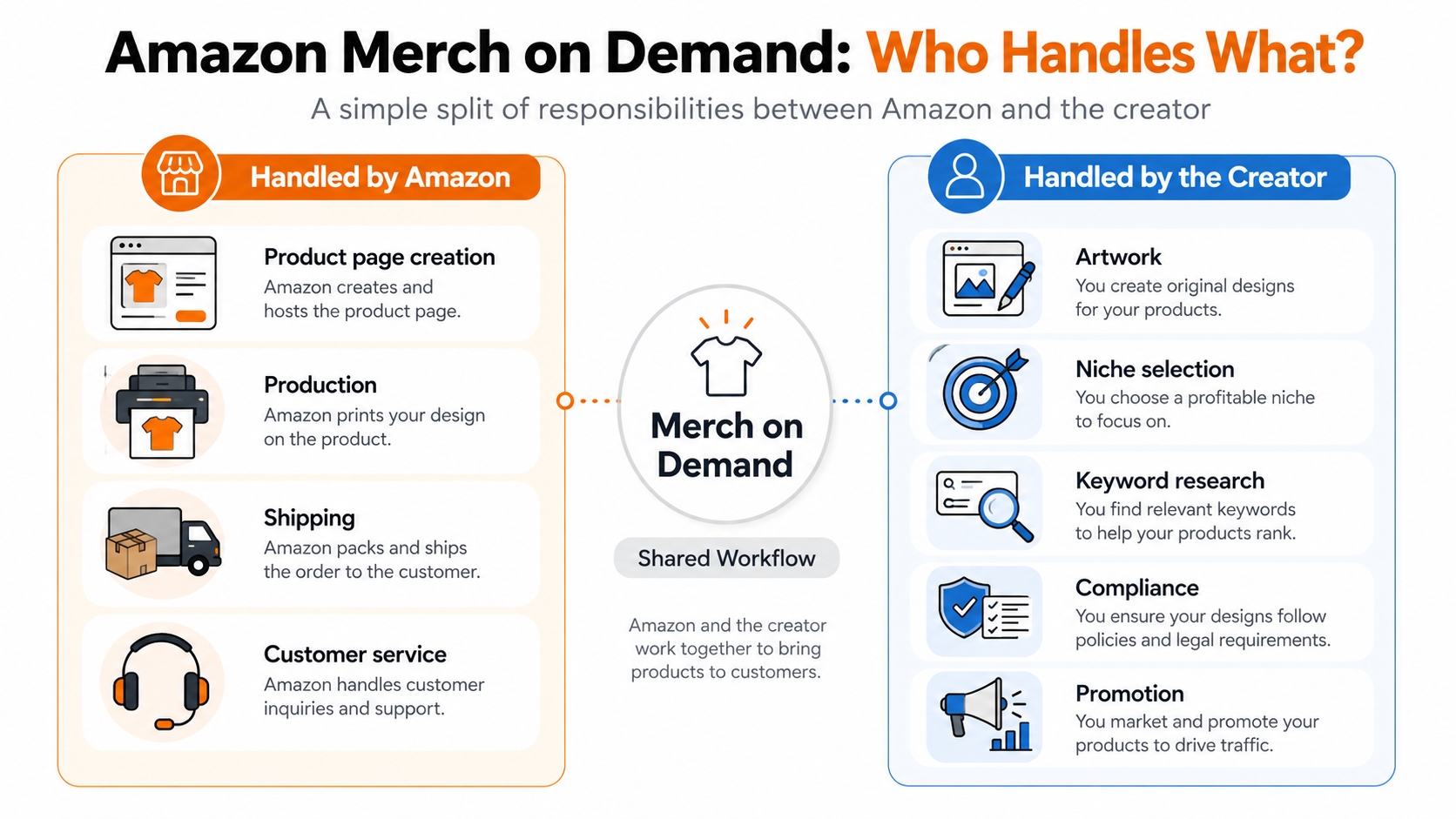
Amazon Merch on Demand is Amazon's print-on-demand program for creators and brands. In the official model, creators provide artwork, choose product types and colors, add product information, and promote their products. Amazon handles production, shipping, customer service, and product page creation according to the program's process.
That makes Merch attractive for creators who want to test ideas without holding inventory. However, no-inventory does not mean no strategy. The creator still needs to decide what to design, how to position it, which keywords to use, how to avoid intellectual property risks, and how to promote products to the right audience.
Official source note
For program rules, creator eligibility, upload requirements, royalties, and account-specific details, always refer to Amazon's official Merch on Demand and Merch resources.
| Area | Handled by Amazon | Handled by creator |
|---|---|---|
| Product page creation | Amazon creates the product page according to the program process. | The creator supplies artwork, product information, and metadata. |
| Production and shipping | Amazon handles production and shipping after purchase. | The creator does not manage physical fulfillment. |
| Customer service | Amazon handles customer service for orders under the program. | The creator still needs to maintain account and content compliance. |
| Niche selection | Not handled by Amazon. | The creator chooses markets, audiences, design themes, and product angles. |
| Keyword research | Not handled by Amazon. | The creator plans titles, bullets, descriptions, and discoverability strategy. |
| Promotion | Amazon provides marketplace exposure when relevant. | The creator may promote through social, blog, community, app, brand audience, or external traffic. |
Why Amazon Merch Sellers Need Data Before Designing
Many Merch creators start with design production first and research second. That is risky. A design can be creative but still fail if the niche is saturated, the keywords do not match buyer intent, the product type is wrong, or the metadata uses vague words buyers do not search.
A data-backed Merch workflow does not remove creativity. It gives creativity a market direction. Instead of designing hundreds of random ideas, creators can build repeatable design systems around validated audiences, occasions, product types, and keyword clusters.
Common mistake to avoid
Do not treat no-inventory as no-risk. Amazon Merch on Demand reduces production and fulfillment risk, but it does not remove niche risk, keyword risk, competition risk, or IP risk.
Data points to check before uploading
- Search demand: Are buyers searching for this theme, audience, occasion, or product type?
- Competition depth: How many similar listings appear, and how strong are their reviews, ratings, price, and presentation?
- Seasonality: Is the idea evergreen, seasonal, event-based, or trend-driven?
- Keyword relevance: Do keywords describe real buyer intent or only the design concept?
- Price band: What prices appear normal for similar products?
- Product-type fit: Does the design work better on a t-shirt, hoodie, sweatshirt, tote bag, phone case, or another Merch-supported format?
- Compliance risk: Are phrases, names, images, or references potentially protected by trademark, copyright, publicity rights, or content policy?
SellerSprite Features for Amazon Merch on Demand Sellers
SellerSprite is useful for Merch creators because Amazon Merch success depends on marketplace signals. The same research principles that help Amazon sellers validate products can help Merch creators validate niches, keywords, design angles, competitors, and product expansion opportunities.
1. Market Research for niche validation
Use Market Research or Category Insights to understand demand signals, competitive density, seasonality, review distribution, and product opportunity. This is especially helpful when deciding whether a niche is evergreen, seasonal, or too crowded.
2. Keyword Research for Merch metadata
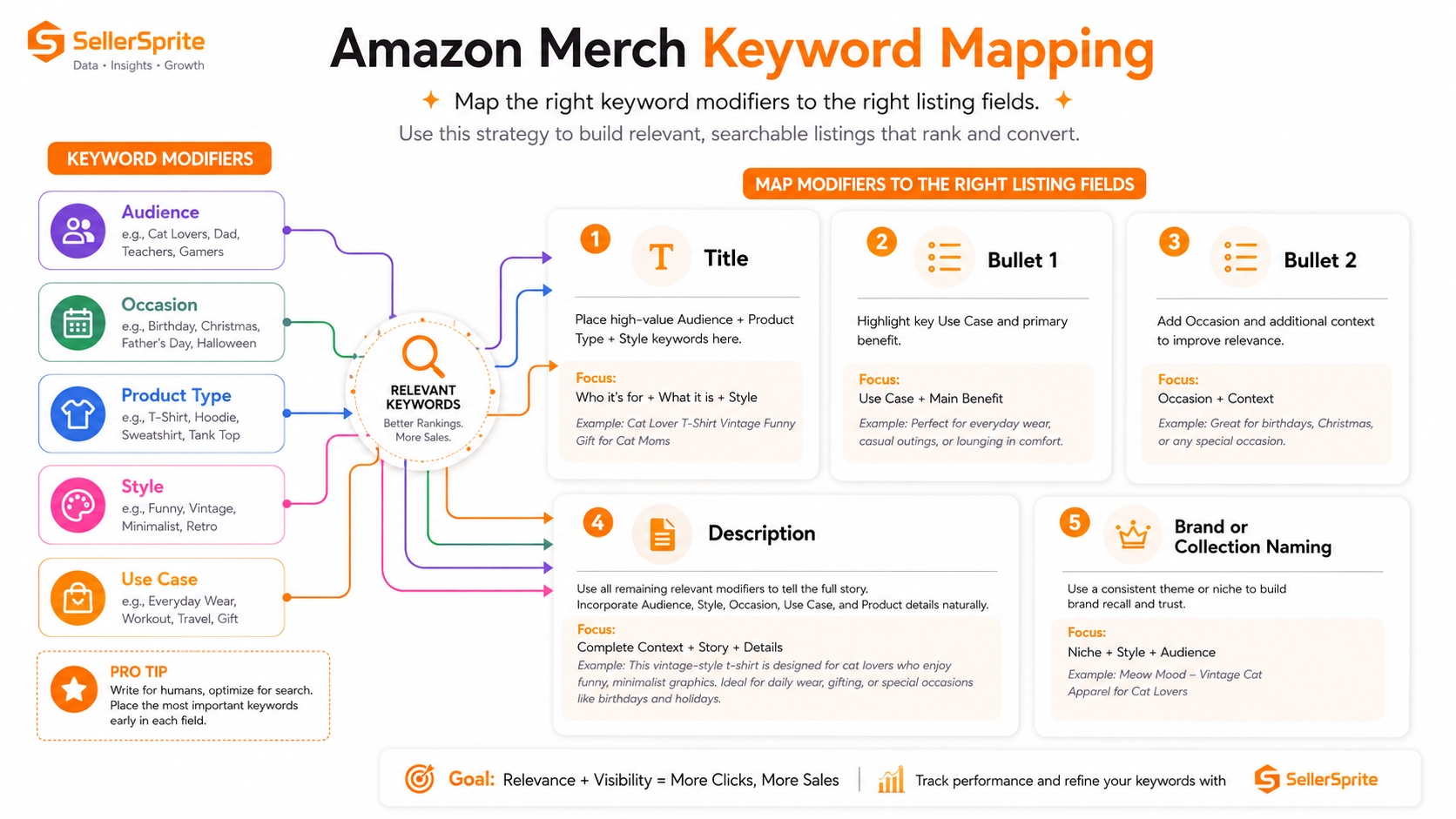
Use keyword research tools to find the words buyers actually use. For Merch, keywords should include audience modifiers, occasion modifiers, product-type modifiers, style cues, and use-case language. The goal is not to stuff keywords; the goal is to match buyer intent clearly.
3. Product Research for design and product-type ideas
Use Product Research to study similar listings, product formats, price bands, review counts, ratings, and visible positioning. A design idea may look weak as one product type but promising as another.
4. Competitor Research and Reverse ASIN for positioning
Use competitor analysis to understand how similar products are positioned. Look at title structure, visible keyword choices, product type, price, reviews, image style, and possible traffic gaps.
5. Chrome Extension for live Amazon page research
Use the SellerSprite Chrome Extension while browsing Amazon pages to review product and keyword data in context. This helps you collect ideas and validate them without switching constantly between research windows.
6. Tracking after publishing
After publishing, use tracking workflows to monitor keywords, competitors, ranking movement, and product changes. Merch research should become a loop: publish, observe, learn, refine, and expand.
| SellerSprite feature | Merch creator use case |
|---|---|
| Category Insights | Validate niche demand, competition, seasonality, and entry difficulty. |
| Keyword Mining | Find Merch keywords for titles, bullets, descriptions, and product positioning. |
| Product Research | Study similar products, price bands, reviews, ratings, and product formats. |
| Competitor Research / Reverse ASIN | Analyze competitor positioning and keyword opportunities. |
| Chrome Extension | Research while browsing Amazon search results and product pages. |
| Keyword Tracker / Product Tracker | Monitor performance signals after publishing and compare changes over time. |
Amazon Merch Research Workflow With SellerSprite
This workflow helps creators move from a rough design idea to a research-backed Merch listing plan. It is designed to be repeatable, so you can use it for evergreen niches, seasonal campaigns, brand merchandise, influencer products, and audience-specific design collections.
Step 1: Start with a broad niche idea
Begin with an audience, interest, profession, hobby, event, or emotion. Examples include teacher gifts, hiking dads, dog moms, nurse humor, retro gaming, gym motivation, or graduation gifts.
Step 2: Validate search demand
Use keyword research to check whether related phrases show real buyer language. Look for variations by product type, audience, occasion, style, and season.
Step 3: Check competition depth
Review similar products on Amazon. Compare review counts, ratings, price bands, image styles, design repetition, and whether the niche appears dominated by established listings.
Step 4: Cluster keyword angles
Group keywords by audience, product type, occasion, style, humor, sentiment, and season. This prevents random keyword stuffing and helps you create natural metadata.
Step 5: Compare product types
A design idea can perform differently across t-shirts, hoodies, sweatshirts, tote bags, phone cases, and other formats. Use product research to compare what similar buyers seem to prefer.
Step 6: Build upload-ready metadata
Prepare a clear product title, bullet points, product description, and positioning notes. Avoid protected phrases, misleading claims, and irrelevant keywords.
Step 7: Track and expand
After publishing, monitor movement over time. If a niche shows promise, expand carefully with new design variations, product types, or related keyword clusters.
Repeatable Merch workflow
Idea → Market Research → Keyword Research → Competitor Review → Product-Type Choice → Metadata Plan → Upload → Track → Expand.
Keyword Research and Metadata Mapping for Amazon Merch Listings
Merch keyword research should reflect how buyers search. A buyer rarely searches only for a design concept. They often search by recipient, occasion, product type, humor style, profession, hobby, identity, or gift intent.
Common Merch keyword modifiers
- Audience modifiers: women, men, kids, moms, dads, teachers, nurses, dog lovers, runners.
- Occasion modifiers: birthday, Christmas, graduation, Halloween, back to school, Mother's Day, Father's Day.
- Product-type modifiers: t-shirt, hoodie, sweatshirt, tote bag, phone case.
- Style modifiers: funny, vintage, retro, minimalist, cute, sarcastic, aesthetic.
- Use-case modifiers: gift, party, family trip, classroom, team event, vacation, reunion.
Keyword mapping rule
Merch metadata should combine buyer intent, product type, audience, occasion, and style in natural language. The goal is not to repeat every keyword, but to make the listing clearly match how a buyer searches.
| Metadata field | Keyword role | Example structure |
|---|---|---|
| Title | Primary buyer intent and product type | Funny teacher appreciation t-shirt for women |
| Bullet 1 | Audience and use case | Gift idea for elementary school teachers, preschool teachers, and classroom staff. |
| Bullet 2 | Occasion and emotional angle | Designed for back to school, teacher birthday, or end-of-year appreciation. |
| Description | Natural language context | Describe who the design is for, when it fits, and why the style matches the audience. |
| Brand or collection naming | Use carefully | Avoid trademarked phrases, misleading brand terms, or protected references. |
Niche Validation Checklist for Merch Creators
Before creating a full design batch, run the niche through a structured validation checklist. A niche does not need to pass every item perfectly, but weak answers should tell you where the risk is.
| Checklist item | Question to ask | Action if weak |
|---|---|---|
| Buyer demand | Are people searching for this niche or related product terms? | Try broader, narrower, seasonal, or audience-specific keyword variants. |
| Competition | Are top listings deeply reviewed, highly optimized, and visually similar? | Look for sub-niches or stronger design differentiation. |
| Repeatability | Can you create several original designs without copying others? | Choose a niche with multiple angles, jokes, styles, or audience segments. |
| Seasonality | Is demand evergreen, seasonal, event-based, or trend-driven? | Plan upload timing and promotion calendar earlier. |
| IP risk | Could the phrase, image, character, celebrity, team, or brand reference be protected? | Do manual trademark and copyright checks before designing or uploading. |
| Product-type fit | Does the artwork work across shirts, hoodies, bags, or accessories? | Adapt layout, size, contrast, and text readability by product format. |
| Promotion angle | Can you reach this audience through social, blog, community, app, or brand traffic? | Choose a niche with identifiable communities or search intent. |
Key conclusion
A weak answer in the checklist does not always mean the niche is unusable. It means the creator should narrow the audience, improve differentiation, adjust product type, or delay upload until the risk is clearer.
Illustrative Example: From Design Idea to Research-Backed Merch Listing
Illustrative example only:
The following scenario is not a revenue claim, not a ranking guarantee, and not based on a specific SellerSprite customer result. It shows how a creator could structure research before uploading.
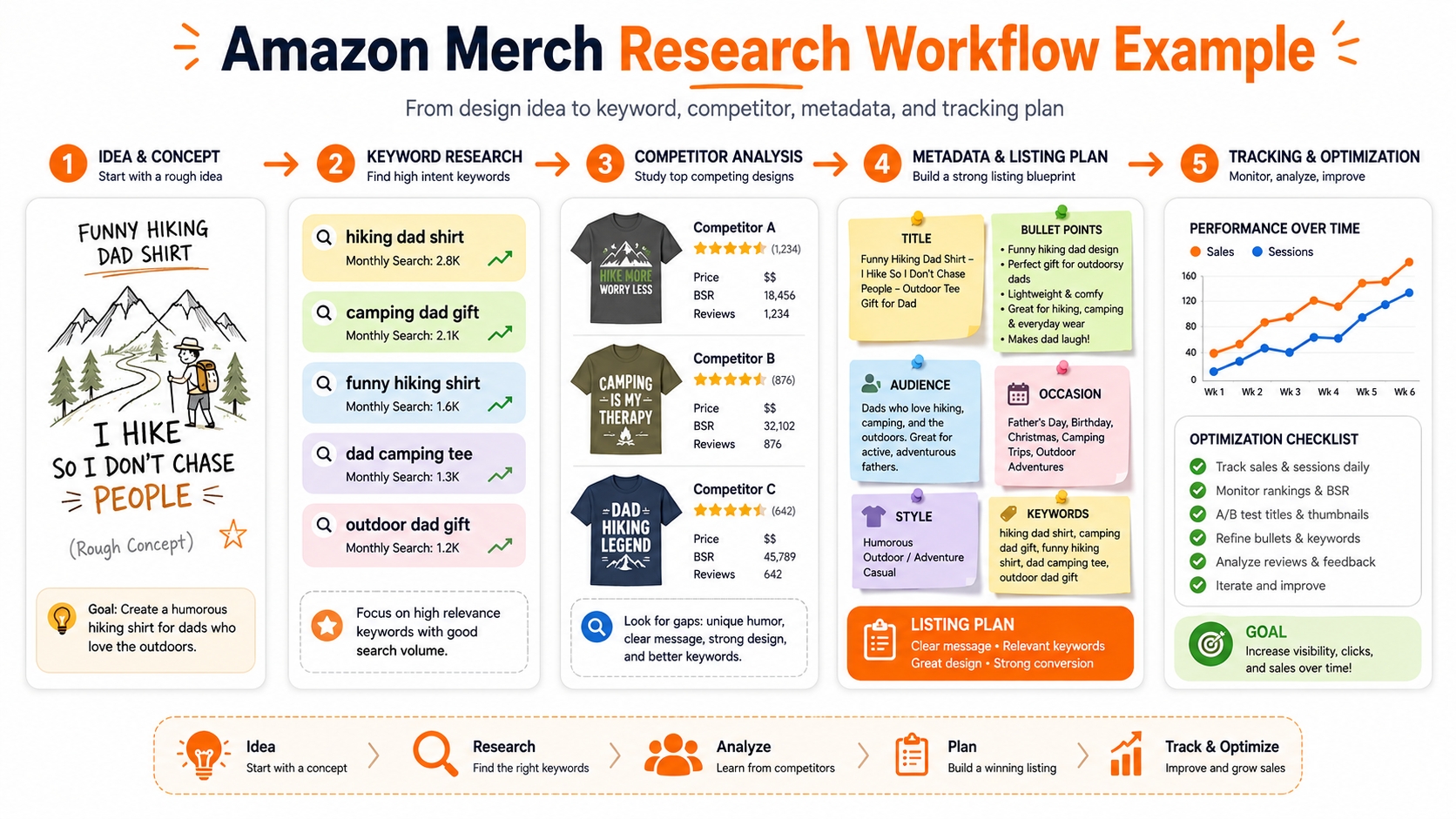
Idea: funny hiking dad shirt
A creator has a rough design idea for a hiking-themed dad shirt. Before designing 50 variations, the creator checks whether the niche has buyer demand, whether similar products are saturated, and which keyword angles could be used naturally.
Research path
- Use keyword research tools to test seed terms such as hiking dad shirt, funny hiking shirt, camping dad gift, and outdoor dad t-shirt.
- Group phrases by audience, occasion, product type, and humor style.
- Use Product Research or the Chrome Extension to review similar Amazon listings and compare reviews, price bands, and design styles.
- Check for risky phrases or protected references before creating artwork.
- Prepare title, bullets, and description around the strongest natural intent clusters.
- Track similar products and keywords after publishing to decide whether to expand the niche.
Possible output
| Research output | What it helps decide |
|---|---|
| Keyword clusters | Which words belong in title, bullets, and product description. |
| Competitor notes | Whether the niche is crowded, under-designed, seasonal, or price-sensitive. |
| Product-type shortlist | Whether to prioritize shirts, hoodies, sweatshirts, tote bags, or other formats. |
| Compliance review notes | Which words, images, or references need manual verification before upload. |
| Expansion plan | Which adjacent ideas could become the next design batch. |
Research Amazon Merch niches before designing at scale
Use SellerSprite to validate niche demand, find keywords, review competitors, and build stronger Merch listing metadata before you upload.
Next steps
- Choose one Merch niche idea and validate demand, competition, and seasonality before creating a full design batch.
- Use SellerSprite keyword research tools to build a metadata map for title, bullets, description, and product-type modifiers.
- Review similar Amazon products, check IP risk manually, and track performance after publishing.
Quick recap
Amazon Merch on Demand simplifies production and fulfillment, but creators still need strong niche selection, keyword strategy, compliance discipline, and promotion planning. SellerSprite helps turn creative ideas into research-backed Amazon product concepts.
FAQs
Is SellerSprite an Amazon Merch on Demand upload tool?
No. SellerSprite is not a Merch upload platform. It is a research toolkit that helps creators validate niches, keywords, competitors, product types, and market opportunities before or after uploading through Amazon's official Merch on Demand system.
Can SellerSprite help me find Amazon Merch niches?
Yes. Use SellerSprite to research demand signals, competition, seasonality, price bands, review depth, and similar product patterns. These signals can help you decide whether a niche deserves more design work.
Can I use SellerSprite for Amazon Merch keyword research?
Yes. SellerSprite keyword research tools can help you identify search phrases, long-tail variants, audience modifiers, occasion keywords, and product-type terms that can inform Merch titles, bullets, and descriptions.
Does SellerSprite calculate Amazon Merch royalties?
SellerSprite can support pricing and competitor research, but Amazon Merch royalties depend on Amazon's current program rules, offer price, costs, taxes, and marketplace-specific factors. Always verify royalty information in Amazon's official Merch resources.
Can SellerSprite help avoid trademark or copyright issues?
SellerSprite can help you discover trends and competitors, but it does not provide legal clearance. You can combine SellerSprite's Design Patent tool and Global Brand Database with other authorative resources to manually check trademarks, copyrights, publicity rights, protected phrases, brand references, and Amazon's current content policy before uploading designs.
Can I use SellerSprite before my Merch account is approved?
Yes. You can research niches, keywords, competitors, and design ideas before approval. This helps you prepare a stronger content plan while you wait for access to upload products.
What data should I check before uploading a Merch design?
Check keyword demand, competition depth, price bands, review counts, product types, seasonality, product presentation, audience fit, and potential IP risk. No single metric is enough by itself.
How often should I refresh Amazon Merch keyword research?
Refresh keyword research before each new design batch, before seasonal campaigns, after major trend shifts, and whenever a listing underperforms. Evergreen niches may need periodic review, while seasonal and trend-driven niches need more frequent updates.
Is Amazon Merch on Demand the same as FBA?
No. Amazon Merch on Demand is a print-on-demand creator program, while FBA is a fulfillment service for sellers who send inventory to Amazon. The research overlap is real, but the operational models are different.


