If your Amazon listing feels uncertain, your keyword list is likely the actual issue.
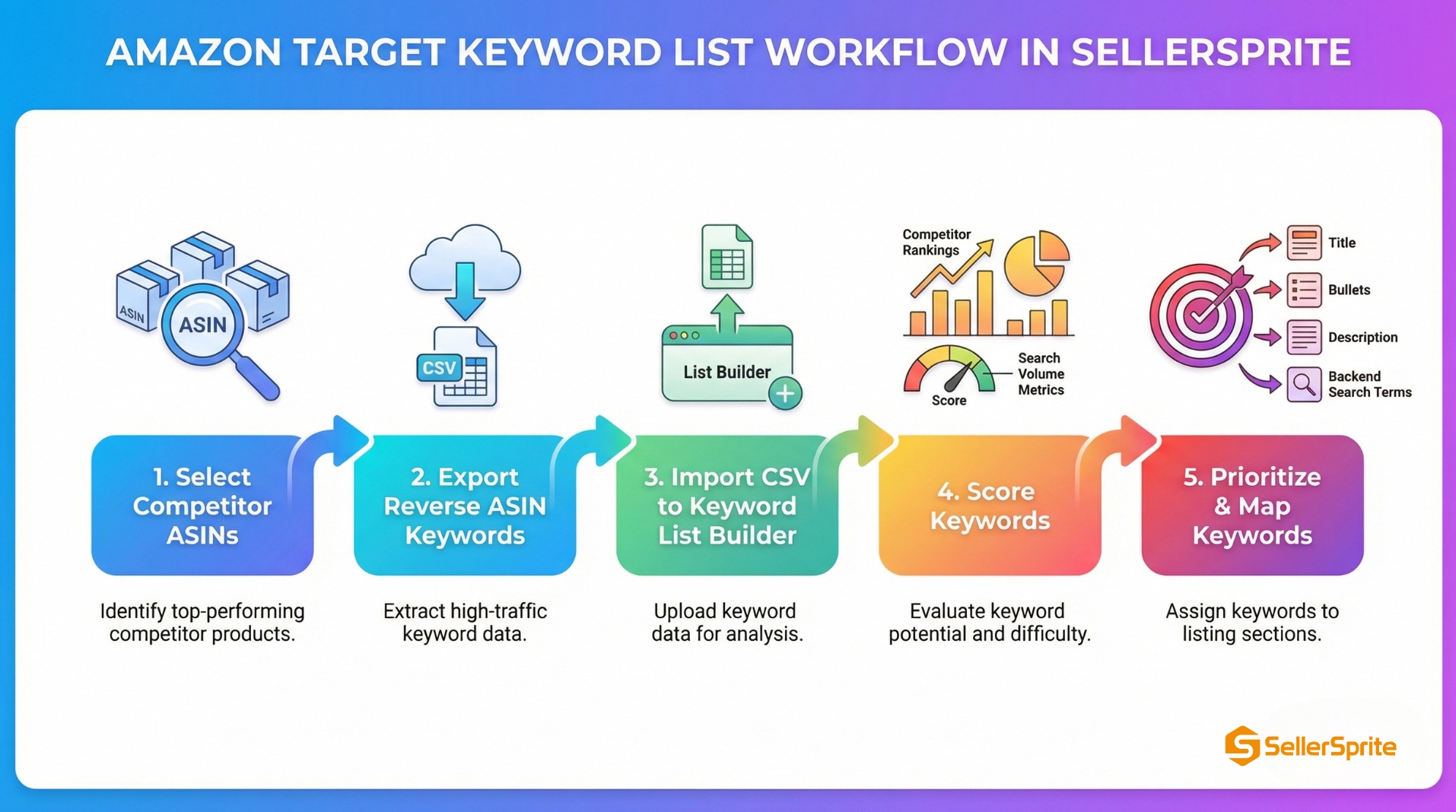
In this chapter, you will build a target keyword list by starting with competitor ASINs, exporting keyword and listing data from SellerSprite, then scoring keywords based on competitor strength and search demand.
You will end with a prioritized list you can map directly into your listing fields.
As you move through the keyword workflow, keep it simple and stay consistent. This discipline will compound results over time.
Conclusion
A strong target keyword list means selecting the right keywords, proving their value, and using them consistently across your listing.
Applicable scenarios
- Launching a new product, and you need a clean keyword foundation.
- Rebuilding a listing that is stuck or losing organic traffic.
- Expanding into new variations, and you want keyword coverage by intent.
- Planning PPC campaigns with keywords that your competitors have already won.
Limitations
- If your product is not comparable to the category leaders, your ASIN set must be adjusted first.
- If you ignore buyer intent, you will build a list that looks big but does not convert.
- If you do not refresh the list, your keyword plan will drift as competitors change.
If you only remember one thing
Your best keywords are the ones that strong competitors already rank for and that shoppers actually search for with purchase intent.
Key takeaways
- Start with competitor ASINs to ensure your keywords are driven by genuine shopper demand, not just assumptions.
- Export all keywords and listing data from SellerSprite, so you consistently track the same signals for every analysis.
- Score each keyword using how many competitors rank for it and the keyword's search volume. Remove unrelated or low-value phrases.
- Prioritize keywords that show strong purchase intent. Assign those to the title and opening features for the biggest impact.
- Review your keyword list regularly. Refresh to find new high-performing keywords as your market shifts.
Background and definition
What is a target keyword list
A target keyword list is a curated, prioritized set of search terms optimized for shopper intent and competitor-proofing, not every keyword you can find.
Why it matters on Amazon
Amazon rewards relevance and performance. When your listing contains the right phrases in the right places, you get better indexing, stronger organic visibility, and cleaner ad targeting.
Common mistakes
- Choosing competitors only by search results position without checking product similarity.
- Collecting low-volume phrases that never move sales.
- Optimizing for too many intents on the same page.
- Never refreshing the list after competitors update.
Table of Contents
- Step 1: Build your competitor ASIN set
- Step 2: Extract keyword and listing data from SellerSprite
- Step 3: Add into SellerSprite My Keyword List
- Step 4: Find more long-tail keywords
- Step 5: Prioritize and map keywords to your listing
- Comparison and selection
- Examples and copyable templates
- FAQs
- Summary and next steps
- About the author
- References
Step 1: Build your competitor ASIN set
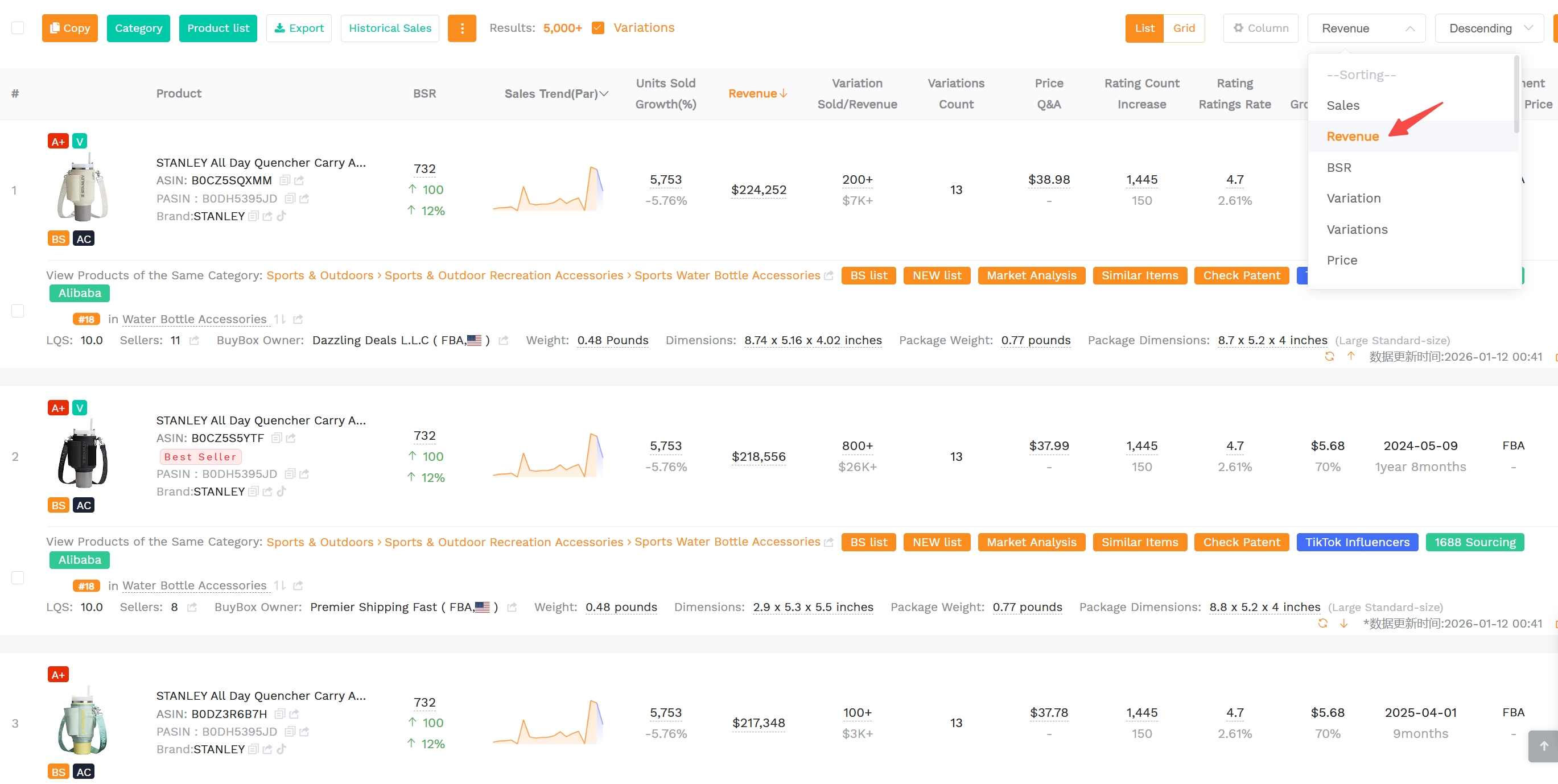
Leverage SellerSprite's Product Research tool to choose 10 competitor ASINs that match your buyer intent, price band, and product promise. This ASIN set becomes the engine for your keyword discovery.
Steps
- Start with a main keyword: pick the phrase shoppers would type when they want to buy your product.
- Open SellerSprite Product Research: review the top products and sort by revenue or sales signals.
- Select your top 10 competitors: choose products that are truly comparable, then copy their ASINs into your worksheet.
Notes
- Stay customer-focused. Similar use cases and similar expectations beat superficial similarity.
- Avoid outliers. A premium niche product will distort the keyword set for a value product.
- Include your own ASIN if you already sell. This helps you spot what you are missing.
Step 2: Extract keyword and listing data from SellerSprite
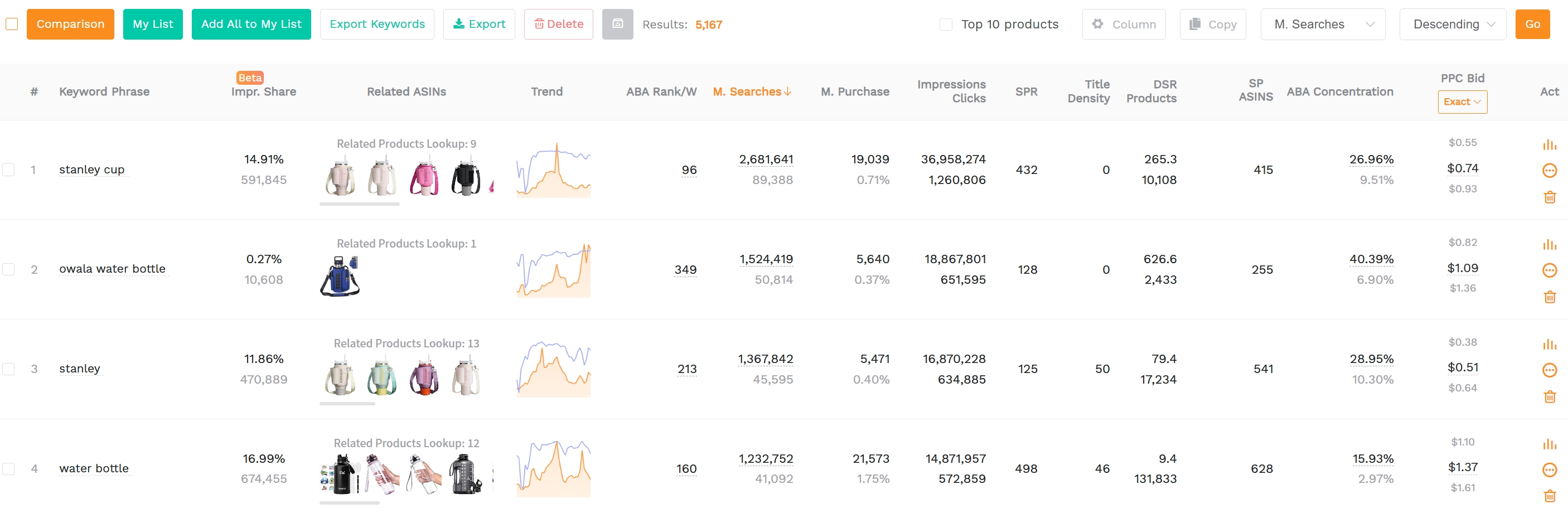
Open SellerSprite's Reverse Multiple ASINs tool and set your expected filters. Then search and unveil target competitor keyword coverage and listing signals from SellerSprite so your keyword list is built on proof, not vibes.
Steps
- Confirm marketplace: set the correct country marketplace for your Amazon listing.
- Run Reverse Multiple ASINs for your ASIN set: enter your target competitor ASINs and search for multi-dimensional results, such as keyword search volume and rank signals.
- Extract listing and product signals: pull listing text and product performance snapshots to validate intent and relevance.
Notes
- Aim for a manageable set on the first pass. About 1500 to 2500 keywords are plenty to start.
- Set a minimum search volume if needed to avoid long-tail noise during your first build.
- Keep your exports consistent. Use the same columns every time to keep scoring stable.
You do not need flawless data. You need a repeatable system. Each refresh makes your keyword list smarter.
Step 3: Add into SellerSprite My Keyword List
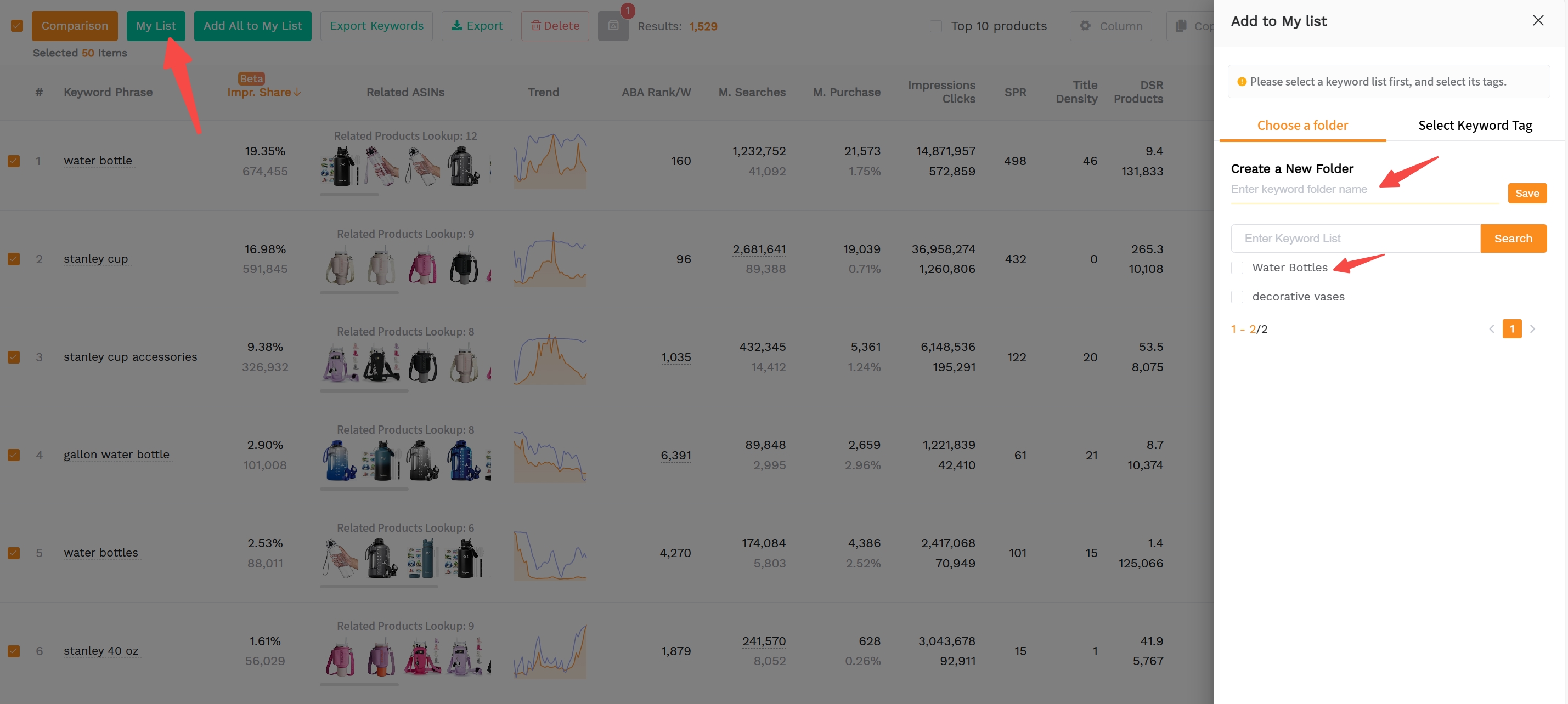
On the results page, analyze and filter out the keywords related to your product, and finally add the selected keywords into your keyword list within SellerSprite.
Steps
- Filter out the precise keywords: based on your actual goals, add or adjust the filtering conditions to narrow down the range of keyword results.
- Eliminate low-relevant keywords: delete those inaccurate keywords unrelated to your products.
- Add the remained keywords into your keyword list: add all the reserved keywords into your keyword list within SellerSprite for further analysis in one place.
Notes
- Eliminate irrelevant keywords to ensure the accuracy of your final keyword database.
- If something looks off, recheck marketplace and file naming first.
Step 4: Find more long-tail keywords
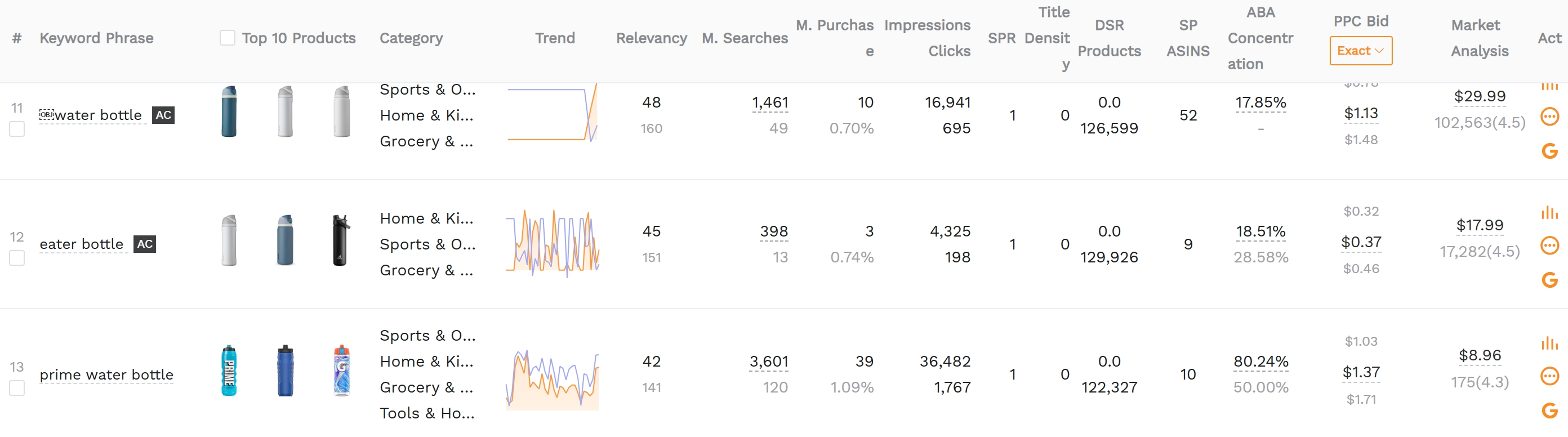
Use SellerSprite Keyword Mining tool to spot more long-tail keywords you may ignore to enrich your keywords list, optimize your future listing and PPC strategy.
Step 5: Prioritize and map keywords to your listing
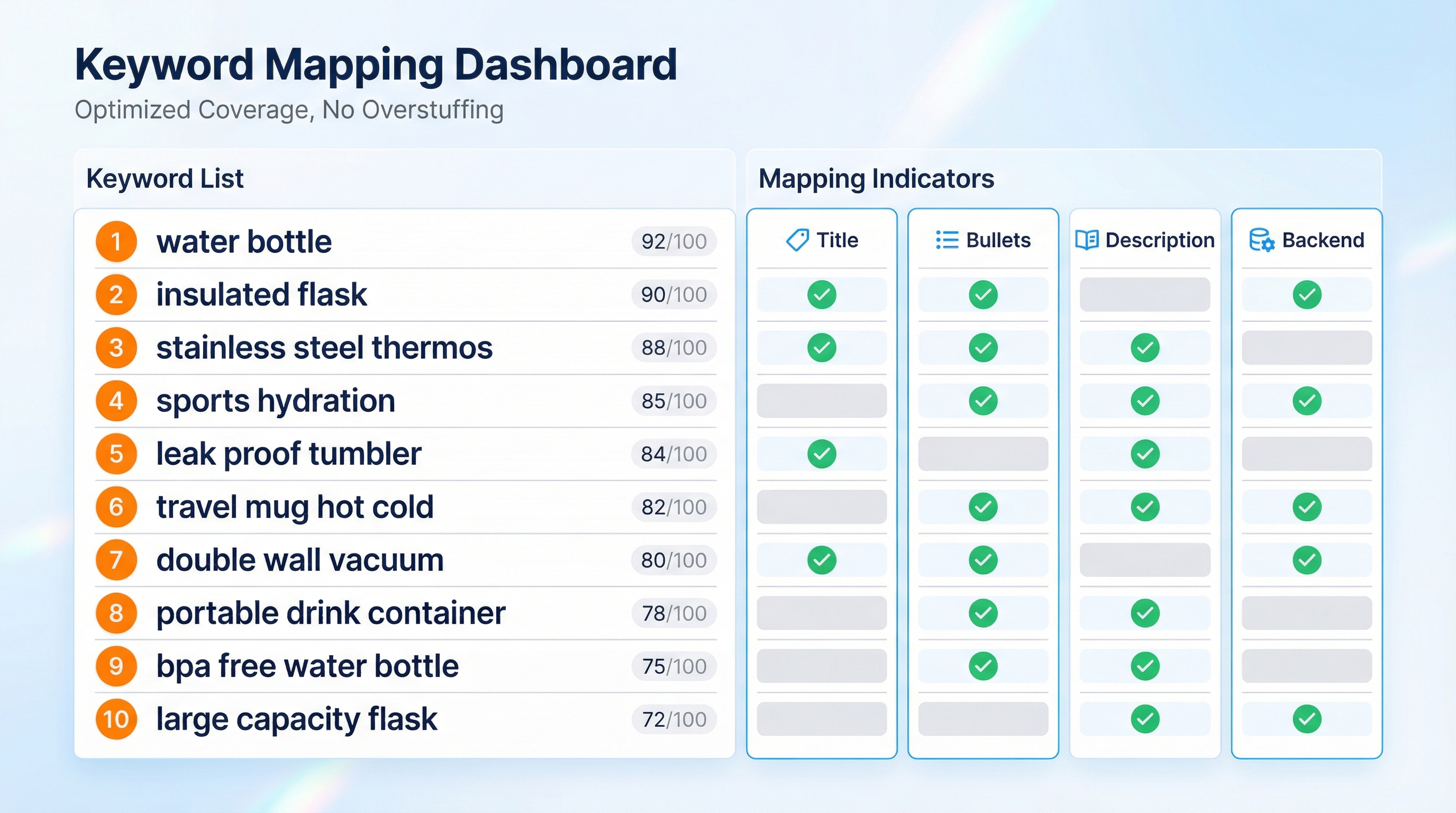
Your target keyword list becomes actionable only when it is mapped to your listing fields. Start with the highest intent phrases and earn coverage step by step.
Steps
- Assign priority: mark each keyword as primary, secondary, or support based on intent and search demand.
- Optimize top fields first: place primary keywords naturally into your title and first bullets.
- Fill coverage thoughtfully: use description and backend terms for secondary and support phrases.
- Track what you used: keep a simple check system so you do not repeat or miss key phrases.
Notes
- Do not chase every keyword. Win the core intent first, then expand.
- Protect readability. Conversion is the multiplier for keyword work.
- Use SellerSprite to validate ranking movement after changes, then iterate.
Comparison and selection
Choose the workflow depth that matches your current stage. You can always upgrade later.
Comparison dimensions
- Cost: both options stay inside SellerSprite Seller Tools and your own spreadsheet workflow.
- Time: a quick build is faster, but a deep build takes longer and reveals more opportunities.
- Risk: a quick build can miss niche intents; a deep build can overcollect without strict scoring.
- Best for: quick builds for new sellers or new launches; deep builds for scaling and category expansion.
Recommendation: Start with the quick build, publish improvements, then refresh into a deep build when your listing and ad data give you clearer direction.
Examples and copyable templates
Example 1: Competitor ASIN selection checklist
- Same shopper goal as your product.
- Similar price expectation.
- Similar feature depth and quality tier.
- Strong sales signals in SellerSprite Product Research.
Example 2: Priority scoring guide
- Primary: highest intent phrases that describe the product type and main use case.
- Secondary: important modifiers like size, material, audience, or primary benefit.
- Support: related terms that improve coverage and capture long-tail traffic.
Copyable template
One-month keyword refresh checklist
- Keep the same 10 competitor ASINs unless your category shifted.
- Extract fresh Reverse ASIN keywords from SellerSprite.
- Update your keyword list if neccessary based on the keywords performance.
- Filter new keywords by realtime buyers' intent.
- Update listing mapping and track the changes you made.
FAQs
Q1: How many competitor ASINs should I use for keyword discovery?
A: Ten is a strong starting point. It balances coverage with focus. If your niche is small, use fewer but keep comparability high.
Q2: How do I know if my competitor ASIN set is too broad?
A: If your exported keywords contain many unrelated use cases or customer segments, your ASIN set is too broad. Narrow the list to products with similar positioning, price band, and primary benefit. A good sign is when your top keyword clusters map cleanly to your storefront categories.
Q3: How often should I refresh my keyword list?
A: Every two to four weeks is a practical rhythm. Refresh more often during launches or aggressive PPC testing, and less often once your category is stable.
Summary and next steps
You now have a full workflow to build a target keyword list using SellerSprite Seller Tools, score it with competitor proof, and map it into your listing fields.
Keep your routine simple, focus on intent, and actively refresh your keyword system to grow stronger. Make it a habit: starting your update now to drive meaningful improvement.
Next step action checklist
- Pick your main keyword and lock in 10 competitor ASINs.
- Export Reverse ASIN keywords from SellerSprite and import into the worksheet.
- Score, filter, and map primary keywords into title and top bullets.
- Ask the community for an intent check if anything feels uncertain.
Share Your Sourcing Journey With SellerSprite Community
Join the SellerSprite community on the Facebook Group to share your sourcing journey, ask questions, and get support from fellow Amazon sellers.
View The SellerSprite Course Directory
Ready for the next step? Open the SellerSprite Academy course directory to continue building your Amazon FBA skills chapter by chapter.
About the author
SellerSprite Team builds practical workflows that help Amazon sellers move faster, stay organized, and make decisions backed by real demand signals.


