By SellerSprite Team
SellerSprite supports Amazon sellers with launch planning, keyword tracking, and competitor monitoring across major marketplaces. Our playbooks are informed by aggregated marketplace signals, daily rank tracking, and the practical patterns we see from a large global seller community. Learn more about SellerSprite
Note: any suggested ranges below are practical benchmarks, not guarantees. Always compare against your category, price point, seasonality, and risk tolerance.
Summary
To know your launch is working, track Amazon product launch metrics that predict future sales, not just yesterday's orders. The fastest signals are keyword indexing, keyword rank trend, and keyword coverage, then CTR, conversion rate, ad efficiency, review momentum, and in-stock rate. This guide shows the exact KPIs to watch and how to monitor them in SellerSprite, so you can answer: how to know your launch is working and what to fix next.
Key Takeaways
- If keyword ranks move up and coverage expands, sales usually follow with a short delay.
- If ranks rise but sales do not, conversion assets (images, price, reviews) are usually the bottleneck.
- Track launch KPIs in one place: keywords, product signals, and ads, then review weekly with a simple decision flow.
- Set alerts for stockouts and competitor changes, because inventory drops can erase momentum fast.
Table of Contents
Which KPIs show that your Amazon launch is working?
Direct answer: Your launch is working when you see a consistent upward trend in keyword visibility (indexing, rank, and coverage) plus stable or improving shopper response (CTR, conversion rate, and reviews) while ads become more efficient and inventory stays in stock.
Below are 8 launch KPIs you can track weekly. For each KPI, you get a definition, why it matters, a practical early-launch range, and what to do when it looks abnormal.
KPI 1: Keyword indexing rate
- Definition: Percent of your priority keywords where your ASIN is indexed and eligible to appear in search.
- Why it matters: If you are not indexed, ranking is slow and unstable, no matter how much you spend.
- Practical range: Aim for 80 to 100 percent indexing on your top 10 launch keywords within the first 7 to 14 days.
- If abnormal: Add missing terms naturally to title, bullets, description, and backend search terms. Then recheck.
SellerSprite quick action: confirm indexing
- Open Index Checker.
- Enter your ASIN and your top 10 to 25 launch keywords.
- Fix any non-indexed keywords, then rerun the check 24 to 72 hours later.
KPI 2: Priority keyword rank trend
- Definition: Your organic position for the keywords that matter most, tracked over time.
- Why it matters: Rank trend is the fastest feedback loop for launch momentum.
- Practical range: In a healthy launch, at least 30 to 50 percent of your top 10 keywords should move up week over week in the first 2 to 4 weeks.
- If abnormal: Recheck indexing, then improve conversion signals before increasing bids.
SellerSprite quick action: track rankings daily
- Open Keyword Tracker.
- Add your ASIN and 10 to 25 launch keywords.
- Review the 7-day and 14-day trend lines for your priority terms.
KPI 3: Keyword coverage growth
- Definition: The number of relevant keywords where you rank in the top 100, and how fast that footprint expands.
- Why it matters: Expanding coverage is how launches turn into stable organic sales.
- Practical range: In week 2 to 4, healthy launches often add 10 to 50 new long-tail rankings, depending on category breadth.
- If abnormal: Improve listing content coverage and add long-tail intent keywords that match your images and bullets.
Pro Tip: Coverage expands faster when you win multiple intent clusters. Group your launch keywords by intent, not just by search volume.
KPI 4: Click-through rate (CTR)
- Definition: Clicks divided by impressions for your search placements and ads.
- Why it matters: CTR reflects relevance and image strength. Weak CTR slows ranking and raises CPC.
- Practical range: Early-launch CTR varies by niche, but many sellers target 0.3 to 1.0 percent on core terms, and higher on branded or high-intent long tails.
- If abnormal: Improve main image clarity, tighten keyword targeting, and test price and coupon visibility.
KPI 5: Conversion rate (CVR)
- Definition: Orders divided by sessions. Often shown as unit session percentage in Seller Central.
- Why it matters: Conversion quality is what makes launch traffic create lasting rank.
- Practical range: Category-dependent, but many healthy launches aim to reach a stable conversion band by week 2. If you are far below your category norm, scale will be expensive.
- If abnormal: Fix images, offer, and trust signals first. Then re-evaluate keyword intent alignment.
SellerSprite quick action: close the conversion gap
- Use Listing Builder to improve keyword coverage and clarity in title and bullets.
- Use Review Analysis to identify the top 3 objections shoppers mention on competitor listings.
- Update your first image and first bullet to answer those objections in plain language.
KPI 6: Ad efficiency (ACoS and TACoS)
- Definition: ACoS is ad spend divided by ad sales. TACoS is ad spend divided by total sales.
- Why it matters: You want ads to become more efficient as organic rank improves.
- Practical range: Early launch ACoS can be high, but the healthy pattern is a downward trend by week 2 to 4, while sales and rank rise.
- If abnormal: Tighten match types, add negatives, and shift budget to the keywords that convert and lift rank.
KPI 7: Review velocity and rating stability
- Definition: New reviews per week and your average rating trend.
- Why it matters: Reviews support conversion and reduce shopper hesitation during the launch window.
- Practical range: Focus on consistency, not a magic number. A steady upward review curve with stable rating is the healthy signal.
- If abnormal: Identify the top 1 to 2 product issues from feedback and fix listing clarity, instructions, or packaging fast.
KPI 8: In-stock rate and days of cover
- Definition: Whether your offer stays available and how many days your inventory can support your current sales pace.
- Why it matters: Stockouts can erase rank momentum quickly and raise your relaunch cost.
- Practical range: Many sellers aim for 30 to 45 days of cover during the first month to protect momentum.
- If abnormal: Reduce ad exposure temporarily and prioritize replenishment to protect rank.
SellerSprite quick action: monitor competitors during launch
- Add your ASIN and key competitors to Product Tracker.
- Track price, rating, and inventory signals so you can react to sudden competitor moves.
- Check changes weekly, and daily during days 1 to 7.
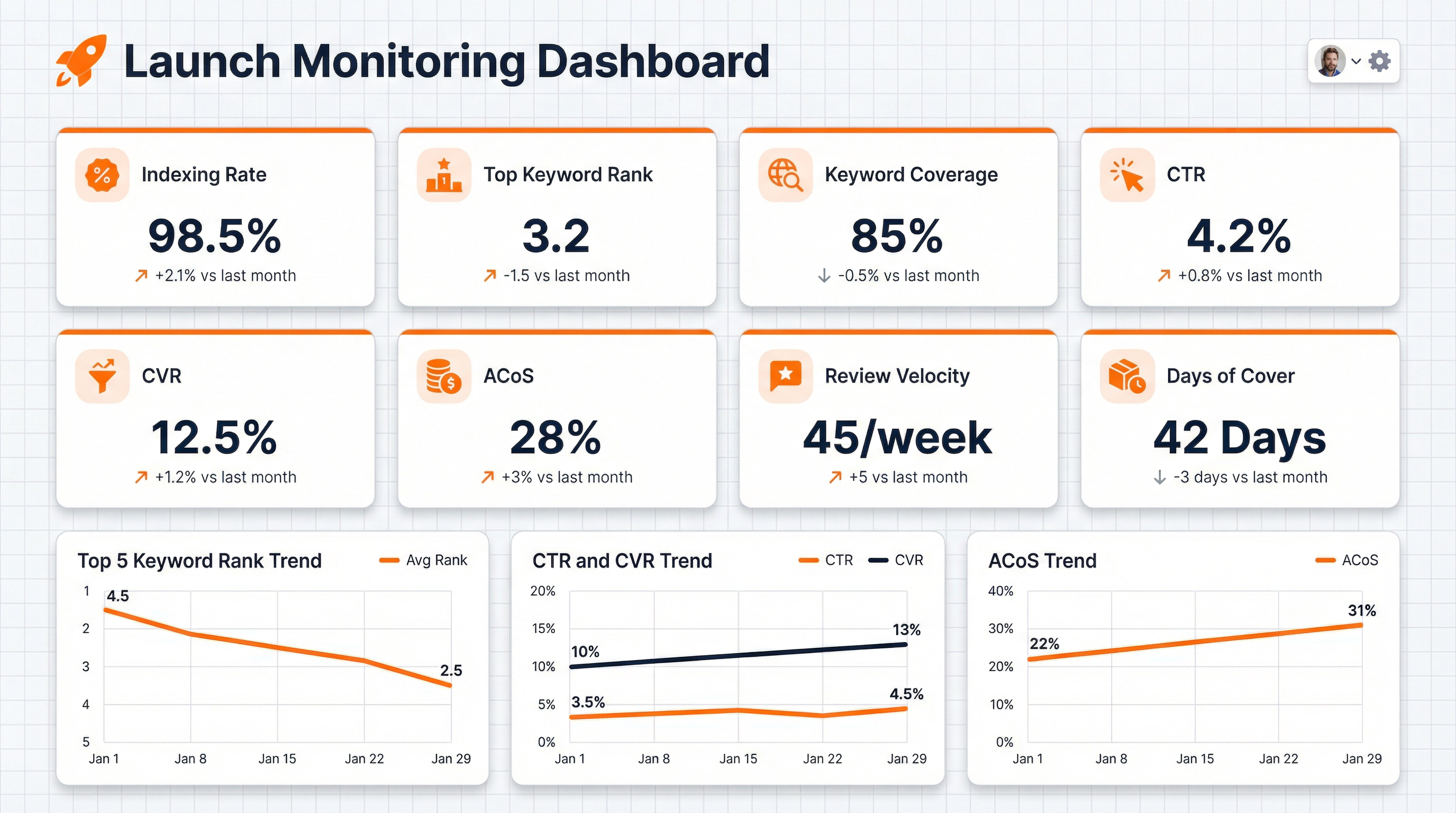
How to track launch success in one dashboard with SellerSprite
Direct answer: Build a simple launch dashboard with three panels: keyword visibility (indexing, rank, coverage), listing response (CTR, conversion, reviews), and business control (ads efficiency and inventory). You do not need perfect data but a consistent weekly view that makes decisions obvious.
KPI health vs abnormal: a quick diagnosis table
Direct answer: Use this table when you feel stuck. It tells you whether the problem is visibility, conversion, ads precision, or inventory, and what to do first so you stop guessing.
Metric to SellerSprite feature mapping: where to check each KPI
Direct answer: This table turns KPIs into actions. When a number looks wrong, you immediately know which SellerSprite feature to open and what question to answer.
Launch case study: how KPI trends guided decisions
Direct answer: A good launch decision is rarely one metric. In this example, indexing and rank moved first, then CTR and conversion confirmed whether the listing deserved more ad budget.
Scenario: New ASIN launch, days 1 to 21
- Day 1 to 3: Indexing rate was 60 percent on the top 10 keywords. Decision: update bullet wording and backend search terms, then recheck indexing.
- Day 4 to 7: Indexing improved to 90 percent. Two mid-tail keywords moved from beyond top 100 into the 40 to 70 band. CTR stayed low. Decision: replace the main image to clarify the value proposition and tighten ad targeting to exact match on the two strongest intent terms.
- Day 8 to 14: CTR improved and conversion stabilized. ACoS started trending down. Decision: expand keyword coverage by adding long-tail use cases to bullets and launching a small phrase match test set.
- Day 15 to 21: More keywords appeared in the ranking footprint and priority terms held a stable position band. Decision: shift budget from broad discovery to the top converting keywords, and add competitor ASINs to Product Tracker to monitor price and inventory shifts.
This is an anonymized, representative pattern. Your results depend on category competition, offer strength, and product-market fit.
Launch Health Checklist and one-click setup
Direct answer: If you set up tracking once, launch becomes weekly decisions instead of daily guesswork. Use this checklist to move from reading to execution in under 15 minutes.
One-click setup
- Step 1: Add your new ASIN to Product Tracker to monitor competitor moves and key listing changes.
- Step 2: Add 10 to 25 launch keywords in Keyword Tracker and label your priority tier.
- Step 3: Recheck indexing weekly using Index Checker, especially after listing edits.
- Step 4: Set a weekly review reminder: rank trend, coverage growth, CTR and conversion, then ad efficiency and inventory cover days.
Open Keyword Tracker Open Product Tracker Open Index Checker
Get Help From the SellerSprite Community
Share your negotiation situation, get feedback, and learn from other sellers in the SellerSprite Discord and Facebook Group.
View The SellerSprite Course Directory
Ready for the next step? Open the SellerSprite Academy course directory to continue building your Amazon FBA skills chapter by chapter.
FAQ
These answers cover common questions about Amazon product launch metrics, KPI priority, and how often to review data.
How long should I measure launch KPIs before I decide to scale?
Most sellers track daily in week 1, then weekly through week 4. If indexing and rank trends are improving and conversion is stable, scaling decisions become safer after the first 14 to 30 days.
Which KPI should I prioritize first when my launch feels stuck?
Start with indexing, then rank trend, then conversion. If you are not indexed, ranking will be limited. If ranking improves but conversion is weak, fix images and offer before increasing ad spend.
How often does SellerSprite update keyword tracking data?
Rank tracking is designed to give a consistent daily benchmark. Your live Amazon view may differ due to location and personalization, so focus on trend direction instead of a single snapshot.
Can I use the same KPI dashboard across marketplaces?
Yes. The KPI logic is the same across marketplaces, but you should benchmark CTR and conversion against each marketplace's norms and language behavior.
What if my sales are up but keyword ranks are not improving?
Your traffic may not be keyword-relevant, or your listing might not match the intent keywords you want to win. Tighten ad targeting to exact match, improve listing keyword placement, and track rank trends for the specific keyword set you care about.


