Selling on Amazon in 2026 can feel like a race. The sellers who win are not the ones with the most tabs open, but the ones with a repeatable workflow: product research, keyword strategy, pricing discipline, and ongoing tracking.
This guide is a practical look at the best Amazon seller tools and software in 2026, with a focus on how each tool fits into a real seller workflow. It applies to major Amazon marketplaces, including the US, UK, CA, DE, FR, IT, ES, JP, IN, and MX.
You will see 10 high impact tools you can use inside SellerSprite, plus quick examples of other popular tools in each category so you can compare options and build your stack with confidence.
Byline and trust note
Author: SellerSprite Customer Team (hands-on onboarding support and workflow audits for Amazon sellers)
How we use these tools: We map them to repeatable seller routines (weekly product discovery, listing build, ranking checks, pricing review, inventory planning, and reimbursement review) so you can copy a proven system instead of piecing together random tactics.
Key takeaways
- In 2026, the best Amazon seller tools are the ones you can turn into a routine, not the ones with the longest feature list.
- Product research is faster when you filter to a shortlist first, then validate with niche analysis and competitor tracking.
- Keyword research and a keyword tracker work best as a loop: research, launch, track, then adjust the listing and PPC.
- Price tracking and profit math protect margins. Do not scale revenue before you can explain profit per unit.
- Inventory planning and reimbursement checks are unglamorous, but they are where mature sellers keep cash flow healthy.
Table of contents
- Why Use Third-Party Tools as an Amazon Seller?
- Product Research Tools
- Keyword Research & Tracking Tools
- Pricing and Profitability Tools
- Inventory and Analytics Tools
- Amazon Reimbursement and Refund Tools
- Other Useful Amazon Seller Tools
- How to Choose the Right Tools for Your Business
- Conclusion: Empowering Your Business with the Right Tools
Quick comparison table
Tool or module | Main use case | Stage in workflow | Best for |
|---|---|---|---|
SellerSprite Product Research | Discover product ideas with filters | Product discovery | New and scaling sellers |
SellerSprite Keyword Research | Build keyword sets for SEO and PPC | Listing and ads setup | All sellers |
SellerSprite Keyword Tracker | Monitor ranking changes over time | Ongoing optimization | Operators and PPC teams |
SellerSprite Browser Extension | On-page price and trend checks | Daily decisions | Sourcing and analysis |
SellerSprite Profit Calculator | Estimate profit after fees and ads | Pricing and scaling | Margin focused sellers |
Recommended workflow you can copy
- Product Finder: build a weekly shortlist.
- Product Database: sanity-check the niche landscape.
- Keyword Research: build a launch keyword map.
- Reverse ASIN and Keyword Gap: steal the right lessons from winners.
- Keyword Tracker and Browser Extension: monitor rankings and pricing signals daily.
- Business Dashboard and Reimbursement Assistant: protect cash flow as you scale.
Start Building Your Amazon Tool Stack in SellerSprite
Create an account to test the product research, keyword tracking, and on-page extension workflows in this guide.
Why Use Third-Party Tools as an Amazon Seller?
Gain a Competitive Edge (how tools provide data and automation that manual work can’t easily match)
Amazon is a data game. Demand shifts, competitors adjust pricing, and rankings move constantly. Third-party tools help you see those signals earlier and turn them into actions: what to launch next, which keywords to target, and when to defend your price.
Without tooling, sellers tend to research in snapshots. With the right tools, you can research in systems. That difference is what creates compounding advantage.
Save Time and Make Informed Decisions (emphasize efficiency and smarter strategy)
Manual work breaks at scale. A repeatable workflow lets you make decisions faster while staying consistent: shortlist products the same way each week, build keyword maps the same way each launch, and track performance with the same dashboard every Monday.
Practical tip
If you only do one thing this week: define a weekly routine (for example, 60 minutes for product discovery, 30 minutes for keyword tracking, 20 minutes for pricing review). Tools are most valuable when they become a habit.
Product Research Tools
Find Profitable Products and Niches (overview of what these tools do: estimate sales, competition for product ideas)
Product research tools help you answer three questions before you spend money: Is there demand, is competition realistic, and can you win with a clear angle (price, bundle, brand, or differentiation).
The best approach is two-step. First, filter down to a shortlist. Second, validate the niche with deeper checks (listing quality, review distribution, and how concentrated demand is).
Mini use case (from 0 to 1)
Start with one category you understand. Use filters to find products with steady demand and manageable review counts. Save your top 20 ideas, then validate each niche by comparing the top listings, the spread of reviews, and obvious differentiation gaps you can fill.
Top Examples: (mention a few like AMZScout, Jungle Scout, Helium 10’s Black Box, and SellerSprite’s product finder, noting unique features briefly)
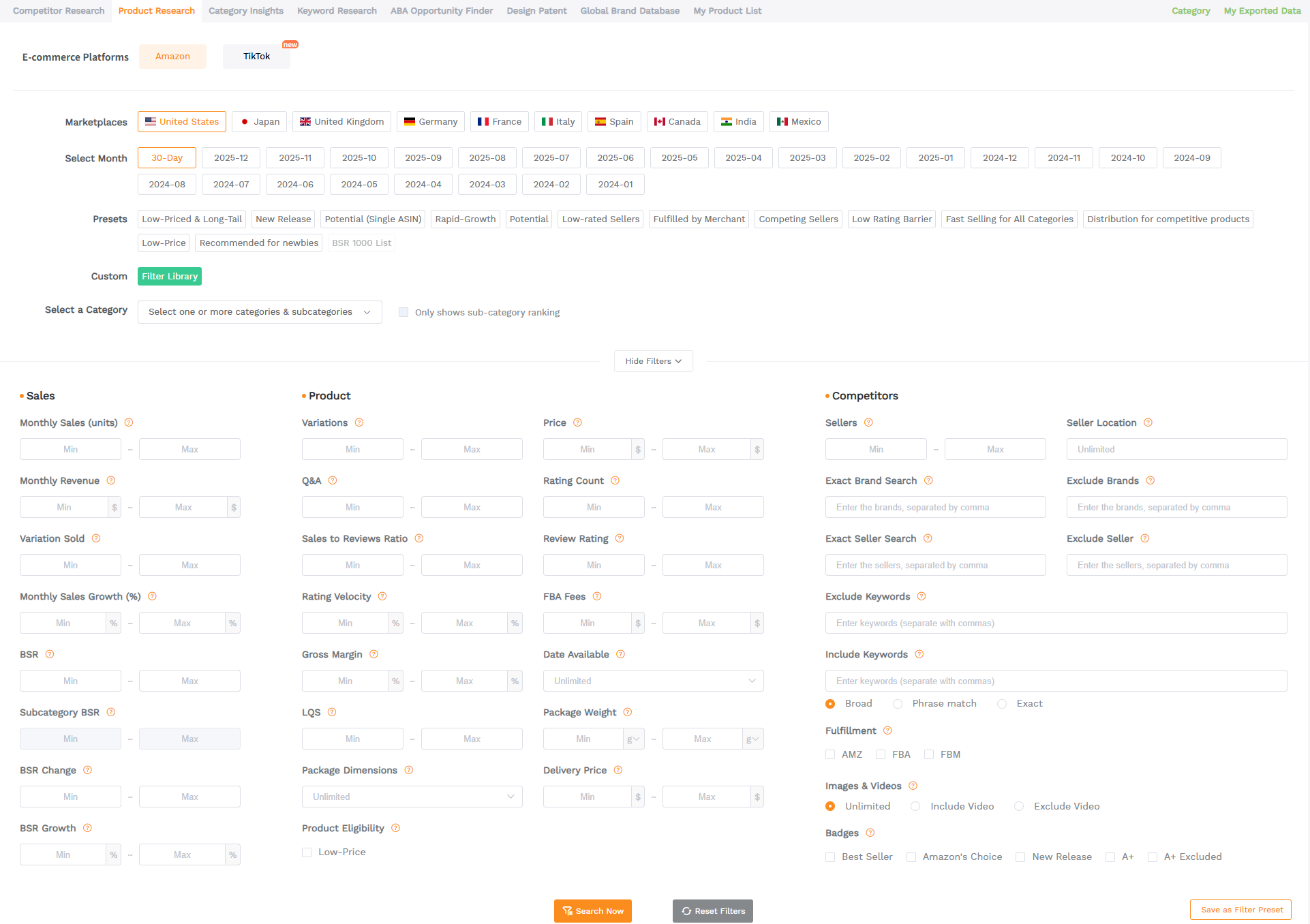
- SellerSprite Product Finder: filter-first discovery to build a weekly pipeline of ideas.
- Jungle Scout: popular all-in-one suite with product and niche research features.
- Helium 10 Black Box: large product database filtering for opportunity discovery.
- AMZScout: product research tooling often used by newer sellers for quick validation.
1. SellerSprite Product Finder
One-line positioning: The fastest way to turn a huge category into a shortlist you can actually validate.
Who it is for
Sellers who want a structured discovery routine (especially if you feel stuck scrolling random Amazon pages).
Key features
- Filter by category, price, revenue, and other demand signals.
- Surface candidates that match your business model, not just trending items.
- Save a repeatable filter set so you can run the same discovery process weekly.
Practical use case
Build a weekly "20 ideas" list. Spend one focused session filtering, save your shortlist, then validate the top five with niche analysis before you ask a supplier for quotes.
Try this in SellerSprite
Go to Product Research > set your category and price band > add a review ceiling and revenue floor > export your shortlist for validation.
2. SellerSprite Product Database
One-line positioning: A landscape view of a niche so you can spot patterns, not just winners.
Who it is for
Sellers validating a niche and comparing the top listings side by side.
Key features
- Explore listings at scale inside a niche.
- Compare price points, reviews, and positioning patterns.
- Identify where the market is overcrowded vs where there is whitespace.
Practical use case
Before committing to sourcing, scan the top 30 listings and note: median review count, common features in titles, and price clustering. If every winner looks identical, you likely need a stronger differentiation angle.
3. SellerSprite Category AI Insights
One-line positioning: Your validation step for demand, competition, and realistic entry difficulty.
Who it is for
Sellers deciding whether a niche is a trend spike or a sustainable opportunity.
Key features
- Review distribution and listing quality signals to gauge competition.
- Demand concentration clues (one dominant seller vs many viable sellers).
- Decision support for positioning and differentiation strategy.
Practical use case
Run niche analysis on your top five ideas. Kill ideas where the top listings are too entrenched (high review moat) unless you have a unique supply chain advantage.

4. SellerSprite Competitor Research
One-line positioning: Track competitor moves so you respond early, not after sales drop.
Who it is for
Sellers launching into competitive niches or defending a product that already sells.
Key features
- Monitor competitor performance and changes over time.
- Spot pricing changes and listing shifts that signal new strategy.
- Support smarter launch planning and defensive actions.
Practical use case
Track three direct competitors per SKU. If two competitors lower price and your ranking drops within days, you can connect cause and effect and adjust faster.
Keyword Research & Tracking Tools
Optimize Listings for SEO (why keyword tools matter for finding high-volume search terms)
Keyword research is not about stuffing every phrase into your title. It is about matching buyer intent. In 2026, the most effective listings are clear to humans and easy for the algorithm to categorize.
A good keyword tool helps you build a keyword map: primary keyword for the title, supporting terms for bullets, and high intent variations for PPC.
Track Your Keyword Rankings (the importance of a keyword tracker to monitor how your product ranks over time)
Rankings move daily. Price, ads, conversion rate, inventory, and competitor promotions all influence your position. A keyword tracker turns ranking into a measurable loop: change something, then see what happens.
Top Examples: (e.g., SellerSprite’s keyword tracker, Helium 10’s Cerebro & Rank Tracker, Viral Launch)
- SellerSprite Keyword Research and Keyword Tracker: build the map, then monitor the results.
- Helium 10 Cerebro and Rank Tracker: widely used reverse ASIN and tracking options.
- SmartScout: always on Rank Tracking with click-through and conversion rate data
5. SellerSprite Keyword Research
One-line positioning: Turn raw keyword lists into an organized plan for SEO and PPC.
Who it is for
Sellers launching a new listing or rebuilding a listing that is not ranking.
Key features
- Discover keywords based on real shopper searches.
- Sort by intent and competitiveness, not just volume.
- Support clean listing structure and PPC targeting.
Practical use case
Build a keyword map in 30 minutes: pick 1 primary keyword, 5 supporting phrases, and 10 long-tail terms. Then assign each group to title, bullets, backend, and exact match PPC.
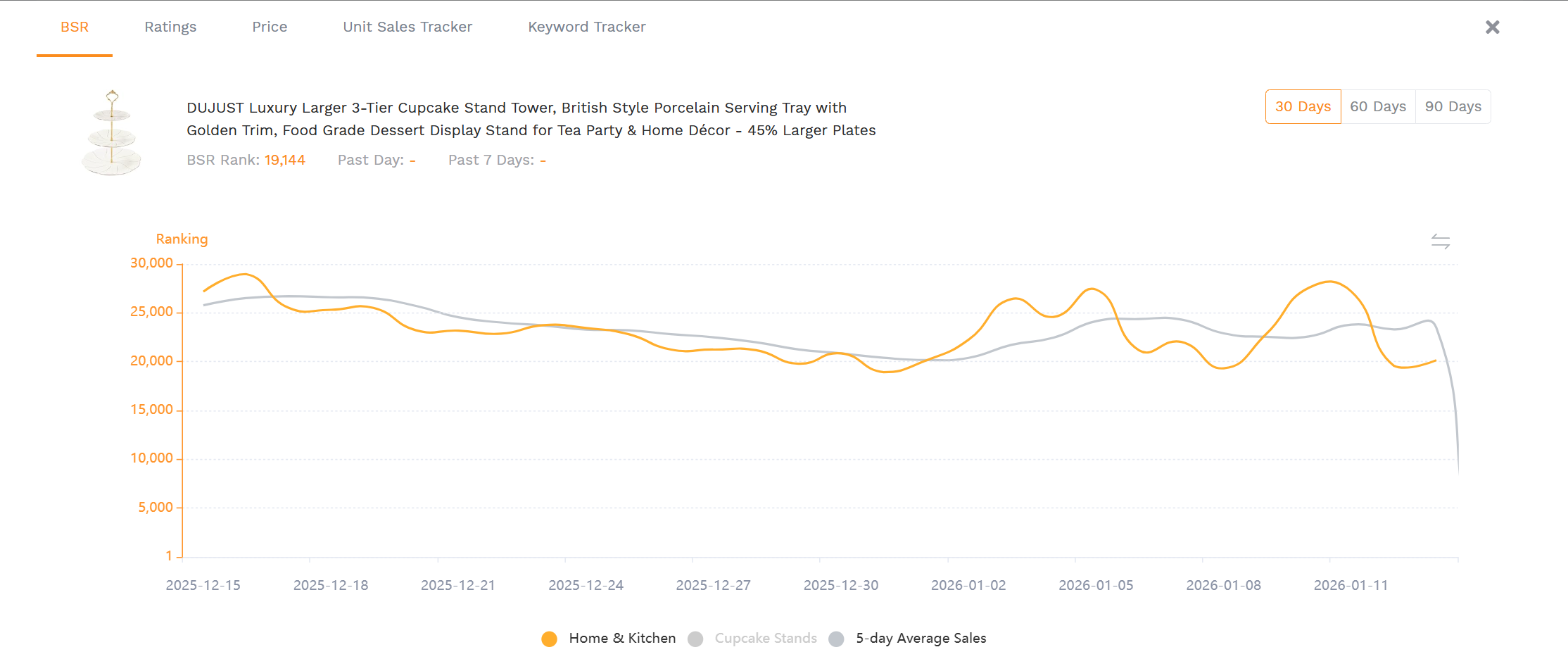
6. SellerSprite Keyword Tracker
One-line positioning: A keyword ranking dashboard that connects your actions to visibility.
Who it is for
Sellers who want a weekly and daily control panel for rankings (especially after listing edits or ad changes).
Key features
- Track ranking movement for your highest priority keywords.
- Spot gains after optimization and identify drops early.
- Build a consistent measurement habit for SEO and PPC.
Practical use case
After a listing update, watch your top 10 keywords for seven days. If rankings improve but conversion is flat, the listing may be attracting less qualified traffic and needs copy refinement.
7. SellerSprite Reverse ASIN and Keyword Gap
One-line positioning: Learn what keywords competitors win with, then find gaps you can exploit.
Who it is for
Sellers entering established niches or rebuilding a listing that is not capturing enough demand.
Key features
- Identify competitor keyword coverage.
- Highlight missing terms where you lack visibility.
- Support structured SEO updates and smarter PPC targeting.
Practical use case
Compare your ASIN with the top two competitors. Add only the keyword gaps that fit your product truthfully, then track rankings to verify impact.
View The SellerSprite Browser Extension
Do on-page research while browsing Amazon listings. Great for fast validation and price checks.
Pricing and Profitability Tools
Amazon Price Tracker Extensions (how tools like Keepa or CamelCamelCamel help track price history and sales rank trends for products)
Pricing is strategy. A good Amazon price tracker extension helps you understand what is normal for a niche: typical price range, promotion frequency, and whether the market is racing to the bottom.
For many sellers, the real value is speed. If pricing and trend insights show up directly on the Amazon product page, you can make faster sourcing decisions without switching tabs.
Repricers and Profit Calculators (repricing tools to auto-adjust prices, and tools to calculate profit after fees)
Repricers help you defend the Buy Box or stay competitive automatically, while profit calculators keep you honest about margin after fees, shipping, and ad spend. In 2026, sellers who scale safely know their profit per unit before they scale spend.
Top Examples: (Keepa – as a leading Amazon price tracker extension, RepricerExpress or Seller Snap for repricing, Amazon’s free FBA calculator tool for profit calc)
- Keepa: widely used price history charts and alerts.
- CamelCamelCamel: classic Amazon price tracking and notifications.
- Seller Snap: repricing automation often used by Buy Box focused sellers.
- RepricerExpress: repricing tooling for competitive categories.
- Amazon Revenue Calculator: an official tool to compare fee and profitability estimates.
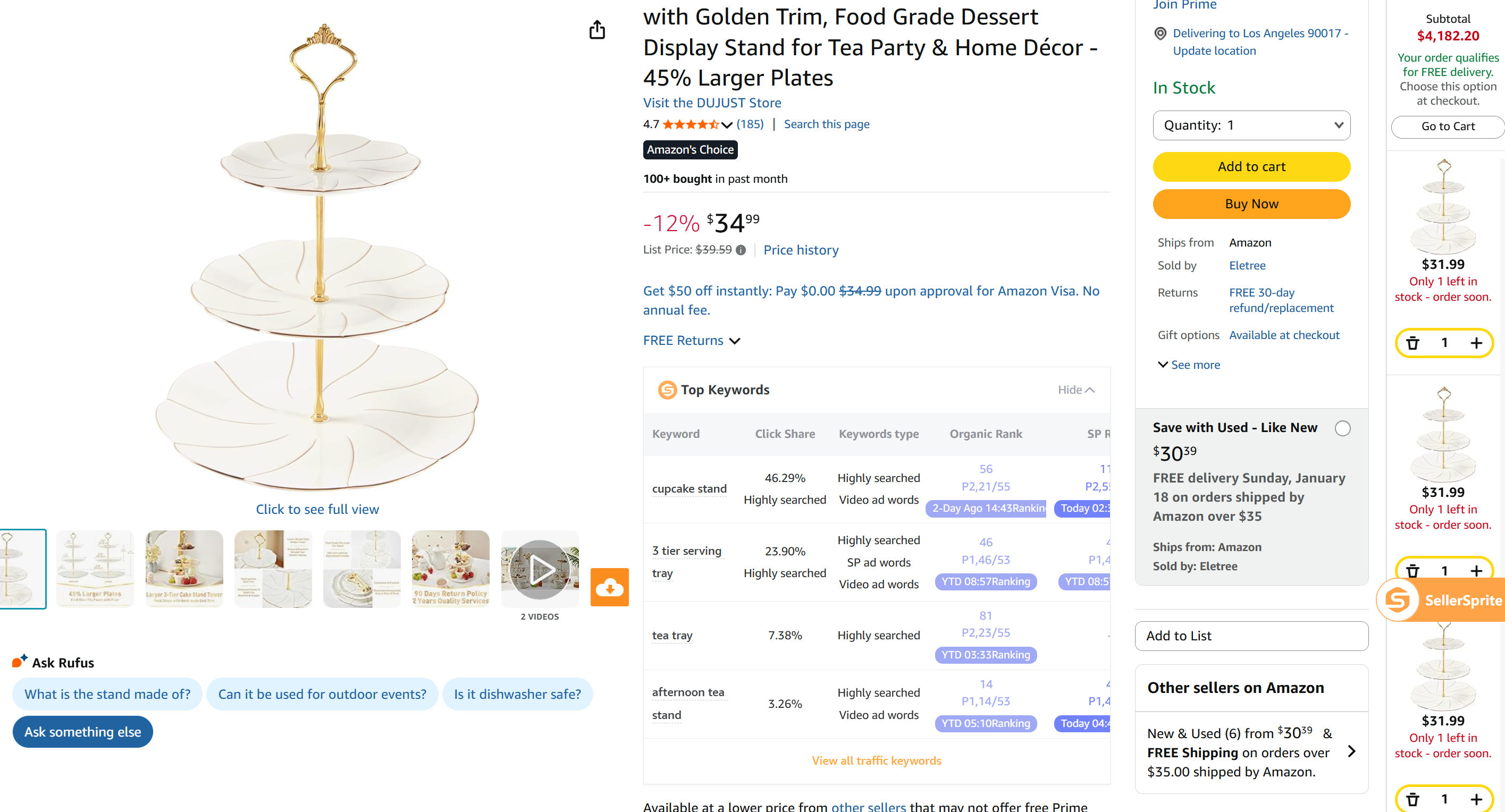
8. SellerSprite Browser Extension for Price and Trend Tracking
One-line positioning: On-page signals while browsing Amazon so you can validate faster.
Who it is for
Sellers doing daily sourcing checks, competitor monitoring, and quick niche validation.
Key features
- Show product signals directly on Amazon listing pages.
- Support trend and historical context while you browse.
- Reduce tab switching so research stays fast enough for daily use.
Practical use case
If you are evaluating retail arbitrage or wholesale, the extension helps you do quick go or no-go decisions on the spot by checking price behavior and competitive signals.
Try this in SellerSprite
Install the extension > open an Amazon product page > review trend and pricing context > save the ASINs worth deeper validation in Product Database or Niche Analyzer.
9. SellerSprite Profit Calculator and Fee Analysis
One-line positioning: Profit math that helps you price with discipline and scale safely.
Who it is for
Sellers who want to set pricing rules and understand margin after fees, shipping, and PPC.
Key features
- Estimate profit after fees based on your cost structure.
- Run scenario comparisons (price changes, coupons, and ad spend).
- Support calm decisions about scaling vs pausing.
Practical use case
Before you scale PPC, calculate break-even ACoS and a safe target margin. Then use pricing and coupon tests that keep you above your profit floor.
Inventory and Analytics Tools
Managing Inventory and Orders (tools that help forecast inventory, manage restocks, e.g., SoStocked or Restock Pro)
Inventory mistakes get expensive fast. Stockouts kill ranking momentum and force you into rushed air shipments. Overstock ties up cash and increases storage risk. Forecasting tools help you plan reorder timing and avoid emotional restocks.
Sales Analytics & Accounting (tools that aggregate sales, fees, profit, e.g., Fetcher, InventoryLab for accounting & listing, or SellerApp which provides analytics and PPC management)
The bigger you grow, the more you need a single place to review the business: sales, fees, ad spend, and product health signals. Analytics tools help you prioritize the next best action instead of reacting to noise.
Practical tip
Create a Monday dashboard routine: check top SKUs, check stock cover, check ranking trends, then pick one improvement per product for the week. Consistency beats complexity.
10. SellerSprite Business Dashboard for Analytics and Inventory Planning
One-line positioning: A business control panel to spot issues early and plan next steps.
Who it is for
Operators managing multiple SKUs who need a clear weekly review system.
Key features
- Organize key performance signals into a single view.
- Support inventory planning by highlighting demand patterns.
- Make it easier to prioritize the next improvement.
Practical use case
Use the dashboard to find your highest leverage problem first: a fast-selling SKU with low stock cover, a high traffic listing with low conversion, or a keyword set losing rank after a competitor promotion.
Amazon Reimbursement and Refund Tools
Recover Money Owed by Amazon (why FBA sellers need to check for lost inventory, missing refunds, etc.)
If you sell with FBA, reimbursements are part of operations. Lost inventory, damaged units, fee discrepancies, and return processing issues can add up. A reimbursement workflow helps you protect cash flow and reduce profit leakage.
How Reimbursement Tools Work (automate the process of finding and filing claims for you)
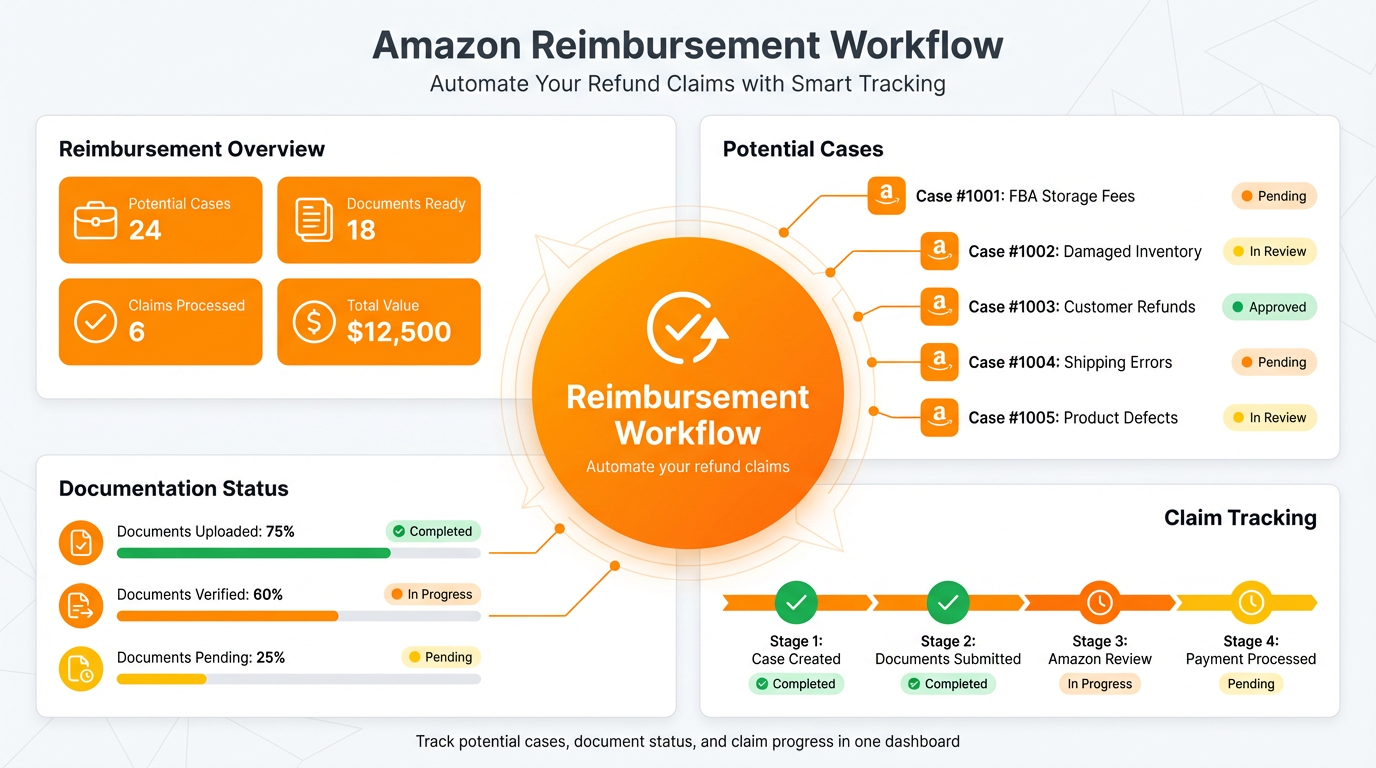
Most reimbursement tools follow a simple pattern: (1) scan reports for potential cases, (2) organize evidence and documentation, (3) help you submit claims or manage case status. The main benefit is consistency, because deadlines and volume make manual checks unreliable.
Top Examples: (Refund Genie in Helium 10, Refunds Manager, Sellerise – any known Amazon reimbursement tool services)
- SellerSprite FBA Reimbursement Assistant: supports a repeatable review routine for common FBA issues.
- Refund Genie (Helium 10): reimbursement tooling inside a broader operations suite.
- Refunds Manager: reimbursement tracking and recovery service for sellers and vendors.
- Sellerise: reimbursement tool focused on identifying eligible refunds and organizing claims.
SellerSprite FBA Reimbursement Assistant
One-line positioning: Keep reimbursement checks consistent so you do not miss recoverable money.
Who it is for
FBA sellers with multiple SKUs or higher monthly volume who want a cleaner review process.
Key features
- Help identify potential reimbursement opportunities tied to common FBA issues.
- Support documentation and organization so reviews are faster.
- Encourage a repeatable habit instead of occasional manual digging.
Practical use case
Schedule a monthly reimbursement review. Treat it like a financial close: check, document, submit, and record outcomes so you can measure recovered value over time.
Other Useful Amazon Seller Tools
Amazon Seller App (Official) (overview of Amazon’s own Seller app for on-the-go management, scanning products in stores for arbitrage, etc.)
The official Amazon Seller app is still worth using as a lightweight command center. It helps you keep an eye on notifications, basic metrics, and account health when you are away from your desk.
- Check sales and key metrics quickly while traveling.
- Respond to time sensitive notifications faster.
- Support retail sourcing checks when doing arbitrage.
Listing Optimization Tools (software to optimize titles, images, or create A+ content, e.g., Canva for images, Helium 10 Listing Builder)
Keyword tools help you choose the right terms. Listing optimization tools help you present them clearly with strong visuals and a logical structure. In practice, you want both: data for strategy, and creative tooling for execution.
- Canva: fast image and infographic creation for listing images.
- Helium 10 Listing Builder: structured listing drafting with keyword inclusion support.
- SellerSprite keyword insights: use the keyword map to guide title, bullets, backend, and PPC structure.
PPC Management Tools (tools that automate or simplify Amazon advertising, e.g., PPC Scope, Sellics, Pacvue, etc.)
PPC tools are helpful when you need automation, faster reporting, or bulk actions across many campaigns. The most common mistake is scaling ads before you have a tight keyword and listing foundation.
- Pacvue: advertising and commerce management platform used by larger brands.
- Sellics: PPC and optimization tooling often used by growing sellers.
- PPC Scope: PPC-focused workflows and analytics for campaign refinement.
Practical tip
Use SellerSprite keyword research to build a clean keyword set first, then use PPC tools to automate execution and reporting. Automation works best after strategy is clear.
How to Choose the Right Tools for Your Business
Assess Your Needs and Budget (start with tools for your biggest pain points, many have free trials)
Start with the bottleneck that blocks growth right now. If you do not have products, focus on product research. If you have products but weak rankings, focus on keyword research and a keyword tracker. If margins are unclear, focus on pricing and profitability.
- New sellers: Product Finder and Keyword Research first.
- Scaling sellers: Keyword Tracker, price tracking, and analytics dashboards.
- High volume operators: inventory planning and reimbursements become mandatory.
Don’t Overload on Tools (learn one at a time to get the most value, ensure it’s worth the cost)
More tools do not automatically create progress. Tools only work when they become part of a routine. Add one module at a time, master it, then expand.
Look for Integration and Support (tools that can work together or provide good customer support and training)
Platform workflows reduce friction. When product research, keyword strategy, tracking, and analytics live in one place, you spend less time exporting spreadsheets and more time executing.
Simple stack checklist
- Can this tool support your main workflow stage (discovery, launch, optimization, or operations)?
- Does it reduce time per decision, or just add more data?
- Can your team learn it quickly and use it weekly?
- Does it help you measure outcomes (rank, profit, stock cover, recovered funds)?
Share Your Sourcing Journey With SellerSprite Community
Join the SellerSprite community on the Facebook Group to share your sourcing journey, ask questions, and get support from fellow Amazon sellers.
Conclusion: Empowering Your Business with the Right Tools
Invest in Efficiency (encouragement that smart use of tools can free up your time and boost profits)
The best Amazon seller tools do more than save time. They help you make better decisions, avoid common mistakes, and protect profit as you scale. When tools become a weekly routine, you stop reacting and start operating the business with clarity.
Stay Updated (note that new tools emerge, and existing ones update features; keep learning to stay ahead)
Amazon changes fast. New tools appear, and existing tools evolve. Keep learning, keep testing, and refine one part of your workflow at a time.
Why you can trust this guide
- We map tools to real seller workflows (discovery, validation, listing build, tracking, pricing, inventory, reimbursements).
- We include external tool examples for comparison, not just one platform.
- We reference third-party coverage and official documentation where it improves decision making.
View The SellerSprite Course Directory
Ready for the next step? Open the SellerSprite Academy course directory to continue building your Amazon FBA skills chapter by chapter.
FAQ
What is the best Amazon seller tool for beginners in 2026?
Start with product research and keyword research. A beginner friendly stack is: Product Finder to discover ideas, Niche Analyzer to validate, then Keyword Research to build a launch keyword map.
Do these tools work for non-US marketplaces like JP, DE, or IN?
Many sellers run the same workflow across marketplaces. This guide is written for major Amazon marketplaces, including the US, UK, CA, DE, FR, IT, ES, JP, IN, and MX. Always verify marketplace coverage on the tool’s official site before committing.
What is an Amazon price tracker extension and why does it matter?
A price tracker extension helps you see historical pricing behavior and market movement so you can avoid entering unstable niches or pricing emotionally. Popular examples include Keepa and CamelCamelCamel.
What is the difference between keyword research and keyword tracking?
Keyword research helps you choose and structure the keywords you target. Keyword tracking shows how your ranking changes over time, so you can measure the impact of listing edits, pricing changes, and ads.
How do I avoid paying for too many tools?
Use one workflow at a time. If you can only choose one category, prioritize the bottleneck that limits growth today. Then expand once you have a weekly routine.
About the author
SellerSprite Customer Success Team
We support Amazon sellers through onboarding sessions, workflow design, and troubleshooting. This guide is written from the perspective of building repeatable routines that sellers can actually maintain week after week.
Suggested author bio fields to add for stronger E-E-A-T
- Hands-on Amazon selling experience: [X] years
- Marketplaces operated: [US, UK, DE, JP, etc]
- Categories managed: [Home, Beauty, Sports, etc]
- Scale managed: [monthly order volume or revenue range]
References
- LandingCube: Amazon product research tools roundup (includes SellerSprite and marketplace coverage)
- SellerSprite browser extension page
- Keepa: Amazon price tracker
- CamelCamelCamel: Amazon price tracker
- Amazon Seller Central: Revenue Calculator documentation
- SoStocked: inventory forecasting software
- Helium 10: Refund Genie reimbursement tool
- Refunds Manager: reimbursement tracking service
- Sellerise: FBA reimbursements tool


