Course Benefits at a Glance
- Follow a beginner to master roadmap that turns random tips into a repeatable workflow.
- Learn product research filters that help you shortlist winners faster and avoid costly demand traps.
- Build a keyword map and high-converting listing structure that supports both SEO and ads from day 1.
- Launch with a practical PPC launch framework, then optimize bids using real marketplace signals.
- Keep cash discipline with profit checks, lead time planning, and scaling milestones that protect margin.
- Get started with a free Amazon FBA course and plug into SellerSprite tools when you want speed and validation.
Who This Course Is For
- True beginners who want a step-by-step Amazon FBA path instead of scattered YouTube advice.
- New private label sellers who need a repeatable product research and launch checklist.
- Operators with a live listing who want better keywords, higher conversion, and more efficient ads.
- Global sellers who want notes on language and compliance differences.
- Teams that need a shared playbook, templates, and a tool assisted workflow to move faster.
Start the Course for Free
Open the directory to start Lesson 1, then follow the modules in order for the fastest beginner to master progress.
Start Lesson 1 for Free Download Free SellerSprite Extension Start Free Trial to Unlock Tools
Table of Contents
Basics
Question: What should a beginner do first to avoid wasting months on the wrong idea?
Answer: Choose one marketplace, learn the FBA fundamentals, and commit to a single product validation process before you source or launch.
What you will lock in during the Basics module
- A simple decision on business model: private label vs wholesale vs arbitrage, and why private label typically scales better.
- The minimum numbers you must understand: price corridor, fees, landed cost, and target margin.
- A launch ready mindset: you win by conversion and economics, not by chasing vanity keywords.

Visual roadmap reminder: you are building a system. Keep your workflow consistent from research to listing to launch.
Internal reading path: if you want a practical Amazon SEO baseline early, bookmark Amazon SEO Tips and revisit after you finish the Keyword and Listing module.
Product Research
Question: How do I find a product that can actually win without gambling on hype?
Answer: Use a filter first workflow: define demand signals, set competition thresholds, then validate profit and review risk before you shortlist.
Your product research checklist
- Demand: stable search volume, clear buyer intent, and enough room for differentiation.
- Competition: avoid markets where the top listings dominate with overwhelming review velocity and brand moat.
- Economics: confirm margin after FBA fees, shipping, packaging, and refunds.
- Risk: check restrictions and compliance early to avoid dead ends after sampling.
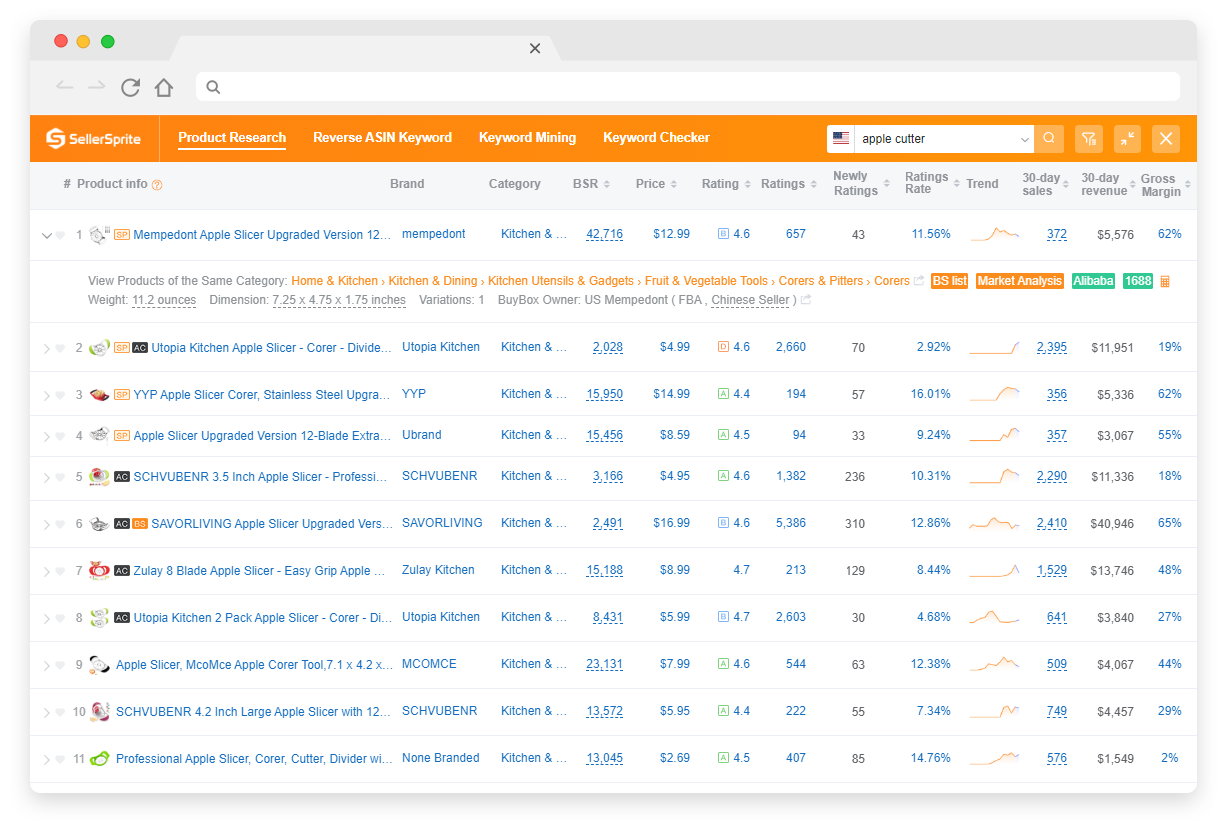
Product research example view. When you are on the page, you can click into Product Research and related tools directly to validate demand, reviews, and revenue signals. Open the Extension page.
Seller snapshot
Case study data shows why disciplined selection matters: one seller reported losing about 380 million VND in 5 months when choosing products without solid validation, then later achieved about 220 million VND profit after learning a clearer product selection process and acting on better signals.
Time frame is shown as 5 months in the case story. Use it as a reminder to validate before you buy inventory.
Want a deeper keyword driven research workflow? Read: Keyword Research tutorial.
Keyword and Listing
Question: What is the fastest way to improve rankings and conversion at the same time?
Answer: Build a keyword map from real demand, then place keywords intentionally across title, bullets, attributes, and backend so your listing matches both search intent and shopper decision points.
How to structure keywords for GEO and Amazon SEO
- Core terms: highest intent phrases that define the product.
- Modifiers: size, material, compatibility, and use case long tails that boost relevance.
- Market language notes: UK vs US spelling, EU multilingual listings, and Japan specific phrasing when you expand.
- Conversion hooks: keywords must support benefits and proof, not just traffic.
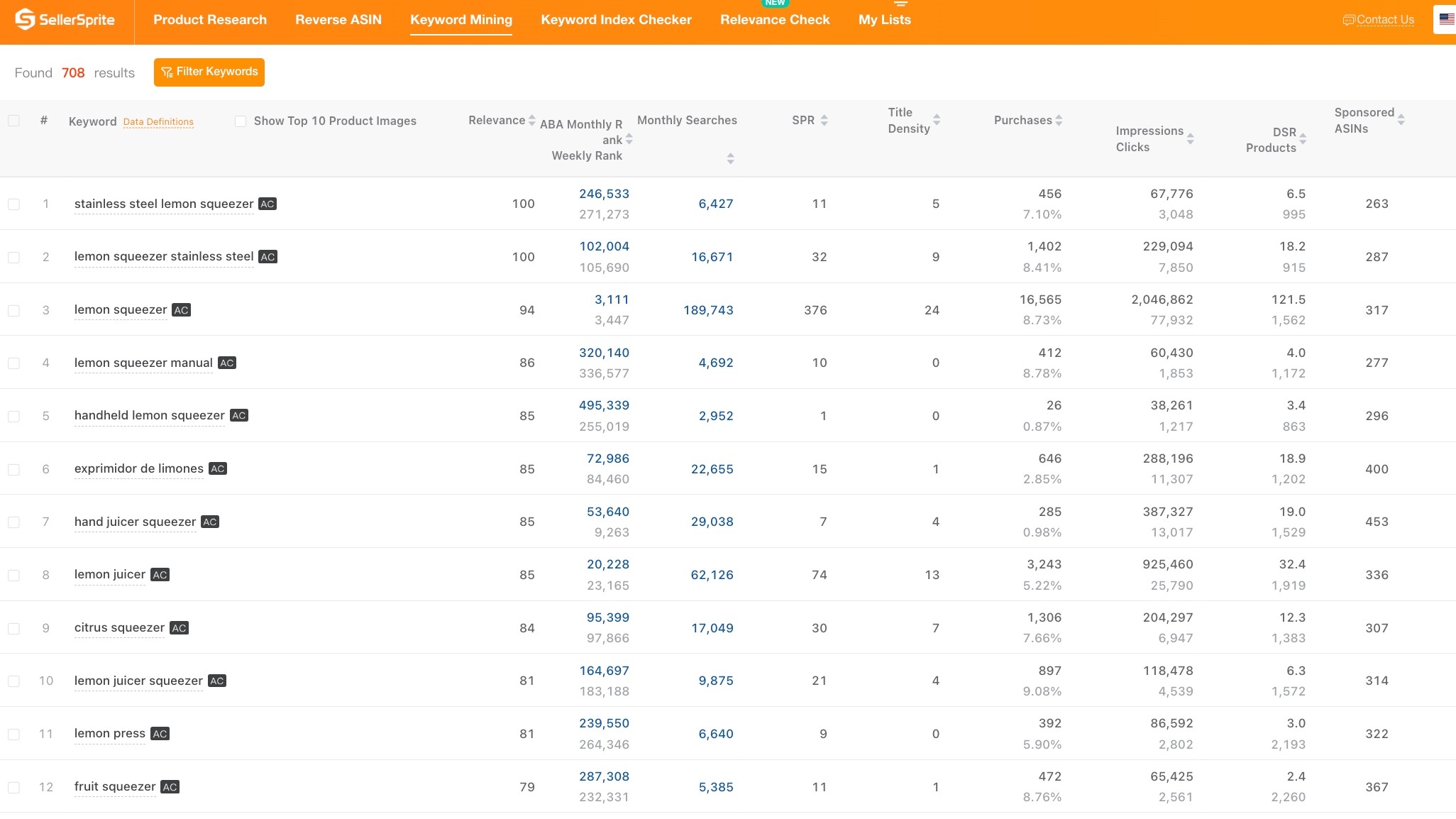
Keyword Mining example. You can click into keyword tools, export lists, and use them to build your listing structure and PPC seed list.
Recommended internal reading: Amazon SEO Tips and Keyword Research and Listing Optimization guide.
PPC and Launch
Question: How do I launch without burning cash on the wrong bids and keywords?
Answer: Start with a controlled PPC launch: seed campaigns with validated keywords, monitor conversion, then adjust bids using real-time suggested bid benchmarks and competitor signals.
PPC launch workflow you will follow
- Launch with a small keyword set mapped to your listing, then expand only after you confirm conversion.
- Use competitor ad structure insights to avoid bidding blind in expensive niches.
- Check suggested bids and track fluctuations before major events like Prime Day and holidays.
- Scale budgets only when margin and conversion remain stable.
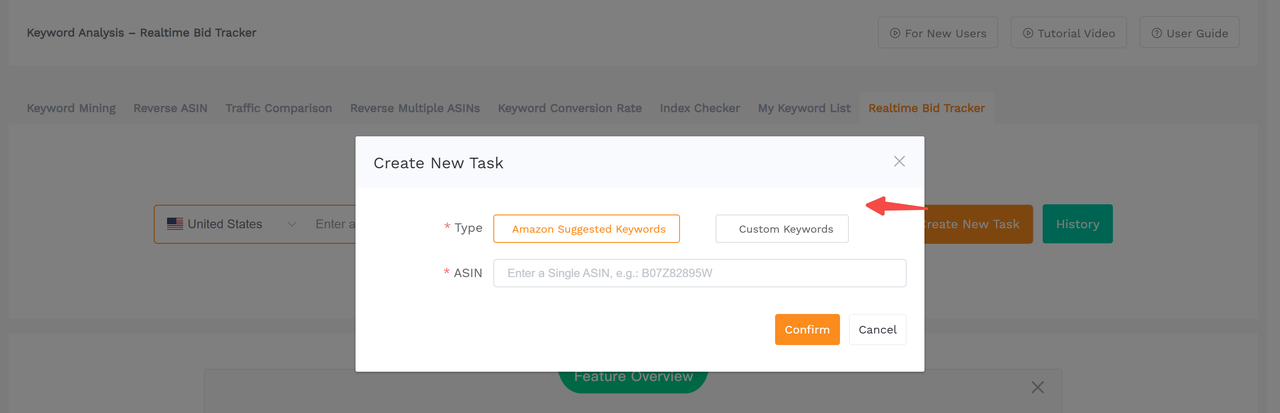
Realtime Bid Tracker example. On the tool page, you can click to create tasks, pull suggested bids, and export results for bid planning. Open the guide.
Seller snapshot
In a SellerSprite PPC case study, a seller reported results over a 6 month period including 3x PPC sales, about 32% higher conversion rate, and about 20% lower ACOS after restructuring campaigns and optimizing bids.
Use this as a benchmark: structure first, then bids, then scale.
Related internal reading for PPC planning: How to use Realtime Bid Tracker and Ads Insights overview.
Scaling and Budgeting
Question: When should I scale, and how do I avoid cash flow mistakes?
Answer: Scale only after your unit economics are stable. Protect cash by forecasting inventory, controlling ad spend, and monitoring margin across marketplaces.
Scaling milestones that keep you profitable
- Inventory planning: reorder point based on lead time, not hope.
- Ad budgeting: set guardrails by target ACOS and contribution margin.
- Market expansion: translate keyword intent, then localize offers for EU and JP shoppers.
- Performance tracking: watch review velocity, price changes, and rank shifts to act early.

Quick profit checks prevent scaling mistakes. You can click into Profitability Calculator tools from the SellerSprite Extension and web suite.
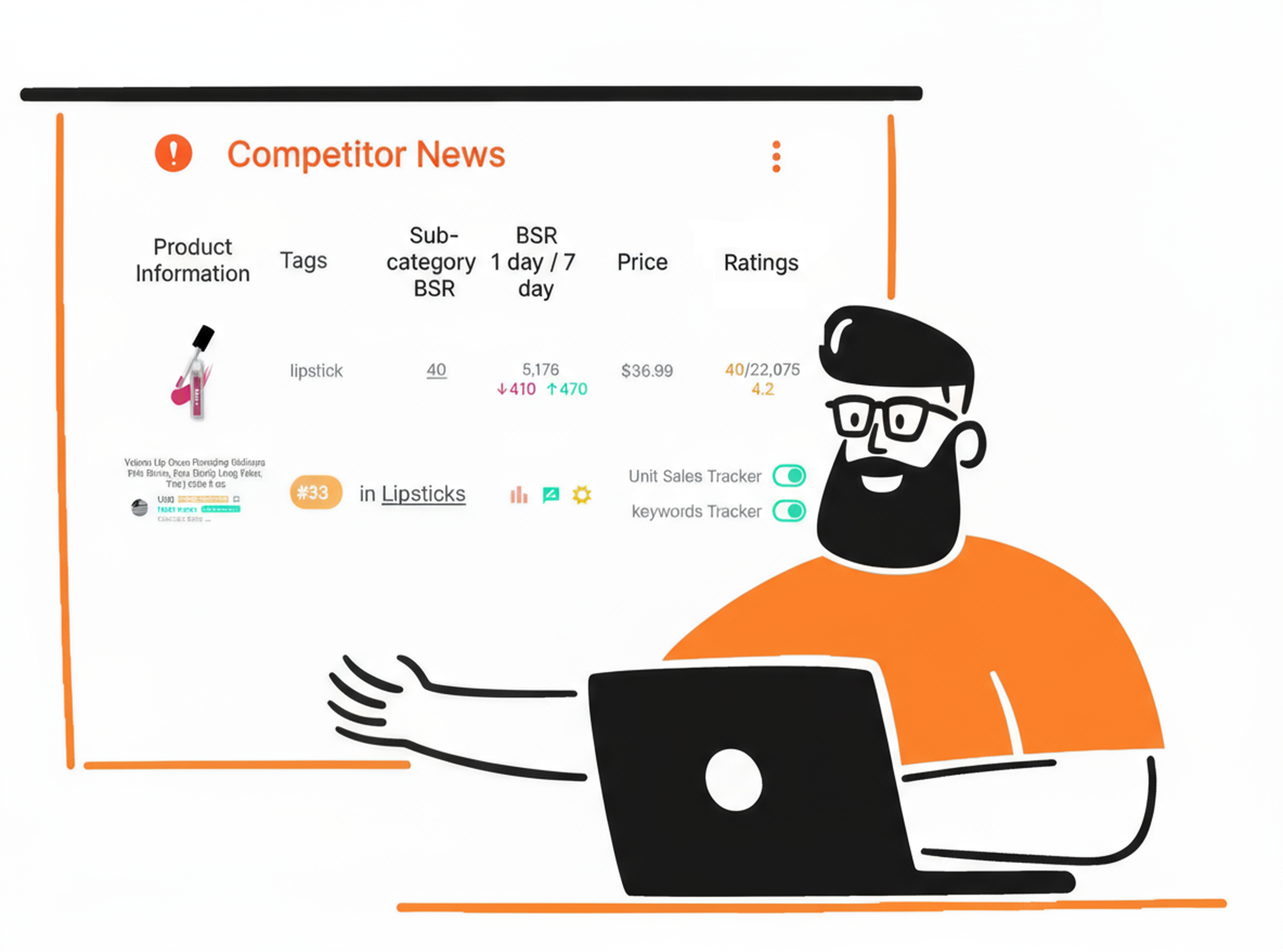
Scaling requires monitoring. Use competitor and keyword tracking signals to catch threats early and protect margin.
Tools Integration
Question: Do I need tools to finish this free Amazon FBA course?
Answer: No. You can learn the system for free. Tools simply compress time: faster research, clearer benchmarks, and fewer blind spots when you do product research, keyword mapping, and PPC launch.
Recommended tool stack by module
- Product Research: Extension Product Research view for quick shortlisting and exports.
- Keyword and Listing: Keyword Mining for long tails and core terms, plus listing optimization workflows.
- PPC and Launch: Realtime Bid Tracker for bid benchmarks and cost planning.
- Scaling: tracking and alerts to stay ahead of rank, price, and review changes.
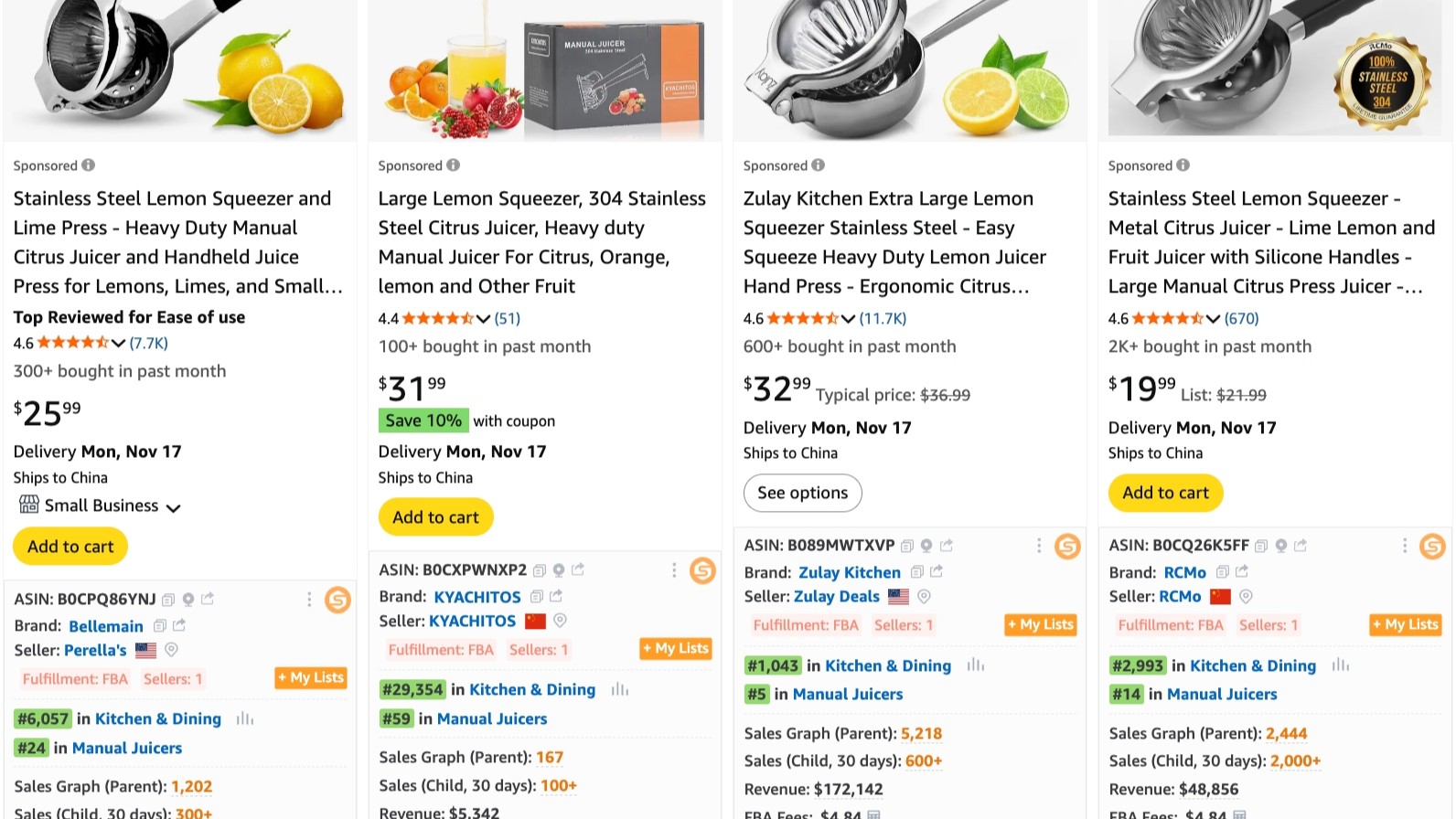
Tools integration example: analyze marketplace data while browsing Amazon. You can click through to deeper tool pages and export the data you need to act.
Course Format and How to Join
Question: What is the best way to take this course and see results quickly?
Answer: Follow the modules in order, complete one action per chapter, and use the directory as your single source of truth for the current lesson list.
What to expect
- Chapter based lessons: each chapter is a focused lesson page with clear actions.
- Tool walkthroughs: where relevant, you can click directly into SellerSprite tools or guides to replicate steps.
- Practical assets: the directory includes chapters built around spreadsheets and structured workflows, so you can copy the process.
- Learning path: do Product Research, then Keyword and Listing, then PPC launch. Scale last.
Open the Directory and Follow the Latest Chapters
The directory is updated over time. Use it to start from the beginning and keep your workflow consistent across marketplaces.
About the Instructor and Course Team
Question: Why should I trust this roadmap over random advice online?
Answer: The course is built by a team that studies real marketplace data, updates content over time, and supports the workflow with tools, guides, and an active partner ecosystem.
What this team brings to the table
- Hands on Amazon experience: the SellerSprite Academy team states the roadmap is based on years of seller experience and is updated chapter by chapter.
- Data first approach: lessons connect strategy to measurable signals like demand, conversion, and bid benchmarks.
- External trust signals: SellerSprite has been recognized by third party software review outlets and is supported by a broader partner and creator ecosystem.
- Global readiness: the site provides multiple language blog hubs (English, Japanese, Chinese) to support GEO and marketplace expansion.
Where to see more proof
- Explore the partner ecosystem: SellerSprite Partners
- Browse creators and community education: Ambassador Hub
- Prefer Chinese content? Visit: Chinese blog hub
- Prefer Japanese content? Visit: Japanese blog hub
Get Help From the SellerSprite Community
Share your situation, get feedback, and learn from other sellers in the SellerSprite Discord and Facebook Group.
Key Takeaways
- This is a free Amazon FBA course that teaches a single workflow from beginner to master, not disconnected tactics.
- Product research comes first. Listing and keywords turn demand into conversion. PPC launch scales predictable traffic.
- GEO ready sellers should localize keywords and compliance notes when expanding to EU and JP marketplaces.
- Tools are optional, but the right tools shorten cycles and reduce blind spots when you validate and optimize.
FAQ
Is this really a free Amazon FBA course?
Yes. You can access the course and follow the beginner to master roadmap for free. Optional SellerSprite tools and trials help you move faster, but they are not required to understand the system.
How long does it take to finish?
It depends on your pace and whether you are executing alongside learning. Most sellers get the best results by completing 1 chapter, then doing 1 real action (product research shortlist, keyword map, listing rewrite, PPC launch test) before moving on.
Do I need SellerSprite to follow the PPC launch steps?
No. You can run a PPC launch with Amazon Ads alone. SellerSprite helps by surfacing competitor context and bid benchmarks so you can plan bids and budgets with less guessing.
Is this course suitable for US, EU, and Japan marketplaces?
Yes. The workflow applies across Amazon marketplaces. For GEO, pay extra attention to local keyword intent, EU language localization, VAT and compliance expectations, and Japan specific listing phrasing. Use the English, Japanese, and Chinese blog hubs for localized reading when needed.
I already have a listing. Where should I start?
Start with Keyword and Listing to rebuild your keyword map, then run a controlled PPC launch optimization cycle. If your economics are unclear, jump to Scaling and Budgeting for margin and cash discipline first.
View The SellerSprite Course Directory
Ready for the next step? Open the SellerSprite Academy course directory to continue building your Amazon FBA skills chapter by chapter.
References
- Amazon Seller Beginner to Master Course (this page)
- SellerSprite Academy Course Directory
- SellerSprite Extension and Free Tools
- Realtime Bid Tracker Guide
- Case Study: Amazon PPC Secrets
- Seller story: from small product to Amazon Best Seller (VN)
- Amazon SEO Tips: How to Rank for Keywords on Amazon
- Amazon Keyword Research tutorial


