Build a high-intent PPC keyword list for launches by validating relevance in Amazon search results, then use SellerSprite to prioritize and scale with real data.
If your launch PPC ACoS is exploding, it is rarely a bidding problem first. It is almost always a keyword relevance problem.
In this chapter, you will learn how to pick the right keywords to target with Amazon PPC during a product launch, using a simple relevance rule that protects your budget.
You will start targeted, let Amazon search term data guide expansion, and use SellerSprite Seller Tools to keep every next keyword smarter than the last.
Key Takeaways
- Do not launch PPC by targeting every keyword in your listing. Start with the most relevant and highest intent terms.
- A fast relevance test is the 50 percent rule: if most organic results on page one are not similar to your product, skip the keyword for launch.
- Avoid broad category keywords early. Prioritize product keywords that describe exactly what you sell.
- Use SellerSprite Seller Tools by first inputting your prioritized keywords to retrieve their search volume. Then explore suggested variants and filter results to identify launch targets that align with your product's intent and audience.
- Scale by data: expand only after search term reports and ranking signals show which terms convert.
Table of Contents
What Keywords to Target for a Launch
Your listing keyword set is the starting point, not the PPC target list. For launching PPC, you want fewer keywords, higher intent, and cleaner conversion signals.
The goal: start targeted, then expand
- Start with your master keyword list used for listing optimization.
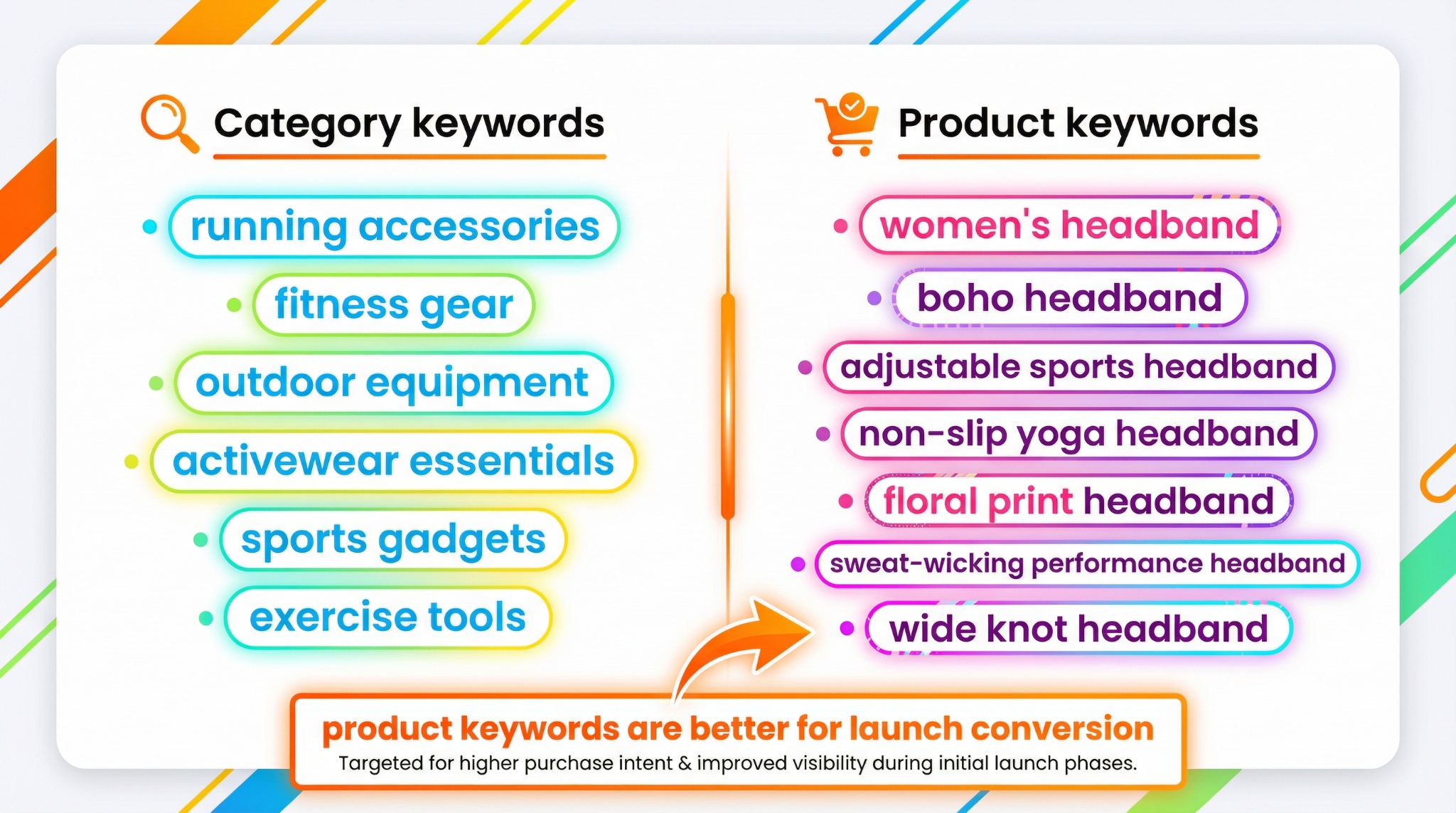
- Select the most relevant product keywords first, not broad category terms.
- Use real launch data (search terms and rank movement) to add more keywords later.
Mindset shift
Start targeted and scale later to reduce wasted clicks, lower launch stress, and identify clearer winners.
The 50 Percent Relevance Rule
Here is the simplest launch filter that saves the most money: search the keyword on Amazon, scan the organic results, and ask one question.
If 50 percent or more of page one organic results are not similar to your product, skip the keyword for launch.
Product keywords vs. category keywords
Early on, you want product keywords that describe what the shopper is trying to buy. Broad category keywords are usually vague and convert poorly during launch.
Tip
If a keyword feels ambiguous, do not force it. Skip it for launch and let your search term report earn it later.
Common mistake
Copying your entire master keyword list into PPC on day one. This usually creates high spend, low relevance, and a painful optimization workload.
Step by Step: Build Your Launch PPC Keyword List
Use this simple process to turn your listing keyword set into a launch-ready PPC target list.
Steps
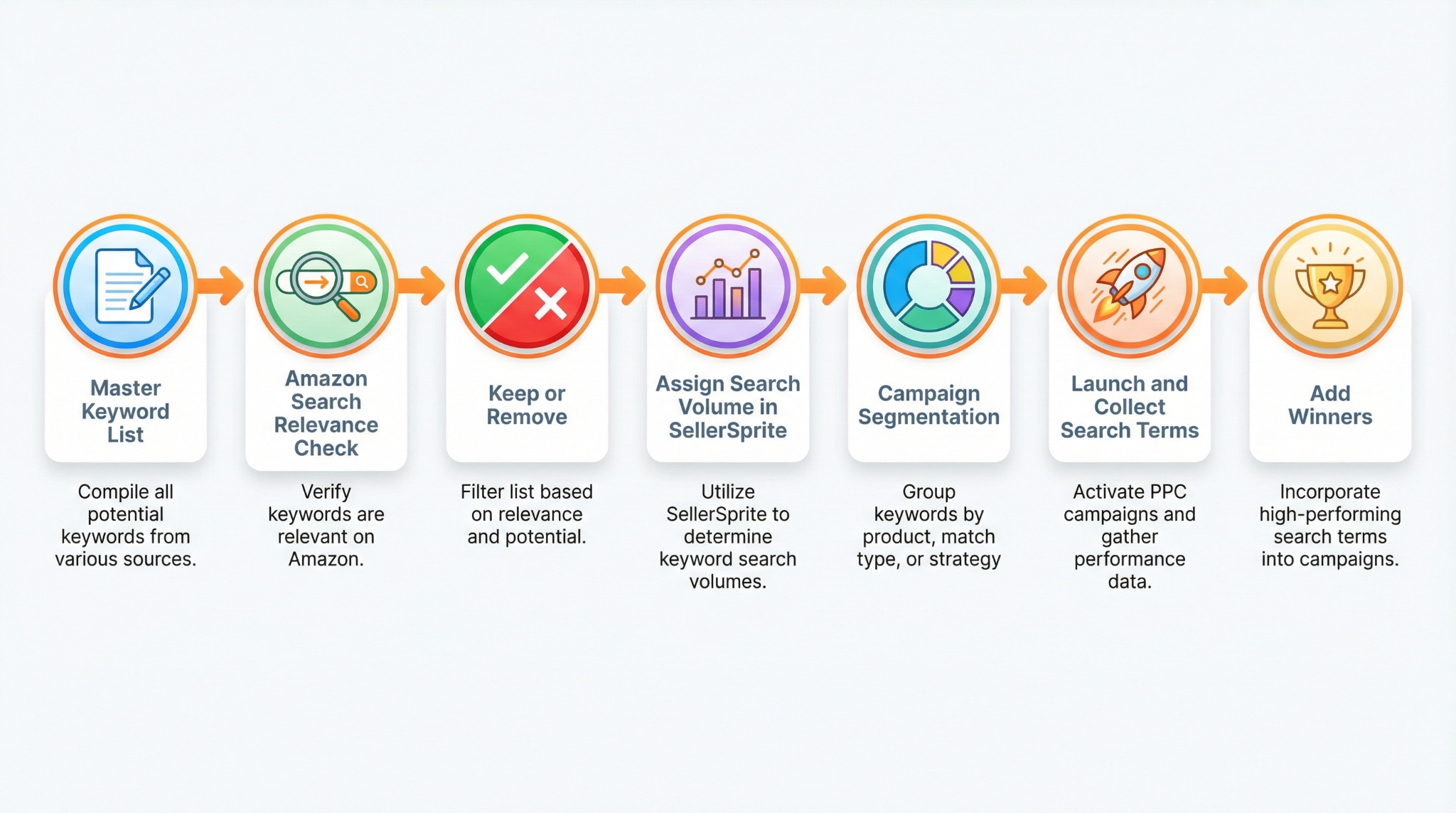
- Start with your master keyword list. This is the list you used to optimize title, bullets, and backend search terms.
- Run the relevance test on uncertain keywords. Search for the term on Amazon and apply the 50 percent rule to the organic results.
- Remove brand-intent keywords you cannot win. If shoppers are searching for a dominant brand name, you will usually pay more and convert less during launch.
- Add a few logical variants. If a keyword is clearly relevant, add small variations shoppers might type, as long as the intent stays the same.
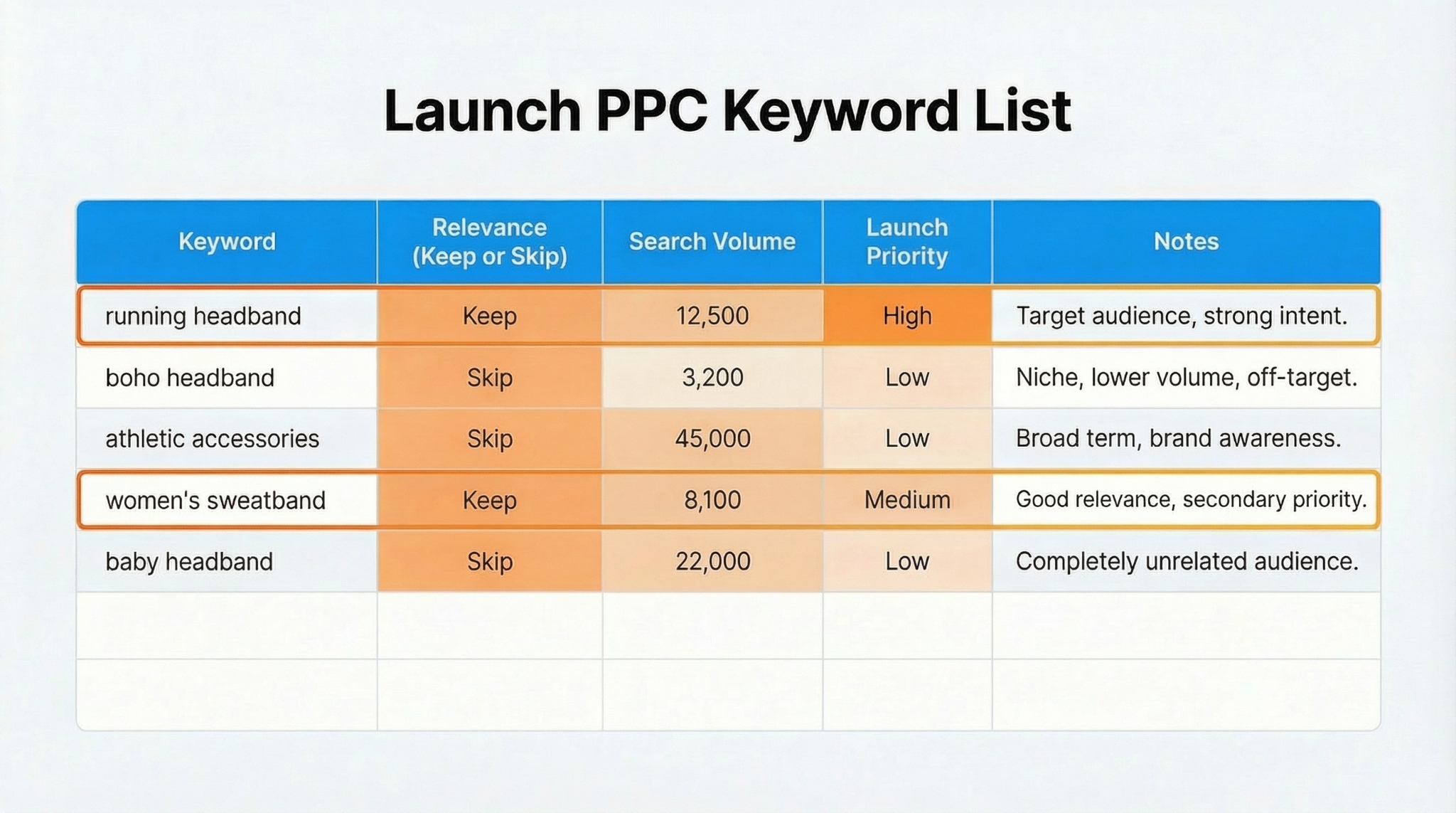
- Assign search volume and prioritize. Use SellerSprite to pull search volume, then label launch priority as high, medium, or later.
- Launch targeted campaigns first. Let search term data and ranking movement decide what you expand next.
Quick exercise
Select 20 keywords from your master list. Apply the relevance test to any uncertain term. Finish with 8-12 launch-ready targets.
How to Use SellerSprite Seller Tools for Prioritization
Once a keyword passes the relevance check, use SellerSprite to enter the keywords and review their associated search volume, competitiveness, and suggested related keywords. Let this information guide which keywords you target at launch and which to save for later.
Recommended tool workflow
- Keyword Mining: Enter your keywords into SellerSprite to check the search volume and discover close match suggestions you may have missed.
- Reverse ASIN: Pull real keywords competitors rank for, then apply your relevance test before targeting.
- Product and Keyword Tracker: Monitor rank changes for your shortlisted keywords, so you can strategically add them once you see movement toward page one.
How SellerSprite helps
Validating relevance for five minutes can save weeks of PPC cleanup by reducing wasted clicks.
Campaign Segmentation by Search Volume
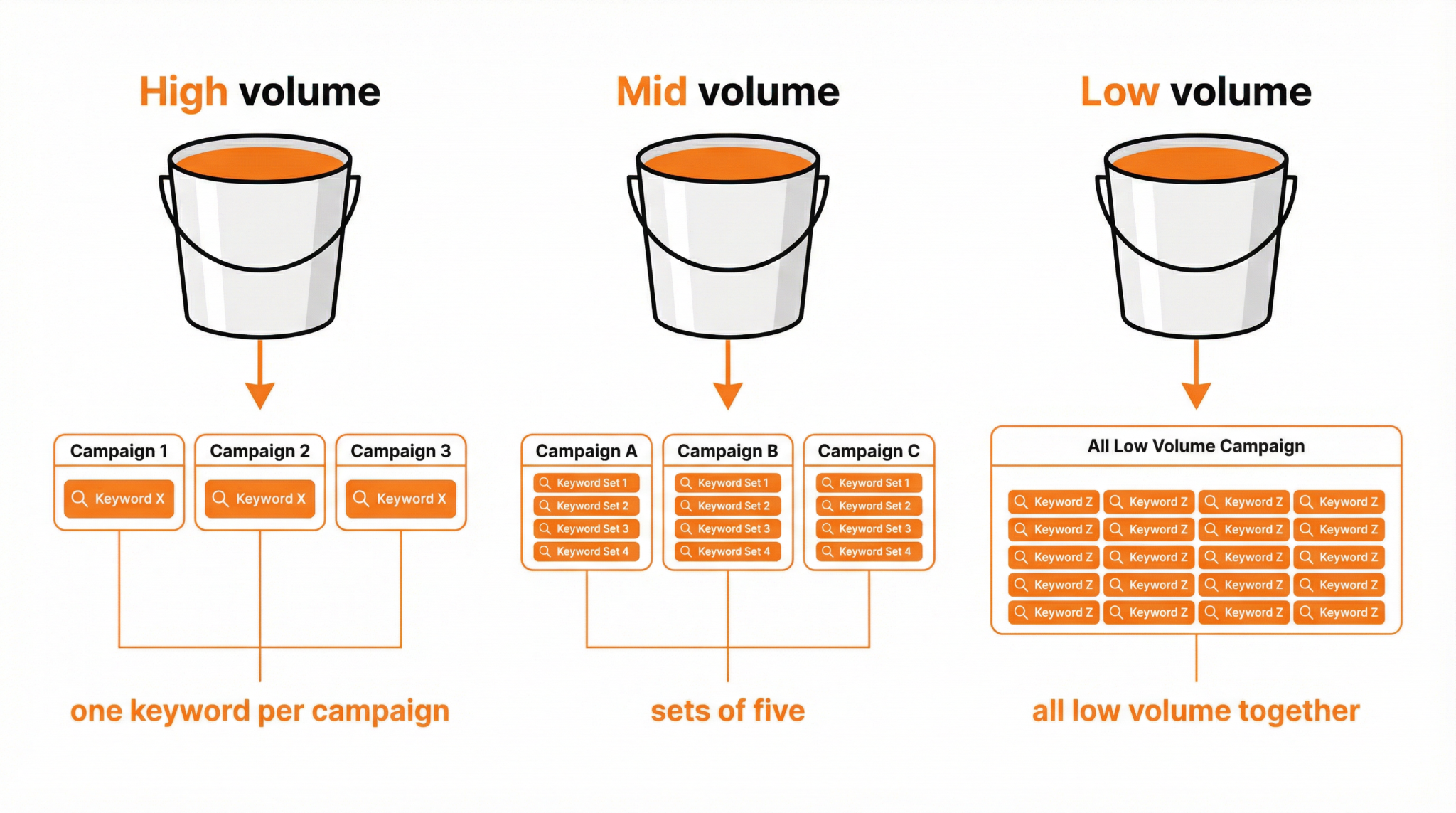
After you have a launch-safe keyword list, segment it so high-volume keywords do not steal budget from lower-volume terms.
A simple segmentation approach
- High volume: Put one keyword in one campaign to get a clean budget and reporting.
- Mid volume: Group in sets of five so each term still gets meaningful exposure.
- Low volume: Group together because they will not generate enough traffic on their own.
Tip
If you are unsure about a keyword, place it in a lower-priority group and let search term results prove it before promoting it into a higher-budget campaign.
Common Mistakes and Fixes
Mistake 1
Targeting broad category keywords during launch. This often drives unqualified traffic and high ACoS.
Fix: Prioritize product keywords with clear buyer intent, then expand into broader terms after reviews and conversions improve.
Mistake 2
Skipping the relevance check. You assume a keyword fits because it appears in a tool list.
Fix: Use Amazon search as the truth test. If the results look wrong, the keyword is wrong for launch.
Mistake 3
Trying to be perfect on day one. You overbuild the list and overcomplicate the launch.
Fix: Build a strong base list first, then let search term reports expand your keyword universe over time.
FAQs
Q1: How many keywords should I target during a launch?
A: Start smaller than you think. Begin with the highest-intent, most relevant keywords, then expand after search-term data shows which convert.
Q2: Should I target every keyword in my listing?
A: Not at launch. Many listing keywords are useful for indexing, but not all are good PPC targets on day one.
Q3: What if a keyword is relevant but extremely competitive?
A: You can postpone it. Launch with more specific long-tail product keywords first, then step into the head term after conversion and reviews improve.
Q4: Do small keyword variants matter?
A: Variants can help, but do not overdo it. Start with the clearest terms, then let search term reports reveal the exact variants shoppers use.
Q5: How do SellerSprite tools fit into this workflow?
A: SellerSprite helps you validate search volume, find competitor keyword signals, and track ranking movement so you expand PPC based on evidence, not guesses.
Summary and Next Steps
The fastest way to improve launch PPC performance is to target fewer, higher-relevance keywords. Start with product keywords, validate with Amazon search, and expand only when the data earns it.
When you run a disciplined relevance-first workflow, your optimization becomes lighter, your spend becomes cleaner, and your winners become obvious.
Next step action checklist
- Run the relevance test on your top 20 launch keywords and keep only the clearest matches.
- Use SellerSprite to pull search volume and label launch priority.
- Segment keywords by volume so big keywords do not suppress smaller ones.
- Launch targeted campaigns, then expand using search term winners and rank movement.
Share Your Sourcing Journey With SellerSprite Community
Join the SellerSprite community on the Facebook Group to share your sourcing journey, ask questions, and get support from fellow Amazon sellers.
View The SellerSprite Course Directory
Ready for the next step? Open the SellerSprite Academy course directory to continue building your Amazon FBA skills chapter by chapter.
About the author
SellerSprite Team publishes practical playbooks for Amazon sellers, combining Seller Central workflows with SellerSprite Seller Tools so you can launch, optimize, and scale with fewer mistakes.


