TL;DR: Amazon backend search terms are hidden keywords that help Amazon index your product for relevant searches. When optimized correctly in 2026, they boost discoverability without cluttering your visible listing.
Key Takeaways
- Amazon backend search terms are invisible keywords that support product indexing but don't appear in your listing.
- Use backend fields for synonyms, misspellings, abbreviations, and long-tail variants, not for repeating front-end content.
- Avoid keyword stuffing, competitor brands, and irrelevant terms to stay compliant and effective.
- Validate indexing through controlled testing and maintain a change log to track performance.
- Integrate backend optimization into a full SEO + PPC strategy using tools like Keyword Mining for data-driven decisions.
Table of Contents
- What Amazon Backend Search Terms Are (And Why They Still Matter in 2026)
- The Backend Search Terms Field Explained (Rules, Limits, and Allowed Content)
- Step-by-Step Workflow: How to Build Backend Search Terms the Right Way
- What to Put in Backend Search Terms (High-Value Keyword Types)
- Avoid Repetition and Keyword Stuffing (The Most Common Backend Mistakes)
- Indexing and Validation: How to Know Backend Terms Are Working
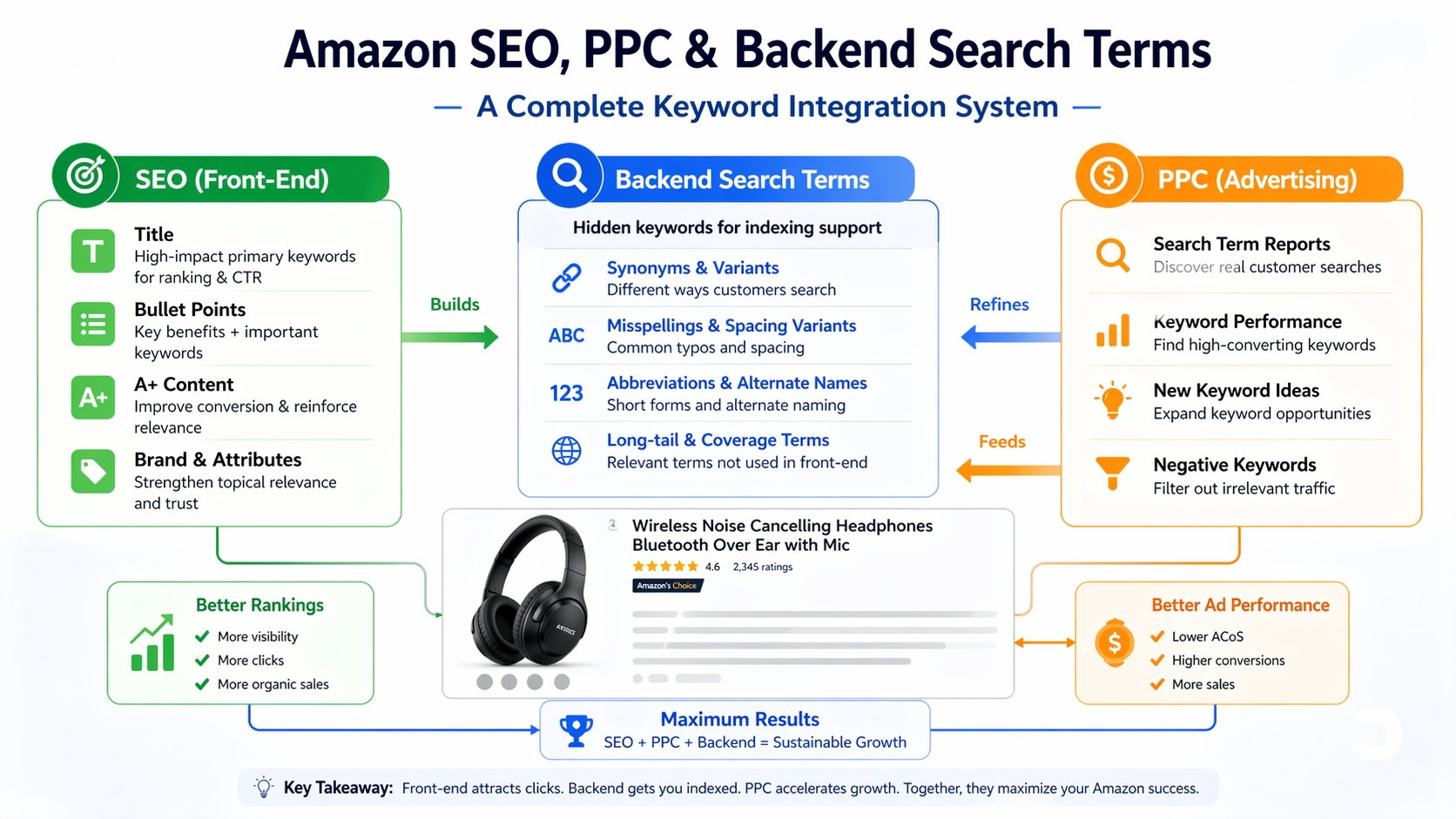
- Advanced: Backend Terms as Part of a Complete SEO + PPC System
- Downloadable Template: Backend Search Terms Builder (Copy/Paste)
- Common Scenarios (What to Do When Results Don't Improve)
- FAQ
- References
Note on marketplaces: This guide is specifically optimized for the US market.
What Amazon Backend Search Terms Are (And Why They Still Matter in 2026)
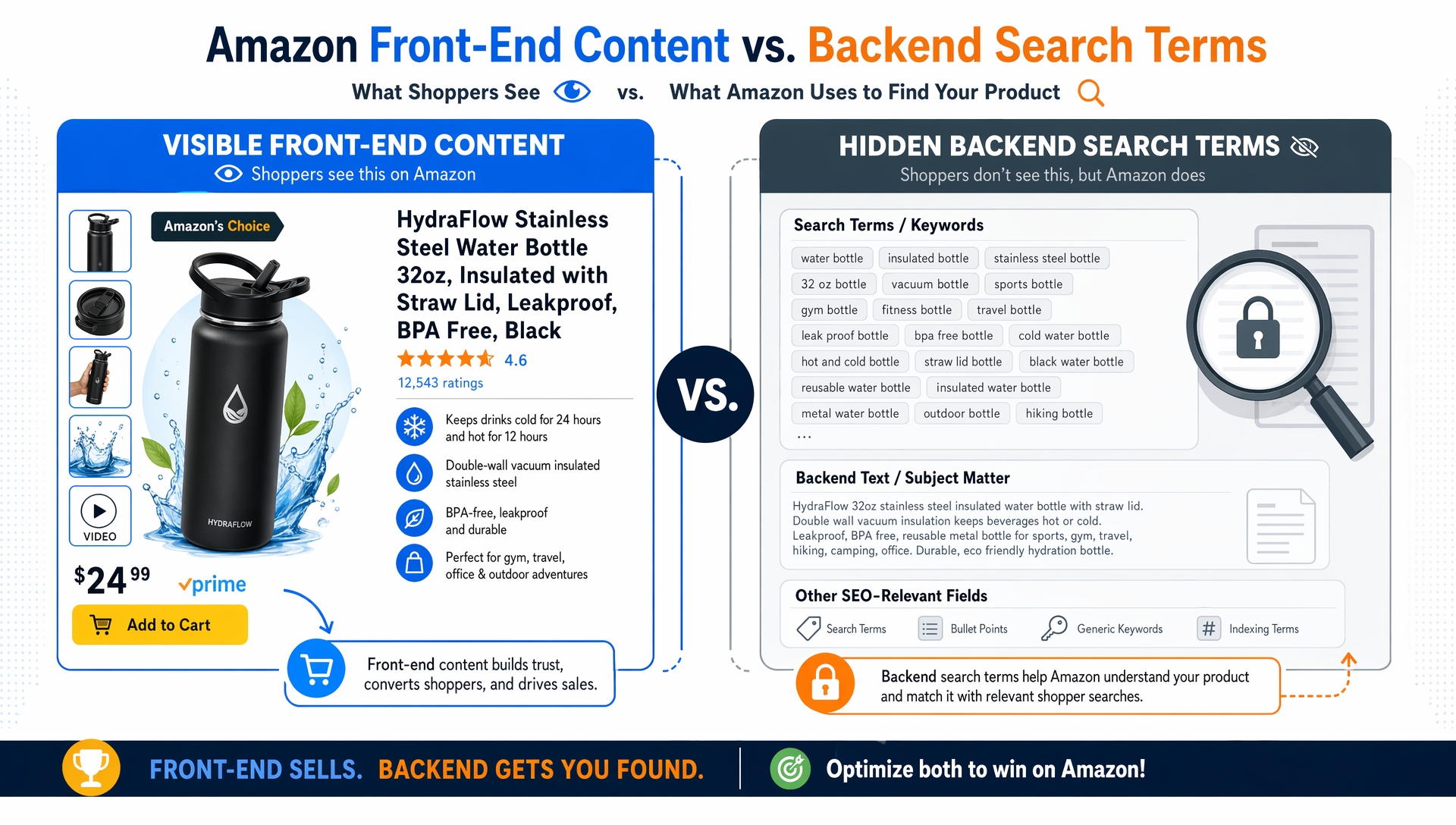
Amazon backend search terms, also known as hidden keywords, are non-visible fields in your product listing used by Amazon's A9 algorithm to understand what your product is and who might search for it. Despite myths about their deprecation, these fields remain a critical part of Amazon SEO in 2026, especially for new sellers and niche products.
Definition Box: Backend Search Terms = Hidden Keyword Fields for Indexing Support
Backend search terms are keyword phrases you enter in Seller Central that do not appear on your product page. Amazon uses them during its indexing process to match your listing with relevant customer searches. Think of them as internal tags that help Amazon "file" your product correctly in its catalog.
What Backend Terms Do vs. What They Don't Do
Backend terms support indexing; they help Amazon understand your product's relevance to certain queries. However, they do not guarantee ranking. Ranking depends on conversion rate, price, reviews, and other performance signals. Backend keywords are not a shortcut to the top of search results, but they are essential for ensuring your product is even considered for those results.
When Backend Terms Matter Most
These hidden keywords are especially valuable in three scenarios: (1) for new listings with little sales history, (2) for niche or long-tail products with low competition, and (3) when targeting regional variations (e.g., "sneakers" vs. "trainers" in US vs. UK). In these cases, backend terms can give Amazon the extra context it needs to surface your product.
The Backend Search Terms Field Explained (Rules, Limits, and Allowed Content)
To use backend search terms effectively, you must follow Amazon's current rules. These vary slightly by marketplace, but the US store has consistent guidelines. Missteps can lead to wasted space or even policy violations.
Where to Edit (Seller Central Path + Which Fields Matter)
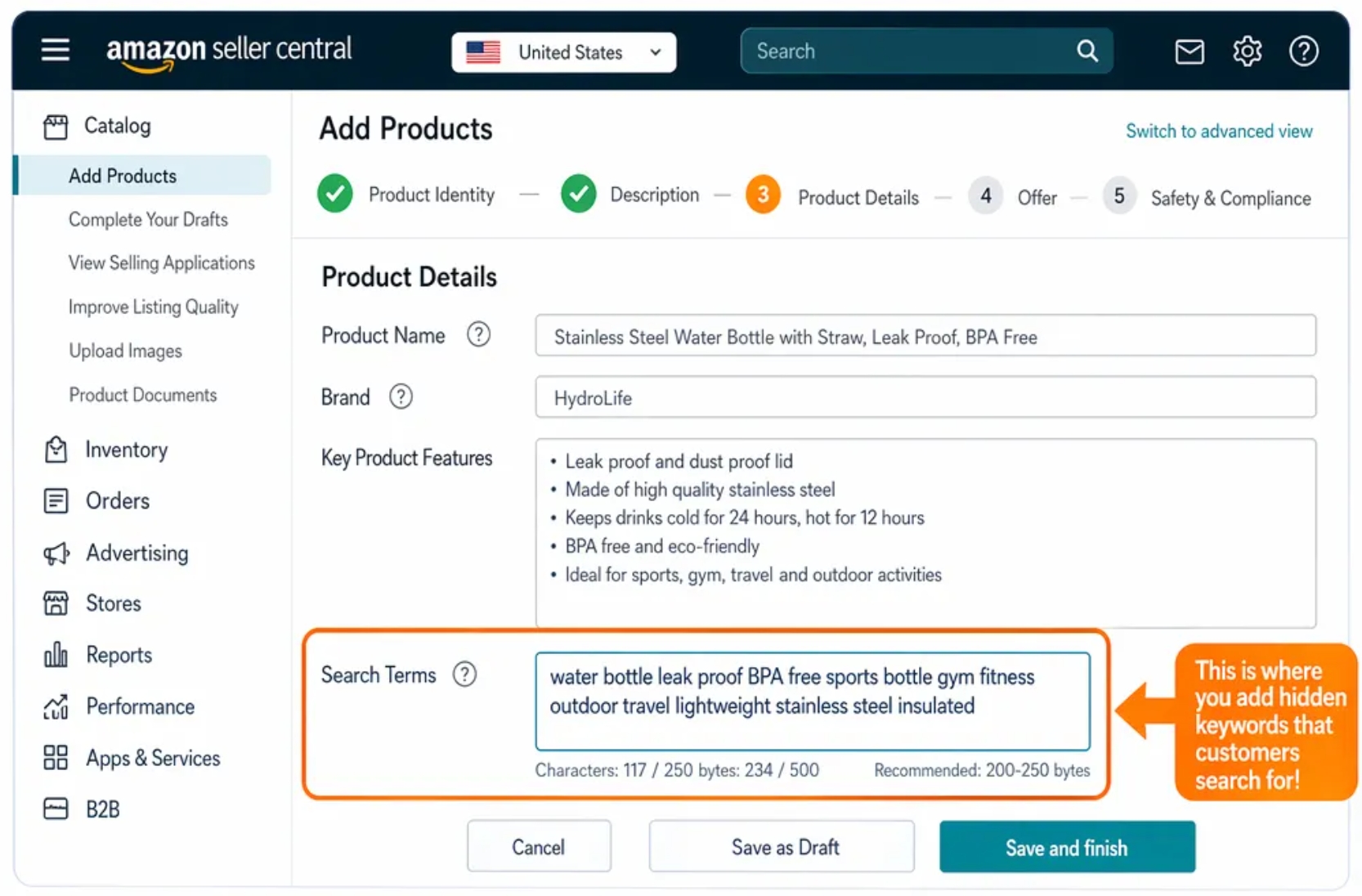
In Seller Central, go to Catalog > Add a Product > Search for your ASIN > Edit Listing > Backend Search Terms. The field is labeled "Search Terms" and appears under the "Keywords" tab. Note: Some templates may split this into multiple fields (e.g., Search Terms 1-5), but Amazon combines them into one 250-byte pool.
Limits and Formatting
As of 2026, Amazon allows up to 250 bytes for backend search terms in the US marketplace. This is not 250 characters; bytes include spaces and punctuation. For example, "wireless earbuds" uses 18 bytes.
What's Allowed vs. Risky
Allowed: Relevant Synonyms, Spelling Variants, Abbreviations
You can include terms like "Bluetooth headphones," "BT headsets," "bluetooth earphones," or "noise-cancelling" (US spelling). These help Amazon map your product to diverse search behaviors.
Risky/Avoid: Irrelevant Terms, Competitor Brands, Prohibited Claims
Never include competitor brand names (e.g., "fits iPhone"), false claims ("best on Amazon"), or irrelevant high-volume keywords ("gift for her"). These can trigger policy flags or hurt relevance scoring.
Rules in 60 Seconds:
- Max 250 bytes (not characters)
- No competitor brands
- No commas or separators
- No repetition from title/bullets
- Use spaces to separate terms
Step-by-Step Workflow: How to Build Backend Search Terms the Right Way
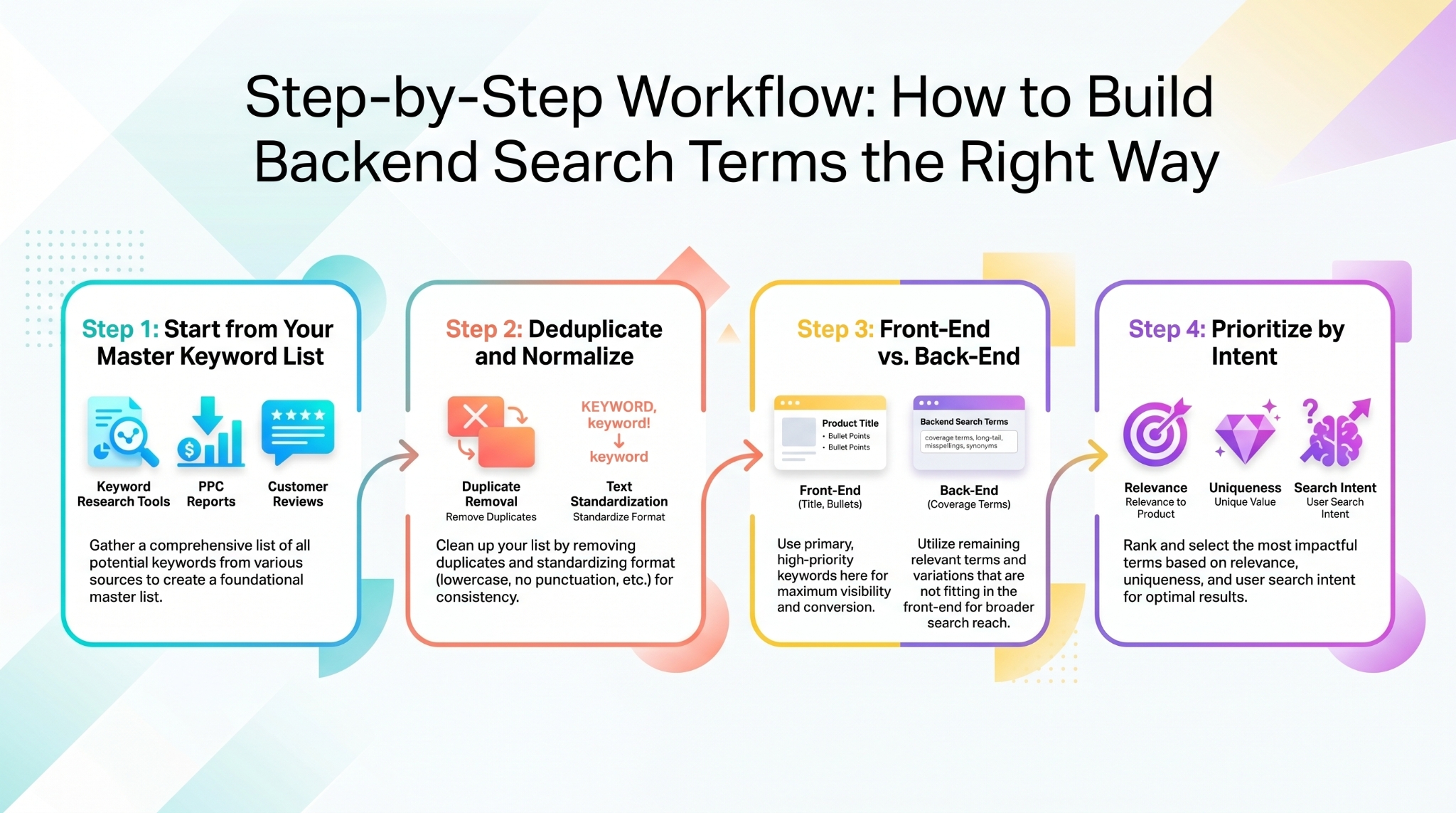
Optimizing backend keywords isn't random. Follow this repeatable workflow to build high-impact backend fields every time.
Step 1: Start from Your Master Keyword List
Pull keywords from three sources: (1) Amazon keyword research tools, (2) PPC search term reports, and (3) customer reviews and Q&A. This ensures you cover SEO, paid, and voice-of-customer language.
Step 2: Deduplicate and Normalize
Remove duplicates. Standardize formats: use singular unless plural is more common (e.g., "shoes"), remove hyphens ("e book" vs. "e-book"), and ensure consistent spacing. This maximizes byte efficiency.
Step 3: Decide What Goes Front-End vs. Back-End
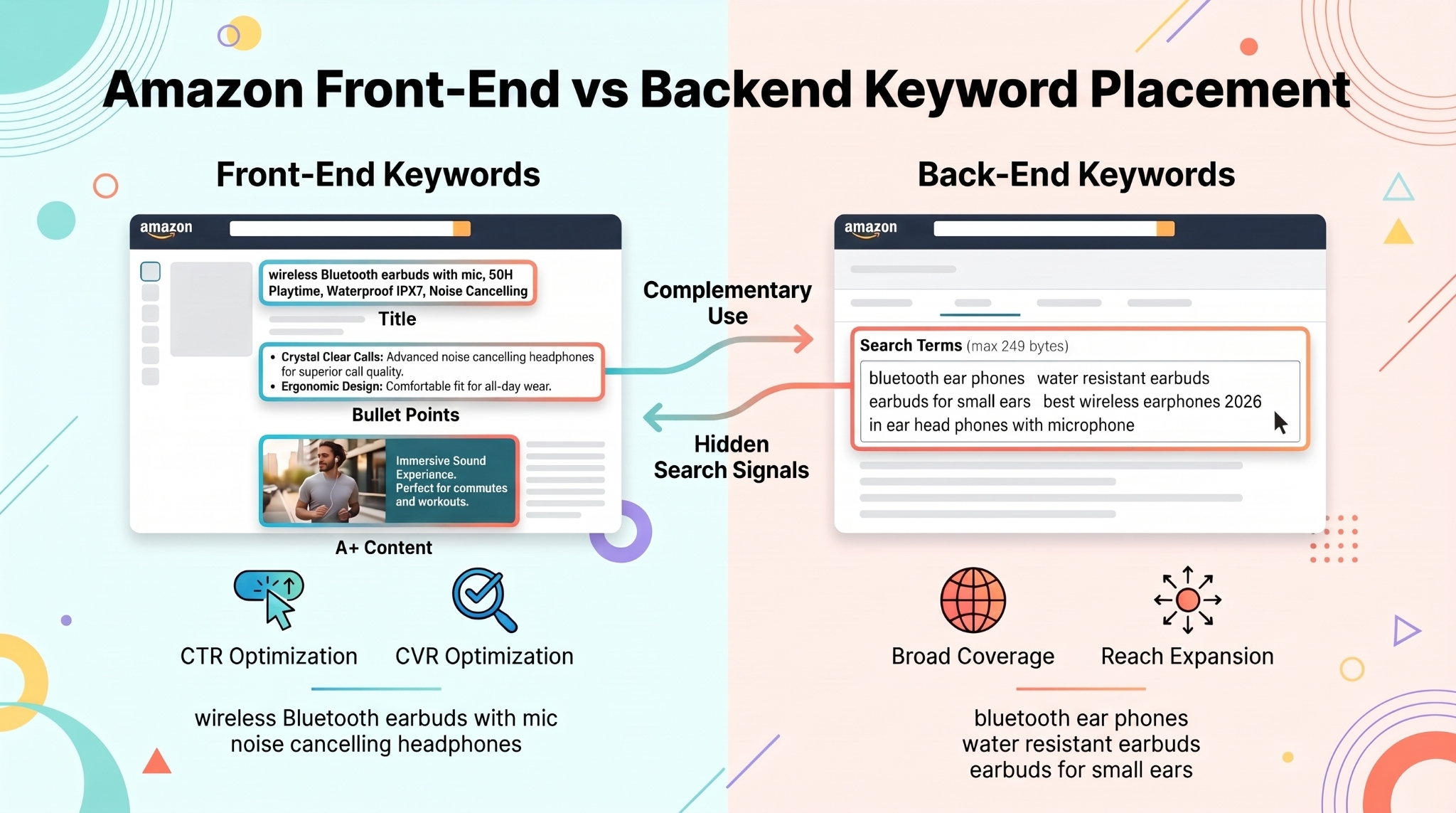
Front-End: Primary Buyer Terms That Improve CTR/CVR
Use your title, bullet points, and A+ content for high-intent, conversion-optimized terms like "wireless Bluetooth earbuds with mic." These drive clicks and sales.
Back-End: Coverage Terms That Don't Read Well But Are Relevant
Use backend for awkward but relevant phrases like "bluetooth ear phones," "water resistant earbuds," or "earbuds for small ears." These expand reach without cluttering your listing.
Step 4: Prioritize by Intent and Uniqueness
Space is scarce. Prioritize terms that are (1) highly relevant, (2) not already in your front-end, and (3) represent unique search behaviors. For example, "gym earbuds no fall out" is a long-tail with clear intent.
What to Put in Backend Search Terms (High-Value Keyword Types)
Not all keywords belong in the backend. Focus on these five high-value types to maximize impact.
Synonyms and Close Variants
Include phrases with the same meaning but different wording, like "headphones" vs. "head sets" or "laptop bag" vs. "notebook case."
Common Misspellings and Spacing Variants
Only include misspellings that are actually used, like "blutooth" or "earbuds" vs. "ear buds." Avoid rare typos.
Abbreviations and Alternate Naming Conventions
Use both "USB C" and "Type C," or "AC adapter" and "power supply." Amazon may index these differently.
Regional Spelling and Phrasing
For US market, use "color" not "colour," "center" not "centre." But include UK variants if customers search that way.
Long-Tail 'Leftovers' That Fit Your Product
Use backend for phrases like "earbuds for running no sweat" or "lightweight laptop backpack for college." These are too long for bullets but valuable for discovery.
Front: "Noise-Cancelling Wireless Earbuds with 24-Hour Battery"
Back: "bluetooth ear phones, water resistant, gym earbuds no fall out, earbuds for small ears"
Avoid Repetition and Keyword Stuffing (The Most Common Backend Mistakes)
Many sellers waste their 250 bytes. Avoid these five critical mistakes.
Don't Repeat What's Already in Title/Bullets/A+
If "wireless charging" is in your title, don't repeat it in backend. Amazon already indexes it. Use space for new terms.
Don't Repeat the Same Root Word 10 Ways
Avoid "earbud, earbuds, ear-bud, ear-buds, ear phone, ear phones." Pick the most common 2-3 variants.
Don't Add Unrelated High-Volume Keywords
"iPhone charger" on a headphone listing won't help. It dilutes relevance and may trigger policy reviews.
Don't Include Competitor Brands or Prohibited Terms
Never use "fits Samsung" or "better than Apple." These violate Amazon's policies and risk suppression.
Don't 'Comma-Stuff' or Add Filler Words
Use spaces only. No commas, semicolons, or "and," "the," "a." Keep it clean: "wireless earbuds water resistant gym" not “wireless, earbuds, water-resistant, for gym.”
Indexing and Validation: How to Know Backend Terms Are Working
You can't see backend indexing directly, but you can test it.
Indexing Check Basics
A term is "indexed" if your product appears in search results when that phrase is used. Use incognito mode and search exact phrases to test.
A Simple Testing Cadence
Change one backend term → wait 7 days → search for the term → check if your product appears. Repeat monthly.
Build a Keyword Change Log
Track every change: date, term added/removed, and outcome. This helps you refine over time.
Advanced: Backend Terms as Part of a Complete SEO + PPC System
Top sellers don't optimize backend terms in isolation. They integrate them into broader strategies.
Use PPC Search Term Reports to Feed Backend Ideas
Download your Sponsored Products search term report. Identify converting queries not in your backend. Add relevant ones.
Use Competitor Intelligence (Reverse ASIN)
Use tools like Reverse ASIN to reverse-engineer competitor backend terms. Find keyword gaps and fill them.
Marketplace Expansion: Localization Workflow
When expanding to new regions, translate backend terms, validate local search behavior, and map to regional variants (e.g., "torch" vs. "flashlight" in UK vs. US).
Downloadable Template: Backend Search Terms Builder (Copy/Paste)
Use this ready-to-use template to build compliant, effective backend keyword sets.
Template Sections
Primary Keyword (Front-End)
e.g., Wireless Bluetooth Earbuds with Mic
Synonyms/Variants (Backend)
bluetooth ear phones, wireless headsets, BT earbuds
Misspellings/Spacing Variants (Backend)
ear buds, blutooth, water resistant
Use-Case Long-Tails (Backend if Not Used in Bullets)
earbuds for running no fall out, gym earbuds sweatproof
Exclusions List (Brands, Irrelevant Terms)
Apple, Samsung, iPhone, gift for her, best seller
Final "Before You Save" Checklist
One-page SOP:
- Under 250 bytes
- No competitor brands
- No commas or separators
- No front-end repetition
- Only relevant terms
- Includes variants and misspellings
- No keyword stuffing
- Spaces between terms
- Validated for regional spelling
- Logged in change tracker
Common Scenarios (What to Do When Results Don't Improve)
Indexed but Not Ranking
If indexed but not ranking, the issue is likely conversion rate, price, or reviews, not keywords. Optimize your listing's conversion elements.
Not Indexed
If not indexed, check for term mismatch, listing suppression, or policy violations. Try rephrasing or removing risky terms.
Rankings Move But Sales Don't
This indicates intent mismatch. The keyword brings traffic, but your product doesn't fulfill the need. Reassess product-market fit or adjust targeting.
FAQ
What are Amazon backend search terms and how do they impact product visibility?
Amazon backend search terms are hidden keywords that help Amazon index your product for relevant searches. They don't appear on your listing but support discoverability, especially for new or niche products.
How many backend search terms should I use for my Amazon product listing?
There's no fixed number; focus on using all 250 bytes efficiently. Prioritize unique, relevant terms not already in your title or bullets.
Can I use competitor brand names in Amazon backend search terms?
No. Including competitor brands (e.g., "fits iPhone") violates Amazon's policies and can lead to listing suppression or account warnings.
Should I include plurals, synonyms, and misspellings in backend search terms?
Yes, but strategically. Include common plurals, synonyms, and frequent misspellings (e.g., "earbuds" vs. "ear buds"), but avoid rare or irrelevant variants.
Next Steps
- Use the Keyword Mining tool to find high-potential backend terms.
- Apply the Amazon Keyword List Building Guide to build a master keyword list.
- Sign up for SellerSprite and start optimizing your backend keywords today: Free Trial.
References
- Amazon Backend Search Terms and Bullet Points That Rank and Convert View
- Amazon Backend Search Terms: The 2026 Complete Checklist View
- Amazon Keyword Research Guide View
By SellerSprite Success Team
The SellerSprite Success Team combines 10+ years of Amazon marketplace expertise with data science to deliver actionable SEO and keyword strategies. We help thousands of sellers optimize listings, improve visibility, and scale profitably using tools like Keyword Mining and Reverse ASIN.


