TL;DR: Finding the right keywords on Amazon is the difference between ranking for traffic and ranking for sales. This guide shows you how to identify high-intent search terms that real buyers use to make purchases.
Key Takeaways
- Prioritize buyer intent keywords over high-volume generic terms to maximize ROI.
- Use a combination of Amazon's native autocomplete, reverse ASIN lookups, and PPC reports for a holistic keyword list.
- Organize keywords into a structured listing map, placing core terms in titles and long-tail modifiers in backend search terms.
Table of Contents
- What "Keywords Buyers Actually Use" Really Means
- Before You Hunt Keywords: Build Your Product "Entity"
- Step 1: Mine Amazon Native Data for "Real Searches"
- Step 2: Reverse ASIN
- Step 3: Use PPC Search Term Reports
- Step 4: Mine Reviews & Q&A for Natural Language
- Step 5: Validate & Score Keywords
- Step 6: Cluster Keywords + Build a Listing Keyword Map
- Step 7: Track, Iterate, and Prove Success
- Common Mistakes + Quick Self-Audit Checklist
- FAQ
- References
Note on marketplaces: This guide is specifically optimized for the US market.
What "Keywords Buyers Actually Use" Really Means
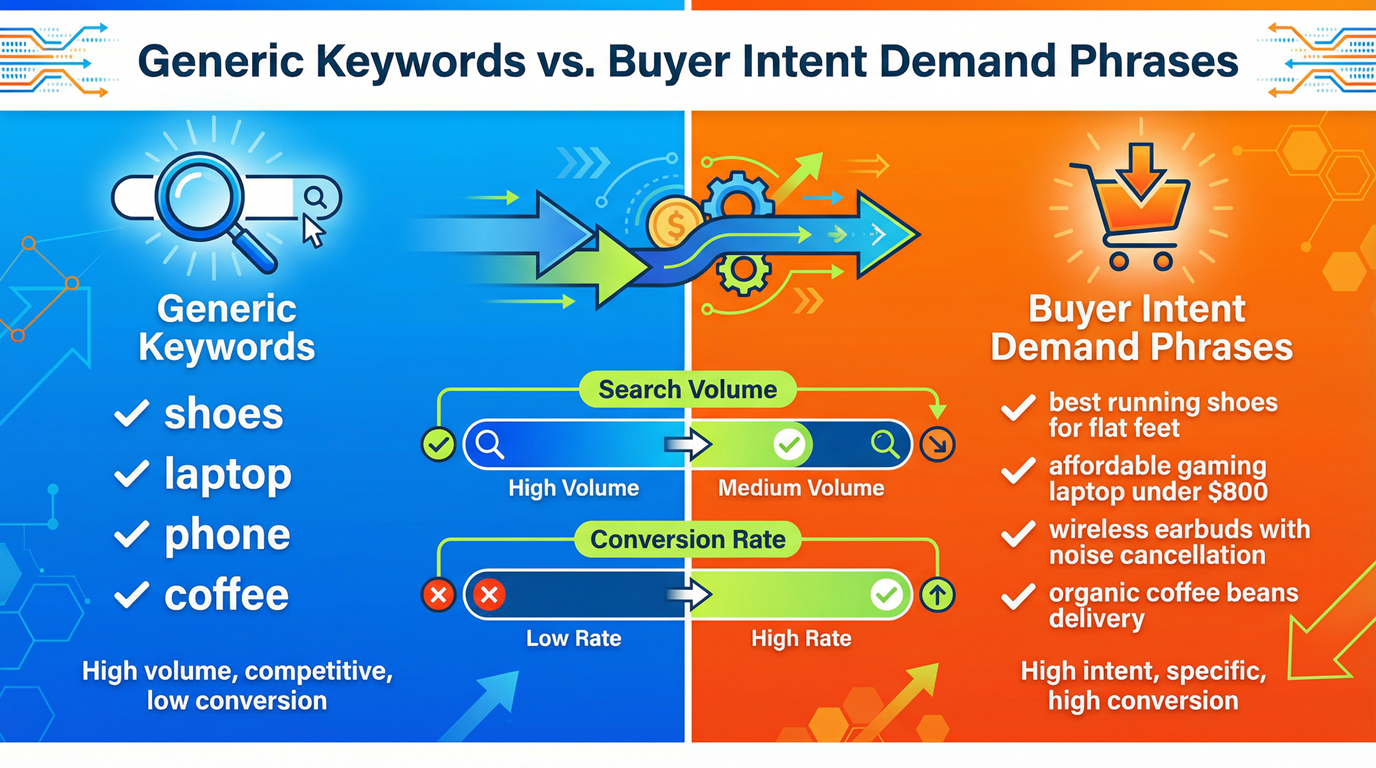
Many sellers confuse high search volume with high value. However, a keyword like "headphones" might have massive volume but low conversion because it is too broad. To succeed in Amazon keyword research, you must focus on intent.
The 3 Proof Signals of a Real Buyer Keyword
- Real Search Demand: Verified search frequency via an Amazon search volume tool.
- High Relevance: The term describes exactly what you sell (e.g., "noise cancelling headphones for sleeping").
- Conversion Intent: The term implies a readiness to buy, often including specific attributes or use cases.
Stop Chasing "Words", Start Capturing "Demand Phrases"
Buyers rarely search for single words. They search for solutions. Use-case modifiers (e.g., "for travel"), problem-solvers (e.g., "waterproof"), and compatibility phrases (e.g., "compatible with iPhone 15") are where the real sales happen.
Before You Hunt Keywords: Build Your Product "Entity" + Shopping Scenarios
Create an Entity List (Non-Negotiable)
Define your product's DNA before searching. This includes category, materials (silicone, steel), size, compatibility, and compliance boundaries (e.g., BPA-free). This prevents you from bidding on irrelevant terms.
Write 5 Buyer Search Scenarios
Think like your customer. Are they looking for a "gift for dad," a "replacement for Keurig," something "for small spaces," or performing a "vs." comparison? These scenarios dictate your long-tail strategy.
Step 1: Mine Amazon Native Data for "Real Searches" Fast
Amazon Autocomplete: A-Z + 0-9 Expansion Method
Type your root keyword into the Amazon search bar followed by 'a', then 'b', and so on. This reveals exactly what Amazon suggests based on current buyer trends.
Modifier stacking
Stack your search terms with modifiers like "for," "with," "size," or "pack." For example: "yoga mat for [hot yoga/beginners/extra thick]."
Category + Filters: The Hidden Buyer Vocabulary
Look at the left-hand navigation filters on Amazon search results. Terms like "Organic," "Memory Foam," or "Portable" are Amazon filter keywords that reflect high-priority buyer preferences.
Best Sellers & New Releases: Language That Already Sells
Analyze the top-selling products in your sub-category. Identify recurring phrases in their titles: these are the terms proven to drive conversions.
Step 2: Reverse ASIN to Find Proven Keywords
How to Pick the Right Competitor ASINs (3 Rules)
1. Choose ASINs with the same positioning.
2. Ensure they are in a similar price band.
3. Confirm they share the same primary use case. Don't compare a budget brand to a luxury one.
Extract Terms from Listings: Title, Bullets, A+, Q&A
Go beyond the title. Look at the Bullet Points and A+ content. Tag each term you find: Is it an Attribute, Use Case, Compatibility, or Comparison keyword?
Metrics That Matter (Not Just Search Volume)
Look for rank presence (where competitors consistently rank in the top 10) and relevance. High competition intensity might mean you should pivot to a less crowded long-tail variant.
Step 3: Use PPC Search Term Reports to Identify Converting Buyer Terms
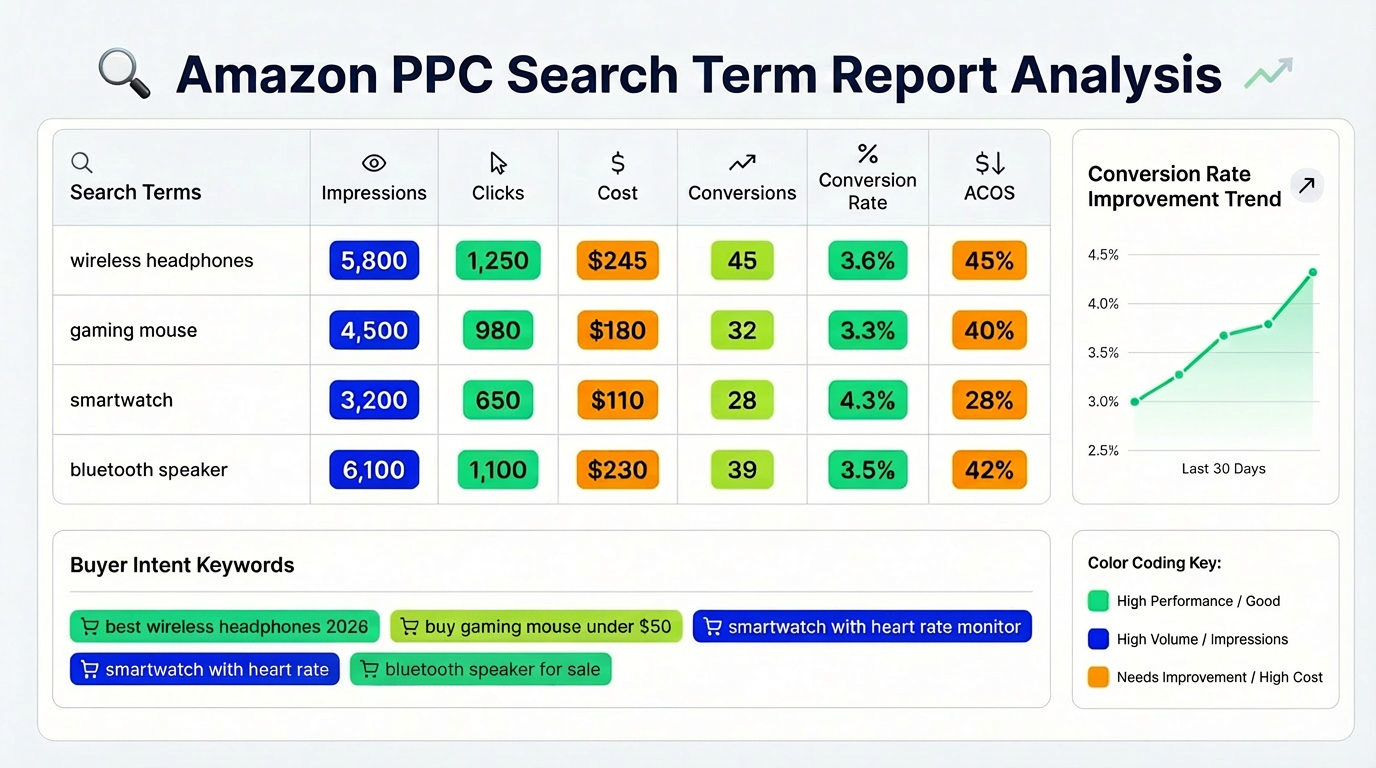
Your own data is the most reliable source for Amazon SEO keywords. PPC reports tell you exactly what buyers typed before clicking 'Buy'.
Which Campaign Types Are Best for Keyword Discovery?
Run Automatic campaigns to find new terms, and Broad/Phrase match campaigns to explore variations. Auto-campaigns act as your "fishing net" to catch evolving search trends.
The 3 Filters for "Buyers Actually Use"
- Orders: Did the term result in at least 2 sales?
- Conversion Rate (CVR): Is the CVR higher than your category average?
- ACoS/ROAS: Is the term profitable or at least efficient for brand awareness?
Build a Negative Keyword System
Identify terms that are irrelevant, low-intent, or too expensive. For example, if you sell high-end watches, "cheap watches" should be a negative keyword.
Step 4: Mine Reviews & Q&A for Natural Language Long-Tails
The 4 Review Patterns That Generate Keyword Gold
Search reviews for pain points ("leaks after a month"), alternatives ("better than [Brand X]"), comparisons, and specific usage situations ("great for hiking in rain").
Q&A = Compatibility & Edge-Case Language
The Customer Q&A section is a goldmine for "fit / works with / not for / replacement for" phrasing. These are perfect for Amazon search terms in your backend.
Step 5: Validate & Score Keywords (Turn "Sounds Right" Into "Data-Right")
A Simple Keyword Scoring Model You Can Copy
Score keywords on a scale of 1-5 for Relevance, Intent, and Opportunity. Multiply them: (Relevance × Intent × Opportunity). Focus on the highest scores first.
Spot False-Positive Keywords
Beware of high-volume terms in the wrong subcategory or ambiguous terms (e.g., "Apple" could be a fruit or a tech brand). These will ruin your conversion rate.
Marketplace Localization (US/UK/DE/FR Differences)
In the US, use "sneakers"; in the UK, use "trainers." Ensure your units (inches vs. cm) and spelling match the target market's local phrasing.
Step 6: Cluster Keywords + Build a Listing Keyword Map
The 3-Layer Cluster Model
1. Primary term (e.g., "Coffee Maker").
2. Subcategory terms ("Drip Coffee Maker").
3. Long-tail scenarios ("Automatic drip coffee maker for office").
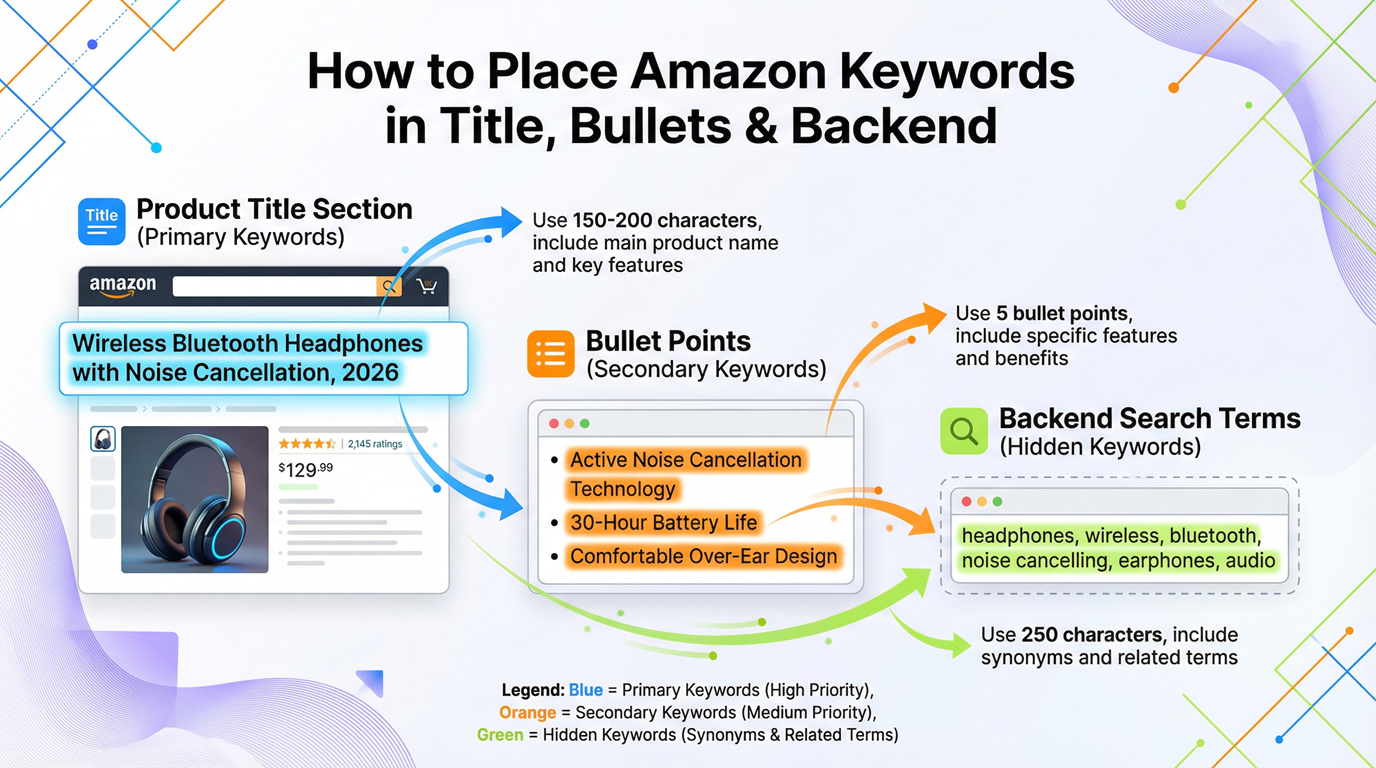
Placement Rules: Title vs. Bullets vs. A+ vs. Backend
- Title: Core term + key differentiators (Keep it readable!).
- Bullets: Scenario + benefit + proof modifiers.
- Backend search terms: Synonyms, spelling variants, and Amazon backend keywords.
Step 7: Track, Iterate, and Prove These Are "Buyer Keywords"
What to Monitor Weekly
Track your rank movement for primary terms, CTR (Click-Through Rate), and CVR. If a keyword has high clicks but zero sales, it's not a buyer keyword for you.
A 30-Day Iteration Loop
Every 30 days: Expand your list based on new PPC data -> Validate -> Deploy -> Measure -> Refine. Success on Amazon is an iterative process.
Common Mistakes + Quick Self-Audit Checklist
- Chasing Volume Over Relevance: Avoid "ego keywords" that don't convert.
- Keyword Stuffing: Don't repeat the same terms across Title and Bullets; it doesn't help ranking and hurts readability.
- Ignoring Compliance: Ensure you aren't using trademarked terms or restricted health claims.
FAQ
How can I find high-volume Amazon keywords for free without using expensive tools?
Use the Amazon search bar autocomplete feature, analyze the 'Customers who bought this also bought' sections, and look at the category filters on the left side of search results. These provide direct insights into buyer behavior without any cost.
What is the difference between front-end and back-end keywords for Amazon product listings?
Front-end keywords are visible to customers (Title, Bullets, Description) and are used for both ranking and persuasion. Back-end keywords are hidden in Seller Central (Search Terms field) and are used primarily for indexing synonyms and variations without cluttering the visible listing.
How do I use the Amazon search bar auto-suggest feature to find profitable long-tail keywords?
Type your main keyword plus a modifier like "for" or "with" (e.g., "kitchen scale with"). Amazon will suggest popular long-tail completions like "with bowl" or "with backlight." These suggestions are based on actual high-volume buyer searches.
How often should I update my Amazon listing keywords?
Review your keyword performance every 30 days. Major updates should only be made if your conversion rate is dropping or if seasonal trends (like Q4) require new terms. Avoid frequent changes to core titles to maintain ranking stability.
Next Steps
- Audit your current top 5 keywords for conversion intent.
- Sign up for a professional Amazon keyword research tool to validate your findings.
References
- Amazon Keyword Research Comprehensive Guide View
- How to Filter Irrelevant Traffic View
- How to Build a Target Keyword Lisiting Faster View
By Seller Success Team
The Seller Success Team at SellerSprite consists of veteran Amazon sellers and data analysts dedicated to helping e-commerce entrepreneurs scale their businesses using data-driven SEO and PPC strategies.


